DiskLens
DiskLens is a free desktop app for analyzing disk usage on macOS and Windows.
What DiskLens is
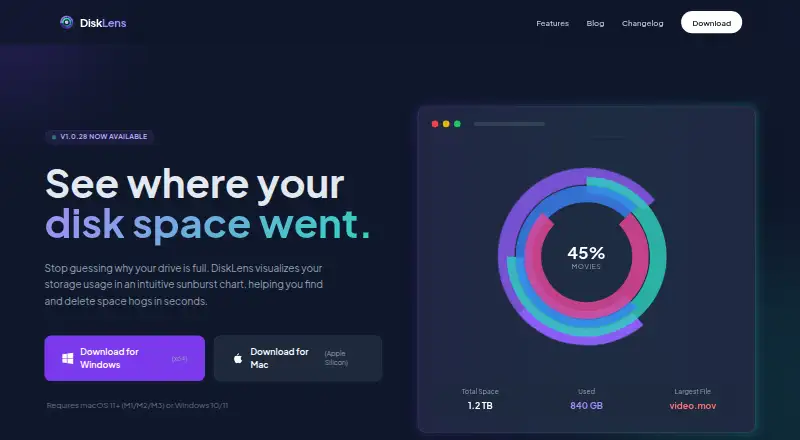
DiskLens is a free desktop app for analyzing disk usage on macOS and Windows. It scans files, folders, and applications, then displays space usage in interactive pie, donut, radial, and sunburst charts. The app reports application sizes and file-type breakdowns and can export chart images as PNG files with watermarks and captions, along with detailed reports in various formats. DiskLens reads file names, sizes, and modification dates but not file contents. Scans run locally, and the maker says file information, personal data, and usage analytics are not sent to its servers or third parties. The app may contact its website for update checks, sending only its version. Users can reveal files in Finder or Explorer, move them to Trash or Recycle Bin, or exclude them from later scans. It supports macOS 10.15 or later on Apple Silicon or Intel and 64-bit Windows 10 or later, requiring 100 MB of free disk space on each platform.
Good
- Free for personal and commercial use
- Local scanning keeps file data on-device
- Multiple interactive chart views
- Exports charts and detailed reports
- Supports macOS and Windows
Watch out
- Linux support is planned, not available
- Some folders require elevated permissions
- Unsigned app may trigger security warnings
- PNG exports include watermarks and captions
Who it suits
It suits people who want a local disk-space overview on a Mac or Windows computer. It is also useful when file-type reports, exports, and direct file actions are needed.
Verdict
DiskLens provides local disk analysis with several chart styles, reports, and file-management actions at no cost. Its current platform coverage, permission requirements, and unsigned distribution are the main points to consider before installation.
Plans and prices
From DiskLens's own pricing page, checked 11 Oct 2026.
| Plan | Price | What it gives you |
|---|---|---|
| DiskLens | Free | Free for personal and commercial use |
The facts
Each one read from DiskLens's own pages, with the date it was checked.
Where it runs
- Application sizes
- Yeschecked 23 Sep 2026
- Desktop platforms
- macOS,Windowschecked 23 Sep 2026
- Linux support
- Linux support is planned for a future release; the FAQ lists macOS and Windows as available platforms.checked 11 Oct 2026
What it does
- Charts
- It offers interactive pie, donut, radial, and sunburst chart views.checked 11 Oct 2026
- Exportable reports
- Yeschecked 23 Sep 2026
- Exports
- The FAQ says users can export charts as PNG images with watermark and captions, plus detailed reports in various formats.checked 11 Oct 2026
- File actions
- Users can reveal files in Finder or Explorer, move them to Trash or Recycle Bin, and exclude them from future scans.checked 11 Oct 2026
- File metadata
- It reads file metadata such as name, size, and modification date, but not file contents.checked 11 Oct 2026
- File-type breakdown
- Yeschecked 23 Sep 2026
- Large directories
- For directories with 100,000 or more files, the FAQ recommends Pie or Donut views for faster rendering and using the minimum file size filter.checked 11 Oct 2026
- Local processing
- Disk scans happen locally, and the maker says no file information, personal data, or usage analytics are sent to its servers or third parties.checked 11 Oct 2026
- Permissions
- Some system folders may require Full Disk Access on macOS or running DiskLens as Administrator on Windows.checked 11 Oct 2026
- Purpose
- DiskLens analyzes disk usage and visualizes what is taking up space on a computer.checked 11 Oct 2026
- Scan scope
- files_folders_appschecked 23 Sep 2026
- Signing notices
- The homepage says the app is not signed with an Apple Developer certificate or Microsoft certificate, so Gatekeeper or SmartScreen warnings may appear.checked 11 Oct 2026
- Support contact
- The maker lists [email protected] for general inquiries, partnerships, and press requests, and directs bug reports and feature requests to GitHub Issues.checked 11 Oct 2026
- System requirements
- Support lists macOS 10.15 or later on Apple Silicon or Intel, and Windows 10 or later 64-bit; each requires 100 MB free disk space.checked 11 Oct 2026
- Treemap view
- Nochecked 23 Sep 2026
- Update checks
- The app may contact the website for updates, sending only its app version.checked 11 Oct 2026
Money
- Free plan
- Yeschecked 23 Sep 2026
Alternatives to DiskLens
- 1

WizTree
Free planmacOSWindows8.0Free plan - 2
LumaDisk
Free planmacOSWindows7.9$6.89 one-time - 3

Disk Usage Analyzer
Free planOpen sourceLinuxmacOS7.7Free plan - 4
FolderSizes
Free planWindows7.7$30 one-time - 5
SizeTrend
Free planWindows7.7$69.99 one-time - 6
dust
Free planOpen sourceLinuxmacOSWindows7.6Free plan