
Disk Bench
Disk Bench is a Windows utility for measuring disk performance through file operations rather than synthetic benchmarks.
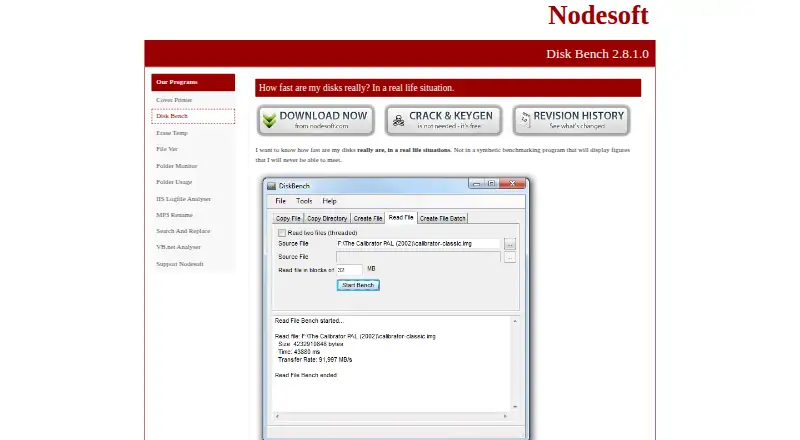
What Disk Bench is
Disk Bench is a Windows utility for measuring disk performance through file operations rather than synthetic benchmarks. Its copy test times a file transfer between locations and then deletes the destination file. The Create File test writes a file using a repeated 128-byte string, which Nodesoft describes as appropriate when a computer has one hard disk. Because the program saves files through the current filesystem, fragmentation can affect results as it can during ordinary file use.
Command-line options provide additional tests and logging: copying all files from a source directory, reading multiple files in parallel with a configurable block size, and creating files in parallel with configurable block size and block count. Disk Bench requires Microsoft .NET Framework. It has no installation kit, and Nodesoft says it tests its programs only on Windows 10 and 11. The program is completely free and has command-line support.
Good
- Free to use.
- Tests performance through file operations.
- Command-line tests support logging.
- Parallel read and create tests are configurable.
Watch out
- Requires Microsoft .NET Framework.
- No installation kit is provided.
- Windows is the only listed platform.
Who it suits
Disk Bench suits Windows users who want to measure disk performance through file operations or automate file-based tests from the command line. Users should have Microsoft .NET Framework available and be prepared to run it without an installation kit.
Verdict
Disk Bench offers file-operation tests and command-line options for Windows users who want to measure disk performance. Its .NET Framework requirement and lack of an installation kit are worth considering before use.
Plans and prices
From Disk Bench's own pricing page, checked 10 Oct 2026.
| Plan | Price | What it gives you |
|---|---|---|
| Disk Bench | Free | Completely free |
The facts
Each one read from Disk Bench's own pages, with the date it was checked.
What it does
- Automation
- The maker added command line options for Read File and Create File in version 2.8.0.1, noting a hard disk manufacturer requested automation options.checked 10 Oct 2026
- Copy test
- It copies a file from one location to another, times the operation, and deletes the destination file afterward.checked 10 Oct 2026
- Create benchmark
- The command line supports creating files in parallel with configurable block size and number of blocks.checked 10 Oct 2026
- Create test
- Its Create File test writes a file made from a repeated 128 byte string, which the maker describes as optimal when there is only one hard disk.checked 10 Oct 2026
- Directory copy
- The command line supports copying all files from a source directory to a destination and logging the result.checked 10 Oct 2026
- Filesystem behavior
- The program uses the current filesystem to save files, so fragmentation can degrade performance as it would in real use.checked 10 Oct 2026
- Installation
- The maker says it did not create an installation kit for Disk Bench.checked 10 Oct 2026
- Purpose
- Disk Bench measures disk performance in real world file operations rather than synthetic benchmarks.checked 10 Oct 2026
- Read benchmark
- The command line supports reading multiple files in parallel with a configurable block size and logging the result.checked 10 Oct 2026
- Runtime requirement
- Disk Bench requires Microsoft .NET Framework.checked 10 Oct 2026
- Security claim
- The Disk Bench page says the program does not contain spyware, while referring readers to other sites for corroboration.checked 10 Oct 2026
- Support
- Nodesoft invites users to email suggestions and feedback about its free tools.checked 10 Oct 2026
- Supported testing
- Nodesoft says it tests its programs only on Windows 10 and 11.checked 10 Oct 2026
The company
- Maker
- Nodesoft identifies itself as Anders Svensson and Jonas Lewin.checked 10 Oct 2026
Alternatives to Disk Bench
- 1

GitHub CodeQL
Free planWebExtensionLinuxmacOS7.5From $30 a month - 2
Parkdale
Free planAndroidmacOSWindows7.2Free plan - 3
CrystalDiskMark
Free planWindows6.9$9.99 one-time - 4
fio
Free planLinuxmacOSWindows6.6Free plan - 5

AJA System Test
Free planmacOSWindows6.5Free plan - 6
DiskSpd
Free planLinuxmacOSWindows6.5Free plan