
AJA System Test
AJA System Test is a free utility for checking whether a drive system can sustain recording and playback at different resolutions and codecs.
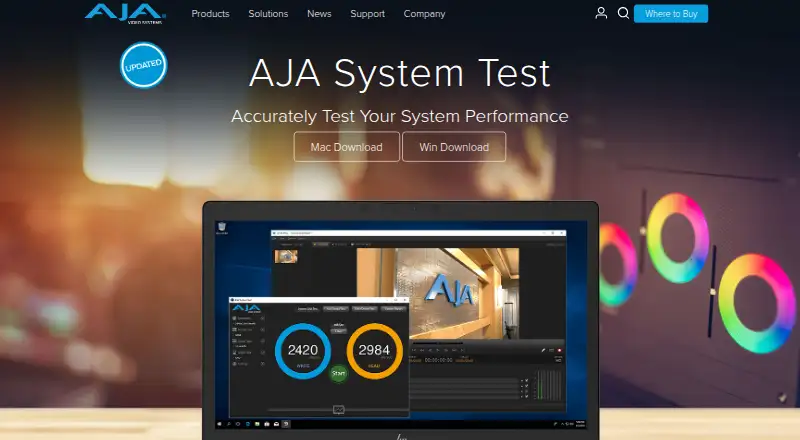
What AJA System Test is
AJA System Test is a free utility for checking whether a drive system can sustain recording and playback at different resolutions and codecs. It measures read/write speed and throughput on local or network-mapped drives. In its graphical interface, you choose a test type, drive, video size, frame rate, file size, and connected video device. Results can appear in MB/sec or FPS, with graphs, and be exported as text, PDF, or SPX. Text reports can also be copied into spreadsheets or other software for analysis and archiving. The full version, included in AJA Desktop Software downloads, adds PCIe bandwidth testing for PCIe-based I/O devices; other workload areas include AJA-device DMA and combined disk and device I/O. Custom test profiles are supported. AJA System Test runs on macOS and Windows. The standalone Apple Store and Windows versions are listed as AJA System Test Lite v16.0 at no cost. The download page offers a way to proceed without signing up.
Good
- Measures drives, including network-mapped drives.
- Shows results in MB/sec or FPS with graphs.
- Exports reports as text, PDF, or SPX.
- Custom test profiles are supported.
Watch out
- Runs only on macOS and Windows.
- PCIe bandwidth testing requires the full version.
- No CLI or automation support is listed.
Who it suits
It suits production and postproduction users who need to assess drive bandwidth for their workflows. It may also fit users checking PCIe or AJA-device I/O, with the full version needed for PCIe bandwidth testing.
Verdict
AJA System Test focuses on measuring drive and device I/O, with configurable tests and exportable results. Check whether the Lite version covers your needs, particularly if PCIe bandwidth testing is required.
Plans and prices
From AJA System Test's own pricing page, checked 8 Oct 2026.
| Plan | Price | What it gives you |
|---|---|---|
| AJA System Test Lite v16.0 | Free | Standalone Apple Store and Windows versions; full version adds PCIe bandwidth testing |
The facts
Each one read from AJA System Test's own pages, with the date it was checked.
What it does
- CLI or automation
- Nochecked 24 Sep 2026
- Comparison database
- Nochecked 24 Sep 2026
- Custom test profiles
- Yeschecked 24 Sep 2026
- Download choice
- The page offers a way to continue to the download without signing up.checked 8 Oct 2026
- Drive testing
- It tests read/write speed and overall throughput on drives, including network mapped drives.checked 8 Oct 2026
- Included software
- AJA System Test is included in retail software downloads for KONA, Io, and T-TAP products.checked 8 Oct 2026
- Intended users
- AJA describes the tool as useful for production and postproduction workflows that need drive bandwidth sufficient for their demands.checked 8 Oct 2026
- Operating systems
- macOS; Windowschecked 24 Sep 2026
- PCIe testing
- The full version, included in AJA Desktop Software downloads, can evaluate PCIe bandwidth for PCIe-based I/O devices.checked 8 Oct 2026
- Purpose
- AJA System Test evaluates drive performance so users can estimate whether a drive system can record and play back different resolutions and codecs.checked 8 Oct 2026
- Reporting
- The report generator creates text results that can be copied into spreadsheets or other software for analysis and archiving.checked 8 Oct 2026
- Result export formats
- Text report; PDF; SPXchecked 24 Sep 2026
- Results
- Test results can be displayed in MB/sec or FPS with graphs.checked 8 Oct 2026
- Security
- AJA's site links to security advisories, but the opened product page does not state a System Test security certification or compliance claim.checked 8 Oct 2026
- Support
- AJA says technical support is available free of charge to answer questions or help resolve issues.checked 8 Oct 2026
- Test configuration
- The graphical interface lets users select the test type, drive, video size, frame rate, file size, and connected video device.checked 8 Oct 2026
- Workload areas
- Drive read/write performance and throughput; PCIe bandwidth; AJA-device DMA; combined disk and device I/Ochecked 24 Sep 2026
The company
- Company
- AJA Video Systems makes products for broadcast, cinema, proAV, and post-production markets.checked 8 Oct 2026
- Founded
- 1993checked 28 Sep 2026
- Headquarters
- Grass Valley, California, United Stateschecked 28 Sep 2026
Money
- Free plan
- Yeschecked 24 Sep 2026
Where it runs
- Platforms
- The product page links to Mac and Windows downloads and identifies them as standalone System Test Lite v16.0 versions.checked 8 Oct 2026
The full review of AJA System Test
AJA System Test is a video-oriented drive and I/O benchmark for checking whether storage can sustain specified recording and playback workloads. It is most useful to production and postproduction teams, editors, and operators working with AJA hardware. The free Lite release is a practical starting point, but PCIe analysis requires the full edition.
Overview
AJA System Test measures read and write speed and overall throughput, including on network-mapped drives. Instead of reducing a result to one headline transfer rate, its workflow lets you relate storage performance to a chosen video size, frame rate, file size, and connected video device. That makes it better suited to answering “can this setup handle this media workload?” than to casual comparisons between unrelated drives.
Its purpose is estimating whether a drive system can record and play back particular resolutions and codecs. Production and postproduction users therefore get a result that maps more directly to operational decisions. For general-purpose PC benchmarking, however, its media-specific approach may be narrower than needed.
Key features
The graphical interface covers test type, drive, video size, frame rate, file size, and connected video device. You can test local storage and mapped network drives, which is valuable when shared storage is part of the workflow. Custom test profiles let teams preserve recurring configurations instead of rebuilding them for every check.
Results can be viewed in MB/sec or FPS, with graphs that make throughput changes easier to interpret. The report generator produces text output suitable for copying into spreadsheets or other analysis tools, and export formats include text report, PDF, and SPX. Those options support archiving and sharing, although there is no command-line interface or automation for scripted or unattended runs.
PCIe bandwidth testing is reserved for the full version supplied through AJA Desktop Software downloads. That distinction matters for owners of PCIe-based I/O devices: Lite can assess drive performance, but it cannot provide the PCIe measurement needed to examine that part of the signal path. AJA also includes the software in retail downloads for KONA, Io, and T-TAP products. Downloads can be continued without signup, and AJA states that technical support is free for questions and troubleshooting.
Pricing
AJA System Test Lite v16.0 — free. The standalone Apple Store and Windows editions provide the no-cost drive-testing feature set. There is no free trial because the Lite plan is already free, and no recurring renewal or seat limit is stated.
The full edition is included in AJA Desktop Software downloads and adds PCIe bandwidth testing for PCIe-based I/O devices. Its price is custom pricing rather than a published consumer plan. Choose Lite when drive throughput and media-workload checks are sufficient; choose the full release when PCIe bandwidth is part of the diagnosis or validation process.
Platforms
AJA System Test runs on macOS and Windows. That covers the two principal desktop platforms used in many video environments, but there is no Linux release identified. The Lite plan is offered as standalone Apple Store and Windows software.
Who it's for
This is a strong fit for video professionals who need to validate storage against resolution, frame-rate, file-size, and device combinations before committing to a recording or playback workflow. AJA hardware users get an especially coherent path because the full tool is distributed with AJA Desktop Software and the retail software for KONA, Io, and T-TAP.
It is less suitable for infrastructure teams seeking repeatable command-line jobs, CI-style checks, or unattended fleet benchmarking. The missing CLI and automation mean each run remains a graphical task. Users who only want a broad, platform-agnostic disk score may also prefer a general benchmark.
Pros and cons
Pros
- Media-aware configuration: Video size, frame rate, file size, and device choices tie measurements to real recording and playback requirements.
- Network-drive coverage: Mapped shared storage can be assessed alongside local drives.
- Useful reporting: MB/sec and FPS views, graphs, and text, PDF, and SPX exports support analysis and archival workflows.
- Free entry point: Lite v16.0 costs nothing and can be downloaded without signup.
Cons
- PCIe testing is gated: Lite does not measure PCIe bandwidth; that capability requires the full version.
- No automation: Without CLI support, scripted, scheduled, and unattended benchmark runs are not an option.
- Platform scope: Support is limited to macOS and Windows, excluding Linux systems.
Alternatives
For a wider selection, browse Disk Benchmark Software or PC Benchmark Software.
- fio is a free GNU GPL tool for Linux, macOS, and Windows; pick it when command-line, scriptable storage workloads matter more than a video-focused interface.
- DaVinci Resolve is a freemium Linux, macOS, and Windows editor; choose it when you need an editing application alongside media work, not a dedicated drive benchmark.
- Buddi is free GPLv2 budgeting software for Linux, macOS, and Windows, so it is unrelated to storage testing.
- Parkdale is a free disk utility for Android, macOS, and Windows; consider it for a broader device-platform reach.
- simple-disk-benchmark is a free MIT-licensed command-line tool for Linux, macOS, and Windows; choose it for terminal-based benchmarking.
- Storage Benchmark Kit is free open-source software spanning API, Linux, self-hosted, and Windows deployments; it suits users needing those deployment options.
- ATTO Disk Benchmark is a free disk-performance utility for macOS and Windows.
- Bonnie++ is free GPL 2.0 software for Linux and self-hosted environments.
Verdict
Choose AJA System Test Lite when you need a free, media-aware check of drive throughput for macOS or Windows production work, especially with AJA devices or shared storage. Its configurable profiles and exportable reports make results practical to document. Look elsewhere if PCIe bandwidth testing is essential but the full edition is not available to you, or if your priority is automated command-line benchmarking across Linux and other environments.
Alternatives to AJA System Test
- 1

GitHub CodeQL
Free planWebExtensionLinuxmacOS7.5From $30 a month - 2
Parkdale
Free planAndroidmacOSWindows7.2Free plan - 3
CrystalDiskMark
Free planWindows6.9$9.99 one-time - 4
fio
Free planLinuxmacOSWindows6.6Free plan - 5
DiskSpd
Free planLinuxmacOSWindows6.5Free plan - 6
HD Tune Pro
Windows6.4