
Dev Container CLI
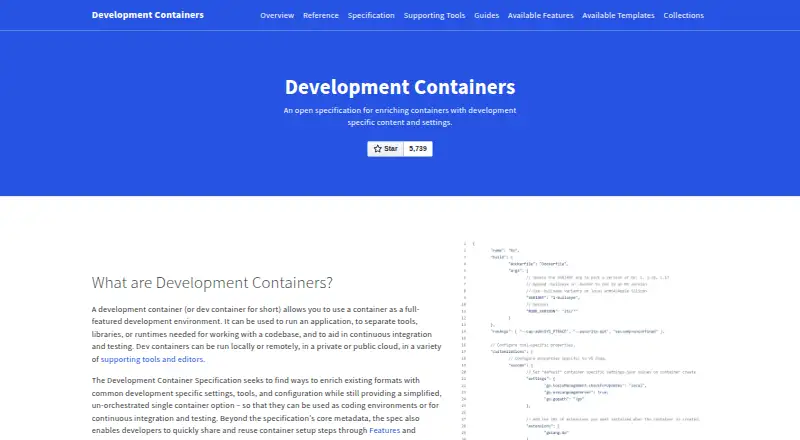
Dev Container CLI creates and configures a development container from a devcontainer.json file.
What Dev Container CLI is
Dev Container CLI creates and configures a development container from a devcontainer.json file. It is the reference implementation of the Development Container Specification and is intended for direct use as well as use by compatible tools and services. Its commands build images, start containers, run lifecycle commands, read configuration, execute commands, and manage features and templates. By default, it generates lockfiles when building or starting containers to pin feature versions for reproducible builds. The project describes using it to prebuild configurations in CI or DevOps workflows; a GitHub Action and Azure DevOps Task are also available for running a repository’s dev container in CI builds. The VS Code Dev Containers extension includes a CLI variation that can open a dev container in VS Code. The CLI is free and MIT-licensed. Its standalone install script supports Linux and macOS on x64 and arm64; desktop support is listed for Linux and macOS, with Windows via WSL2. Installing the npm package requires Python and C/C++ tools to build a dependency. The project describes the CLI as being in active development.
Good
- MIT-licensed and free.
- Generates lockfiles by default for pinned feature versions.
- Commands cover container setup and lifecycle tasks.
- VS Code includes a CLI variation.
Watch out
- npm installation requires Python and C/C++ tools.
- Windows desktop use is listed via WSL2.
- The project is in active development.
Who it suits
It suits developers who want to create and configure development containers directly, or build tools and services that support the specification. CI and DevOps users may also use it to prebuild container configurations.
Verdict
Dev Container CLI provides specification-based container setup, configuration, and lifecycle commands, including support for CI workflows. The standalone install script covers Linux and macOS; npm installation has additional build-tool requirements.
Plans and prices
From Dev Container CLI's own pricing page, checked 4 Oct 2026.
| Plan | Price | What it gives you |
|---|---|---|
| Free | Free | MIT-licensed CLI · install via script or npm |
The facts
Each one read from Dev Container CLI's own pages, with the date it was checked.
What it does
- CI integrations
- The specification project says a GitHub Action and an Azure DevOps Task are available for running a repository’s dev container in CI builds.checked 4 Oct 2026
- CI use
- The project describes using the CLI to prebuild dev container configurations in CI or DevOps workflows.checked 4 Oct 2026
- Commands
- It includes commands to build images, start containers, run lifecycle commands, read configuration, execute commands, and manage features and templates.checked 4 Oct 2026
- Editor integration
- The VS Code Dev Containers extension includes a CLI variation that can open a dev container in VS Code.checked 4 Oct 2026
- Installation requirement
- Installing the npm package requires Python and C/C++ tools to build one of its dependencies.checked 4 Oct 2026
- License
- The CLI project is licensed under the MIT license.checked 4 Oct 2026
- Project status
- The repository describes the CLI as being in active development.checked 4 Oct 2026
- Purpose
- The CLI creates and configures a development container from a devcontainer.json file.checked 4 Oct 2026
- Reference implementation
- The Dev Container CLI is a reference implementation of the Development Container Specification.checked 4 Oct 2026
- Reproducibility
- The CLI generates lockfiles by default when building or starting containers to pin feature versions for reproducible builds.checked 4 Oct 2026
- Supported environments
- The standalone install script works on Linux and macOS on x64 and arm64.checked 4 Oct 2026
- Who it is for
- The CLI is intended for direct use and for tools or services that support the Dev Container Specification.checked 4 Oct 2026
Alternatives to Dev Container CLI
- 1

Garden
Free planOpen sourceWebAPILinuxmacOS8.3From $50 a month - 2

DevPod
Free planOpen sourceLinuxmacOSSelf-hostedWindows7.4Free plan - 3
Docker Desktop
Free planWebLinuxmacOSWindows7.2From $9 a month - 4

OrbStack
Free planAPImacOS7.2From $8 a month - 5

Testcontainers Desktop
Free planWebAPILinuxmacOS7.2Free plan - 6
Kool
Free planWebLinuxmacOSWindows7.1From $49 a month