
DeepQuill
DeepQuill is a desktop novel-writing app for organizing and drafting a long book in one place, available for macOS and Windows.
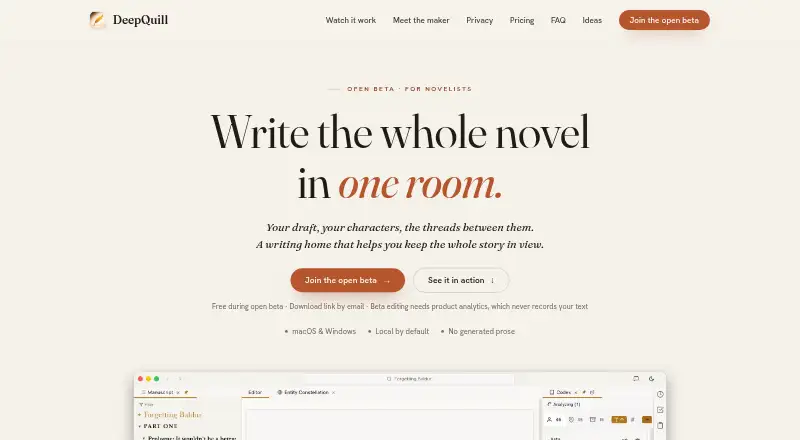
What DeepQuill is
DeepQuill is a desktop novel-writing app for organizing and drafting a long book in one place, available for macOS and Windows. Writers can arrange scenes into story beats, track scene status and story arcs, and view tension and point of view. Its codex links characters and places to mentions in the manuscript and maps relationships among story entities. Project research, notes, and a diagramming canvas that links to story elements support planning. Optional AI analyzes existing writing for entities, relationships, story structure, and character details; it does not generate prose or suggestions. Local analysis runs on the writer’s computer in the background, but a first analysis of a full-length novel may take hours depending on hardware. Projects are stored locally by default. If sync is enabled, projects are encrypted on the device before upload, and DeepQuill says it does not hold the decryption key. It imports Scrivener projects and Word, Markdown, HTML, and plain-text documents, and exports to Word, EPUB, FB2, or PDF. During the free beta, editing requires product analytics and session recordings that mask on-screen words and hide images; the maker says manuscript text is not included.
Good
- Codex links characters and places to manuscript mentions.
- Scenes can be organized into beats and story arcs.
- Optional AI analyzes writing without generating prose.
- Projects are stored locally by default.
Watch out
- First-time local analysis of a full novel may take hours.
- A license activates on up to three devices.
- Lifetime license updates cover only its purchased major version.
- Editing during the free beta requires product analytics.
Who it suits
DeepQuill suits novelists who want outlining, scene organization, continuity tools, and manuscript analysis in a desktop app. Writers who expect AI to generate prose or suggestions should note that it does not do so.
Verdict
DeepQuill brings planning, manuscript organization, continuity tools, and optional analysis into a desktop writing app. Consider the time required for local analysis and the beta analytics requirement before choosing it.
Plans and prices
From DeepQuill's own pricing page, checked 8 Oct 2026.
| Plan | Price | What it gives you |
|---|---|---|
| Open beta | Free | Free during open beta · full desktop application |
| DeepQuill Monthly License | $9.99 a month | Latest version · up to three devices · $9.99 per month |
| DeepQuill Yearly License | $39.99 a year | Latest version · up to three devices · $39.99 per year |
| DeepQuill Lifetime License | $49.99, paid once | Updates to this major version · later major versions are a paid upgrade · up to three devices · $49.99 one-time |
The facts
Each one read from DeepQuill's own pages, with the date it was checked.
What it does
- AI behavior
- Optional AI analyzes existing writing to identify entities, relationships, story structure, and character details; it does not generate prose or suggestions.checked 8 Oct 2026
- Beta analytics
- Editing during the free beta requires product analytics, with session recordings that mask on-screen words and hide images; the maker says manuscript text is not included.checked 8 Oct 2026
- Import and export
- DeepQuill says it imports Scrivener projects and Word, Markdown, HTML, and plain-text documents, and exports to Word, EPUB, FB2, or PDF.checked 8 Oct 2026
- Integrations
- Google sign-in supports optional encrypted sync, and Google Drive or Docs can be used to work with selected files or export manuscripts.checked 8 Oct 2026
- License limit
- A license activates on up to three devices; the lifetime license includes updates only within the purchased major version.checked 8 Oct 2026
- Local analysis
- Local AI analysis runs on the writer’s computer, can take hours for a full-length novel depending on hardware, and runs in the background while the writer continues working.checked 8 Oct 2026
- Manuscript privacy
- DeepQuill says it does not train models on manuscript text; text is sent for analysis only when the user configures a remote AI provider.checked 8 Oct 2026
- Notable limit
- The site says first-time local analysis of a full novel may take hours depending on hardware.checked 8 Oct 2026
- Purpose
- DeepQuill is a desktop novel-writing app for writers who want to draft and organize a long book in one place.checked 8 Oct 2026
- Storage and encryption
- Projects are stored locally by default; if sync is enabled, projects are encrypted on the device before upload and DeepQuill says it does not hold the decryption key.checked 8 Oct 2026
- Story organization
- Its codex links characters and places to manuscript mentions and maps relationships between story entities.checked 8 Oct 2026
- Structure and pacing
- Writers can arrange scenes into story beats, view tension and point of view, and track scene status and story arcs.checked 8 Oct 2026
- Support
- The maker invites users to contact support by email and offers in-app feedback reports for issues.checked 8 Oct 2026
Money
- Research and planning
- The app includes project research, notes, and a diagramming canvas that can link to story elements.checked 8 Oct 2026
The full review of DeepQuill
DeepQuill is a desktop novel-writing workspace for authors who want drafting, outlining, research, and continuity in one project. It best suits long-form writers managing interlocking characters, places, and plot lines. Choose it for connected organization and optional manuscript analysis, not for generated prose or rewrites.
Overview
DeepQuill combines a manuscript with the planning material that usually surrounds it. Its codex ties characters and locations to where they appear in the text, while relationship mapping gives a visual view of the story’s entities. That structure is valuable when a book’s continuity becomes difficult to hold in ordinary notes or folders.
The app’s focus is editorial control rather than automated writing. Optional AI examines existing pages for entities, relationships, structure, and character details, but it produces no prose or suggestions. Writers who want an AI co-author, rewriting controls, or generated scenes should look elsewhere.
Key features
Planning and continuity
Scenes can be arranged into beats and reviewed through tension, point of view, status, and story-arc views. These controls help an author diagnose pacing and see whether a scene is doing its intended job. A chapter workspace, research area, notes, and a diagramming canvas linked to story elements keep both high-level plotting and supporting material in the same project.
Analysis and privacy
Local analysis runs on the computer and continues in the background while you work. A first pass over a full-length novel may take hours, with the exact wait dependent on hardware, so this is a substantial processing step rather than an instant overview. Remote analysis is optional; DeepQuill says manuscript text is sent to a remote provider only when you configure one and is not used to train models.
Projects stay local by default. If encrypted sync is enabled, files are encrypted on the device before upload, and DeepQuill says it does not possess the decryption key. Google sign-in enables that sync, while Google Drive or Docs can handle selected files or manuscript exports. During the free beta, editing requires product analytics, including session recordings that mask on-screen words and hide images; the maker says manuscript text is excluded.
Import and export
DeepQuill imports Scrivener projects and Word, Markdown, HTML, and plain-text documents. Export options cover Word, EPUB, FB2, PDF, TXT, and Google Docs, giving finished manuscripts several practical destinations.
Pricing
The Open beta plan is free at no cost and includes the full desktop application. Editing during this beta requires the analytics arrangement described above, so privacy-sensitive writers should weigh that condition before adopting it.
The DeepQuill Monthly License costs $9.99 a month for the latest version, and the DeepQuill Yearly License costs $39.99 a year. Both activate on up to three devices and suit writers who want current releases without a long commitment; yearly billing lowers the stated cost compared with paying monthly for a full year.
The DeepQuill Lifetime License is $49.99, paid once. It covers updates within the purchased major version, while later major versions are paid upgrades, and it also supports up to three devices. That makes it the clearest fit for an author expecting to stay with one major release, but not a promise of perpetual upgrades. A 14-day trial is offered.
Platforms
DeepQuill runs on macOS and Windows. Its desktop-only reach favors writers who want a computer-based writing environment, not those who need a native phone or browser workspace.
Who it's for
Choose DeepQuill for a substantial novel with a cast, setting, and plot structure that benefit from explicit links and status tracking. It is especially appropriate for planners and continuity-focused revisers who prefer analysis of their own text over generated material. It is a weaker choice for mobile-first workflows, instant AI drafting, or authors unwilling to enable beta analytics.
Pros and cons
- Pro: The codex and relationship mapping connect manuscript mentions to characters and places, supporting continuity in complex books.
- Pro: Beat, tension, point-of-view, status, and arc views make structural review more concrete than a plain chapter list.
- Pro: Local storage, device-side encryption before sync, and no model training on manuscript text provide a clear privacy posture when remote analysis is not configured.
- Con: First-time local analysis of a full novel can take hours, depending on the computer.
- Con: The optional AI diagnoses text but cannot rewrite, suggest, or generate prose.
- Con: Free-beta editing requires analytics and masked session recordings.
- Con: The lifetime license excludes later major-version upgrades.
Alternatives
AI Book Writing Software is the broader category to browse when you want a wider range of writing assistants. Jenova Creative Fiction Writer is a better match for Android, iOS, or web access and offers AI usage tiers, including custom model selection on Plus. Pendraic suits writers wanting macOS, Windows, or web access, up to three active books on its free plan, and built-in AI cover and map allowances. Calliope is the alternative for a web or API editor with unlimited free books and optional one-time credit purchases. BookBud.ai is web-only and centers its free offer on signup credits for starting a book and early chapters. Kosmos is a free web beta that requires your own Claude subscription and access approval. AI Novel Studio fits authors seeking credit-based AI generation, from a free starter tier to a one-time full-draft package. AIWriteBook Audiobook Studio is a web or extension option with credit limits and audiobook-oriented tooling. Bookwiz is web-based, offering free book limits, daily autocomplete, and publishing exports.
Verdict
DeepQuill is a strong choice for desktop novelists who need one organized home for manuscript, structure, research, and continuity, with optional analysis that stays local when configured that way. Look elsewhere if you require generated or rewritten prose, mobile or browser access, or a beta workflow without analytics.
Alternatives to DeepQuill
- 1

Jenova Creative Fiction Writer
Free planAndroidiOSWebAPI7.9From $20 a month - 2

Pendraic
Free planWebAPImacOSWindows7.7From $14.99 a month - 3

Squibler
Free planWeb7.5From $29.99 a month - 4

Calliope
Free planWebAPI7.4From €99 a year - 5

Novelcrafter
AndroidiOSWeb7.4From $4 a month - 6

BookBud.ai
Free planWeb7.3From $190 a year