deckhost
deckhost turns plain-text enhanced Markdown into presentations that can be published as shareable links.
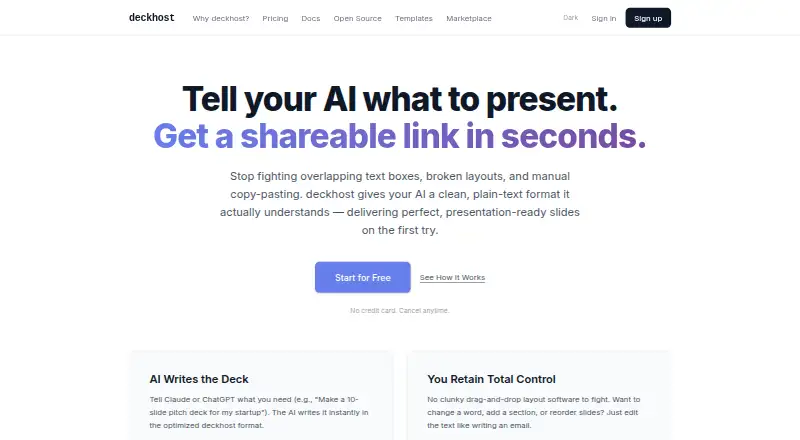
What deckhost is
deckhost turns plain-text enhanced Markdown into presentations that can be published as shareable links. Users can edit presentation text directly and see changes in a live preview. Presenting features include keyboard navigation, fullscreen mode, 12 built-in animation reveal styles, math styling, syntax highlighting, and background controls. For AI use, it supports bring-your-own Anthropic and OpenAI API keys and provides an MCP server for Claude Desktop and Claude Code. VS Code and Cursor extensions add live preview, speaker notes, and one-click publishing to a hosted URL. It can detect Marp frontmatter and map common Marp directives when importing. The CLI, MCP server, and local presentation engine can be used for local work without an account; the CLI can also build static HTML for external hosting. Published decks can be viewed in a browser without an account. The free plan costs nothing, billed forever, and includes five public published decks and 100 API calls per day. Pro costs $20 a month, and Team costs $29 a month.
Good
- Live preview updates as presentation text is edited
- Local tools work without an account
- VS Code and Cursor extensions support one-click publishing
- Published decks can be viewed without an account
Watch out
- Free plan allows five published decks
- Free-plan decks are public only
- Free plan limits API access to 100 calls per day
Who it suits
deckhost may suit founders, product managers, educators, trainers, developers, and analysts who want to build presentations from Markdown. Its local tools also suit users who want to work without an account.
Verdict
deckhost supports Markdown-based deck creation, local work, and browser sharing, with extensions and AI integrations for different workflows. The free plan has public-deck and API limits; private and password-protected decks are included with Pro.
Plans and prices
From deckhost's own pricing page, checked 11 Oct 2026.
| Plan | Price | What it gives you |
|---|---|---|
| Free | Free | Unlimited local presentations · 5 published decks · Public decks only · BYOK AI · API access (100 calls/day) · deckhost branding · forever |
| Pro | $20 a month | 100 published decks · Private and password-protected decks · 300 AI credits/month · $0.08/credit overage · 10 versions per deck · API access (1,000 calls/day) · or $200/year (save 17%) |
| Team | $29 a month | Unlimited published decks · 500 AI credits/seat/month pooled · $0.06/credit overage · Shared workspace · Multiple editors per deck · Priority support · or $290/seat/year (save 17%) |
| Pro | $200 a year | 100 published decks · Private and password-protected decks · 300 AI credits/month · $0.08/credit overage · 10 versions per deck · API access (1,000 calls/day) · save 17% |
| Team | $290 a year | Unlimited published decks · 500 AI credits/seat/month pooled · $0.06/credit overage · Shared workspace · Multiple editors per deck · Priority support · save 17% |
The facts
Each one read from deckhost's own pages, with the date it was checked.
What it does
- AI integrations
- The maker documents BYOK support for Anthropic and OpenAI API keys, and an MCP server for Claude Desktop and Claude Code.checked 11 Oct 2026
- API
- The free plan includes API access at 100 calls per day, and Pro includes 1,000 calls per day.checked 11 Oct 2026
- Brand controls
- Yeschecked 22 Sep 2026
- Editing
- Users can edit presentation text directly, with a live preview that updates as they type.checked 11 Oct 2026
- Editor integrations
- The VS Code and Cursor extension provides live preview, speaker notes, and one-click publishing to a hosted URL.checked 11 Oct 2026
- Import
- The product detects Marp frontmatter and maps common Marp directives to deckhost equivalents on import.checked 11 Oct 2026
- Intended users
- The maker describes the product for founders and product managers, educators and trainers, and developers and analysts.checked 11 Oct 2026
- Local use
- The CLI, MCP server, and local presentation engine are free forever, with no account required for local work.checked 11 Oct 2026
- Presenting
- Presentations include keyboard navigation, fullscreen mode, 12 built-in animation reveal styles, math styling, syntax highlighting, and background controls.checked 11 Oct 2026
- Product
- deckhost turns plain-text, enhanced Markdown into presentations that can be published as shareable links.checked 11 Oct 2026
- Prompt-to-deck generation
- Yeschecked 22 Sep 2026
- Security and privacy
- Pro includes private and password-protected decks; the maker's pricing page says free-plan decks are public only.checked 11 Oct 2026
- Self-hosting
- The CLI can build presentations into static HTML for hosting on services such as Netlify, S3, or GitHub Pages.checked 11 Oct 2026
- Support
- The Team plan includes priority support.checked 11 Oct 2026
- Viewer access
- Published decks can be viewed in a browser without an account.checked 11 Oct 2026
Money
- Free plan
- Yeschecked 22 Sep 2026
The full review of deckhost
deckhost is a text-first presentation system for people who would rather write enhanced Markdown than arrange objects on a canvas. It is particularly well suited to developers, educators, analysts, founders and product managers who need reproducible decks and browser sharing. The strongest value is its unusually generous local workflow; the main constraint is that serious publishing quickly runs into free-plan caps and public-only visibility.
Overview
You author slides as plain text and see a live preview update while you type. Published presentations open as browser links, and viewers can watch without creating an account, removing a common barrier when sending decks to clients, students or colleagues. This model keeps presentation content close to code and documentation, but it will feel restrictive to anyone who expects a conventional drag-and-drop visual editor.
Key features
Decks support keyboard navigation and fullscreen playback, with 12 built-in reveal animation styles, math styling, syntax highlighting and background controls. Those options cover the practical requirements of technical talks, lessons and analytical briefings, especially when equations or code need to appear cleanly. Prompt-to-deck generation can turn an instruction into a starting presentation, while brand controls help keep output aligned with an identity.
AI users can supply their own Anthropic or OpenAI API keys (BYOK), avoiding dependence on a bundled provider account. An MCP server connects deckhost to Claude Desktop and Claude Code, which is useful for people already building AI-assisted writing workflows. Paid subscriptions add a monthly credit allowance, but BYOK remains important for users who want to manage provider choice and billing themselves.
The VS Code and Cursor extension keeps the workflow in a developer editor, adding live preview, speaker notes and one-click publishing to a hosted URL. If you have Marp material, deckhost detects Marp frontmatter and maps common directives to its own equivalents, reducing the cost of moving an existing text-based deck.
Local work is a notable strength: the CLI, MCP server and local presentation engine are free forever and do not require an account. The CLI can also compile decks to static HTML for Netlify, S3, GitHub Pages or similar hosting, giving technical users control over deployment rather than forcing every presentation onto deckhost’s service.
Pricing
| Plan | Price | What you get |
|---|---|---|
| Free | free, billed forever | Unlimited local presentations, five published decks, public decks only, BYOK AI, 100 API calls per day and deckhost branding |
| Pro | $20 a month, or 200 USD/year (save 17%) | 100 published decks, private and password-protected decks, 300 AI credits/month, 10 versions per deck, 1,000 API calls per day and $0.08 per extra credit |
| Team | $29 a month, or 290 USD/seat/year (save 17%) | Unlimited published decks, 500 pooled AI credits per seat/month, shared workspace, multiple editors per deck, priority support and $0.06 per extra credit |
Free is a capable local authoring tier, but five published decks and mandatory public visibility make it unsuitable for a private client library or a growing catalogue. Pro is the sensible choice for an individual who needs confidentiality, version history and a higher API quota; its 300-credit allowance can still incur overage charges. Team earns its price when several people edit together or publication volume is effectively unlimited, with pooled credits and priority support adding operational value. A free trial is offered, so prospective subscribers can assess the paid workflow before committing.
Platforms
deckhost provides web access, Windows and macOS support, Linux support, an API, browser/editor extensions and self-hosting options. The combination suits mixed-device teams and users who want either hosted links or static files deployed on their own infrastructure.
Who it's for
Founders and product managers can produce branded, shareable updates without leaving a structured writing workflow. Educators and trainers benefit from fullscreen playback, animations, equations and account-free viewing. Developers and analysts get the deepest fit through Markdown authoring, syntax highlighting, Marp import, editor extensions, MCP connectivity and static HTML output. Choose another tool if visual, freeform composition is more important than text-based control.
Pros and cons
Pros
- Strong local-first option: the CLI, MCP server and presentation engine remain free forever and work without an account.
- Developer-oriented integrations: VS Code, Cursor, Marp import and Claude-compatible MCP support keep deck production near existing tools.
- Practical presentation controls: navigation, fullscreen, 12 reveal styles, math and code formatting cover technical and instructional use.
- Low-friction sharing: browser viewers need no account, and static HTML can be hosted independently.
Cons
- Free publishing is constrained: only five decks may be published, and all are public with deckhost branding.
- Private sharing requires Pro: confidentiality is not included in the free tier.
- Text-first editing is a trade-off: users seeking a visual canvas may find the authoring model less suitable.
- AI usage can add cost: Pro and Team charge for credits beyond their monthly allowances.
Alternatives
For a broader directory of options, see AI Presentation Software and AI Presentation Makers.
- Cuppa Studio is a better pick for mobile coverage and a free allowance of 50K AI tokens with up to 15 slides per presentation.
- Google Drive suits people prioritising familiar cloud storage, with 15 GB included on a free Google Account.
- Microsoft PowerPoint is preferable for a traditional slide editor, with a free web version, basic templates and 5 GB of cloud storage.
- Slaide is worth considering when an Apache-2.0 open-source language, CLI, themes, importers, MCP server and native viewer are priorities.
- Canva is an alternative for template-led visual design.
- Google Slides fits browser collaboration and Google Workspace users.
- Pitch is an option for presentation teams wanting a free tier with five members, two external guests and 10 GB of storage.
- Presenton is an alternative for users seeking a self-hosted or open-source presentation workflow.
Verdict
Choose deckhost if you want Markdown-driven, developer-friendly presentations, powerful no-account local tooling and simple browser distribution. Pro is the practical entry point for private decks, while Team is aimed at collaborative publishing at scale. Look elsewhere if you need a visual canvas first, or if public-only free publishing and the five-deck limit do not fit your workflow.
Alternatives to deckhost
- 1

Visme
Free planAndroidiOSWebAPI8.4From $12.25 a month - 2

Pitch
Free planAndroidiOSWebAPI8.3From €10 a month - 3

Simplified
Free planAndroidiOSWebAPI8.3From $19 a month - 4

AiPPT
Free planAndroidiOSWebAPI8.0From $60 a year - 5
Google Slides
Free planAndroidiOSWeb7.8From $7 a month - 6
Slaide
Free planiOSWebLinuxmacOS7.8From $6.90 a month