Cuppa Studio
Cuppa Studio turns Markdown into animated, timeline-driven technical presentations.
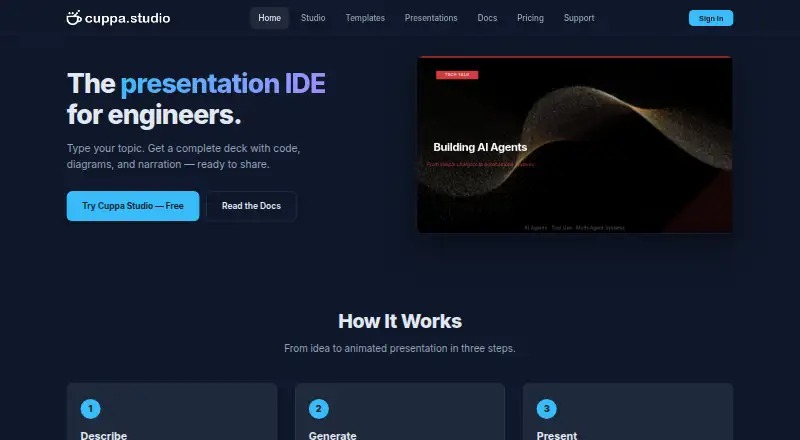
What Cuppa Studio is
Cuppa Studio turns Markdown into animated, timeline-driven technical presentations. Its AI can build decks from a topic or outline, including code blocks, diagrams, charts, and narration. In the browser-based Studio, users can edit slides live, preview changes in real time, and refine a presentation with follow-up instructions. The tool supports 17 element types, including Mermaid diagrams, cards, counters, and terminal simulations. Auto Drive narrates each slide aloud as it advances through the deck. Presentations can be shared through a link that viewers can open without an account, or exported as Markdown, standalone HTML, or .cup files. Cuppa Studio is available on Android, iOS, Linux, macOS, Windows, the web, and as self-hosted software. It has a free plan with 50K AI tokens per month and up to 15 slides per presentation. The maker describes an MCP server for Claude, Cursor, and other AI tools.
Good
- Generates decks from a topic or outline
- Includes 17 types of slide elements
- Auto Drive narrates slides aloud
- Share links work without viewer accounts
- Exports to Markdown, HTML, and .cup
Watch out
- Free plan limits presentations to 15 slides
- CLI requires Node.js 18 or later
- CLI AI guide requires an ANTHROPIC_API_KEY
Who it suits
Cuppa Studio suits people preparing technical presentations who want to generate and refine decks from topics or outlines. Its code, diagram, chart, and narration features may also fit presenters who want more than text slides.
Verdict
Cuppa Studio combines AI deck generation with a live editor, narration, and several export formats. The free plan provides a way to start, while higher plans raise token and slide limits.
Plans and prices
From Cuppa Studio's own pricing page, checked 11 Oct 2026.
| Plan | Price | What it gives you |
|---|---|---|
| Free | Free | 50K AI tokens/month · Up to 15 slides per presentation · All 8 themes and templates · Cloud sync · Markdown, .cup and .html export · No branding · forever |
| Starter | $5 a month | 500K AI tokens/month · Up to 25 slides per presentation · All 8 themes and templates · Cloud sync · Markdown, .cup and .html export · No branding · billed monthly |
| Pro | $15 a month | 2M AI tokens/month · Up to 40 slides per presentation · All 8 themes and templates · Cloud sync · Markdown, .cup and .html export · No branding · billed monthly |
| Unlimited | $35 a month | Unlimited AI tokens · Up to 60 slides per presentation · All 8 themes and templates · Cloud sync · Markdown, .cup and .html export · No branding · billed monthly |
The facts
Each one read from Cuppa Studio's own pages, with the date it was checked.
What it does
- AI generation
- Its AI can generate presentations with code blocks, diagrams, charts, and narration from a topic or outline.checked 11 Oct 2026
- CLI requirements
- The CLI requires Node.js 18 or later, and its AI generation guide requires an ANTHROPIC_API_KEY.checked 11 Oct 2026
- Editing
- The browser-based Studio provides a live editor and real-time preview, with follow-up instructions for refining presentations.checked 11 Oct 2026
- Exports
- Presentations can be exported as Markdown, standalone HTML, or .cup files.checked 11 Oct 2026
- Integrations
- The maker describes an MCP server that connects Cuppa Studio to Claude, Cursor, and other AI tools.checked 11 Oct 2026
- Maximum slides
- 25checked 22 Sep 2026
- Narration
- Auto Drive generates narration for each slide and reads it aloud while advancing through the presentation.checked 11 Oct 2026
- Prompt-to-deck generation
- Yeschecked 22 Sep 2026
- Sharing
- A shareable link lets anyone view a presentation without an account.checked 11 Oct 2026
- Slide elements
- The product supports 17 element types, including code blocks, Mermaid diagrams, charts, cards, counters, and terminal simulations.checked 11 Oct 2026
- Support
- General support is available at [email protected], and the contact page says enquiries are typically answered within 1–2 business days.checked 11 Oct 2026
- What it does
- Cuppa Studio turns markdown into animated, timeline-driven technical presentation slides.checked 11 Oct 2026
Where it runs
- Browser storage
- Projects created in the browser auto-save locally in IndexedDB.checked 11 Oct 2026
The company
- Company location
- Cuppa Technologies says it is based in Sydney, Australia.checked 11 Oct 2026
- Headquarters
- Sydney, Australiachecked 28 Sep 2026
Money
- Free plan
- Yeschecked 22 Sep 2026
The full review of Cuppa Studio
Cuppa Studio is a presentation tool for turning markdown and AI prompts into animated, timeline-driven technical decks. It suits developers and technical communicators who want code, diagrams, and narration together. Its focused workflow is compelling, but slide and token caps make the free plan better for trying it than for sustained use.
Overview
Cuppa Studio generates presentations from a topic or outline, with code blocks, diagrams, charts, and narration. The markdown foundation and timeline-driven animations make it a more specialized choice than a broad visual-design tool.
The browser-based Studio pairs a live editor with real-time preview and accepts follow-up instructions to refine a deck. Browser projects auto-save locally in IndexedDB, while cloud sync is included on every plan. A shareable link lets viewers open a presentation without an account, which keeps sharing straightforward.
Key features
- Technical slide elements: Seventeen element types include code blocks, Mermaid diagrams, charts, cards, counters, and terminal simulations. This is a useful toolkit for software and data explanations, though its emphasis is narrower than a general-purpose design suite.
- Narration and playback: Auto Drive generates narration for each slide, reads it aloud, and advances through the presentation. That makes a deck more self-guided; it is less valuable if the audience expects a presenter to lead.
- Exports and integrations: Markdown, standalone HTML, and .cup exports provide several ways to keep or distribute a deck. The maker also describes an MCP server for connecting Cuppa Studio with Claude, Cursor, and other AI tools. The CLI requires Node.js 18 or later, and its AI generation guide requires an ANTHROPIC_API_KEY.
Pricing
The Free plan costs nothing, billed forever. It includes 50K AI tokens per month, up to 15 slides per presentation, all eight themes and templates, cloud sync, Markdown, .cup and .html exports, and no branding. Those allowances are enough to explore the workflow, but 15 slides and a monthly token quota constrain larger or frequent projects.
Starter costs $5 a month, billed monthly, and raises the allowance to 500K AI tokens per month and 25 slides per presentation. It keeps the same themes, sync, export formats, and no-branding terms, making it the entry paid option for regular smaller decks.
Pro costs $15 a month, billed monthly, with 2M AI tokens per month and up to 40 slides per presentation. It is the more suitable tier for users whose decks regularly exceed Starter's slide or generation limits. Unlimited costs $35 a month, billed monthly, and provides unlimited AI tokens and up to 60 slides per presentation; the slide cap still applies despite the unlimited token allowance. Both retain the same themes, sync, export formats, and no-branding terms. The plans are presented as individual tiers, with no seat counts given.
Platforms
Cuppa Studio supports Android, iOS, Linux, macOS, self-hosted use, the web, and Windows. Its browser editor is central to the editing workflow; the CLI adds a Node.js 18-or-later requirement for command-line use.
Who it's for
Choose Cuppa Studio if you regularly explain technical material and want a workflow built around markdown, structured slide elements, animation, and narration. Developers comfortable with an AI-assisted workflow may also benefit from the Claude and Cursor integrations. Look elsewhere if your priority is a general design suite or if your typical deck needs more than 60 slides.
Pros and cons
- Pro: Code, Mermaid diagrams, charts, and terminal simulations are supported as slide elements, helping keep technical material in one deck.
- Pro: Browser editing, real-time preview, follow-up refinement, and local auto-save support an iterative workflow.
- Pro: Every plan includes cloud sync, all eight themes and templates, three export formats, and no branding.
- Con: The free tier stops at 15 slides and 50K AI tokens per month, so more substantial use calls for a paid plan.
- Con: Even Unlimited caps presentations at 60 slides, which limits its fit for very long decks.
- Con: Command-line AI generation requires Node.js 18 or later and an ANTHROPIC_API_KEY, adding setup for users who prefer that route.
Alternatives
For broader presentation workflows, compare AI Presentation Software and AI Presentation Makers.
- Google Drive is a sensible alternative when general file storage and a free Google Account's 15 GB of storage matter more than Cuppa Studio's technical presentation workflow.
- Microsoft PowerPoint is worth considering for its web version, basic templates and tools, and 5 GB cloud storage on the free plan.
- Slaide is an alternative for readers who want its language, CLI, themes, importers, MCP server, and native desktop viewer released under Apache-2.0.
- Canva is an alternative for readers seeking a free one-person design editor with templates and a content library.
- deckhost may suit readers who want unlimited local presentations and up to five published decks on its free plan, with BYOK AI.
- Google Slides is another freemium presentation option, with Android, iOS, and web support.
- Pitch is an alternative with a free plan for up to five members and two external guests.
- Presenton is an alternative with a free self-hosted/open-source plan under Apache 2.0.
Verdict
Cuppa Studio is a strong fit for developers and technical communicators who want AI-assisted deck creation, technical slide elements, and narration in one focused workflow. Its exports, sharing, and free tier make it easy to start, but the 15-slide free cap and 60-slide ceiling are meaningful constraints. Choose it for technical presentations; look elsewhere for a general design suite or longer decks.
Getting started
- Visit the Cuppa Studio website.
- Choose the Free plan or a paid monthly plan.
- Open the browser-based Studio and provide a topic, outline, or Markdown content.
- Edit the slides and review them in the live preview.
- Share a presentation link or export it as Markdown, standalone HTML, or .cup.
Limits worth knowing
The Free plan includes 50K AI tokens/month and allows up to 15 slides per presentation. Starter costs $5 a month and allows up to 25 slides; Pro costs $15 a month and allows up to 40; Unlimited costs $35 a month, includes unlimited AI tokens, and allows up to 60 slides.
Questions
Is there a free plan?
Yes. Free costs nothing, billed forever, and includes 50K AI tokens/month with up to 15 slides per presentation.
What do the paid plans cost?
Starter is $5 a month, Pro is $15 a month, and Unlimited is $35 a month. Each is billed monthly.
Which platforms does Cuppa Studio support?
The listed platforms are Android, iOS, Linux, macOS, self-hosted, web, and Windows.
Can presentations be shared with people who do not have an account?
Yes. A shareable link lets anyone view a presentation without an account.
What export formats are available?
Presentations can be exported as Markdown, standalone HTML, or .cup files.
Who makes Cuppa Studio, and where is it based?
Cuppa Studio is made by Cuppa Studio. The maker is based in Sydney, Australia.
Alternatives to Cuppa Studio
- 1

Visme
Free planAndroidiOSWebAPI8.4From $12.25 a month - 2

Pitch
Free planAndroidiOSWebAPI8.3From €10 a month - 3

Simplified
Free planAndroidiOSWebAPI8.3From $19 a month - 4

AiPPT
Free planAndroidiOSWebAPI8.0From $60 a year - 5
Google Slides
Free planAndroidiOSWeb7.8From $7 a month - 6
Slaide
Free planiOSWebLinuxmacOS7.8From $6.90 a month