Daz 3D
Daz Studio is 3D software for creating characters, scenes, images, and animation, available for macOS, Windows, and the web.
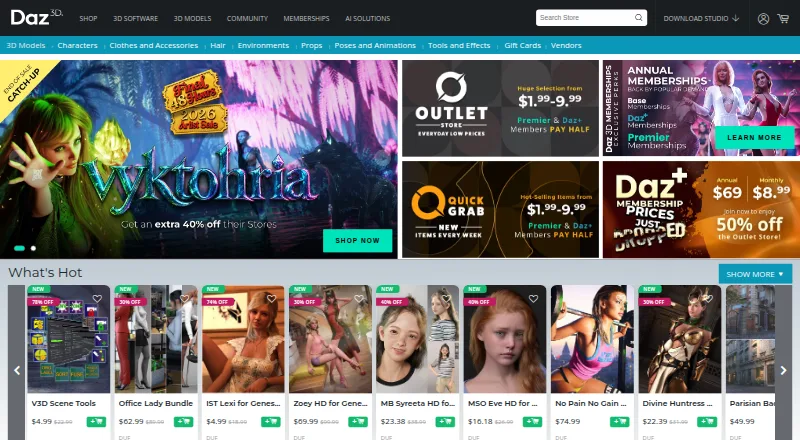
What Daz 3D is
Daz Studio is 3D software for creating characters, scenes, images, and animation, available for macOS, Windows, and the web. Its Genesis character creator supports rigged models, mix-and-match clothing and hair, and morphing between figure shapes. The Daz store offers tens of thousands of premade assets, spanning characters, environments, props, clothing, textures, shaders, lighting, and animation kits. Daz identifies Genesis 9 as its latest figure platform. For movement and rendering, Daz Studio uses dForce for cloth and hair simulation with the NVIDIA Iray render engine; its maker also describes a Filament-enabled viewport and render engine for real-time rendering and animation. Bridges transfer content to Blender, Unreal, Unity, Cinema 4D, Maya, and 3ds Max, though Daz warns the Blender bridge may not work with the latest Daz Studio version. Daz Base is free and includes Studio and Starter Essentials. Daz+ costs $69 a year; Daz Premier costs $199 a year and includes Premier tools and content while membership is active.
Good
- Genesis supports rigged, morphable characters.
- Store offers many types of 3D assets.
- dForce simulates cloth and hair movement.
- Bridges connect to several 3D applications.
- Free Daz Base includes Studio.
Watch out
- Blender bridge may not support the latest Studio version.
- Premier-only content requires an active membership.
- Premier costs $199 a year.
Who it suits
Daz Studio may suit hobbyists or professionals creating 3D characters, scenes, images, or animation. Its asset store and bridges may be useful to creators working with the listed content types and applications.
Verdict
Daz Studio combines character creation, simulation, rendering, and a large asset catalog. Daz Base is free; paid memberships add member benefits and, for Premier, additional tools and access to Premier-only content while active.
Plans and prices
From Daz 3D's own pricing page, checked 14 Oct 2026.
| Plan | Price | What it gives you |
|---|---|---|
| Daz+ | $69 a year | Member pricing on Daz+ items · 30% off Daz Originals · monthly coupons · tokens · $69 /year |
| Daz Premier | $199 a year | Daz Studio Premier · 35% off Daz Originals · monthly character bundle · Premier-only content · tokens · $199 /year |
| Daz Base | Free | Daz Studio · Starter Essentials · monthly Legacy content · cross-platform exporters · community forums |
| Daz+ | $8.99 a month | Member pricing on Daz+ items · 30% off Daz Originals · monthly coupons · tokens · $8.99 /month |
| Daz Premier | $18.98 a month | Daz Studio Premier · 35% off Daz Originals · monthly character bundle · Premier-only content · tokens · $18.98 /month |
The facts
Each one read from Daz 3D's own pages, with the date it was checked.
What it does
- Animation
- Daz Studio supports recorded figure movements and animation workflows using aniblocks and add-on plugins, its product page says.checked 14 Oct 2026
- API and scripting
- Daz Studio documentation exposes a scripting API with global objects, methods and application-object references for DAZ Script.checked 14 Oct 2026
- Asset library
- The Daz store offers tens of thousands of premade 3D models, including characters, environments, props, wearables, textures, shaders, lighting, and animation kits.checked 28 Sep 2026
- Blender compatibility
- The Daz to Blender page warns that the bridge may not currently be compatible with the latest Daz Studio version and says compatibility updates are planned.checked 28 Sep 2026
- Character creation
- Its Genesis character creator supports fully rigged models, mix-and-match clothing and hair, and morphing between figure shapes.checked 28 Sep 2026
- Character shaping
- Daz Studio lets users blend figure shapes and adjust individual character attributes such as facial features.checked 14 Oct 2026
- Cloth and hair simulation
- Daz describes dForce as physics technology for simulating cloth and hair movement.checked 14 Oct 2026
- Commercial use
- Daz says standard content rights cover rendered 2D images and videos, while distributing underlying 3D content in games or apps requires an Interactive License when offered.checked 14 Oct 2026
- Content management
- Daz Install Manager is provided to install and organize Daz content.checked 14 Oct 2026
- Content marketplace
- The Daz shop offers characters, environments, props, wearables, textures, shaders, lighting and animation kits.checked 14 Oct 2026
- Developer SDK
- The documentation center lists a public SDK release for Daz Studio 4.x and describes user and reference guides.checked 14 Oct 2026
- Documentation
- The documentation center separates tutorial-oriented user guides from a reference guide covering product features and technical details.checked 14 Oct 2026
- Export formats
- The Daz Studio 4.x Pro page lists FBX, Poser, OBJ, DUF and BLEND formats.checked 14 Oct 2026
- Funding
- Crunchbase reports one Series A funding round but obscures the disclosed amount and date in its accessible profile.checked 14 Oct 2026
- GPU requirements
- The same requirements article says Iray is 64-bit and recommends an NVIDIA GPU with at least 4 GB VRAM and CUDA compute capability 2.0 or greater.checked 14 Oct 2026
- Integrations
- The official site lists Bridges for Blender, Maya, Unreal, Unity, 3ds Max and Cinema 4D, and a Roblox exporter.checked 14 Oct 2026
Where it runs
- Character platform
- Genesis figures support rigged characters that users can shape and outfit with clothing, hair and accessories.checked 14 Oct 2026
- Figure platform
- Daz describes Genesis 9 as its latest figure platform, with billions of possible combinations.checked 28 Sep 2026
The company
- Company
- Daz describes itself as a 3D technology company serving hobbyists and professionals with software and a marketplace of inter-compatible assets.checked 28 Sep 2026
- Company legal name
- Daz's current pages identify the company as DAZ Productions, Inc.checked 14 Oct 2026
- Company size
- LinkedIn lists Daz 3D at 51–200 employees.checked 14 Oct 2026
- Founded
- LinkedIn lists Daz 3D as founded in 2000.checked 14 Oct 2026
- Headquarters
- LinkedIn lists Daz 3D headquarters in Salt Lake City, Utah.checked 14 Oct 2026
Money
- Free plan
- Yeschecked 20 Sep 2026
The full review of Daz 3D
Daz 3D is best for artists who want to build character-led scenes from customizable rigged figures and ready-made assets. Its main appeal is bringing character creation, simulation, and rendering together; users needing a standalone modeling workflow or a dependable Blender bridge should look elsewhere.
Overview
Daz Studio brings character creation, scene assembly, rendering, and animation into a workflow supported by a large marketplace. The store spans tens of thousands of models, from characters and environments to clothing, props, shaders, and animation kits. That range makes it practical to start with existing content and adapt it, rather than create every component yourself.
Genesis 9 is Daz’s latest figure platform, with billions of possible combinations. The breadth is useful for artists producing varied characters, though Daz’s strongest case is work built around its own ecosystem of compatible assets rather than every kind of 3D modeling task.
Key features
Character creation and assets
Genesis figures are fully rigged, with mix-and-match clothing and hair and morphs for changing body shapes. This gives character artists a flexible starting point without requiring them to construct and rig each figure from scratch. The marketplace adds environments, props, textures, lighting, poses, and animation kits, making it easier to populate a scene from compatible content.
Simulation, rendering, and export
dForce simulates cloth and hair movement, while NVIDIA Iray handles rendering. Daz also describes its Filament-enabled viewport and render engine as supporting real-time, high-quality rendering and animation. Together, these tools make Daz a compelling option for artists who want character and scene work in one application.
Daz Bridges transfer content to Blender, Unreal, Unity, Cinema 4D, Maya, and 3ds Max. The Blender bridge carries a specific caveat: Daz says it may not work with the latest Daz Studio version, with compatibility updates planned. Users whose workflow depends on Blender should weigh that risk before committing.
Premier tools
Daz Studio Premier adds Geometry Sculptor, shape and pose converters, a render queue, and a simulation manager. These tools extend the core workflow, but Premier-only content is available only while the membership remains active.
Pricing
Daz uses a freemium model. Daz Base includes free Daz Studio, Starter Essentials content, free monthly Legacy content, and cross-platform exporters. That makes Base the natural starting point for artists who want the core application without a paid membership.
Daz+ costs $69 a year, billed $69 /year. It includes member pricing, 30% off Daz Originals, and monthly coupons. It suits regular store users who expect member pricing and discounts to matter; it does not include the Premier tools or Premier-only content.
Daz Premier costs $199 a year, billed $199 /year. It includes Daz Studio Premier, member discounts, a monthly character bundle, and Premier-only content while membership is active. Choose it for the additional tools and content access; choose Daz+ if store discounts are the priority and those Premier extras are not needed. The stated paid-from price is 8.99 /mo, but the two membership plans are priced annually.
Commercial licenses are available, with custom license scope. Buyers planning commercial work should confirm the scope that applies to their use.
Platforms
Daz Studio is available on macOS and Windows, and the product also has a web presence. Cross-platform exporters are included with Daz Base. The maker provides a Help Center, tutorials, documentation, and a contact page for support.
Who it's for
Daz is a strong fit for hobbyists and professionals who want customizable rigged characters, a broad compatible asset catalog, and built-in simulation and rendering. It is less suitable for users seeking a general-purpose modeling tool or a Blender-dependent workflow that needs assured bridge compatibility.
Pros and cons
- Pros: Genesis combines rigged figures, clothing and hair options, and shape morphing, giving character artists many ways to adapt a shared base.
- Pros: A store with tens of thousands of models and production assets supports asset-led scene building.
- Pros: dForce, NVIDIA Iray, and the Filament-enabled viewport bring simulation and rendering into the same product.
- Cons: The Blender bridge may not support the latest Daz Studio version, a meaningful limitation for users relying on that transfer path.
- Cons: Premier-only content depends on an active membership, so access ends when the membership is no longer active.
- Cons: Commercial license scope is custom, so commercial users need to establish the applicable terms for their work.
Alternatives
For a different asset source, Sketchfab offers a free Basic plan capped at 50MB per model; consider it when that stated file-size limit fits the asset workflow. ambientCG provides downloadable assets under CC0 at no cost, making it a relevant choice when free access and that license are the priority.
Blendkit offers a free plan with models, materials, scenes, HDRIs, brushes, upload capability, and 200 MiB private storage; it may suit users looking for that range of asset types. Poliigon has a free Polydex Core plan for automatic identification, PBR textures, models and HDRIs, local search, and drag-and-drop import, an alternative for those focused on that asset-search workflow.
For broader browsing, see 3D Asset Libraries, 3D Character Animation Software, and 3D modeling software.
Verdict
Choose Daz Studio if your work centers on customizable characters and you value a large compatible asset catalog alongside simulation and rendering. Its integrated workflow is the main reason to pick it; the Blender bridge caveat and Premier membership condition are the main reasons to consider another tool or stay with Base.
Getting started
- Visit the Daz 3D shop
- Choose the free Daz Base plan or a paid membership
- Install or open Daz Studio on macOS, Windows, or the web
- Select Genesis figures and marketplace assets
- Use dForce and the available render engines for scenes
- Transfer content through a Daz Bridge when needed
Limits worth knowing
Daz Base is free, while Daz+ costs $69 a year and Daz Premier costs $199 a year. Premier-only content is available only while the Premier membership remains active, and Blender bridge compatibility may be limited with the latest Studio version.
Questions
Is Daz Studio free?
Yes. The Daz Base plan includes free Daz Studio, Starter Essentials content, free monthly Legacy content, and cross-platform exporters.
What do the paid plans cost?
Daz+ costs $69 a year. Daz Premier costs $199 a year.
Which operating systems support Daz Studio?
Daz Studio is available for macOS, Windows, and the web.
Can Daz content move to other applications?
Daz Bridges transfer content to Blender, Unreal, Unity, Cinema 4D, Maya, and 3ds Max.
What does Genesis provide?
Genesis supports fully rigged models, mix-and-match clothing and hair, and morphing between figure shapes. Genesis 9 is described as the latest figure platform.
What happens to Premier-only content after membership ends?
Premier-only content is available for the duration of an active membership.