Blendkit
Blendkit is an asset library integrated into Blender 3D, with 3D models, materials, brushes, scenes, HDRIs, node groups, and add-ons.
What Blendkit is
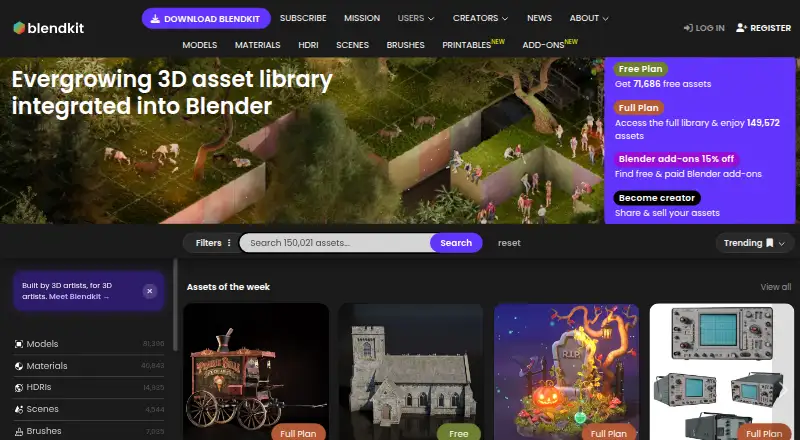
Blendkit is an asset library integrated into Blender 3D, with 3D models, materials, brushes, scenes, HDRIs, node groups, and add-ons. About half of its library is completely free. The Free plan lists 23,300 models, 40,938 materials, 1,070 scenes, 4,994 HDRIs, 1,272 brushes, upload access, and 200 MiB of private storage. Full costs $9.90 a month and Business costs $29 a month; both list larger collections and storage, with extra add-ons. Downloads are unlimited during the subscription period. Uploaded assets receive a quality check, and licensing options include Royalty-free and CC0 for commercial and non-commercial use. The Blender add-on requires Blender 3.0 or newer and works best with the latest Blender LTS version. Experimental plugins are available for Godot, Maya, and Rhino. The free Maya plugin allows browsing and dragging assets into Maya but is in early alpha. The Rhino plugin supports Rhino 8 on Windows and macOS, including Apple Silicon. Blendkit says 5% of each subscription fee supports open-source development and the Blender Development Fund.
Good
- Integrated directly into Blender 3D
- About 50% of the library is free
- Free plan includes multiple asset types
- Uploaded assets receive a quality check
- Royalty-free and CC0 license options
Watch out
- Blender add-on requires Blender 3.0 or newer
- Maya plugin is in early alpha
- Full costs $9.90 a month
- Business costs $29 a month
Who it suits
Blendkit suits Blender users seeking models and other production assets, including artists, designers, architects, illustrators, and filmmakers. Its optional Maya, Rhino, and Godot plugins may also interest users of those tools, with the Maya plugin still in early alpha.
Verdict
Blendkit combines a free asset selection with paid plans that expand collections and storage. Check the Blender version requirement and the early-alpha status of its Maya plugin before relying on those integrations.
Plans and prices
From Blendkit's own pricing page, checked 15 Oct 2026.
| Plan | Price | What it gives you |
|---|---|---|
| Free | Free | 23,709 models · 42,368 materials · 1,068 scenes · 5,089 HDRIs · 1,275 brushes · upload · 200 MiB private storage |
| Full | $9.90 a month | 82,640 models · 42,368 materials · 4,633 scenes · 15,163 HDRIs · 7,104 brushes · upload · 2 GiB private storage · extra add-ons · recurring payment |
| Business | $29 a month | 82,640 models · 42,368 materials · 4,633 scenes · 15,163 HDRIs · 7,104 brushes · upload · 100 GiB private storage · extra add-ons · recurring payment; price per seat |
The facts
Each one read from Blendkit's own pages, with the date it was checked.
What it does
- Add-ons
- Users can find and install free and paid Blender add-ons directly inside Blender.checked 1 Oct 2026
- Asset licensing
- Blendkit offers Royalty Free and CC0 licenses; Royalty Free permits commercial use but forbids reselling the asset itself, even modified.checked 15 Oct 2026
- Asset types
- The database includes 3D models, materials, brushes, scenes, HDRIs, node groups, and add-ons.checked 1 Oct 2026
- Blender requirement
- The Blendkit add-on requires Blender 3.0 or newer and works best with the latest Blender LTS version.checked 1 Oct 2026
- Core workflow
- The official add-on lets users search, download, upload and rate assets directly in Blender's 3D Viewport.checked 15 Oct 2026
- Documentation
- The public documentation covers installation, troubleshooting, licensing, uploads, validation, ratings and creator guidelines, while the main Docs landing page itself is only an index.checked 15 Oct 2026
- Godot plugin
- The Godot integration is a free open-source alpha plugin for Godot 4 on Linux and Windows, with macOS listed as untested.checked 15 Oct 2026
- Independent library coverage
- Digital Production reported free and paid plugins for Maya, Rhino and Godot, with all three integrations still in early alpha or experimental status.checked 15 Oct 2026
- Installation
- The downloadable ZIP is version 3.21.3.261002; Blender 3.0 or newer is required and the latest Blender LTS is recommended.checked 15 Oct 2026
- Integrations
- Official experimental plugins are available for Godot, Maya and Rhino in addition to the Blender add-on.checked 15 Oct 2026
- Internet requirement
- The user terms state that full service use requires an active internet connection and may involve websites, applications, plug-ins, add-ons, APIs and integrations.checked 15 Oct 2026
- Legal operator
- The legal operator is Blender Kit s.r.o., registered at Ladova 2044/3, Prague 2, Czech Republic, company ID 07549946.checked 15 Oct 2026
- Library size
- The homepage lists 73,803 free assets and 152,553 assets in the full library.checked 15 Oct 2026
- Licensing
- Assets are licensed for commercial and non-commercial use, with Royalty-free and CC0 license options.checked 1 Oct 2026
- Limit: Blender dependence
- DigiLiner says Blendkit requires an active internet connection and is built exclusively for Blender users.checked 15 Oct 2026
- Limit: creator earnings
- Reddit creators reported strict approval processes, low or inconsistent download revenue and difficulty keeping newer uploads visible.checked 15 Oct 2026
- Limit: entitlement bug
- A GitHub issue describes a Windows Full subscriber repeatedly being prompted to sign up and intermittently denied access despite a valid account.checked 15 Oct 2026
- Limit: Godot reliability
- VR.org reported that the Godot Send-to-Godot workflow can be fickle, with browser permissions, failed BLEND imports and imperfect GLTF exports.checked 15 Oct 2026
The company
- Company history
- Blendkit says it was founded in 2017 in the Czech Republic and first released in October 2018.checked 15 Oct 2026
- Company size
- LinkedIn lists the company as privately held, headquartered in Prague and employing 2–10 people.checked 15 Oct 2026
- Founded
- 2017checked 28 Sep 2026
- Headquarters
- Prague, Czech Republicchecked 28 Sep 2026
- Independent company record
- A Czech business-registry listing records Blender Kit s.r.o. as incorporated on 15 October 2018 with stated capital of CZK 1,000.checked 15 Oct 2026
Money
- Free coverage
- About 50% of the library is completely free.checked 1 Oct 2026
The full review of Blendkit
Overview
Blendkit is an asset library built into Blender, covering models, materials, scenes, brushes, HDRIs, node groups and add-ons. It suits creators who want to find assets without leaving Blender, especially those who can start with a substantial free collection. Its main appeal is breadth and in-app access; users who depend on Maya or Rhino should weigh the maturity and scope of those integrations.
Key features
About half of Blendkit’s library is free, and every uploaded asset passes a quality check. That gives artists and designers a useful range to explore before paying, though the Free plan’s smaller selection and 200 MiB of private storage may constrain anyone building a sizable personal library. The library serves a variety of creative work, from architecture and illustration to filmmaking.
The Blender add-on supports Blender 3.0 or newer and works best with the latest Blender LTS release. Browsing and installing assets directly in Blender makes it a natural fit for people who already work there. Free and paid Blender add-ons can also be found and installed in the application. Subscribers can download without a quota while their subscription is active, an advantage for asset-heavy workflows.
Assets can be used commercially or non-commercially, with Royalty-free and CC0 license options; the license scope is custom. That flexibility is useful, but creators should check the terms that apply to the assets they plan to use. Blendkit says it contributes 5% of each subscription fee to open-source development and the Blender Development Fund.
Experimental plugins extend Blendkit beyond Blender, but they are not equally mature. The free Maya plugin supports browsing and dragging assets into Maya, but its early-alpha status makes it a risky dependency for established production workflows. The Rhino plugin is more specifically defined: it offers over 100K models, materials and HDRIs, and supports Rhino 8 on Windows and macOS, including Apple Silicon.
Pricing
The Free plan costs nothing and includes 23,300 models, 40,938 materials, 1,070 scenes, 4,994 HDRIs and 1,272 brushes, along with uploads and 200 MiB of private storage. It is the sensible starting point for occasional users and anyone evaluating the library, but it has fewer models, scenes, HDRIs and brushes than Full or Business, and far less private storage.
Full costs $9.90 a month with recurring billing, with a promotional price of $7.92 / month. It includes 81,752 models, 40,938 materials, 4,544 scenes, 14,972 HDRIs and 7,063 brushes, plus uploads, 2 GiB of private storage and extra add-ons. This is the strongest fit for individual creators who regularly need the expanded catalog and do not need Business’s larger storage allowance.
Business costs $29 a month with recurring billing, with a promotional price of $23.20 / month. It offers the same listed asset counts and extra add-ons as Full, but increases private storage to 100 GiB. That makes the price difference chiefly a storage decision for users who need substantially more room; the plan details do not establish a separate team-seat allowance.
Platforms
Blendkit is available through an API, extension, Linux, macOS, web and Windows. The core asset workflow is centered on Blender, which must be version 3.0 or newer. Rhino 8 support is available on Windows and macOS, while the Maya plugin remains in early alpha.
Who it's for
Blendkit is best for Blender users who want a broad, quality-checked asset source inside their main application, particularly creators who download frequently or value commercial-use options. The free plan is a credible entry point; Full suits individuals who outgrow its catalog limits, while Business makes sense when 2 GiB of private storage is not enough. It is a less dependable choice for teams that need clearly defined seat terms or for Maya users who need a mature integration.
Pros and cons
- Pros: A varied library spans key 3D asset types, with about half of it free, so newcomers can explore without a subscription.
- Pros: Quality checks and in-Blender browsing and installation make the catalog more useful to creators who want assets in their existing workflow.
- Pros: Subscription downloads are unlimited during the subscription period, and paid plans provide substantially more private storage.
- Cons: The Free plan has just 200 MiB of private storage and smaller counts for models, scenes, HDRIs and brushes than the paid tiers.
- Cons: The Maya plugin is early alpha, so it is a poor foundation for workflows that require a dependable Maya integration.
- Cons: Custom license scope means creators should verify individual asset terms for their intended commercial use.
Alternatives
Browse 3D Asset Libraries for more options in the category. Sketchfab is worth considering if Android or iOS access matters, or if a 50MB maximum file size per model fits your needs. Choose ambientCG if you want free downloadable assets under CC0. Daz 3D may fit creators seeking Daz Studio, Starter Essentials content and cross-platform exporters. Poliigon is an alternative for users seeking PBR textures, models and HDRIs with local search and drag-and-drop import. Unity Version Control is an alternative for version-control needs. Textures.com offers a free sample selection and a Starter plan with 1,000 credits per month for US$13/month. KitBash3D is another option for creators interested in a library of textured models. Poly Haven suits users seeking a public CC0 asset library with no paywalls or signup requirement.
Verdict
Choose Blendkit if you work in Blender and want a broad, quality-checked catalog with meaningful free access and unlimited subscriber downloads. Full is the practical upgrade for regular users who need more assets; Business is primarily for those who need its 100 GiB storage. Look elsewhere if your workflow depends on a mature Maya plugin or you need clearer license scope before committing assets to commercial work.
Getting started
- Open the Blendkit website.
- Install the Blendkit add-on in Blender 3.0 or newer.
- Choose the Free, Full or Business plan.
- Browse and install assets or add-ons from inside Blender.
Limits worth knowing
The Free plan includes 200 MiB of private storage and smaller asset collections than Full and Business. Full costs $9.90 a month and includes 2 GiB of storage; Business costs $29 a month and includes 100 GiB.
Questions
Is Blendkit free?
Yes. Its Free plan costs nothing, and Blendkit says about half of its library is free.
How much do the paid plans cost?
Full costs $9.90 a month, and Business costs $29 a month. The listed promotional prices are $7.92 / month and $23.20 / month respectively.
What does the Free plan include?
It lists 23,300 models, 40,938 materials, 1,070 scenes, 4,994 HDRIs, 1,272 brushes, uploads and 200 MiB of private storage.
Which platforms and software does it support?
Platforms listed are API, extension, Linux, macOS, web and Windows. The Blender add-on requires Blender 3.0 or newer; experimental plugins are offered for Godot, Maya and Rhino.
Can Blendkit assets be used commercially?
Yes. Assets are licensed for commercial and non-commercial use, with Royalty-free and CC0 options.
Does Blendkit have open-source support?
Blendkit says 5% of each subscription fee goes to open-source development and the Blender Development Fund.
Alternatives to Blendkit
- 1
Unity
Free planAndroidiOSWebAPI8.4Free plan - 2
Sketchfab
Free planAndroidiOSWebAPI8.2From $15 a month - 3
Unity Version Control
Free planWebAPILinuxmacOS8.1Free plan - 4
Daz 3D
Free planWebmacOSWindows7.8From $69 a year - 5
Textures.com
Free planWebWindows7.5From $13 a month - 6

ambientCG
Free planWebAPILinuxmacOS7.1Free plan