DataLens
DataLens is a free, open-source tool for exploring CSV files in a browser and producing interactive reports.
What DataLens is
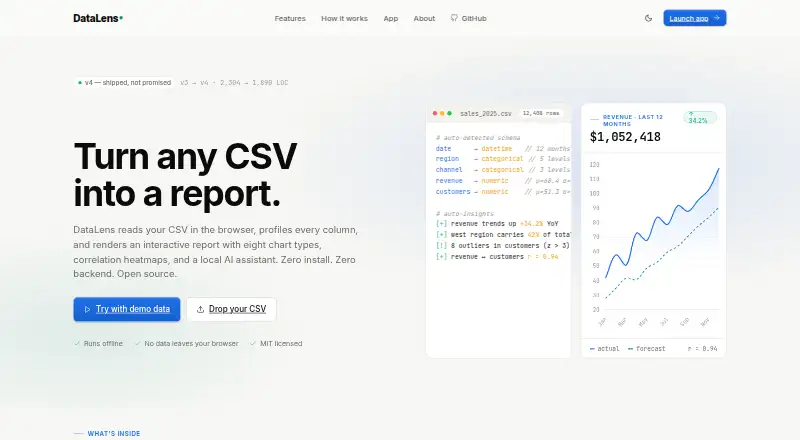
DataLens is a free, open-source tool for exploring CSV files in a browser and producing interactive reports. It profiles columns and recognizes numeric, categorical, and datetime fields. Users can import multiple CSVs by drag and drop or paste data from the clipboard, then examine it with bar, line, pie, donut, scatter, radar, histogram, and box plot charts. The tool calculates Pearson correlations and displays them in a heatmap; it also surfaces outliers, trends, top-k segments, and cross-correlations as text. An assistant supports Ollama, OpenRouter, Groq, and OpenAI-compatible endpoints. The site says CSV data stays in the browser and AI requests go directly from the tab to the configured provider. DataLens runs offline without installation or a backend, either in a browser or locally from its HTML file or an HTTP server. CSV files are described as supported up to approximately 50 MB. Users can export PDF reports and filtered CSV data. The interface is available in French and English, and the project uses the MIT License.
Good
- Free and open source under the MIT License
- Supports multiple CSV imports and clipboard paste
- Provides eight chart types and correlation heatmaps
- Runs offline without installation or a backend
- Exports PDF reports and filtered CSV data
Watch out
- CSV files are limited to approximately 50 MB
- CSV is the stated import format
- No SQL connections are listed
Who it suits
It suits analysts who want to generate reports from CSV files without starting a notebook. It is also a fit for people who need offline use, browser-based analysis, or local HTML access.
Verdict
DataLens brings CSV profiling, charts, and automatic insights together in a browser-based workflow. Its approximate file-size limit and CSV-focused imports are important considerations for larger or database-driven work.
The facts
Each one read from DataLens's own pages, with the date it was checked.
What it does
- AI integrations
- The assistant supports Ollama, OpenRouter, Groq, and any OpenAI-compatible endpoint.checked 9 Oct 2026
- Analysis
- It provides Pearson correlation heatmaps and automatic insights about outliers, trends, segments, and correlations.checked 9 Oct 2026
- Automatic insights
- It surfaces outliers, trends, top-k segments, and cross-correlations as text.checked 9 Oct 2026
- Charts
- It provides eight chart types: bar, line, pie, donut, scatter, radar, histogram, and box plot.checked 9 Oct 2026
- CSV import
- It supports drag-and-drop multi-file CSV import, clipboard paste, and automatic detection of numeric, categorical, and datetime columns.checked 9 Oct 2026
- Data handling
- The site says CSV data stays in the browser and AI requests go directly from the browser tab to the configured provider.checked 9 Oct 2026
- Deployment
- The GitHub README says the app can be opened in a browser or run locally from its HTML file or an HTTP server.checked 9 Oct 2026
- Export
- It offers one-click PDF report export and filtered CSV download.checked 9 Oct 2026
- Exports
- Users can export a PDF report and download filtered CSV data.checked 9 Oct 2026
- File size limit
- The maker describes CSV support up to approximately 50 MB.checked 9 Oct 2026
- Import limit
- The site describes CSV uploads up to approximately 50 MB.checked 9 Oct 2026
- Intended audience
- The maker describes DataLens as an auto-report generator for analysts who would rather not start a notebook.checked 9 Oct 2026
- Interface
- The GitHub README says the interface is available in French and English.checked 9 Oct 2026
- Interface languages
- The GitHub project page states that the interface is available in French and English.checked 9 Oct 2026
- License
- DataLens is open source under the MIT License.checked 9 Oct 2026
- Local use
- The app can be opened as a local HTML file or served from a local HTTP server.checked 9 Oct 2026
- Offline use
- The site says DataLens runs offline and requires no installation or backend.checked 9 Oct 2026
- Purpose
- DataLens reads CSV files in the browser, profiles columns, and creates an interactive report.checked 9 Oct 2026
- Statistics
- It calculates Pearson correlations and displays them in a heatmap.checked 9 Oct 2026