
Cut Alert
Cut Alert is a mobile-friendly web app for schools managing class cuts and daily absences.
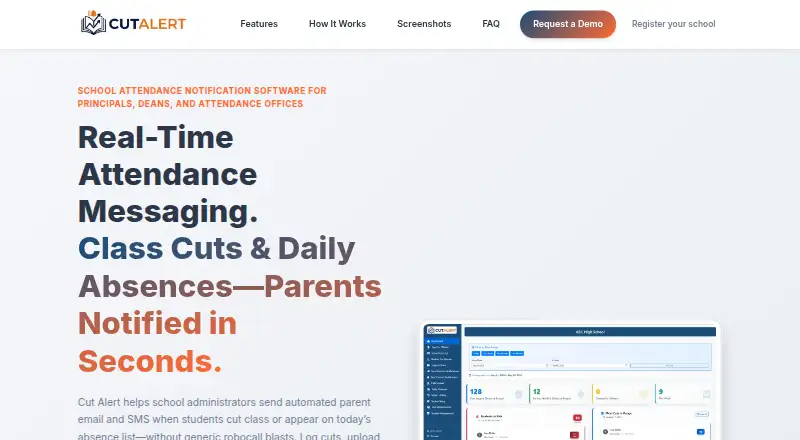
What Cut Alert is
Cut Alert is a mobile-friendly web app for schools managing class cuts and daily absences. Staff can select a student and class period, record a cut, and automatically notify guardians by email and SMS. For daily absence lists, staff upload a CSV, review entries, send bulk notifications, and record callback reasons. Messages can use students’ home languages and school branding. Staff can create custom outreach with saved templates, reusable groups, and email attachments. Schools can configure at-risk rules using a minimum cut count, a rolling day window, and an optional repeated-period rule. Support plans and interventions can be edited and exported as PDFs linked to student records. CSV imports cover student, staff, and schedule data, including NYC DOE RESI and RCON files. Reports can be downloaded as merged PDFs or ZIP files. Role-based access covers administrators, teachers, and office staff. Pricing is on request.
Good
- Email and SMS guardian notifications
- Bulk absence notifications from CSV
- Home-language and branded messages
- Configurable at-risk rules
- PDF and ZIP report exports
Watch out
- Attendance capture is manual
- Class-cut workflow requires several selections
- Pricing is available on request
Who it suits
It suits schools that need attendance tracking, family notifications, callback follow-up, and support-plan records in one web app. It is intended for administrators, teachers, and office staff.
Verdict
Cut Alert combines manual attendance entry, automated family alerts, reporting, and support-plan tools for schools. Its mobile-friendly web access and CSV imports support varied school roles and data workflows.
The facts
Each one read from Cut Alert's own pages, with the date it was checked.
What it does
- Access
- The mobile-friendly web app lists admin, teacher, and office roles.checked 9 Oct 2026
- Callback follow-up
- Staff can record a parent's callback reason, after which Cut Alert can email the student's teachers with that context.checked 9 Oct 2026
- Class cut alerts
- Staff can select a student and class period, then automatically notify guardians by email and SMS.checked 9 Oct 2026
- Custom outreach
- Staff can send custom notifications using saved templates, groups, and email attachments.checked 9 Oct 2026
- Cut alerts
- Staff can log a class cut against a student’s schedule and automatically notify guardians.checked 9 Oct 2026
- Daily absences
- Staff can upload a daily absence CSV, review the list, send bulk notifications, and record callback reasons.checked 9 Oct 2026
- Data import
- Cut Alert supports CSV imports for student and staff data and schedules, including NYC DOE RESI and RCON files.checked 9 Oct 2026
- Family messaging
- Notifications can use students’ home languages and the school’s branding.checked 9 Oct 2026
- Getting started
- The site invites schools to request a demo and says school registration is typically approved within 24 hours.checked 9 Oct 2026
- Imports
- The site says schools can import student, staff, and schedule data by CSV, including NYC DOE RESI and RCON files.checked 9 Oct 2026
- Notable limitation
- The described class-cut workflow requires staff to find the student, select the period, and confirm the cut.checked 9 Oct 2026
- Onboarding
- The site says schools start with a demo, submit a registration request when ready, and are typically approved within 24 hours.checked 9 Oct 2026
- Outreach
- The product supports saved message templates, reusable groups, and email attachments for custom notifications.checked 9 Oct 2026
- Purpose
- Cut Alert helps school administrators notify families by email and SMS when students cut class or appear on a daily absence list.checked 9 Oct 2026
- Reports
- Staff can download merged PDF cut reports or ZIP files of individual student reports.checked 9 Oct 2026
- Risk rules
- Schools can configure at-risk rules using a minimum cut count, rolling day window, and optional repeated-period rule.checked 9 Oct 2026
- Security
- The site says its multi-tenant architecture keeps each school’s data, branding, and users private to that school.checked 9 Oct 2026
Where it runs
- Access and device use
- The product is a mobile-friendly web app with role-based access for administrators, teachers, and office staff.checked 9 Oct 2026
Money
- Support plans
- Schools can edit support plans, customize interventions, and export plans as PDFs tied to student records.checked 9 Oct 2026