
CreativeOps Tracker
CreativeOps Tracker is a workflow tool for design teams managing projects, revisions, timesheets, leave and reports.
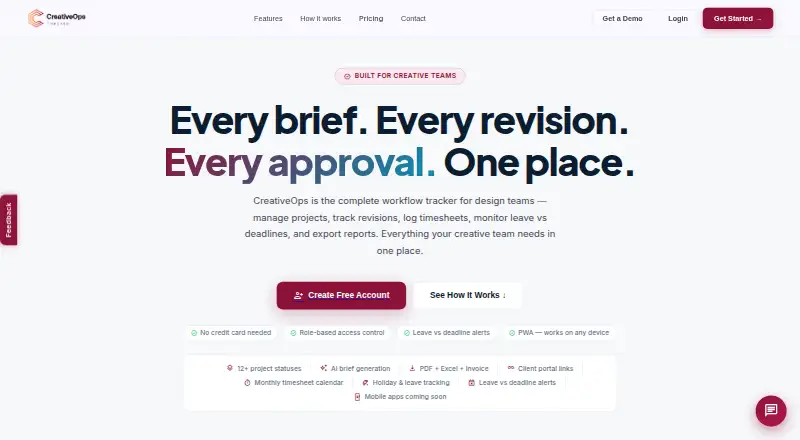
What CreativeOps Tracker is
CreativeOps Tracker is a workflow tool for design teams managing projects, revisions, timesheets, leave and reports. Project features include timelines, revision tracking, monthly timesheets, media asset logs and working-day countdowns. Managers can be alerted when logged leave overlaps an approaching deadline, and weekends are excluded from overdue-day calculations. Teams can share project or batch status links that update automatically without requiring a client login. Reporting includes PDF summaries and multi-sheet Excel exports covering meetings, KPIs, assets and billing. The product also lists workload planning, proofing and approvals, asset versioning and an AI brief generator. Individual plans include a 60-day free trial; workspace plans have 30-day trials. If a trial ends without a paid subscription, the workspace switches to read-only, allowing users to view data and export reports but not add projects or log work. Pricing is $79.99 a year for Individual, $329.99 a year for Workspace Starter and $659.99 a year for Workspace Agency. Mobile access is described through browser-based PWA installation; native app listings are coming soon.
Good
- Tracks revisions, timesheets, leave and deadlines.
- Client status links update automatically without login.
- Exports PDF summaries and multi-sheet Excel reports.
- Includes an AI brief generator.
Watch out
- Expired trials switch the workspace to read-only.
- Native app listings are coming soon.
- Enterprise pricing is custom and not listed.
Who it suits
CreativeOps Tracker is aimed at solo designers and freelancers, creative agencies, and in-house design teams. It may fit teams that need to monitor deadlines, workload, client status and time records.
Verdict
CreativeOps Tracker brings project tracking, team workload details and reporting into a workflow aimed at design groups. Note the read-only limit after an unconverted trial and that mobile access is described as PWA installation rather than native store apps.
Plans and prices
From CreativeOps Tracker's own pricing page, checked 2 Oct 2026.
| Plan | Price | What it gives you |
|---|---|---|
| Individual | $79.99 a year | 1 user · 60-day free trial · Unlimited projects · Timesheets & leave tracking · PDF + Excel reports · AI brief generator · Client portal links · KPI targets & reports · $79.99/yr Save 22% |
| Workspace Starter | $329.99 a year | Up to 5 users · 30-day free trial · Team workload view · Multi-designer assignment · Leave vs deadline alerts · Manager performance reports · Workspace admin panel · $329.99/yr Save 25% |
| Workspace Agency | $659.99 a year | Up to 15 users · 30-day free trial · Advanced workload planning · Custom branding · Invoice reports per client · Priority support · $659.99/yr Save 25% |
| Enterprise | Priced on request | Unlimited users · SSO / SAML login · Dedicated account manager · SLA guarantee · Custom integrations · Custom |
The facts
Each one read from CreativeOps Tracker's own pages, with the date it was checked.
What it does
- AI feature
- The product lists an AI brief generator for creative briefs.checked 2 Oct 2026
- Client portal
- Users can share project or batch status links that update automatically and require no client login.checked 2 Oct 2026
- Compliance and privacy
- The privacy policy describes GDPR and India DPDP legal bases where applicable and says personal data is not sold or rented.checked 2 Oct 2026
- Integrations
- The pricing page lists custom integrations for Enterprise, but does not name any integrations.checked 2 Oct 2026
- Intended users
- The site presents the product for solo designers and freelancers, creative agencies, and in-house design teams.checked 2 Oct 2026
- Leave alerts
- The product warns managers when logged leave overlaps an upcoming deadline, and weekends do not count as overdue days.checked 2 Oct 2026
- Project tracking
- The product lists project timelines, revision tracking, monthly timesheets, media asset logs, and working-day countdowns.checked 2 Oct 2026
- Purpose
- CreativeOps is a workflow tracker for design teams to manage projects, revisions, timesheets, leave versus deadlines, and reports.checked 2 Oct 2026
- Reports
- The product offers PDF summaries and multi-sheet Excel exports covering meetings, KPIs, assets, and billing.checked 2 Oct 2026
- Security
- The privacy policy says safeguards include TLS encryption in transit, encrypted database storage, role-based access controls, row-level security, backups, and audit logging.checked 2 Oct 2026
- Support
- Workspace Agency includes priority support, and the site provides [email protected] for enquiries.checked 2 Oct 2026
The company
- Headquarters
- Kerala, Indiachecked 28 Sep 2026
Where it runs
- Mobile apps
- The page describes browser-based installation as a Progressive Web App and says App Store and Google Play native app listings are coming soon.checked 2 Oct 2026
Money
- Trial limit
- After a trial ends without a paid subscription, the workspace enters read-only mode so users can view data and export reports but cannot add projects or log work.checked 2 Oct 2026
Alternatives to CreativeOps Tracker
- 1

Wrike
Free planAndroidiOSWebAPI8.4From $10 a month - 2

Frame.io
Free planAndroidiOSWebAPI8.3From $15 a month - 3

Celtx
Free planAndroidiOSWebExtension8.2From $11.24 a month - 4

Dart
Free planAndroidiOSWebAPI7.9From $8 a month - 5
Kitsu
Free planOpen sourceWebAPILinuxSelf-hosted7.9From €20 a month - 6
Autodesk Flow Production Tracking
AndroidiOSWebAPI7.8