CoverForge
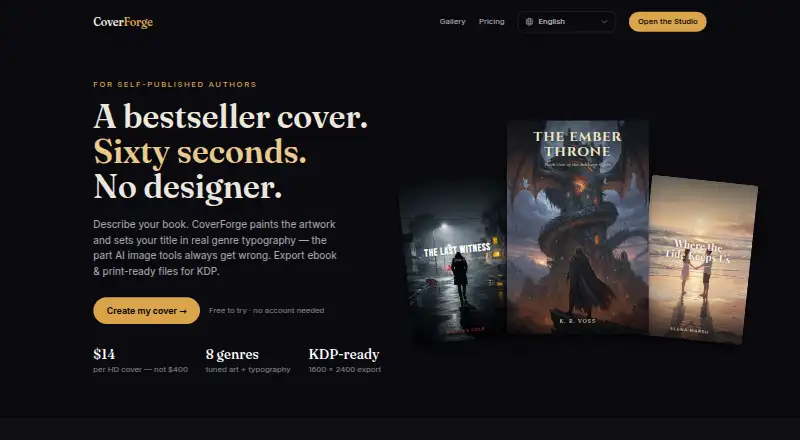
CoverForge is a web-based AI book-cover generator for self-published authors preparing ebook and print files.
What CoverForge is
CoverForge is a web-based AI book-cover generator for self-published authors preparing ebook and print files. Users choose a genre, describe a scene in one sentence, and select a mood; the image model then creates original cover artwork in about 20 seconds. Genre-specific art direction and font pairings are used to lay out the title and author name. Genres include fantasy, romance, thriller, science fiction, horror, cozy mystery, literary fiction, and non-fiction. The free Try it plan costs nothing and includes unlimited previews plus a watermarked 1024px export. A one-time 14.00 USD Single cover export provides a 1600 × 2400 PNG that the site says meets Amazon KDP’s recommended ebook-cover specification, as well as requirements for Kobo Writing Life, Apple Books, Google Play Books, and Draft2Digital. A one-time 29.00 USD Print + eBook pack adds a wrap PDF with back, spine, and front cover, bleed, and an ISBN barcode zone. Paid exports include a full commercial license, and users can regenerate designs before paying to export.
Good
- Offers eight listed genres and matching font pairings.
- Allows unlimited design regenerations before export.
- Paid exports include a full commercial license.
- Print pack includes a wrap PDF with bleed and barcode zone.
Watch out
- Free export is watermarked and 1024px.
- Single cover export costs $14, paid once.
- Print + eBook pack costs $29, paid once.
Who it suits
CoverForge suits self-published authors who want to create ebook covers or paperback wraps from a short scene description. It is relevant to authors who need a commercial license with paid exports.
Verdict
CoverForge offers a preview-first workflow and distinct ebook and print export options. Choose the plan based on whether you need only a cover image or a paperback wrap as well.
Plans and prices
From CoverForge's own pricing page, checked 30 Sep 2026.
| Plan | Price | What it gives you |
|---|---|---|
| Try it | Free | Unlimited design previews · watermarked 1024px export · all 8 genres & fonts |
| Single cover | $14, paid once | 1600 × 2400 HD export · full commercial license · KDP/Kobo/IngramSpark ready · unlimited regenerations |
| Print + eBook pack | $29, paid once | Single-cover features · paperback wrap · spine width from page count · print-ready PDF with bleed · ISBN barcode zone |
The facts
Each one read from CoverForge's own pages, with the date it was checked.
What it does
- Artwork
- A production image model creates original, royalty-free cover artwork in about 20 seconds.checked 30 Sep 2026
- Ebook export
- CoverForge exports a 1600 × 2400 pixel, 2:3 PNG that meets the recommended Amazon KDP ebook-cover specification.checked 30 Sep 2026
- Genres
- The site lists fantasy, romance, thriller, science fiction, horror, cozy mystery, literary fiction, and non-fiction.checked 30 Sep 2026
- Paperback wraps
- The Print pack creates a single PDF containing back cover, spine, and front cover, with bleed and an ISBN barcode zone.checked 30 Sep 2026
- Product
- CoverForge is an AI book-cover generator for self-published authors that exports ebook and print-ready files for KDP.checked 30 Sep 2026
- Regeneration
- Users can regenerate artwork as many times as they like before exporting, and only the export is paid.checked 30 Sep 2026
- Rights
- Paid exports include a full commercial license, and the artwork is generated exclusively for the customer and is not shared with other users.checked 30 Sep 2026
- Spine calculation
- The spine calculator uses Amazon thickness formulas for white and cream paper and sizes the spine from page count and paper type.checked 30 Sep 2026
- Store compatibility
- The site says its PNG also meets requirements for Kobo Writing Life, Apple Books, Google Play Books, and Draft2Digital.checked 30 Sep 2026
- Support
- The site lists [email protected] as its contact email.checked 30 Sep 2026
- Typography
- Each genre includes its own art direction and professional font pairing, with the title and author name laid out in curated genre fonts.checked 30 Sep 2026
- Workflow
- Users pick a genre, write one sentence describing the scene, and choose a mood.checked 30 Sep 2026
The full review of CoverForge
CoverForge is a web-based AI cover generator for self-published authors preparing ebook covers or KDP paperback files. It suits writers who want genre-directed artwork and export-ready layouts without paying until they download. Its one-time prices make it a focused choice for individual titles, though the free export is watermarked and low-resolution.
Overview
The workflow is deliberately narrow: choose a genre, describe the scene in one sentence, and set a mood. CoverForge generates original artwork in about 20 seconds, then places the title and author name using fonts paired with that genre’s art direction. That makes it a practical route from a short brief to a composed cover, rather than a general-purpose design tool.
Previews can be regenerated without limit before export, so users can refine the artwork without spending on each attempt. The trade-off is that a usable, unwatermarked file requires a paid export. The eight supported genres span fantasy, romance, thriller, science fiction, horror, cozy mystery, literary fiction, and non-fiction; authors working outside those categories may find the guided approach restrictive.
Key features
The ebook export is a 1600 × 2400 pixel PNG in the recommended Amazon KDP ebook-cover specification. CoverForge says the same PNG meets requirements for Kobo Writing Life, Apple Books, Google Play Books, and Draft2Digital, giving authors selling across those storefronts one file to work with.
For print, the Print pack produces a single PDF with back cover, spine, and front cover, plus bleed and an ISBN barcode zone. Its spine calculator uses Amazon thickness formulas and sizes the spine according to page count and paper type, including white and cream paper. This is the more complete option for authors preparing a paperback; the Single cover purchase does not include the wrap.
Paid exports include a full commercial license. Artwork is generated exclusively for the customer rather than shared with other users, an important distinction for authors seeking cover art they can use commercially.
Pricing
CoverForge is freemium, with a free trial and one-time paid exports rather than a recurring subscription. That suits authors buying a cover for an individual book, while offering no stated monthly plan for frequent publishers.
- Try it — free: Unlimited design previews, all eight genres and fonts, and a watermarked 1024px export. It is useful for judging the direction before committing, but the smaller, watermarked file is not the high-resolution paid deliverable.
- Single cover — $14, paid once: A 1600 × 2400 HD export, full commercial license, KDP/Kobo/IngramSpark readiness, and unlimited regenerations. This is the fit for ebook authors who need a finished cover but not a paperback wrap.
- Print + eBook pack — $29, paid once: Includes Single-cover features plus a paperback wrap, spine width calculated from page count, a print-ready PDF with bleed, and an ISBN barcode zone. Choose it when the same project needs both ebook and paperback files; the additional cost buys the print layout, not a subscription.
Regeneration is unlimited before export, and only the export is paid. The paid plans include commercial rights; the free plan is best treated as a preview option.
Platforms
CoverForge runs on the web. Its stated export formats are PNG and PDF, with the PNG for ebooks and the PDF wrap for paperback production.
Who it's for
CoverForge is best for self-published authors who can describe a scene succinctly, want genre-specific typography, and need an ebook file or KDP-oriented paperback wrap. Its preview-first pricing is particularly useful when the author wants to iterate before buying an export. It is less suitable for someone who needs a free, unwatermarked final cover or broader platform coverage than the web workflow.
Pros and cons
- Pros: Unlimited previews and regenerations keep experimentation separate from the one-time export cost.
- Pros: Ebook and paperback options address distinct publishing needs, with spine sizing and print elements included in the wrap pack.
- Pros: Paid exports include commercial rights, and the artwork is exclusive to the customer.
- Cons: The free export is watermarked and only 1024px, so it is not equivalent to the paid HD file.
- Cons: The guided workflow is organized around eight genres and a short scene brief, which may not fit every author’s creative direction.
- Cons: The 14.00 USD Single cover plan omits the paperback wrap; print authors must choose the 29.00 USD pack.
Alternatives
For a wider comparison, browse AI Book Cover Generators.
- Cover Studio AI is a better fit when you want to upload your own artwork or need paperback, hardcover, and ebook layouts in its free Draft plan; it also includes trim and spine calculations and PDF and Kindle exports.
- BookCover AI is worth considering if a credit-based free allowance and several generation styles suit your process: its Free plan includes 10 credits, up to 10 covers, four basic styles, and 1K high-res downloads.
- getvivix may suit someone looking beyond book covers to a tool available on Android, iOS, and web; its free plan includes access to all models, but outputs are watermarked.
- Entangled Text AI Book Cover Generator is another web-based freemium option, built and maintained by software engineers and fiction authors.
- BookCoverDesign.ai offers a monthly Standard plan with 500 credits, priority and batch generation, and watermark-free downloads; consider it if a recurring credit allowance fits better than CoverForge’s one-time export pricing.
- C2Story is an alternative for creators seeking picture-book tools, with a Starter plan that includes monthly credits, picture-book capacity, chat messages, and API access.
- AI Book Cover Generator is a paid web-based alternative.
- BeYourCover is a paid alternative.
Verdict
Choose CoverForge if you are a self-published author who wants to shape a genre-led cover through previews, then pay once for an ebook export or a complete paperback wrap. Its clearest advantage is separating unlimited experimentation from export cost while offering both digital and print deliverables. Look elsewhere if you need a free final file, want to supply your own artwork, or need a less genre-bound workflow.
Alternatives to CoverForge
- 1
getvivix
Free planAndroidiOSWeb7.3From $10 a month - 2

BookCoverDesign.ai
Free planWeb7.2From $9.99 a month - 3

Coverfairy
Free planWebLinuxmacOSWindows7.0From $12 a month - 4

BookClad
Free planWeb6.7From $9 a month - 5

BookCover AI
Free planWeb6.7$6,949.90 one-time - 6
Publbee Cover Studio
Free planWebExtension6.7From $29.99 a month