
BookClad
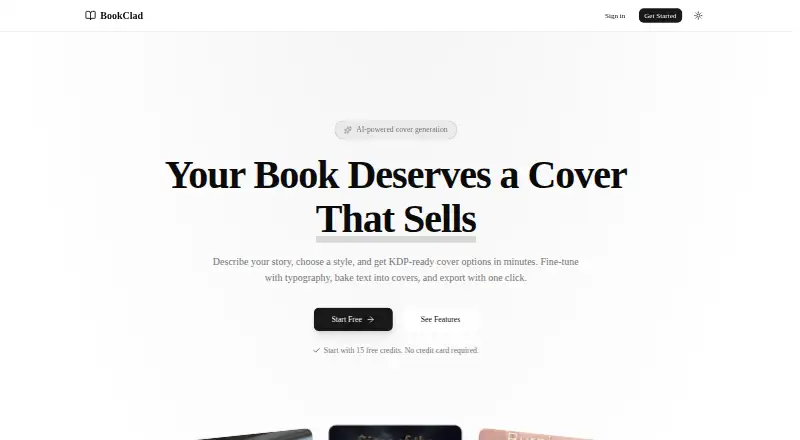
BookClad is a web-based AI book cover generator designed for Amazon KDP authors.
What BookClad is
BookClad is a web-based AI book cover generator designed for Amazon KDP authors. Users provide a title, author, and description, and the AI selects genre, mood, art style, and visual attributes for a cover. It supports thriller, romance, fantasy, and more than 10 genres. In the canvas editor, users can add text, adjust layers, and preview how a cover will appear on a Kindle. Text tools include genre-organized fonts, safe-zone guides, and legibility effects. BookClad saves generations with their attributes, allowing users to compare versions or return to an earlier result. Exports are JPEG files at 1600 x 2560 px, RGB, and 300 DPI; the site describes them as compliant with Amazon KDP specifications. The terms say users own generated covers and may use them commercially, including publishing on Amazon KDP. The free plan provides 15 credits for Quick-mode drafts but has no KDP export. Credits do not roll over, and their cost depends on the selected generation model.
Good
- Supports more than 10 genres.
- Includes a canvas editor and Kindle preview.
- Saves generations for comparison or reversion.
- Terms allow commercial use of generated covers.
Watch out
- Free plan has no KDP export.
- Subscription credits do not roll over.
Who it suits
BookClad suits authors creating covers for Amazon KDP who want to generate and edit designs in a web editor. Its free tier may suit users who only need draft generation.
Verdict
BookClad combines AI cover generation with editing, saved versions, and KDP-ready exports on paid plans. The free option is limited to Quick-mode drafts and does not include KDP export.
Plans and prices
From BookClad's own pricing page, checked 7 Oct 2026.
| Plan | Price | What it gives you |
|---|---|---|
| Free | Free | 15 credits to try · Quick mode (drafts only) · No KDP export · forever |
| Starter | $9 a month | 100 credits / month · All quality modes · KDP-ready export · $9/month |
| Pro | $19 a month | 250 credits / month · All quality modes · KDP-ready export · Priority queue · $19/month |
| Studio | $35 a month | 500 credits / month · All quality modes · KDP-ready export · Priority queue · Priority feedback & feature requests · $35/month |
The facts
Each one read from BookClad's own pages, with the date it was checked.
What it does
- Canvas editor
- The editor lets users add text, adjust layers, and preview how a cover will look on a Kindle.checked 7 Oct 2026
- Commercial usage
- The terms say users own generated covers and may use them commercially, including publishing on Amazon KDP.checked 7 Oct 2026
- Credit limits
- Subscription credits do not roll over, and the terms say image credit cost depends on the generation model selected.checked 7 Oct 2026
- Data deletion
- Users can delete projects and images in the editor or delete their account, which permanently removes account data described by the policy.checked 7 Oct 2026
- Export
- The site says covers export as 1600 x 2560 px, RGB, 300 DPI JPEG and describes them as compliant with Amazon KDP specifications.checked 7 Oct 2026
- Genre support
- The AI supports thriller, romance, fantasy, and more than 10 genres.checked 7 Oct 2026
- History
- BookClad saves generations with their attributes so users can compare versions and revert to an earlier result.checked 7 Oct 2026
- Integrations and providers
- The privacy policy names Google Gemini for image generation and attribute suggestions, Cloudflare R2 for file storage, and DodoPayments for billing; it also lists Google, Apple, and Amazon OAuth sign-in.checked 7 Oct 2026
- Privacy
- BookClad says it does not sell user data, use it for marketing, or build advertising profiles.checked 7 Oct 2026
- Product
- BookClad is an AI-powered book cover generator designed for Amazon KDP authors.checked 7 Oct 2026
- Quick creation
- Users enter a book title, author, and description, and the AI selects genre, mood, art style, and visual attributes to generate covers.checked 7 Oct 2026
- Security
- The privacy policy says sessions are stored in its database, payment webhook signatures are verified, download URLs expire after one hour, and OAuth tokens are stored securely in its database.checked 7 Oct 2026
- Support
- The terms direct users with questions to email or the in-app feedback form; the Studio plan includes priority feedback and feature requests.checked 7 Oct 2026
- Typography
- Built-in genre-organized fonts, safe-zone guides, and legibility effects are available for cover text.checked 7 Oct 2026
The full review of BookClad
Overview
BookClad is a web app for authors who want to generate a cover concept and refine its text and layout in one place. It is strongest for Amazon KDP authors who value a guided start and saved iterations; the credit-based plans and paid-only export make it less compelling for occasional experiments or authors who need a free publishing workflow.
Key features
Enter a title, author, and description, and BookClad uses them to suggest a genre, mood, art style, and other visual attributes. It covers more than 10 genres, including thriller, romance, and fantasy. That guidance can help turn a written brief into a starting point, though the result still depends on generation credits, whose cost varies by model.
The canvas editor supports text and layer adjustments, with a Kindle preview. Genre-organized fonts, safe-zone guides, and legibility effects give authors useful controls for fitting readable title text to a cover. BookClad also saves generations with their attributes, so it is easier to compare directions and return to an earlier version than to reconstruct one from scratch.
Paid plans export JPEGs at 1600 x 2560 px, RGB, 300 DPI; BookClad describes these files as meeting Amazon KDP specifications. The terms grant users ownership of generated covers and permit commercial use, including KDP publishing. Subscription credits expire at the end of the billing period, so the monthly allowance suits regular cover work better than sporadic projects.
BookClad names Google Gemini for image generation and attribute suggestions, Cloudflare R2 for storage, and DodoPayments for billing. It says it does not sell user data, use it for marketing, or build advertising profiles. Users can remove projects and images in the editor or delete their account, which permanently removes account data described by the policy.
Pricing
The Free plan costs nothing, billed forever, and includes 15 credits for trying Quick mode. It produces drafts only and has no KDP export. That is enough to explore the workflow, but not to deliver a publishable file from BookClad.
Starter costs $9 a month, billed $9/month, for 100 credits per month, all quality modes, and KDP-ready export. It is the entry point for authors with a modest monthly workload. Pro costs $19 a month, billed $19/month, and raises the allowance to 250 credits with a priority queue; it fits authors generating more often or who want queue priority. Studio costs $35 a month, billed $35/month, for 500 credits, all quality modes, KDP-ready export, priority queue, and priority feedback and feature requests. Its larger allowance and support extras are aimed at sustained use. All three paid plans provide the export needed to complete a KDP workflow; unused subscription credits do not roll over.
Platforms
BookClad runs on the web. Its described exports are JPEG, so it suits authors whose cover workflow can use that format.
Who it's for
BookClad is a good fit for KDP authors who want AI-generated visual directions, practical title-editing tools, saved versions, and a publishing-ready JPEG from one web app. It is a weaker fit for authors who need KDP export without a subscription, want credits to accumulate between months, or prefer a platform beyond the web.
Pros and cons
- Pros: Guided generation across more than 10 genres gives authors a structured way to start from a book brief.
- Pros: Text tools, safe-zone guides, legibility effects, and Kindle preview address cover-specific layout decisions.
- Pros: Saved generations retain their attributes, helping users compare and revisit earlier options.
- Pros: Paid exports are specified for KDP, and commercial use of generated covers is permitted.
- Cons: The free plan is restricted to Quick-mode drafts and excludes KDP export, so publishing requires a paid plan.
- Cons: Credits are monthly and do not roll over, while model choice affects their cost; irregular users may not get full use from an allowance.
Alternatives
For a wider comparison of tools in this category, browse AI Book Cover Generators.
Choose Cover Studio AI if its free Draft plan's paperback, hardcover, and eBook layouts, artwork uploads, trim and spine calculations, and PDF and Kindle exports better match your production needs. BookCover AI offers a free plan with 10 credits, up to 10 covers, four basic styles, and 1K high-resolution downloads, which may suit authors who want to explore a broader free allowance before paying. CoverForge is an option for authors who want unlimited watermarked design previews on its free plan, with a one-time Single cover purchase for HD export and commercial use.
getvivix, Coverfairy, BookCoverDesign.ai, Entangled Text AI Book Cover Generator, and Publbee Cover Studio are additional alternatives.
Verdict
BookClad is best for KDP authors who want an AI-assisted cover workflow with real text and layer editing, saved iterations, commercial rights, and a KDP-ready JPEG. Its clearest advantage is bringing those steps together; its main drawback is that free users cannot export for publication and paid credits expire monthly. Choose Starter for occasional paid use, or look elsewhere if you need a no-cost export or a different cover-production workflow.
Getting started
- Visit https://bookclad.com/.
- Sign in using Google, Apple, or Amazon OAuth.
- Enter the book title, author, and description to generate a cover.
- Use the canvas editor to adjust text and layers, then preview the cover on a Kindle.
- Choose a paid plan for KDP-ready export, or use the free plan for Quick-mode drafts.
Limits worth knowing
The free plan includes 15 credits for Quick-mode drafts and no KDP export. Starter includes 100 credits per month, Pro 250, and Studio 500; subscription credits do not roll over, and credit cost depends on the selected generation model.
Questions
Is BookClad free?
Yes. The free plan is billed forever and includes 15 credits for Quick-mode drafts, but no KDP export.
How much do paid plans cost?
Starter costs $9 a month, Pro costs $19 a month, and Studio costs $35 a month.
What platforms does BookClad support?
BookClad is available on the web.
Can I use generated covers commercially?
Yes. The terms say users own generated covers and may use them commercially, including publishing on Amazon KDP.
What file does BookClad export?
Covers export as JPEG files at 1600 x 2560 px, RGB, and 300 DPI. The site describes them as compliant with Amazon KDP specifications.
Alternatives to BookClad
- 1
getvivix
Free planAndroidiOSWeb7.3From $10 a month - 2

BookCoverDesign.ai
Free planWeb7.2From $9.99 a month - 3

Coverfairy
Free planWebLinuxmacOSWindows7.0From $12 a month - 4

BookCover AI
Free planWeb6.7$6,949.90 one-time - 5
Publbee Cover Studio
Free planWebExtension6.7From $29.99 a month - 6

Cover Studio AI
Free planWeb6.6From $9.99 a month