
Cover Studio AI
Cover Studio AI is a web editor for preparing Kindle, paperback, and hardcover cover files.
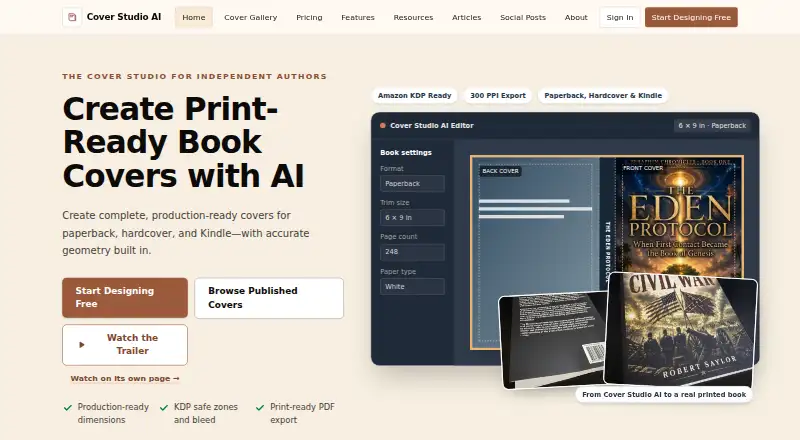
What Cover Studio AI is
Cover Studio AI is a web editor for preparing Kindle, paperback, and hardcover cover files. It handles Kindle front covers and full print layouts with front, spine, and back panels. Based on book settings, it calculates spine width and displays trim, bleed, safe-area, fold, hinge, and barcode guides. Users can upload artwork they own or have permission to use, or generate artwork with an eligible AI plan. Typography controls and drag-and-drop positioning let users arrange cover elements. Print exports are flattened production PDFs, while Kindle covers export as images at configured dimensions. A finished book can optionally have a public showcase page; projects are not public automatically. The tool creates cover files but does not publish books directly to Amazon or another publisher. The free Draft plan includes layouts, artwork uploads, calculations, and exports. AI allowances reset each billing period without rollover, and subscriptions renew monthly until canceled.
Good
- Creates Kindle, paperback, and hardcover cover files.
- Calculates spine width from book settings.
- Shows trim, bleed, safe-area, and barcode guides.
- Free Draft plan includes PDF and Kindle exports.
Watch out
- Does not publish books directly to Amazon or other publishers.
- AI generation requires an eligible paid plan.
- AI allowances reset each billing period without rollover.
- Subscriptions renew monthly until canceled.
Who it suits
Cover Studio AI suits independent authors, series publishers, small presses, and designers preparing print or Kindle cover files. It may also fit users who want spine and print-production guides in the editor.
Verdict
Cover Studio AI focuses on cover-file creation, with layout tools for both print and Kindle formats. Its output is not a substitute for direct book publishing.
Plans and prices
From Cover Studio AI's own pricing page, checked 29 Sep 2026.
| Plan | Price | What it gives you |
|---|---|---|
| Draft | Free | Paperback, hardcover, and eBook layouts · own artwork uploads · trim and spine calculations · PDF and Kindle exports |
| Author | $9.99 a month | 50 AI image generations per month · AI cover concepts and back-cover copy · commercial publishing use · $9.99 /month |
| Publisher | $19.99 a month | 150 AI image generations per month · priority AI processing · future publishing templates · $19.99 /month |
| Press | $39.99 a month | 500 AI image generations per month · priority support · early access to advanced publishing tools · $39.99 /month |
The facts
Each one read from Cover Studio AI's own pages, with the date it was checked.
What it does
- Artwork
- Users can upload artwork they own or have permission to use, or generate artwork with an eligible AI plan.checked 29 Sep 2026
- Cover layouts
- The editor supports Kindle front covers and full paperback and hardcover layouts with front, spine, and back panels.checked 29 Sep 2026
- Editing tools
- The editor provides typography controls and drag-and-drop positioning for cover elements.checked 29 Sep 2026
- Exports
- Print covers export as flattened production PDFs and Kindle covers as images at configured dimensions.checked 29 Sep 2026
- Integrations
- The privacy policy says AI prompts and relevant project inputs may be sent to OpenAI when the user requests AI generation, and Stripe handles payment processing.checked 29 Sep 2026
- Intended users
- The maker describes the product as designed for independent authors, series publishers, small presses, and designers.checked 29 Sep 2026
- Production guides
- It calculates spine width from book settings and displays trim, bleed, safe-area, fold, hinge, and barcode guides.checked 29 Sep 2026
- Publishing limits
- Cover Studio AI creates cover files but does not publish books directly to Amazon or another publisher.checked 29 Sep 2026
- Purpose
- Cover Studio AI helps independent authors, publishers, and small presses create complete Kindle, paperback, and hardcover cover files.checked 29 Sep 2026
- Security and privacy
- The privacy policy says passwords are stored as secure hashes and that administrative, technical, and organizational safeguards are used to protect information.checked 29 Sep 2026
- Showcase
- Users may optionally publish a public showcase page for a finished book; projects are not made public automatically.checked 29 Sep 2026
- Support
- The Press plan includes priority support, and the site directs users to its contact page for questions and privacy requests.checked 29 Sep 2026
- Usage limits
- AI generation allowances reset each billing period and do not roll over, and subscriptions renew monthly until canceled.checked 29 Sep 2026
The full review of Cover Studio AI
Cover Studio AI is a web editor for authors and small publishing teams preparing Kindle and print cover files. It is best suited to people who need measured paperback or hardcover wraps as well as ebook covers. Its standout strength is print-layout guidance; its main boundary is that it stops at the cover file.
Overview
The editor combines front-cover design with full paperback and hardcover layouts, including spine and back panels. Spine-width calculations and guides for trim, bleed, safe areas, folds, hinges, and barcodes make it more practical for print production than a tool focused only on cover artwork. That guidance helps organize a cover to book dimensions, but the finished book still has to be uploaded to Amazon or another publisher separately.
Users can bring artwork they own or have permission to use, or generate images with an eligible paid plan. Typography controls and drag-and-drop placement support arranging the cover elements. Print files export as flattened production PDFs, while Kindle covers export as images at configured dimensions. A finished book can also have a public showcase page, but projects are not public by default.
Key features
- Print and Kindle layouts: Kindle front covers and full paperback or hardcover wraps cover both ebook and print workflows.
- Production guides: Calculated spine width and visible trim, bleed, safe-area, fold, hinge, and barcode guides help with print layout.
- Artwork and editing: Upload permitted artwork or use AI generation on an eligible plan, then arrange elements with typography controls and drag-and-drop positioning.
- Exports: Flattened PDFs serve print production; configured-dimension images serve Kindle covers. The exports are cover files, not book-publishing tools.
- Privacy and payments: When AI generation is requested, prompts and relevant project inputs may go to OpenAI; Stripe handles payment processing. Passwords are stored as secure hashes, and the service says it uses administrative, technical, and organizational safeguards to protect information.
Pricing
Cover Studio AI is freemium, with subscriptions renewing monthly until canceled. AI-generation allowances reset each billing period and do not roll over.
- Draft — free: Includes paperback, hardcover, and eBook layouts, own-artwork uploads, trim and spine calculations, and PDF and Kindle exports. It is a useful starting point for authors who already have artwork, but it does not include the paid plans’ stated AI image-generation allowances or AI cover concepts.
- Author — $9.99 a month: Adds 50 AI image generations monthly, AI cover concepts, back-cover copy, and commercial publishing use. It is the entry paid tier for authors who want AI-assisted artwork and copy; the monthly generation cap is the key constraint.
- Publisher — $19.99 a month: Provides 150 AI image generations monthly, priority AI processing, and future publishing templates. The higher allowance and faster queue suit heavier use, though the templates are future additions rather than current tools.
- Press — $39.99 a month: Includes 500 AI image generations monthly, priority support, and early access to advanced publishing tools. This is aimed at small presses or designers with recurring generation needs; its higher price buys substantially more usage and support access.
Paid subscriptions renew monthly until canceled, and unused AI generations do not carry forward. The free plan retains the layout and export workflow for users who can supply their own artwork.
Platforms
Cover Studio AI runs on the web. No desktop or mobile app platform is specified.
Who it's for
Independent authors, series publishers, small presses, and designers are the natural audience, especially when a project needs both an ebook cover and a print wrap. It is less suitable for anyone looking for a service that publishes the book itself, or for a user who needs cover creation without handling a separate publishing upload.
Pros and cons
- Pro: Print-oriented spine calculations and production guides address details that a front-cover-only workflow cannot.
- Pro: The free Draft plan supports layouts and exports when users already have artwork.
- Con: AI generation is tied to paid plans and capped monthly, with no rollover of unused generations.
- Con: It creates cover files but does not publish books to Amazon or another publisher.
- Con: AI prompts and relevant project inputs may be sent to OpenAI when generation is requested.
Alternatives
CoverForge is worth comparing if a watermarked 1024px preview is enough before paying: its free Try it plan offers unlimited design previews, while a one-time Single cover option provides a 1600 × 2400 HD export.
BookCover AI suits readers who want a credit-based generator, with 10 free credits for up to 10 covers across four basic styles and a 1K high-res download.
getvivix is an option for readers seeking a service available on Android, iOS, and web.
Entangled Text AI Book Cover Generator is another web-based freemium alternative, built and maintained by a small team of software engineers and fiction authors.
BookCoverDesign.ai offers a $9.99 a month Standard plan with 500 monthly credits, watermark-free downloads, and commercial use.
C2Story is a broader picture-book option, with a $10.99 a month Starter plan that includes 100 credits per month, API access, and about 10 picture books.
AI Book Cover Generator is a paid web alternative.
BeYourCover is a paid web alternative.
For more options, see AI Book Cover Generators.
Verdict
Choose Cover Studio AI if you need one workflow for Kindle fronts and dimension-aware paperback or hardcover wraps, especially when print guides matter. The free plan is a sensible fit for users with their own artwork, while the Author plan is the lowest-cost route to its AI-assisted features. Look elsewhere if you need publishing handled for you or want uncapped AI generation.
Alternatives to Cover Studio AI
- 1
getvivix
Free planAndroidiOSWeb7.3From $10 a month - 2

BookCoverDesign.ai
Free planWeb7.2From $9.99 a month - 3

Coverfairy
Free planWebLinuxmacOSWindows7.0From $12 a month - 4

BookClad
Free planWeb6.7From $9 a month - 5

BookCover AI
Free planWeb6.7$6,949.90 one-time - 6
Publbee Cover Studio
Free planWebExtension6.7From $29.99 a month