
Cosmic Watch
Cosmic Watch is a 3D planetarium, sky guide, and clock that renders real-time graphics of Earth and the sky.
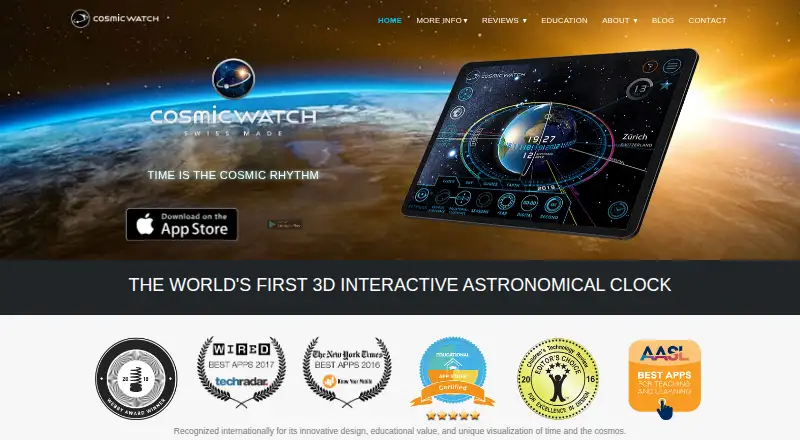
What Cosmic Watch is
Cosmic Watch is a 3D planetarium, sky guide, and clock that renders real-time graphics of Earth and the sky. Its augmented-reality sky guide can show constellations, stars, and planets when users point a phone or tablet upward. Views include the user's location, Earth, and the solar system, with a 360-degree celestial sphere, world clock, astrology mode, retrograde motion, and astronomical-event notifications. The free plan includes sky, Earth, and solar system views, the sky guide, layers, star names, the world clock, and notifications. Subscriptions or Cosmic Pro unlock additional tools, including Moon Calendar, meteor showers, saved date, time, and location, and Time Control. Cosmic Astro offers Western or Vedic natal charts with interactive 3D horoscopes and PDF export for subscribers and Cosmic Pro members. The app is available for Android, iOS, and macOS. The maker says it does not store or share location or network information; optional anonymous analytics can be disabled in settings.
Good
- AR sky guide identifies constellations, stars, and planets.
- Free plan includes sky, Earth, and solar system views.
- Includes world clock and astronomical-event notifications.
- Available for Android, iOS, and macOS.
- Optional anonymous analytics can be disabled in settings.
Watch out
- Moon Calendar and other additional tools require a subscription or Cosmic Pro.
- Cosmic Astro natal charts are for subscribers and Cosmic Pro members.
- No telescope control is listed.
Who it suits
Cosmic Watch may suit amateur astronomers, outdoor adventurers, nature lovers, and people interested in clocks or science fiction. It is also presented as an educational tool for learning about the solar system, Earth cycles, and basic astronomy.
Verdict
Cosmic Watch pairs an AR sky guide with views of Earth and the solar system, plus clock and astronomy tools. The free plan covers core viewing features, while additional tools and natal charts have paid access requirements.
Plans and prices
From Cosmic Watch's own pricing page, checked 30 Sep 2026.
| Plan | Price | What it gives you |
|---|---|---|
| Free | Free | Sky, Earth, solar system views · sky guide · layers · star names · world clock · notifications |
| Monthly Plan | $0.99 a month | Tools and Time Control · Monthly Plan |
| Monthly | $2.99 a month | Tools and Time Control · Monthly |
| Tools Pack | $2.99, paid once | Moon Calendar · Atmosphere Clockface · Meteor Showers · Aspects · Retrogrades Year · Dreamspell Calendar · Date/time/location saving · Camera tools · Tools Pack |
| Yearly Plan | $4.99 a year | Tools and Time Control · Yearly Plan |
| Yearly | $14.99 a year | Tools and Time Control · Yearly |
| Cosmic Pro | $69.99, paid once | Tools and Time Control permanently unlocked · Cosmic Pro |
The facts
Each one read from Cosmic Watch's own pages, with the date it was checked.
What it does
- Analytics
- Optional self-hosted Matomo analytics collects anonymous usage, session, device, country-level location and purchase-related events, and can be disabled in app settings.checked 30 Sep 2026
- Audience
- The maker describes Cosmic Watch as being for nature lovers, outdoor adventurers, amateur astronomers, advanced stargazers, clock fans and science-fiction enthusiasts.checked 30 Sep 2026
- Awards
- The app listing cites a Webby Award for Best Educational App 2018 and recognition from Wired, TechRadar, AASL, The New York Times and Space.com.checked 30 Sep 2026
- Birth charts
- Cosmic Astro provides Western or Vedic natal charts with interactive 3D horoscopes and PDF export for subscribers and Cosmic Pro members.checked 30 Sep 2026
- Core features
- The app includes a geocentric and heliocentric solar system, a 360-degree celestial sphere, astrology mode, retrograde motion, a world clock and astronomical-event notifications.checked 30 Sep 2026
- Data safety
- Google Play states that no data is shared with third parties, data is encrypted in transit, and the app may collect app activity and app info/performance data.checked 30 Sep 2026
- Education
- The app is presented as an educational tool for learning the solar system, Earth cycles and basic astronomical concepts.checked 30 Sep 2026
- Paid tools
- Subscriptions or Cosmic Pro unlock Moon Calendar, real-time clouds, meteor showers, comets, planetary aspects, Retrograde Year, Dreamspell Calendar, Atmosphere Clockface, saved date/time/location and Time Control.checked 30 Sep 2026
- Privacy
- The maker says it does not store or share location or network information and does not collect names, email addresses, account information, precise location data or advertising identifiers.checked 30 Sep 2026
- Product
- Cosmic Watch is a 3D planetarium, sky guide and clock that renders real-time graphics of Earth and the sky.checked 30 Sep 2026
- Sky guide
- The app lets users point a phone or tablet toward the sky to see constellations, stars and planets in augmented reality.checked 30 Sep 2026
- Support
- The maker directs app support and feature requests to [email protected].checked 30 Sep 2026
- Views
- It provides views from the user's location, of Earth and of the solar system.checked 30 Sep 2026
The company
- Headquarters
- Zürich, Switzerlandchecked 28 Sep 2026
Where it runs
- Supported Apple devices
- The App Store listing supports iPhone, iPad, iPod touch, Apple Silicon Mac and Apple Vision, with iOS 15, iPadOS 15, macOS 12 on M1 or later, and visionOS requirements.checked 30 Sep 2026
The full review of Cosmic Watch
Cosmic Watch is a planetarium, augmented-reality sky guide and clock for exploring the sky from a device. It suits curious stargazers, learners and clock enthusiasts; its free viewing tools are useful on their own, while richer calendar and time controls require payment.
Overview
Point a phone or tablet toward the sky to identify stars, planets and constellations, or move between a local sky view, Earth and the solar system. The combination is more versatile than a simple object finder: geocentric and heliocentric models, a 360-degree celestial sphere, retrograde motion, astrology mode, world clock and astronomical-event notifications bring astronomy and timekeeping together.
Cosmic Watch is also presented as an educational aid for learning about Earth cycles, the solar system and basic astronomical ideas. Its focus is visual exploration rather than observatory operations: it has no telescope control or mission tracking. Choose another tool if either is central to your use.
Key features
Sky guide and planetary views
The AR guide is the clearest reason to choose Cosmic Watch for outdoor reference: aim a supported device and use its orientation to explore named objects in the sky. Earth and solar-system views add a broader frame, useful for connecting what is overhead to planetary arrangements. This mix also suits learners who want visual context, though the app's stated educational scope is introductory astronomy rather than a substitute for a dedicated course.
Clocks, calendars and astrology
The world clock and event notifications make the free app relevant beyond a stargazing session. Paid tools broaden that role with a Moon Calendar, real-time clouds, meteor showers, comets, planetary aspects, Retrograde Year, Dreamspell Calendar, Atmosphere Clockface, saved date, time and location, and Time Control. Cosmic Astro adds interactive 3D Western or Vedic natal charts and PDF export for subscribers and Cosmic Pro members. These additions are worthwhile for people who will use the calendar, time-control or astrology features; casual sky identification does not depend on them.
Privacy and support
The maker says it does not store or share location or network information and does not collect names, email addresses, account information, precise location data or advertising identifiers. Optional self-hosted Matomo analytics records anonymous usage, session, device, country-level location and purchase-related events, and can be disabled in settings. Google Play says no data is shared with third parties, data is encrypted in transit, and app activity and app information or performance data may be collected. Support and feature requests go to [email protected].
Pricing
The free plan costs nothing and includes sky, Earth and solar-system views, the sky guide, layers, star names, world clock and notifications. It is the sensible starting point for object identification and general exploration; the paid tools are not required for those core uses.
| Plan | Price | What it includes |
|---|---|---|
| Monthly Plan | $0.99 a month | Tools and Time Control |
| Monthly | $2.99 a month | Tools and Time Control |
| Tools Pack | $2.99, paid once | Moon Calendar, Atmosphere Clockface, Meteor Showers, Aspects, Retrogrades Year, Dreamspell Calendar, date/time/location saving and camera tools |
| Yearly Plan | $4.99 a year | Tools and Time Control |
| Yearly | $14.99 a year | Tools and Time Control |
| Cosmic Pro | $69.99, paid once | Tools and Time Control permanently unlocked |
The subscription choices suit people who want ongoing access to Tools and Time Control; the lower-priced Monthly Plan and Yearly Plan are the cheaper routes to that same stated bundle. The one-time Tools Pack instead names a set of calendar, clock, astronomy and camera tools, but does not include the stated permanent unlock of Tools and Time Control. Cosmic Pro is the option for people who want that permanent unlock rather than recurring access. Cosmic Astro charts and PDF export require a subscription or Cosmic Pro membership.
Platforms
Cosmic Watch is available on Android, iOS and macOS. Apple support covers iPhone, iPad, iPod touch, Apple Silicon Mac and Apple Vision, with iOS 15, iPadOS 15, macOS 12 on M1 or later, and visionOS requirements. Its cross-platform coverage is useful for people who want the app across mobile and Apple desktop devices, but it does not extend to Windows or Linux.
Who it's for
Nature lovers, outdoor adventurers, amateur astronomers, advanced stargazers, clock fans and science-fiction enthusiasts are among the audiences the maker identifies. In practice, the best fit is someone who values a visual sky guide and wants Earth, solar-system and timekeeping views in one app. Beginners can use it to learn basic concepts; experienced observers who need telescope control or mission tracking should look elsewhere.
Pros and cons
Pros
- Useful core features without a subscription: the free plan includes the AR sky guide, star names, multiple views, world clock and notifications.
- More context than a sky identifier: Earth, solar-system and celestial-sphere views connect local sky viewing to larger-scale astronomy.
- Several ways to unlock extras: monthly, yearly, one-time tools and permanent Pro access let users choose between recurring and one-time purchases.
- Optional analytics control: Matomo analytics can be disabled in app settings.
Cons
- Many useful extras are paid: calendars, Time Control and the fuller tool set are not part of the free plan.
- Some plan names have different prices for the same stated bundle: Monthly Plan and Monthly, and Yearly Plan and Yearly, both describe Tools and Time Control.
- No equipment or mission functions: it cannot control telescopes or track missions.
- Platform reach is limited: the listed platforms are Android, iOS and macOS, not Windows or Linux.
Alternatives
Astronomy Apps is the broader category list for comparing options. Choose NASA Eyes instead if a free browser-based experience is preferable and an internet connection is available. Solar System Scope is another freemium option, with a free desktop-browser version requiring WebGL. Choose Celestia if open-source software is a priority. Night Sky is another freemium option for readers comparing apps on Android, iOS or macOS. Star Chart is worth considering if you prefer its free plan, which says every feature and upgrade is included with no subscriptions or paywalls. The separate Star Chart is a free option whose version includes in-app upgrades. Stellarium is a free alternative for Linux, macOS, web and Windows. Gaia Sky is a free, open-source desktop alternative for Windows, Linux and macOS.
Verdict
Cosmic Watch is a strong choice for curious sky-watchers and learners who want an AR guide alongside visual Earth, solar-system and clock tools, especially if its free core features are enough. Pay only if its extra calendars, time controls or natal-chart tools match your interests. Look elsewhere if telescope control, mission tracking or support beyond Android, iOS and macOS is essential.
Alternatives to Cosmic Watch
- 1
Solar System Scope
Free planAndroidiOSWebmacOS8.0$9.80 one-time - 2
NASA Eyes
Free planOpen sourceAndroidiOSWebLinux7.8Free plan - 3
SkyORB
Free planAndroidiOSmacOSWindows7.7$4.99 one-time - 4
ISS Detector
Free planAndroidiOSWebmacOS7.3$17.99 one-time - 5
Gaia Sky
Free planOpen sourceAPILinuxmacOSSelf-hosted7.2Free plan - 6
Heavens-Above
Free planAndroidiOSWeb7.2$4.99 one-time