
Celestia
Celestia is a free, open-source 3D space visualization that lets users explore objects from planets and moons to star clusters and galaxies.
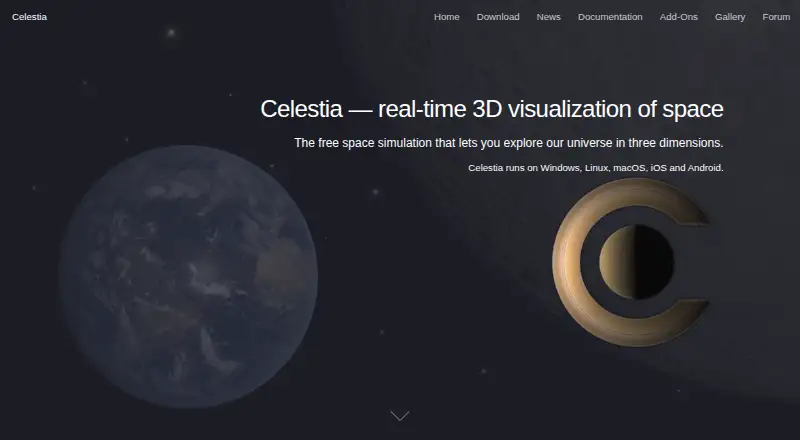
What Celestia is
Celestia is a free, open-source 3D space visualization that lets users explore objects from planets and moons to star clusters and galaxies. Views can be set from different places in space and at different times, while solar-system positions and movements are calculated in real time at a chosen rate. It also serves as a planetarium: users can navigate to a celestial world, land on its surface, and view solar-system objects in its sky. Add-ons can extend catalogues with objects, high-resolution textures, 3D models, spacecraft, and fictional objects. Celestia is licensed under the GNU General Public License and is available for Android, iOS, Linux, macOS, web, and Windows. The browser option is a lite version, and installation routes vary by platform; the latest stable original-project Linux release is listed as source code. The site says data is collected only for analytics and diagnostics. Support routes include forums or GitHub discussions for the original project, with other feedback options for frontends and the website.
Good
- Explores objects from planets to galaxies.
- Calculates solar-system motion in real time.
- Add-ons expand catalogues with models and textures.
- Licensed under the GNU General Public License.
Watch out
- Browser edition is a lite version.
- Linux stable release is listed as source code.
- Installation options differ by platform.
Who it suits
Celestia suits people who want to explore celestial objects interactively or use a planetarium-style view. It is available across mobile, desktop, and browser platforms, though the browser version is lite.
Verdict
Celestia combines a real-time space visualization with planetarium navigation and expandable catalogues. Check the platform-specific installation route and the browser edition’s lite status before choosing it.
Plans and prices
From Celestia's own pricing page, checked 4 Oct 2026.
| Plan | Price | What it gives you |
|---|---|---|
| Celestia | Free | Free software under the GNU General Public License |
The facts
Each one read from Celestia's own pages, with the date it was checked.
What it does
- Add-ons
- Catalogues can be expanded with add-ons containing objects, high-resolution textures, 3D models, spacecraft, and fictional objects.checked 4 Oct 2026
- Celestial objects
- It simulates objects from planets and moons to star clusters and galaxies, viewable from different points in space and time.checked 4 Oct 2026
- License
- Celestia is licensed under the GNU General Public License.checked 4 Oct 2026
- Open source
- The project describes Celestia as open source and links to source code for its mobile frontends and original project.checked 4 Oct 2026
- Orbital motion
- The positions and movements of solar system objects are calculated in real time at any desired rate.checked 4 Oct 2026
- Privacy
- The site states that Celestia collects data only for analytic and diagnostic purposes.checked 4 Oct 2026
- Purpose
- Celestia is a real-time 3D visualization of space.checked 4 Oct 2026
- Support
- The original project directs users to its forum or GitHub discussions, while frontend and website feedback can go through in-app feedback, GitHub issues, or email.checked 4 Oct 2026
Where it runs
- Android availability
- The Android version is available through Google Play, as a GitHub APK, and through alternative markets, which may differ in features.checked 4 Oct 2026
- Apple availability
- The iOS, iPadOS, and macOS versions are available on the App Store, with a direct GitHub download also offered for macOS.checked 4 Oct 2026
- Browser version
- A lite version of Celestia can be tried in a web browser.checked 4 Oct 2026
- Linux support
- The latest stable original project release, version 1.6.4, is listed for Linux as source code.checked 4 Oct 2026
- Windows availability
- The Windows version is available through Microsoft Store or by sideloading the version provided on GitHub.checked 4 Oct 2026
Money
- Planetarium
- Users can navigate to celestial worlds, land on their surfaces, and see solar system objects in the sky.checked 4 Oct 2026
The full review of Celestia
Celestia is a free, open-source space simulator for exploring celestial objects across space and time. It is best suited to curious learners and astronomy enthusiasts who want to move between distant objects and follow the changing solar system. Its breadth and adjustable time make it compelling for exploration, while the browser edition is a lite version.
Overview
Celestia spans planets and moons through star clusters and galaxies, with views from different locations and moments in time. Its real-time calculations of solar-system positions and movements can run at any desired rate. That makes it useful for following orbital changes as well as inspecting objects from new perspectives; it is less suited to someone who wants only a quick, focused guide to the night sky.
The planetarium view adds a more grounded way to explore: travel to a celestial world, land on its surface, and see solar-system objects in the sky. Add-ons can expand the catalogues with objects, high-resolution textures, 3D models, spacecraft, and fictional objects. That flexibility broadens the experience, though users may need to choose which additions suit their interests.
Key features
- Views across space and time: Visit objects from planets to galaxies from different positions and at different times, rather than being confined to a single sky view.
- Adjustable orbital motion: Solar-system positions and movements are calculated in real time, and the rate can be changed as desired. This is useful for watching motion unfold, rather than relying on a static depiction.
- Planetarium navigation: Travel to celestial worlds and land on their surfaces to see solar-system objects from that vantage point.
- Expandable catalogues: Add-ons bring in objects, textures, models, spacecraft, and fictional objects, giving enthusiasts room to customize what they explore.
Pricing
Celestia is free software under the GNU General Public License, with a free plan at free. There is no paid tier or subscription to weigh against the core experience. Its open-source licensing and source code for the original project and mobile frontends are a plus for readers who value inspectable software; the trade-off is that this is a project to explore and extend, not a paid service with a tiered feature promise.
Platforms
Celestia is cross-platform, with versions or routes for Android, iOS, Linux, macOS, web, and Windows. Android users can get it through Google Play, a GitHub APK, or alternative markets, which may differ in features. iOS, iPadOS, and macOS versions are available through the App Store, and macOS also has a direct GitHub download. Windows users can choose the Microsoft Store or sideload the GitHub version.
The browser edition is a lite version, so it is a way to try Celestia rather than an equivalent to the fuller platform-specific routes. Linux support is presented as source code for the latest stable original project release, version 1.6.4; readers who want a ready-to-install desktop package should bear that distinction in mind.
The site says Celestia collects data only for analytic and diagnostic purposes. Support for the original project is through its forum or GitHub discussions; frontend and website feedback can go through in-app feedback, GitHub issues, or email.
Who it's for
Celestia is a strong fit for learners, astronomy enthusiasts, and anyone who wants to explore the solar system from changing viewpoints or inspect a wider range of celestial objects. Its adjustable orbital motion and planetarium navigation make it more than a static catalogue, while add-ons suit users who want to broaden or personalize what appears.
It is a weaker fit for someone whose priority is a simple sky-identification guide, or who expects the browser edition to match the full experience. Linux users should also be comfortable with a source-code release route.
Pros and cons
- Pro: Object views span planets, moons, star clusters, and galaxies, supporting exploration well beyond the solar system.
- Pro: Adjustable real-time orbital motion and surface-level planetarium views provide distinct ways to understand changing positions.
- Pro: Add-ons can extend catalogues with textures, models, spacecraft, and fictional objects.
- Pro: It is free, open source, and licensed under the GNU General Public License.
- Con: The browser edition is lite, so browser access does not offer the full platform-specific experience.
- Con: Linux support is listed as source code for release 1.6.4, which is a less direct route than the named app stores on other platforms.
Alternatives
Astronomy Apps is the directory's broader category for comparing astronomy software. Choose NASA Eyes instead if a free browser-based experience that requires an internet connection better fits how you want to explore.
Solar System Scope is another option if its free online version, which runs in a desktop browser with WebGL, suits your setup. Consider Cosmic Watch if its free plan's sky, Earth, and solar-system views, sky guide, layers, star names, world clock, and notifications better match your needs.
Night Sky, Star Chart, Star Chart, Gaia Sky, and KStars are also alternatives to compare.
Verdict
Choose Celestia if you want a free, open-source environment for ranging across celestial objects, changing your viewpoint, and watching solar-system motion at a chosen rate. Its main advantage is the combination of spatial exploration and adjustable time; look elsewhere if you need a full browser edition or a narrowly focused sky guide.
Getting started
- Open the Celestia website and choose a platform.
- Install the Android version through Google Play, GitHub APK, or an alternative market.
- Get an Apple version from the App Store, or download the macOS version directly from GitHub.
- For Windows, use Microsoft Store or sideload the GitHub version.
- For Linux, obtain the listed stable original-project release as source code.
- Try the lite version in a web browser.
Limits worth knowing
The browser version is a lite edition. The listed latest stable original-project Linux release is source code.
Questions
Is Celestia free?
Yes. It is free software under the GNU General Public License.
Which platforms can I use it on?
Celestia is available for Android, iOS, Linux, macOS, web, and Windows.
Is Celestia open source?
Yes. The project describes it as open source and links to source code for its mobile frontends and original project.
How can I install the Android version?
Android options include Google Play, a GitHub APK, and alternative markets.
Is there a browser version?
Yes. A lite version can be tried in a web browser.
What does the site say about data collection?
The site says Celestia collects data only for analytics and diagnostic purposes.
Alternatives to Celestia
- 1
Solar System Scope
Free planAndroidiOSWebmacOS8.0$9.80 one-time - 2
NASA Eyes
Free planOpen sourceAndroidiOSWebLinux7.8Free plan - 3
SkyORB
Free planAndroidiOSmacOSWindows7.7$4.99 one-time - 4
ISS Detector
Free planAndroidiOSWebmacOS7.3$17.99 one-time - 5

Cosmic Watch
Free planAndroidiOSmacOS7.2From $4.99 a year - 6
Gaia Sky
Free planOpen sourceAPILinuxmacOSSelf-hosted7.2Free plan