
Convert3D
Convert3D converts 3D models between formats, including FBX, OBJ, USDZ, and STEP.
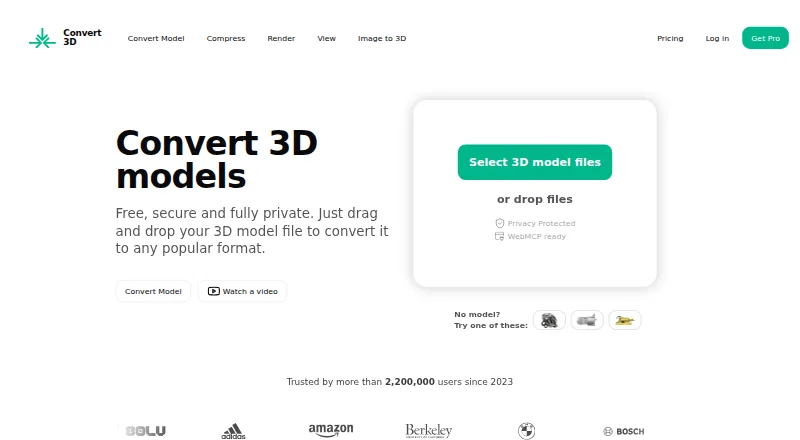
What Convert3D is
Convert3D converts 3D models between formats, including FBX, OBJ, USDZ, and STEP. Its website lists more than 1,000 possible format conversions. The browser converter uses WebAssembly to process models locally and says files do not leave the computer, though its privacy policy notes that some files may be processed on Convert3D or partner servers; API processing takes place server-side. Before exporting, users can rotate, zoom, and pan a 3D preview. The browser viewer can also show scene hierarchy, node properties, material details, wireframe view, and material maps. A compressor provides low, medium, and high presets with optional geometry, quantization, and texture settings, and advertises compression up to 80%. A desktop app is available for Mac, Windows, and Linux. Developers can use the REST API for batch conversion in applications, pipelines, and automation workflows. The Free API plan costs nothing for 10 conversions. Paid plans cost $899 a year, $1,799 a year, or $4,899 a year.
Good
- Lists more than 1,000 possible format conversions
- Browser preview supports rotate, zoom, and pan
- Desktop app supports Mac, Windows, and Linux
- REST API supports batch operations
Watch out
- Free API plan is limited to 10 conversions/month
- Some files may be processed on remote servers
- Custom enterprise pricing is not listed
Who it suits
Convert3D suits people who need to convert or inspect 3D models across formats, as well as developers automating conversions through an API. Its plans cover individual testing through enterprise-scale annual conversion volumes.
Verdict
Convert3D brings format conversion, preview, compression, and developer API access together. Review the privacy details for the workflow you plan to use, since not all processing is local.
Plans and prices
From Convert3D's own pricing page, checked 28 Sep 2026.
| Plan | Price | What it gives you |
|---|---|---|
| Free API | Free | 10 conversions/month · no commitment · $0/month |
| Starter | $899 a year | 5,000 conversions/year · $899/year |
| Growth | $1,799 a year | 15,000 conversions/year · $1,799/year |
| Scale | $4,899 a year | 100,000 conversions/year · $4,899/year |
| Custom enterprise | Priced on request | For more than 100,000 conversions/year · Contact sales for custom enterprise plans |
The facts
Each one read from Convert3D's own pages, with the date it was checked.
What it does
- API
- The developer API is a REST API for integrating 3D model conversion into applications, pipelines, and automation workflows, with batch operations.checked 28 Sep 2026
- API security
- The API page says models are encrypted in transit and at rest and automatically deleted after processing.checked 28 Sep 2026
- Compression
- The compressor offers low, medium, and high presets, with optional geometry, quantization, and texture settings; it advertises compression up to 80%.checked 28 Sep 2026
- Format support
- The website says it supports more than 1,000 possible format conversions, including USDZ and STEP.checked 28 Sep 2026
- Intended users
- The API page describes the service as suited to applications, pipelines, and automation workflows, with plan descriptions for prototypes, growing businesses, and enterprise usage.checked 28 Sep 2026
- Preview
- The converter previews models in 3D so users can rotate, zoom, and pan before exporting.checked 28 Sep 2026
- Privacy limits
- The privacy policy says most website conversion is local, but some files may be processed on Convert3D or partner servers, and API processing is server-side.checked 28 Sep 2026
- Purpose
- Convert3D converts 3D models between a wide range of formats, including FBX and OBJ.checked 28 Sep 2026
- Support
- The maker lists [email protected] for contact and links to a Discord community.checked 28 Sep 2026
- Viewer
- The browser viewer can show scene hierarchy, node properties, material details, wireframe view, and material maps.checked 28 Sep 2026
Where it runs
- Browser conversion
- The online converter processes models locally in the browser using WebAssembly and says files do not leave the user's computer.checked 28 Sep 2026
- Desktop app
- Convert3D offers a desktop app for Mac, Windows, and Linux that opens 3D models from the file system.checked 28 Sep 2026
The company
- Headquarters
- Copenhagen, Denmark and Zurich, Switzerlandchecked 28 Sep 2026
The full review of Convert3D
Convert3D is a 3D model conversion service with browser, desktop, and API options. It best suits people who need broad format coverage or developers automating conversion at scale. Its local browser workflow is a useful privacy advantage, but API processing and some website conversions happen on servers.
Overview
Convert3D handles conversions across more than 1,000 format pairs, including common formats such as FBX and OBJ as well as USDZ and STEP. Batch conversion and a REST API make it more than a one-off file utility: developers can incorporate model conversion into applications and pipelines.
The browser converter processes models locally with WebAssembly and says files stay on the user's computer. That is a meaningful choice for privacy-sensitive work, but it does not describe every workflow: some website files may be processed on Convert3D or partner servers, and API processing is server-side. Check which route applies before sending sensitive models.
Key features
Conversion and inspection
The browser converter previews models in 3D, with rotate, zoom, and pan controls before export. Its viewer also exposes scene hierarchy, node properties, material details, wireframe view, and material maps. These tools help users inspect a model and its components rather than treating conversion as a blind format swap.
Compression and desktop use
The compressor offers low, medium, and high presets, plus optional geometry, quantization, and texture settings. Convert3D advertises compression up to 80%; the range of controls is useful when file size matters, though the advertised maximum is not a guarantee for every model. Desktop apps for Mac, Windows, and Linux open models from the file system.
Developer API
The REST API supports batch operations and integration into applications, pipelines, and automation workflows. API models are encrypted in transit and at rest and automatically deleted after processing, while processing itself remains server-side. It is the strongest fit for recurring automated workloads, but not for teams requiring all conversion to stay on-device.
Pricing
Convert3D has a free API tier and annual paid API plans, with quotas that make the right choice depend on yearly conversion volume:
- Free API: free (billed $0/month), with 10 conversions/month and no commitment. It suits prototypes and light evaluation, but the monthly cap is low for ongoing production.
- Starter: $899 a year (billed $899/year), for 5,000 conversions/year. This is the entry paid tier for modest recurring use.
- Growth: $1,799 a year (billed $1,799/year), for 15,000 conversions/year. It fits a larger workload than Starter without moving to the high-volume tier.
- Scale: $4,899 a year (billed $4,899/year), for 100,000 conversions/year. It is aimed at substantial automated use.
- Custom enterprise: custom pricing for more than 100,000 conversions/year. Contact sales for enterprise plans.
The paid tiers raise annual conversion quotas; the free tier avoids commitment but allows only 10 conversions per month. The plans described are API plans, so users primarily seeking browser or desktop conversion should weigh their needs against that API quota structure.
Platforms
Convert3D supports web, Windows, macOS, Linux, and API access. The desktop app covers the three desktop operating systems, while the browser converter provides the local WebAssembly workflow.
Who it's for
Convert3D is a strong candidate for developers and businesses that need batch conversion inside software, pipelines, or automation, with annual quotas spanning prototypes through enterprise-scale use. It also suits 3D users who want to preview, inspect, compress, and export models across a broad range of formats. It is less suitable when every file must remain local, since API processing and some website conversions use servers.
Pros and cons
- Pro: More than 1,000 possible format conversions, including FBX, OBJ, USDZ, and STEP, give users broad format reach.
- Pro: Local browser processing with WebAssembly keeps files on the user's computer for that workflow.
- Pro: Preview, detailed viewer inspection, and configurable compression put useful checks before export.
- Pro: API batch operations and graduated annual quotas support automated workloads from small prototypes to large volumes.
- Con: Local processing is not universal; some web conversions and all API processing happen server-side.
- Con: Paid API plans start at $899 a year, making them a substantial commitment for users whose conversion needs are occasional.
Alternatives
Browse the 3D File Converter Software category to compare more options.
- CAD Assistant is free for personal and commercial use across desktop and mobile platforms; choose it if commercial import components do not need to be exported or converted, since those operations are restricted.
- ODA File Converter is a free alternative for users looking for a no-cost converter.
- FBX2glTF is a free, open-source option for Linux, macOS, or Windows when its FBX SDK 2019.2-only constraint fits the workflow.
- Spin 3D is worth considering for macOS, web, or Windows users whose use is non-commercial.
- CAD Exchanger offers perpetual or subscription licensing and node-locked or floating license options; consider it if those licensing choices matter.
- 3D Model Converter has unlimited browser-local mesh workflows on its free plan, plus five cloud credits monthly, 24-hour cloud history, a 50 MB cloud-file limit, and a standard queue. Choose it if those browser-local mesh workflows and stated cloud limits match your needs.
- HOOPS Exchange offers a 60-day evaluation with full access and technical expert support.
- FBX-glTF-conv is a free option for Windows, macOS, and Linux users.
Verdict
Choose Convert3D if broad format coverage, inspection and compression tools, or a batch-capable conversion API matter to your workflow. The local browser option is a clear advantage for on-device processing, but server-side API handling and annual paid quotas are reasons to look elsewhere if local-only processing or occasional low-cost API use is essential.
Getting started
- Visit https://convert3d.org/.
- Use the browser converter to work with models online.
- Install the desktop app for Mac, Windows or Linux to open models from the file system.
- For API use, choose the Free API plan or a paid plan based on its conversion allowance.
- Contact sales for a custom enterprise plan above 100,000 conversions/year.
Limits worth knowing
The Free API plan allows 10 conversions/month. Starter costs $899 a year and allows 5,000 conversions/year; Growth allows 15,000 conversions/year for $1,799 a year, and Scale allows 100,000 conversions/year for $4,899 a year.
Questions
Is Convert3D free?
It has a Free API plan at no cost, with 10 conversions/month and no commitment.
What do the paid API plans cost?
Starter is $899 a year, Growth is $1,799 a year, and Scale is $4,899 a year.
Which platforms does Convert3D support?
It supports web, Windows, macOS, Linux and API access. The desktop app is available for Mac, Windows and Linux.
What formats can it convert?
Convert3D names FBX, OBJ, USDZ and STEP, and its website lists more than 1,000 possible format conversions.
Does browser conversion keep files local?
The browser converter processes models locally using WebAssembly and says files do not leave the computer. The privacy policy says some files may be processed on Convert3D or partner servers; API processing is server-side.
How can I contact Convert3D?
The maker lists [email protected] and links to a Discord community.
Alternatives to Convert3D
- 1
CAD Exchanger
AndroidiOSWebAPI7.6From $590 a year - 2
3D-Tool
Free planWindows7.3€200 one-time - 3
ODA File Converter
Free planAndroidLinuxmacOSWindows7.1Free plan - 4
Spin 3D
Free planWebmacOSWindows6.8Free plan - 5

HOOPS Exchange
Free planAndroidiOSWebLinux6.7Free plan - 6
Open Asset Import Library (Assimp)
Free planAndroidiOSLinuxmacOS6.7Free plan