CAD Assistant
CAD Assistant is a free, offline 3D CAD viewer and converter for personal and commercial use, available on Windows, macOS, Linux, iOS, and Android.
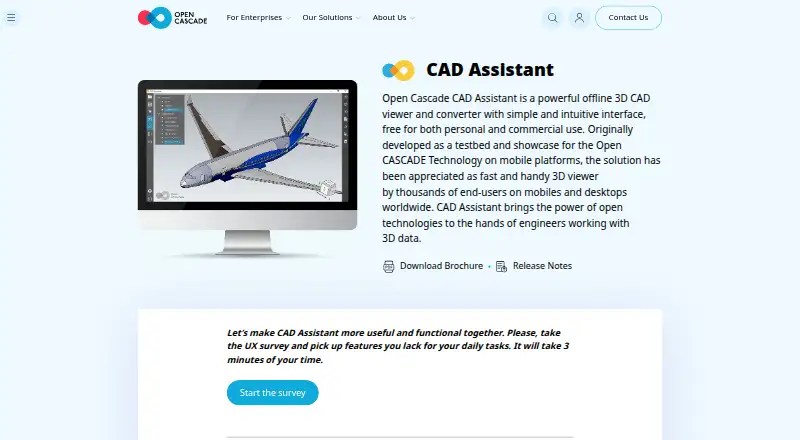
What CAD Assistant is
CAD Assistant is a free, offline 3D CAD viewer and converter for personal and commercial use, available on Windows, macOS, Linux, iOS, and Android. It opens CAD and mesh files including STEP, IFC, IGES, BREP, glTF, JT, PLY, STL, OBJ, 3DM, DXF, SAT, and Parasolid XT. You can browse assembly trees, show or hide components, and inspect properties such as area, volume, and centroid. For PLY meshes, it offers wireframe, shaded, and shrink views, with color or scalar values mapped to mesh elements or nodes. Desktop versions include a GPU-accelerated path-tracing renderer for screenshots. The maker says processing happens locally, without a server connection. Imports provided by commercial Open Cascade components restrict model export and conversion, though the maker says models keep their complete structure without size limits. Large files may take time, low-range GPUs may be slow, and scenes with several million triangles may be stopped by the system. The listed latest version is 1.6.0, dated 2021-10-05.
Good
- Free for personal and commercial use
- Runs locally without a server connection
- Opens a broad range of CAD and mesh formats
- Inspects assemblies and geometric properties
- Desktop versions include path-tracing rendering
Watch out
- Commercial-component imports restrict export and conversion
- Large files may take time to process
- Low-range GPUs may be slow
- Very large scenes may be terminated
Who it suits
It suits people who need to inspect CAD or mesh files across desktop and mobile devices, including for commercial use. Note that commercial-component imports restrict export and conversion.
Verdict
CAD Assistant covers file viewing, conversion, assembly inspection, and mesh analysis without requiring a server connection. Check the export restriction and device limits if you plan to work with commercial-component imports or large scenes.
Plans and prices
From CAD Assistant's own pricing page, checked 3 Oct 2026.
| Plan | Price | What it gives you |
|---|---|---|
| CAD Assistant | Free | Free for personal and commercial use · commercial import components restrict model export/conversion |
The facts
Each one read from CAD Assistant's own pages, with the date it was checked.
What it does
- Commercial import limit
- Imports provided by commercial Open Cascade components disallow model export or conversion, while the maker says models retain complete structure without model-size limits.checked 3 Oct 2026
- Current listed release
- The product page lists version 1.6.0 dated 2021-10-05 as the latest version.checked 3 Oct 2026
- File formats
- It supports CAD and mesh formats including STEP, IFC, IGES, BREP, glTF, JT, PLY, STL, OBJ and 3DM, plus DXF, SAT and Parasolid XT.checked 3 Oct 2026
- Integrations
- The application integrates with operating-system file associations so compatible apps can open relevant files in CAD Assistant; saved model images can be attached through a mail client.checked 3 Oct 2026
- Mesh analysis
- It can display PLY mesh data in wireframe, shaded and shrink modes, with color or scalar quantities mapped to mesh elements or nodes.checked 3 Oct 2026
- Model inspection
- Users can browse assembly trees, show or hide components, and inspect product and geometric properties such as area, volume and centroid.checked 3 Oct 2026
- Offline and local use
- The maker’s brochure says no server connection is needed and that processing is performed locally on the device.checked 3 Oct 2026
- Purpose
- CAD Assistant is an offline 3D CAD viewer and converter for personal and commercial use.checked 3 Oct 2026
- Rendering
- Desktop versions include a GPU-accelerated path-tracing renderer for photo-realistic screenshots.checked 3 Oct 2026
- Support
- The product page directs users to forums for comments and invites bug reports, questions and suggestions through its contact options.checked 3 Oct 2026
- Warranty
- The application is provided as is, without warranty of any kind.checked 3 Oct 2026
Where it runs
- Device limits
- The maker warns that large files may take time, low-range GPUs may be slow, and scenes with several million triangles may be terminated by the system; it says files under 50 MB are generally safe on most devices.checked 3 Oct 2026
The company
- Headquarters
- Issy-les-Moulineaux, Francechecked 28 Sep 2026
The full review of CAD Assistant
CAD Assistant is a local 3D viewer and converter for people who need to inspect CAD assemblies or mesh data across different devices. Its broad format support and offline processing make it a practical free utility, but commercial-component imports cannot be exported or converted.
Overview
CAD Assistant combines file viewing, model inspection and conversion in one application, for personal and commercial use. It supports a mix of CAD and mesh formats, including STEP, IFC, IGES, BREP, glTF, JT, PLY, STL, OBJ, 3DM, DXF, SAT and Parasolid XT. That range suits users receiving models from varied workflows; the import restriction means it is not a dependable all-purpose conversion route for every file.
Processing is performed locally, with no server connection required. The listed release is version 1.6.0, dated 2021-10-05.
Key features
Assembly and geometry inspection
Users can navigate assembly trees, show or hide components, and inspect product and geometric properties such as area, volume and centroid. This is useful for checking a model's structure and measurements without moving to a separate analysis tool.
Mesh analysis and rendering
PLY meshes can be displayed in wireframe, shaded or shrink modes, with color or scalar quantities mapped to elements or nodes. These options help users examine mesh data visually. Desktop versions also include GPU-accelerated path tracing for photo-realistic screenshots, though lower-end GPUs may struggle with demanding scenes.
File handling and conversion
Operating-system file associations let compatible applications open relevant files in CAD Assistant, and saved model images can be attached through a mail client. The important caveat is that imports provided by commercial Open Cascade components cannot be exported or converted. The maker says models otherwise retain their complete structure without model-size limits, but device performance remains a practical constraint.
Pricing
CAD Assistant: free. The free plan is for personal and commercial use, with no seat or quota terms stated. Commercial-component imports restrict model export and conversion, so readers whose work depends on those operations should not treat the free license as an unrestricted converter.
Platforms
CAD Assistant supports Windows, macOS, Linux, iOS and Android. Large files may take time to open, low-range GPUs can be slow, and scenes with several million triangles may be terminated by the system. Files under 50 MB are generally safe on most devices, a useful guide for mobile and lower-powered hardware.
Who it's for
Choose CAD Assistant if you want a no-cost, offline viewer for mixed CAD and mesh formats, especially when assembly structure, geometric properties or PLY mesh visualization matter. It is less suitable when you need unrestricted conversion of commercial-component imports or routinely work with very large scenes. The application is provided as is, without warranty; support is directed through forums and contact options for comments, questions, suggestions and bug reports.
Pros and cons
- Pros: Broad CAD and mesh format support makes it useful for inspecting files from different workflows.
- Pros: Local processing avoids a required server connection, and the free plan permits personal and commercial use.
- Pros: Assembly navigation, geometric properties and PLY visualization provide more than basic file preview.
- Cons: Commercial-component imports cannot be exported or converted, limiting its usefulness as a universal converter.
- Cons: Large scenes can be slow or terminated on constrained devices, and desktop path tracing may tax low-range GPUs.
Alternatives
For a broader set of converter options, browse 3D File Converter Software.
- HOOPS Exchange is worth considering if you need paid software with a 60-day full-access evaluation and technical expert support.
- Convert3D may suit API-focused conversion workflows, with a free tier of 10 conversions per month and a paid Starter plan.
- Spin 3D is an option for non-commercial users who want a free version.
- ODA File Converter is another free converter option.
- FBX2glTF is a free option for users who need its FBX-to-glTF workflow; its open-source offering is tied to FBX SDK 2019.2.
- meshio may fit users seeking MIT-licensed software, with NumPy at its core and optional dependencies for some formats.
- 3D-Tool suits Windows users who need a free viewer for DDD, STL and 3MF and do not need CAD export.
- CAD Exchanger is an alternative with perpetual or subscription licensing and node-locked or floating license options.
Verdict
CAD Assistant is a strong free choice for people who want local, cross-platform viewing plus meaningful assembly and mesh inspection. Its main advantage is the combination of broad format support and useful analysis without a server connection; look elsewhere if your workflow requires converting commercial-component imports or routinely handling scenes that strain your device.
Getting started
- Visit https://www.opencascade.com/products/cad-assistant/.
- Choose the version for Windows, macOS, Linux, iOS, or Android.
- Open compatible files in CAD Assistant through operating-system file associations.
Limits worth knowing
Imports provided by commercial Open Cascade components do not allow model export or conversion. Large files may take time, low-range GPUs may be slow, and scenes with several million triangles may be terminated; files under 50 MB are generally safe on most devices.
Questions
How much does CAD Assistant cost?
CAD Assistant is free for personal and commercial use.
Which platforms does it support?
It is available for Windows, macOS, Linux, iOS, and Android.
Can it convert CAD files?
It is a viewer and converter, but imports provided by commercial Open Cascade components cannot be exported or converted.
Does CAD Assistant need an internet connection to process files?
The maker says no server connection is needed and that processing happens locally on the device.
What file formats does it support?
Supported formats include STEP, IFC, IGES, BREP, glTF, JT, PLY, STL, OBJ, 3DM, DXF, SAT, and Parasolid XT.
Who makes CAD Assistant?
The product page identifies Open Cascade components in connection with commercial import limits; its headquarters are in Issy-les-Moulineaux, France.
Alternatives to CAD Assistant
- 1
CAD Exchanger
AndroidiOSWebAPI7.6From $590 a year - 2
3D-Tool
Free planWindows7.3€200 one-time - 3
ODA File Converter
Free planAndroidLinuxmacOSWindows7.1Free plan - 4

Convert3D
Free planWebAPILinuxmacOS7.0From $899 a year - 5
Spin 3D
Free planWebmacOSWindows6.8Free plan - 6

HOOPS Exchange
Free planAndroidiOSWebLinux6.7Free plan