
Compare and Merge
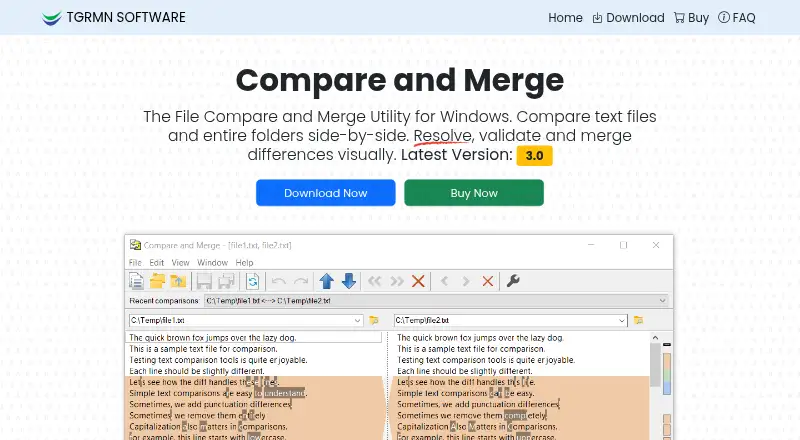
Compare and Merge is a Windows application for comparing text files and folders, locating character-level changes, and merging selected differences.
What Compare and Merge is
Compare and Merge is a Windows application for comparing text files and folders, locating character-level changes, and merging selected differences. Files or complete folders appear side by side, with an overview bar indicating where changes occur. Users can edit directly, trigger automatic re-comparison, and merge lines or larger blocks by clicking or dragging. Results can be printed or exported to HTML, with Unix and Mac line endings supported. For development workflows, the software provides command-line automation for continuous integration and validation, can ignore case or whitespace differences, and is described as integrating with version-control workflows. The Standard License costs $39.95 per computer as a one-time payment. A fully functional evaluation allows up to 50 file comparisons, but there is no free plan. Supported systems include Windows 11, 10, 8, 7, Vista, Windows on ARM, and Windows Server; macOS and Linux are not supported. TGRMN Software develops the application.
Good
- Compares complete folders side by side
- Highlights character-level differences
- Supports click or drag-and-drop merging
- Command-line automation for CI and validation
- Exports results to HTML
Watch out
- No macOS or Linux support
- Evaluation limited to 50 comparisons
- Requires administrator rights to install
- Website uses Google Analytics
Who it suits
Compare and Merge suits Windows users comparing source files, folders, or version-controlled work who need editable diffs, merge controls, and command-line automation.
Verdict
Compare and Merge combines visual file and folder comparison with direct editing, merging, and developer automation. Its Windows-only availability and 50-comparison evaluation limit are key factors before purchase.
Plans and prices
From Compare and Merge's own pricing page, checked 7 Oct 2026.
| Plan | Price | What it gives you |
|---|---|---|
| Standard License (per computer) | $39.95, paid once | Windows 11, 10, 8, 7 and Windows Server · per computer |
The facts
Each one read from Compare and Merge's own pages, with the date it was checked.
What it does
- Developer features
- The software supports command-line automation for CI and validation tasks and can ignore case or whitespace differences.checked 7 Oct 2026
- Editing and merging
- Users can edit in place, re-compare automatically, and merge lines or blocks with a click or drag-and-drop.checked 7 Oct 2026
- File and folder comparison
- It compares files and entire folders side by side, with an overview bar showing differences.checked 7 Oct 2026
- Installation
- The installer is about 2 MB, is digitally signed by TGRMN Software, and requires administrator rights to install.checked 7 Oct 2026
- Operating systems
- It runs on Windows 11, 10, 8, 7, Vista, Windows on ARM, and Windows Server; the maker says it does not run on macOS or Linux.checked 7 Oct 2026
- Output
- Results can be printed or exported to HTML, and Unix/Mac line endings are supported.checked 7 Oct 2026
- Payments and tax
- The page lists credit card, Link, E-Check (ACH), SEPA, and other regional payment methods, and says local taxes or VAT may apply.checked 7 Oct 2026
- Privacy
- The privacy policy says customer information is kept confidential and personal information is not shared except in specified legal circumstances.checked 7 Oct 2026
- Purpose
- Compare and Merge compares text files and folders, highlights character-level changes, and lets users merge differences.checked 7 Oct 2026
- Support
- The maker provides a technical support email and says lost activation codes can be resent by customer support on request.checked 7 Oct 2026
- Version control
- The maker says it integrates with version control workflows.checked 7 Oct 2026
- Website analytics
- The maker says it uses Google Analytics to collect website usage and user metrics, including cookies and IP addresses.checked 7 Oct 2026
The company
- Headquarters
- Fullarton, South Australia, Australiachecked 28 Sep 2026
- Maker
- Compare and Merge is developed by TGRMN Software, which lists a mailing address in Fullarton, South Australia, Australia.checked 7 Oct 2026
Money
- Trial limit
- The fully functional free evaluation allows up to 50 file comparisons.checked 7 Oct 2026
Alternatives to Compare and Merge
- 1

Diffchecker
Free planiOSWebAPIExtension8.2From $15 a month - 2
Avidemux
Free planOpen sourceWebLinuxmacOSWindows7.3Free plan - 3
Code Compare
Free planAPIExtensionWindows7.3$69.95 one-time - 4

KDiff3
Free planOpen sourceLinuxmacOSWindows7.3Free plan - 5
UltraCompare
LinuxmacOSWindows7.1From $99.95 a year - 6

Diffract
Free planLinuxmacOSWindows6.8$34 one-time