ColorPalette Pro
ColorPalette Pro is a free, open-source web app for generating palettes from a chosen base color.
What ColorPalette Pro is
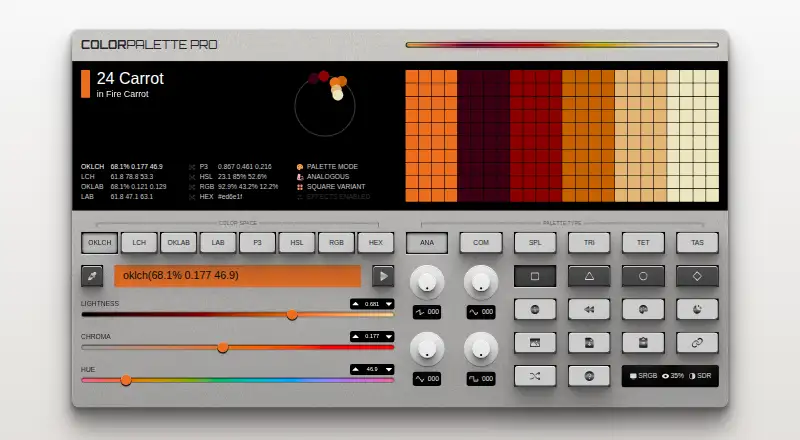
ColorPalette Pro is a free, open-source web app for generating palettes from a chosen base color. It offers analogous, complementary, split complementary, triadic, tetradic, and tint-and-shade palettes, each with square, triangle, circle, and diamond variations. You can enter a color as text, adjust sliders, choose one at random, use a URL, revisit history, or pick with an eyedropper. Supported color spaces include OKLCH, LAB, LCH, HSL, and RGB. For interface design, UI mode creates palettes with surface and on-surface colors and supports light and dark versions. You can copy palette values as CSS, download a CSS file, generate an image, or share a URL that retains the selected color and most options. Palette images can be dragged into Figma for sampling. Color names are matched to nearby names using hex values. The project uses Color.js and is MIT licensed. The maker says it has no plans for ads or subscriptions.
Good
- Offers six palette types with four variations each
- Supports OKLCH, LAB, LCH, HSL, and RGB
- Exports CSS values, CSS files, and palette images
- UI mode includes light and dark palettes
- MIT licensed and free to use
Watch out
- Eyedropper is unavailable in Firefox
- Eyedropper is unavailable in mobile browsers
Who it suits
It suits designers and developers who need to explore color combinations for interfaces or dynamic themes. The eyedropper is unavailable in Firefox and mobile browsers.
Verdict
ColorPalette Pro covers palette generation, interface-oriented color sets, and several export options in one web tool. Its browser-based eyedropper has stated availability limits.
Plans and prices
From ColorPalette Pro's own pricing page, checked 11 Oct 2026.
| Plan | Price | What it gives you |
|---|---|---|
| Free | Free | No ads or subscriptions are planned |
The facts
Each one read from ColorPalette Pro's own pages, with the date it was checked.
Where it runs
- Browser limitation
- The eyedropper is unavailable in Firefox and mobile browsers, according to the maker’s article.checked 10 Oct 2026
What it does
- Color input
- Users can enter colors as text, adjust sliders, use an eyedropper, revisit history, choose a random color, or load a color through a URL.checked 11 Oct 2026
- Color naming
- The app uses a maker-written API to match color values to nearby names and combine them into palette names.checked 11 Oct 2026
- Color science
- The project uses Color.js for color-science functionality.checked 11 Oct 2026
- Color spaces
- It supports multiple color spaces, including OKLCH, LAB, LCH, HSL, and RGB.checked 10 Oct 2026
- Exports
- Palettes can be copied as CSS values, downloaded as a CSS file, or generated as an image.checked 10 Oct 2026
- Eyedropper support
- The eyedropper is unavailable in Firefox and mobile browsers, according to the maker's guide.checked 11 Oct 2026
- Figma workflow
- The maker says palette images can be dragged into Figma and sampled with its eyedropper.checked 11 Oct 2026
- Integration
- A JavaScript package is available for programmatically generating palettes.checked 11 Oct 2026
- Intended use
- The maker describes the tool as intended for creating palettes for user interfaces and dynamic theming.checked 11 Oct 2026
- License
- The maker’s GitHub repository identifies the project as MIT licensed.checked 10 Oct 2026
- Monetization
- The maker says there are no plans to monetize the project through ads or subscriptions.checked 11 Oct 2026
- Palette exports
- Users can copy CSS palette values, download a CSS file, generate a palette image, or share the selected color and palette in a URL.checked 11 Oct 2026
- Palette types
- It generates analogous, complementary, split complementary, triadic, tetradic, and tints-and-shades palettes.checked 11 Oct 2026
- Purpose
- ColorPalette Pro generates customizable color palettes from a base color.checked 11 Oct 2026
- Sharing
- Color changes and most other options are preserved in the URL, which users can copy to share a palette.checked 10 Oct 2026
- Support and documentation
- The project README directs users to the app's question-mark button for its manual.checked 11 Oct 2026
- UI design
- UI mode generates palettes for interfaces, including light and dark mode palettes with surface and on-surface colors.checked 11 Oct 2026
- UI palettes
- UI mode generates palettes suitable for user interfaces and switches between light and dark palettes with the app’s dark mode.checked 10 Oct 2026
- Variations
- Each palette type has four variations: square, triangle, circle, and diamond.checked 11 Oct 2026
The full review of ColorPalette Pro
ColorPalette Pro is a browser-based palette generator for designers and developers shaping interface colors. It is a strong fit for exploring color relationships and moving a chosen palette into a design or CSS workflow; look elsewhere if built-in accessibility checks or dependable eyedropper support are essential.
Overview
Starting from a base color, the app generates analogous, complementary, split-complementary, triadic, tetradic, and tint-and-shade palettes. Four geometric variations—square, triangle, circle, and diamond—give each method several arrangements to compare. Support for OKLCH, LAB, LCH, HSL, and RGB makes the generator useful to people who want to work in a particular color space rather than treat color as a hex value alone.
Its clearest strength is its focus on interface palettes and dynamic themes. UI mode creates surface and on-surface colors and can switch between light and dark palettes. That provides a helpful starting point for a theme, but the app has no accessibility checks, so it cannot assess whether the resulting colors meet a contrast target.
Key features
Flexible color input and iteration
Enter a color as text, adjust sliders, pick a random color, supply a URL, revisit history, or use the eyedropper. The choice of inputs supports both deliberate work from a known brand color and open-ended exploration. The eyedropper has a practical compatibility limit: it is unavailable in Firefox and mobile browsers, making it a poor fit for workflows that depend on sampling from the screen in those environments.
Exports and handoff
Copy palette values as CSS, download a CSS file, or generate a palette image. That covers common handoffs to code and visual design, and generated images can be dragged into Figma and sampled with its eyedropper. Color changes and most other options are retained in a shareable URL, which makes it easier to pass a specific palette to a teammate. The app also uses a color-name API to find the nearest name from a hex value.
Pricing
ColorPalette Pro is free at no cost, with an open-source MIT license. The maker says there are no plans to add ads, subscriptions, or other monetization. There are no paid tiers to weigh against the free version, and the plan has no stated seat or generation quota. Its main functional omissions are image extraction and accessibility checks, so users needing either will need another tool.
Platforms
ColorPalette Pro runs on the web. The browser eyedropper is unavailable in Firefox and mobile browsers, so users on those platforms can still use the other color inputs, but should not count on eyedropper sampling.
Who it's for
Choose it if you need a free web tool for generating interface palettes from a base color, comparing several color relationships, and exporting results to CSS or Figma. It is less suitable when your process depends on extracting colors from images or verifying accessibility in the same tool.
Pros and cons
- Pros: Multiple palette methods, geometric variations, and color spaces give designers room to explore without changing tools.
- Pros: UI mode includes surface and on-surface colors for light and dark themes, making the output relevant to interface work.
- Pros: CSS exports, draggable palette images for Figma, and shareable URLs support handoff and review.
- Pros: Free and MIT-licensed, with no planned ads or subscriptions.
- Cons: No accessibility checks, so it cannot validate contrast as part of palette creation.
- Cons: No image extraction, and the eyedropper does not work in Firefox or mobile browsers.
Alternatives
Color Palette Generators is the category directory for comparing more options. Consider Pantone Connect Palette Generator if you want a free account with access to 15,000+ colors and Search, Pick, and Measure tools; its free plan also has a trial. ColorKit is another free web color-tool option, with a free account for saving colors and palettes. iWantHue is a free alternative available across web, mobile, desktop, and API platforms. Linux users can consider Gpick, a free desktop option. Color Palette Generator AI offers unlimited generations, every export format, shareable links, and an API for free without an account. For Windows, Colora is free and open source under the BSD 3-Clause license. ColorBox is a free, ad-free web and browser-extension alternative. ColorDesigner is worth considering if you want a free tier with 12 tools, limited saved colors and palettes, one project, and HEX export, or a paid Pro plan.
Verdict
ColorPalette Pro is an easy recommendation for interface designers and developers who want a free, open-source way to explore color systems and carry the result into CSS or Figma. Its interface-oriented palettes and useful handoff options are the reasons to choose it. Look elsewhere if image extraction, accessibility evaluation, or eyedropper support in Firefox and mobile browsers is central to your work.
Getting started
- Open https://colorpalette.pro/ in a web browser.
- Enter a base color, adjust sliders, choose a random color, use history, or provide a URL.
- Select a palette type and one of its square, triangle, circle, or diamond variations.
- Use UI mode for interface palettes, or copy CSS, download a CSS file, create an image, or share the URL.
Questions
How much does ColorPalette Pro cost?
The plan is free. The maker says there are no plans to monetize it through ads or subscriptions.
Which platforms support ColorPalette Pro?
It is a web app. Its eyedropper is unavailable in Firefox and mobile browsers.
Is ColorPalette Pro open source?
Yes. The maker’s GitHub repository identifies the project as MIT licensed.
What can I export?
You can copy palette values as CSS, download a CSS file, or generate a palette image. You can also share a URL that preserves the selected color and most options.
Does it support Figma?
Palette images can be dragged into Figma and sampled with its eyedropper.
Alternatives to ColorPalette Pro
- 1

Pantone Connect Palette Generator
Free planAndroidiOSWebExtension8.0Free plan - 2
PaletteWB
Free planWindows7.1$14.99 one-time - 3

Colorfool
Free planWeb6.6Free plan - 4
qualpal
Open sourceWebAPILinuxmacOS6.6 - 5

ColorDesigner
Free planWebExtension6.5From $37.20 a year - 6

ColorKit
Free planWeb6.4Free plan