
ColorKit
ColorKit is a free, browser-based toolkit for designers and artists who need to create and work with colors.
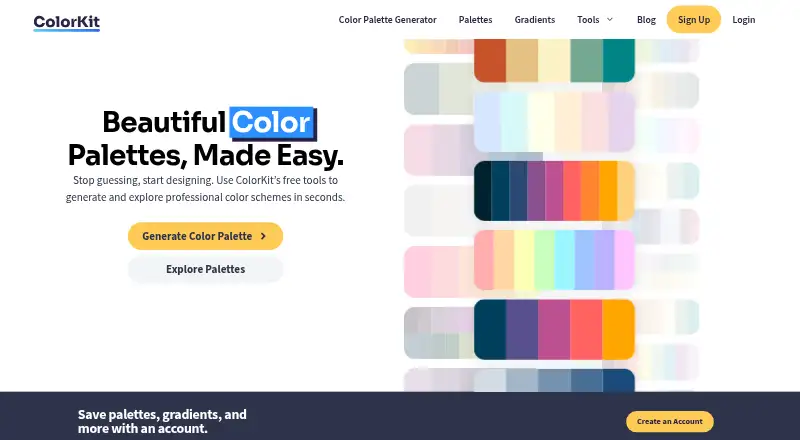
What ColorKit is
ColorKit is a free, browser-based toolkit for designers and artists who need to create and work with colors. Its palette generator supports AI prompts, style modes, color locking, and controls for hue, brightness, saturation, and temperature. Users can export palettes as PNG, copy them as CSV or an array, or share them by URL. The image palette tool extracts between 2 and 10 colors, allows manual adjustment of color points, and can create a PNG collage; ColorKit says images used by this tool are not uploaded to its server. A gradient maker supports linear, radial, and conic gradients, adjustable color stops, AI generation, CSS copying, and image or code export. Gradients can have up to eight stops. Other listed tools include a contrast checker, color picker, shade generator, SVG color changer, background maker, and color mixer. The tools are available on the web. The image palette tool works in a browser on phones, tablets, and computers and does not require signup; a free account is needed to save palettes and gradients.
Good
- Free web-based color tools
- Exports palettes as PNG, CSV, arrays, or URLs
- Extracts and adjusts image colors
- Image palette tool needs no signup
- Free account saves palettes and gradients
Watch out
- Saving palettes and gradients requires an account
- Gradients are limited to eight color stops
Who it suits
ColorKit suits designers and artists looking for web-based palette, gradient, contrast, and related color tools. It is also useful for people who want to extract colors from an image without uploading it to the service's server.
Verdict
ColorKit combines palette creation, image color extraction, gradient editing, and other color utilities in a free web toolkit. Saving palettes and gradients requires a free account, while its image palette tool can be used without signup.
Plans and prices
From ColorKit's own pricing page, checked 3 Oct 2026.
| Plan | Price | What it gives you |
|---|---|---|
| Free | Free | Free color tools; free account for saving palettes and gradients |
The facts
Each one read from ColorKit's own pages, with the date it was checked.
What it does
- Account
- Creating a ColorKit account is free and allows users to save palettes and gradients.checked 3 Oct 2026
- Audience
- ColorKit says it is built for designers and artists.checked 3 Oct 2026
- Contrast checker
- The contrast checker calculates text and background contrast ratios and can pick colors from an uploaded image or image URL.checked 3 Oct 2026
- Creators
- The About page says ColorKit was created in the United States by Andy Feliciotti and Ryan Robinson.checked 3 Oct 2026
- Data practices
- The privacy policy says ColorKit uses Simple Analytics and Google Analytics, and stores email address and account activity with Bento for email marketing.checked 3 Oct 2026
- Data rights
- The privacy policy says users with an account or comments can request a copy of personal data or ask for its erasure, subject to administrative, legal, or security retention needs.checked 3 Oct 2026
- Exports
- The gradient maker offers CSS copying and export options including PNG download or code copying.checked 3 Oct 2026
- Gradient features
- The gradient maker supports linear, radial, and conic gradients, adjustable color stops, rotation, AI generation, and CSS copying.checked 3 Oct 2026
- Gradient limit
- A gradient can contain up to eight color stops.checked 3 Oct 2026
- Image palettes
- The image tool extracts between 2 and 10 colors, supports manual color point adjustments, and can create a PNG collage.checked 3 Oct 2026
- Image privacy
- ColorKit states that images used by its image palette tool are never uploaded to its server.checked 3 Oct 2026
- Integrations and formats
- The site says its palette and shade tools can export CSS variables, SCSS, JSON, or a Tailwind config.checked 3 Oct 2026
- Other tools
- The site lists a color picker, gradient palette generator, color shade generator, SVG color changer, background maker, and color mixer.checked 3 Oct 2026
- Palette export
- Palettes can be exported as PNG, copied as CSV or an array, or shared by URL.checked 3 Oct 2026
- Palette generation
- Its palette generator supports AI prompts, style modes, color locking, and controls for hue, brightness, saturation, and temperature.checked 3 Oct 2026
- Palette generator
- The palette generator supports AI contrast, palette history, export, hue, brightness, saturation, temperature, and colorblind settings.checked 3 Oct 2026
- Palette styles
- Palette styles include pastel, vivid, earthy, deep jewel, muted, neon ink, and mono tint, and users can lock a color while generating the rest of a palette.checked 3 Oct 2026
- Privacy practices
- The privacy policy says the site uses Simple Analytics and Google Analytics, and stores email addresses and account activity with Bento for email marketing.checked 3 Oct 2026
- Product
- ColorKit describes itself as a set of modern web tools for improving designs, including a color palette generator and gradient creator.checked 3 Oct 2026
- Purpose
- ColorKit describes itself as a toolkit built for designers and artists, with color inspiration and tools for creating palettes.checked 3 Oct 2026
Where it runs
- Browser support
- The image palette tool runs in a browser on phones, tablets, and computers.checked 3 Oct 2026
Money
- Free access
- The image palette tool is described as completely free and usable without signup; an optional free account is needed to save palettes for later.checked 3 Oct 2026
The company
- Gradient maker
- The gradient maker supports linear, radial, and conic gradients and can copy CSS or export an image or code.checked 3 Oct 2026
- Maker
- The site credits Andy Feliciotti as its maker, and his portfolio identifies ColorKit as one of his projects.checked 3 Oct 2026
The full review of ColorKit
ColorKit is a web toolkit for making palettes, working with gradients, extracting colors from images, and checking contrast. It is best suited to designers and artists who want several color tasks together without paying for the image palette tool. Its breadth is useful, but saving palettes and gradients requires a free account.
Overview
ColorKit brings color inspiration and practical design utilities into one browser-based toolkit. Its strongest distinction is range: palette generation, image extraction, gradient editing, contrast checking, and smaller color tools sit alongside one another. That makes it a sensible everyday starting point for visual work, though people who need only one specialized workflow may prefer a more focused tool.
The image palette tool works in a browser on phones, tablets, and computers. ColorKit says images used by that tool are never uploaded to its server, a useful privacy distinction for extracting colors from personal or client imagery.
Key features
Palette generation and export
The palette generator combines AI prompts and styles such as pastel, vivid, earthy, deep jewel, muted, neon ink, and mono tint with controls for hue, brightness, saturation, and temperature. Locking a chosen color while generating the rest is particularly useful when a project already has a brand color or other fixed starting point. Palette history supports iteration, while colorblind settings and AI contrast help bring accessibility into the palette workflow.
Palettes can be exported as PNG, copied as CSV or an array, or shared by URL. Palette and shade tools also export CSS variables, SCSS, JSON, or a Tailwind config; that range is more useful to developers than an image-only export. HEX, RGB, and HSL are also among the supported formats.
Image extraction and gradients
The image palette tool extracts between two and ten colors, allows manual adjustment of color points, and can create a PNG collage. Its no-signup access makes it easy to use for a one-off reference image, while the stated no-upload approach is reassuring for sensitive visual material.
The gradient maker handles linear, radial, and conic gradients, with adjustable color stops, rotation, AI generation, CSS copying, and PNG or code export. A limit of eight stops is enough for many backgrounds, but users building more intricate transitions will need another approach. The contrast checker calculates text-to-background ratios and can select colors from an uploaded image or image URL. Other tools include a color picker, shade generator, SVG color changer, background maker, color mixer, and gradient palette generator.
Pricing
ColorKit has one free plan: free. The color tools are free, and a free account enables saving palettes and gradients. The image palette tool is described as completely free and does not require signup. There is no free trial because access is free rather than time-limited. This arrangement suits occasional users and ongoing design work alike, though anyone who wants saved work must create an account.
Platforms
ColorKit is a web product. Its image palette tool runs in a browser on phones, tablets, and computers, making that workflow usable across common device types without a separate app.
Who it's for
ColorKit fits designers and artists who move between palette exploration, image references, gradients, and contrast checks. Developers benefit from the palette and shade export formats, while people working from an image can use extraction without signing up. It is less compelling for someone who needs a narrowly specialized tool or gradient transitions with more than eight stops.
Pros and cons
- Broad color workflow: Palette generation, gradients, image extraction, contrast checking, and several smaller utilities reduce the need to jump between tools.
- Useful palette controls: Color locking, style modes, history, and adjustable color properties support both constrained brand work and open-ended exploration.
- Practical outputs: Image, code, URL, and developer-oriented palette exports suit different handoffs.
- Private, no-signup image extraction: The image tool is free to use without an account, and ColorKit says images are not uploaded to its server.
- Account needed for saved work: Palettes and gradients can be saved only with a free account, adding a step for users who want continuity.
- Eight-stop gradient ceiling: The maker covers common gradient types but may not suit complex designs that need more color stops.
Alternatives
Color Palette Generators is the broader category directory for comparing palette tools. Choose Pantone Connect Palette Generator if you want access to Pantone's 15,000-plus colors and its Search, Pick, and Measure tools, including on mobile apps or a browser extension. Color Palette Generator AI is a better fit when unlimited generations, every export format, shareable links, and API access without an account are the priority.
ColorDesigner may suit users who want a free tier organized around tools and projects, with limits of five saved colors, five palettes, and one project. Choose Colorfool if you specifically want a free web tool with no paywalled accessibility checks. ColorMagic is another free web option, with the site describing unlimited palette generation and noting that ads may appear.
Paletto Studio is worth considering if you prefer palette and recolor tools that need no account in the browser. qualpal is a free alternative for users seeking support across Linux, macOS, Windows, and the web. KColor is another free web and extension option from a solo developer.
Verdict
Choose ColorKit if you want a free, browser-based set of color tools with capable palette controls, useful exports, and image extraction that needs no signup. Its combination of workflows is the main reason to pick it; look elsewhere if you need a more specialized tool or gradients with more than eight stops.
Getting started
- Open https://colorkit.co/ in a browser on a phone, tablet, or computer.
- Choose a palette, image palette, gradient, contrast, or other color tool.
- Use the image palette tool without signup, or create a free account to save palettes and gradients.
- Export or share results using the available formats for the selected tool.
Limits worth knowing
The free plan includes the color tools, while saving palettes and gradients requires a free account. Gradients can contain up to eight color stops.
Questions
How much does ColorKit cost?
The Free plan costs nothing. ColorKit describes its tools as free.
Is there a free plan or trial?
There is a free plan. No free trial is offered.
Which platforms does ColorKit support?
ColorKit is web-based. The image palette tool runs in a browser on phones, tablets, and computers.
Can I use the image palette tool without an account?
Yes. ColorKit says the image palette tool can be used without signup; an optional free account enables saving palettes and gradients.
What can I export?
Palettes can be exported as PNG, copied as CSV or an array, or shared by URL. Palette and shade tools also offer CSS variables, SCSS, JSON, or Tailwind config exports.
Who created ColorKit?
The site credits Andy Feliciotti as its maker and says it was created in the United States by Andy Feliciotti and Ryan Robinson.
Alternatives to ColorKit
- 1

Pantone Connect Palette Generator
Free planAndroidiOSWebExtension8.0Free plan - 2
PaletteWB
Free planWindows7.1$14.99 one-time - 3

Colorfool
Free planWeb6.6Free plan - 4
qualpal
Open sourceWebAPILinuxmacOS6.6 - 5

ColorDesigner
Free planWebExtension6.5From $37.20 a year - 6

ColorPalette Pro
Free planWeb6.5Free plan