
Clover Online Ordering
Clover Online Ordering lets restaurants accept and manage orders placed through searches, apps, or a menu webpage.
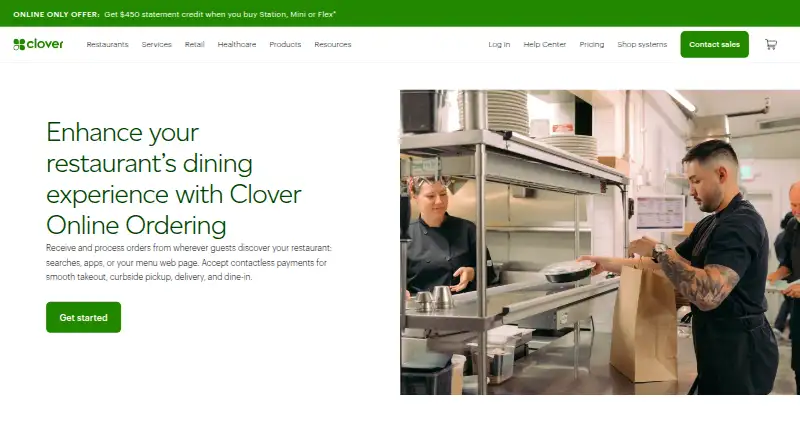
What Clover Online Ordering is
Clover Online Ordering lets restaurants accept and manage orders placed through searches, apps, or a menu webpage. Customers can choose takeout, curbside pickup, delivery, or dine-in. Clover builds an ordering webpage that also appears in the Clover mobile app, and sends orders directly to the kitchen team and Clover POS. Dine-in guests can order and pay from mobile devices using Scan to Order and Scan to Pay. Customers can schedule later pickup within a window set by the merchant and provide vehicle details for curbside service. Menu and operating information sync automatically after setup. Clover processes delivery orders in its POS and dispatches them through DoorDash; Grubhub orders can also be handled in Clover, with menus synchronized between the services. The listed plan has no setup or subscription fees for takeout, curbside pickup, or dine-in, though delivery fees may apply. It requires a Clover Station Solo, Station Duo, Mini, or Flex connected to a printer, and is unavailable on Payments Plus and Register Lite software plans. Clover advertises 24/7 support by phone, chat, or email.
Good
- Supports takeout, curbside, delivery, and dine-in.
- Orders go to the kitchen team and Clover POS.
- Menu details sync automatically after setup.
- Later pickup times can be scheduled.
- Advertised 24/7 support by phone, chat, or email.
Watch out
- Requires a supported Clover POS device and printer.
- Unavailable on Payments Plus and Register Lite.
- Delivery fees may apply.
- No branded mobile app.
Who it suits
It suits restaurants using Clover POS that want to take orders online for pickup, delivery, or dine-in. Merchants should check the required POS hardware and software-plan exclusions first.
Verdict
Clover Online Ordering covers several ordering and fulfillment modes and routes orders into Clover POS. It has no setup or subscription fees for takeout, curbside, and dine-in, but requires specified Clover hardware and excludes two software plans.
Plans and prices
From Clover Online Ordering's own pricing page, checked 30 Sep 2026.
| Plan | Price | What it gives you |
|---|---|---|
| Clover Online Ordering | Free | Requires Clover POS device connected to a printer · unavailable on Payments Plus and Register Lite software plans · No setup or subscription fees for takeout, curbside pickup, or dine-in; delivery fees may apply |
The facts
Each one read from Clover Online Ordering's own pages, with the date it was checked.
Where it runs
- Branded mobile app
- Nochecked 22 Sep 2026
- POS integration
- Yeschecked 22 Sep 2026
What it does
- Curbside pickup
- Customers can provide vehicle information to help staff identify them at curbside pickup.checked 30 Sep 2026
- Customer engagement
- The Clover mobile app supports online ordering plus rewards, promotions, and perks.checked 30 Sep 2026
- Delivery integration
- Clover processes online delivery orders in the Clover POS and dispatches them through DoorDash, while Grubhub can be integrated into Clover.checked 30 Sep 2026
- Delivery orders
- Yeschecked 22 Sep 2026
- Dine-in ordering
- Guests can order and pay from mobile devices using Scan to Order and Scan to Pay.checked 30 Sep 2026
- Grubhub synchronization
- The Clover-Grubhub integration manages Grubhub orders in Clover without a separate tablet and automatically syncs the Grubhub menu with the Clover online-ordering menu.checked 30 Sep 2026
- Menu synchronization
- Changes to menu information and operating details sync automatically after setup.checked 30 Sep 2026
- Merchant compliance responsibility
- Clover handles PCI compliance and script management for Clover-hosted Online Ordering, while merchants using their own domains, APIs, or iframe integrations are responsible for their own PCI compliance.checked 30 Sep 2026
- Ordering channels
- website and appchecked 22 Sep 2026
- Ordering page
- Clover builds an online ordering webpage that also appears automatically in the Clover mobile app.checked 30 Sep 2026
- Order management
- Online orders are sent directly to the kitchen team and Clover POS for management.checked 30 Sep 2026
- Scheduled pickup
- Customers can place orders now and schedule a pickup time later, with an advance-order window specified by the merchant.checked 30 Sep 2026
- Security
- Clover says its hosted online-ordering platform is PCI DSS compliant for applicable requirements, with compliance validated by a Qualified Security Assessor.checked 30 Sep 2026
- Support
- Clover advertises 24/7 support by telephone, chat, or email.checked 30 Sep 2026
- Supported hardware
- Online Ordering requires a Clover Station Solo, Station Duo, Mini, or Flex connected to a printer.checked 30 Sep 2026
- What it does
- Clover Online Ordering lets restaurants receive and process orders from searches, apps, or a menu webpage for takeout, curbside pickup, delivery, and dine-in.checked 30 Sep 2026
The company
- Founded
- 2013checked 28 Sep 2026
- Headquarters
- United Stateschecked 28 Sep 2026
The full review of Clover Online Ordering
Clover Online Ordering is a restaurant ordering service that sends digital orders into Clover POS. It suits restaurants already using compatible Clover hardware that want takeout, curbside, delivery, and dine-in ordering in one workflow. Its no-subscription-fee option is appealing, but the hardware requirement and software-plan exclusions narrow the fit.
Overview
Clover creates an ordering webpage that also appears in the Clover mobile app, and orders go directly to the kitchen team and Clover POS. That gives staff a central place to manage incoming orders rather than treating online ordering as a separate channel. Menu and operating-detail changes sync automatically after setup, reducing the burden of keeping the ordering page current.
Customers can order for takeout, curbside pickup, delivery, or dine-in. For dine-in, Scan to Order and Scan to Pay let guests order and pay on their phones. Scheduled pickup lets customers choose a later time within the advance-order window set by the merchant; curbside customers can provide vehicle information to help staff find them.
Key features
- POS and kitchen routing: Orders reach Clover POS and the kitchen team, a practical advantage for merchants who want online orders managed alongside their existing Clover workflow.
- Delivery integrations: Clover processes delivery orders in POS and dispatches them through DoorDash. Grubhub can also be integrated; orders are managed in Clover without a separate tablet, and its menu syncs with Clover's online-ordering menu.
- Customer engagement: The Clover mobile app combines ordering with rewards, promotions, and perks. Clover also supports loyalty programs, automated campaigns, audience segmentation, email and SMS campaigns, and review requests.
- Security and support: Clover says its hosted platform meets applicable PCI DSS requirements, validated by a Qualified Security Assessor, and advertises 24/7 phone, chat, and email support. Clover handles PCI compliance and script management for its hosted ordering; merchants using their own domain, API, or iframe integrations are responsible for their own PCI compliance.
Pricing
Clover Online Ordering: free. There are no setup or subscription fees for takeout, curbside pickup, or dine-in. Delivery fees may apply, so the free price does not mean every order type is cost-free. Ordering requires a Clover Station Solo, Station Duo, Mini, or Flex connected to a printer, and the plan is unavailable on Payments Plus and Register Lite software plans.
This is the clearest fit for an eligible Clover merchant adding non-delivery ordering without another setup or subscription charge. It is less compelling for a restaurant that lacks the required hardware or uses one of the excluded software plans, since the no-fee terms do not remove those prerequisites.
Platforms
Clover Online Ordering supports Android, iOS, and web. Customers can order through a website and app; the ordering page also appears in the Clover mobile app. Clover does not offer a branded mobile app for this service.
Who it's for
It is best suited to restaurants already running compatible Clover POS hardware that want digital ordering tied directly to kitchen operations, plus options for scheduled pickup, curbside handoff, and scan-based dine-in service. Multi-location support and customer engagement tools also make it relevant to operators coordinating more than one site or running loyalty and campaign programs.
Restaurants seeking a standalone ordering system without Clover hardware should look elsewhere. So should merchants on Payments Plus or Register Lite, or those that want their own branded ordering app.
Pros and cons
- Pro: Orders route to Clover POS and the kitchen team, keeping digital orders within the merchant's Clover workflow.
- Pro: Takeout, curbside, and dine-in have no setup or subscription fees, with automatic menu synchronization after setup.
- Pro: Grubhub orders and menus can be managed through Clover without a separate tablet.
- Con: A compatible Clover device connected to a printer is mandatory, and two software plans are excluded.
- Con: Delivery fees may apply, so the zero-fee terms do not extend unconditionally to delivery.
- Con: There is no branded mobile app, and custom domain, API, or iframe integrations shift PCI compliance responsibility to the merchant.
Alternatives
For a broader comparison of restaurant ordering options, see Restaurant Online Ordering Software. Restaurants prioritizing gift-card tools can compare Restaurant Gift Card Software, while operators focused on customer campaigns can browse Restaurant Marketing Software.
- Lunchbox has free plans for 1–2 locations, including an SMB option with zero sign-up and commission fees; consider it if those terms suit your scale and you want an alternative with Android, iOS, API, and web support.
- Lightspeed Restaurant is a paid option at $69 a month for its Starter plan, with customizable POS, menu management, floor plans, advanced insights, offline mode, and 24/7 support; choose it if those POS capabilities are the priority.
- Cadeau is a freemium gift-card option with a free Pay As You Go plan charging 3% per transaction; consider it when gift cards, rather than full restaurant ordering, are the need.
- GiftFly offers a free plan with no monthly charges or upfront costs, plus 5,000 promotional emails free per month; consider it for that gift-card and email-promotion combination.
- SavoryTab Gift Cards has a $29 a month Mobile POS Plan per device, including a PAX A920 terminal and receipt printer; consider it if a bundled mobile POS and gift-card suite fits better.
- Gift Up! charges 3.49% per gift card sold on its Pay-As-You-Go plan, with a $0.50 minimum fee per gift card; consider it for pay-per-sale gift-card use without a monthly fee.
- Voucher Connect offers a free plan and a web platform for gift cards, tickets, giveaways, and related features; consider it if those voucher functions are the goal.
- Wrapped starts at $49 a month for up to three sites and 50 new gift card activations per month; consider it if its multi-site gift-card allowance suits your operation.
Verdict
Clover Online Ordering is a sound choice for restaurants already equipped with an eligible Clover POS setup that want several ordering modes routed into one system without setup or subscription fees for takeout, curbside, and dine-in. Its decisive drawback is the hardware and software-plan gate, with possible delivery fees on top; restaurants outside that Clover setup should choose another route.
Getting started
- Visit the Clover Online Ordering website.
- Use a Clover Station Solo, Station Duo, Mini, or Flex connected to a printer.
- Set up the online ordering webpage, which also appears in the Clover mobile app.
- Sync menu and operating details after setup.
- Add Grubhub integration if you want its orders managed in Clover.
Limits worth knowing
The plan has no setup or subscription fees for takeout, curbside pickup, or dine-in, though delivery fees may apply. It requires a supported Clover POS device connected to a printer and is unavailable on Payments Plus and Register Lite software plans.
Questions
What does Clover Online Ordering cost?
The listed plan is free, with no setup or subscription fees for takeout, curbside pickup, or dine-in. Delivery fees may apply.
Which order types does it support?
It supports takeout, curbside pickup, delivery, and dine-in orders.
What hardware is required?
It requires a Clover Station Solo, Station Duo, Mini, or Flex connected to a printer.
Which Clover software plans cannot use it?
It is unavailable on Payments Plus and Register Lite software plans.
Can Grubhub orders be managed in Clover?
Yes. Grubhub can be integrated so its orders are managed in Clover, and its menu syncs with Clover's online-ordering menu.
What support does Clover advertise?
Clover advertises support by telephone, chat, or email 24/7.
Alternatives to Clover Online Ordering
- 1

Lunchbox
Free planAndroidiOSWebAPI8.9From $300 a month - 2
GloriaFood
Free planAndroidiOSWebAPI8.9From $9 a month - 3

HungerRush
Free planAndroidiOSWebAPI8.8From $149 a month - 4
CloudWaitress
Free planAndroidiOSWebAPI8.7From $39 a month - 5

Ressto
Free planAndroidiOSWeb8.5From $39 a month - 6
Toast
Free planAndroidiOSWebAPI8.4From $69 a month