Clipman
Clipman is a free, open-source clipboard manager for Windows, macOS, Linux, Android, iPhone, and iPad.
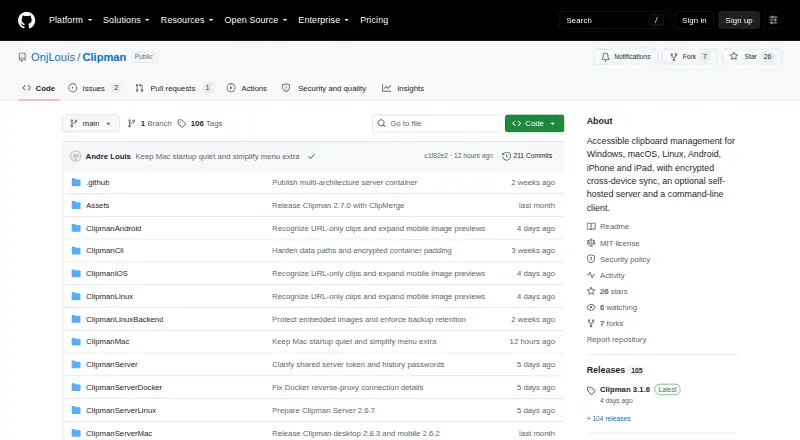
What Clipman is
Clipman is a free, open-source clipboard manager for Windows, macOS, Linux, Android, iPhone, and iPad. It keeps a history that users can search, name, arrange, group, pin, edit, and paste without first opening the app. It supports text, links, formatting, images, and files, with optional Links and Rich Text views. The app is designed for keyboard and screen-reader use, with predictable keyboard behavior and concise speech. History can be stored locally, in a shared folder, or on an optional self-hosted Clipman Server. Windows and Mac can synchronize using a cloud-synced folder or network share, while the server supports encrypted synchronization across supported platforms. Privacy controls include encrypting history, ignoring selected apps, honoring clipboard privacy signals, and excluding likely sensitive values from automatic capture. Quick Paste offers global hotkeys and templates; Quick Clip saves a new entry directly. The CLI can manage server-backed text history on Windows, macOS, and Linux. Clipman is free under the MIT License.
Good
- Searchable history supports several content types.
- Paste saved items without opening the app.
- Keyboard and screen-reader use are explicit design priorities.
- Free and open source under MIT.
Watch out
- Public server deployments must use HTTPS.
- Sync channels do not restrict access between clients sharing credentials.
Who it suits
Clipman suits people who want searchable clipboard history across desktop and mobile devices, particularly those who use keyboard or screen-reader workflows. It also offers local, shared-folder, and self-hosted storage choices.
Verdict
Clipman offers broad clipboard history features and several ways to store or sync that history. Anyone using its server should follow the HTTPS requirement and should not treat channels as access controls.
Plans and prices
From Clipman's own pricing page, checked 15 Oct 2026.
| Plan | Price | What it gives you |
|---|---|---|
| Clipman | Free | Free and open source · local use or optional self-hosted sync |
| Small Tip | $1.99, paid once | Optional Apple tip; unlocks no features |
| Medium Tip | $4.99, paid once | Optional Apple tip; unlocks no features |
| Large Tip | $9.99, paid once | Optional Apple tip; unlocks no features |
The facts
Each one read from Clipman's own pages, with the date it was checked.
What it does
- Accessibility
- The interface is designed for keyboard operation and screen readers, with labelled controls and predictable navigation.checked 15 Oct 2026
- API and CLI
- The command-line client can initialize connections, inspect status, list, retrieve, add, delete and synchronize server-backed text history with JSON output.checked 15 Oct 2026
- Channel limitation
- Sync channels organize transfers but are not an access-control boundary because clients sharing a server token and history password can access every channel.checked 1 Oct 2026
- CLI maturity
- The CLI is a pre-1.0 development preview and has no MCP endpoint or automatic history stream.checked 15 Oct 2026
- ClipMerge
- Desktop ClipMerge can append text or file selections after deliberate rapid copy or cut actions.checked 15 Oct 2026
- Command line
- The Clipman CLI supports Windows, macOS, and Linux and can inspect, list, retrieve, add, delete, and synchronize server-backed text history with JSON output.checked 1 Oct 2026
- Container support
- Clipman Server publishes a multi-architecture container image for x86-64, ARM64 and ARMv7.checked 15 Oct 2026
- Content types
- Clipman supports text, links, formatting, images, and files, with optional Links and Rich Text views.checked 1 Oct 2026
- Documentation depth
- The manual covers platform behavior, shortcuts, preferences, history types, privacy, import/export and synchronization workflows.checked 15 Oct 2026
- Downloads
- Windows is portable, macOS provides signed and notarized Apple Silicon and Intel builds, Linux includes a per-user installer, and mobile apps use normal platform installation flows.checked 1 Oct 2026
- History
- Clipboard history can be searched, named, arranged, grouped, pinned, edited, and pasted without opening Clipman first.checked 1 Oct 2026
- History types
- It supports text, links, rich text, images and machine-local copied-file history.checked 15 Oct 2026
- License
- The project is free and open source under the MIT License.checked 15 Oct 2026
- Limit: physical Intel testing
- The macOS release notes say the Intel package was tested under Rosetta because physical Intel hardware was unavailable.checked 15 Oct 2026
- Local operation
- Clipman works without an account and can keep history entirely on one device.checked 15 Oct 2026
Where it runs
- Android distribution
- Android packages are distributed from GitHub Releases rather than a listed Google Play application.checked 15 Oct 2026
- App Store privacy
- Apple lists the developer as collecting no data from the iPhone and iPad app.checked 15 Oct 2026
- Cross-device sync
- Windows and macOS can share a database through cloud-synced folders or network shares, while Clipman Server extends encrypted sync to all supported clients.checked 15 Oct 2026
- iOS requirements
- The App Store listing requires iOS 16 or later and iPadOS 16 or later.checked 15 Oct 2026
- Limit: browser exposure
- The server manual warns that a compromised host or browser extension could read history after it is unlocked in the browser.checked 15 Oct 2026
- Limit: Windows diagnostic issue
- A Windows latency diagnostic release states that issue #84 remained open and the diagnostic build was not a fix.checked 15 Oct 2026
- macOS requirements
- The macOS builds require macOS 13 or later and are supplied separately for Apple Silicon and Intel.checked 15 Oct 2026
The company
- Maker
- The project and Apple listing identify Andre Louis as the developer.checked 15 Oct 2026
- Maker location
- Andre Louis's LinkedIn profile lists Greater London, England, United Kingdom.checked 15 Oct 2026
The full review of Clipman
Overview
Clipman is a free, open-source clipboard manager for desktop and mobile, with tools for saving and organizing a broad range of clip types. It is best suited to people who want searchable history across devices and control over local or self-hosted storage. Its breadth is appealing, but anyone exposing its server to the internet must configure HTTPS and understand that channels do not restrict access.
Key features
Clipman’s history can be searched, named, arranged, grouped, pinned, edited, and pasted without opening the app. It keeps text, links, formatting, images, and files, with optional Links and Rich Text views. Those options make it useful for more than short text snippets, while the organization tools matter most to people who build up a substantial history.
Privacy controls let users encrypt history, ignore chosen applications, honor clipboard privacy signals, and exclude likely sensitive values from automatic capture. Clipman Server stores encrypted or compressed .clipdb blobs and cannot decrypt the history. That is a useful safeguard, not a substitute for secure deployment: an internet-facing server must use HTTPS, and plain HTTP or plain clipman:// should not be exposed publicly. Sync channels sort transfers but are not permissions; clients sharing a server token and history password can reach every channel.
Quick Paste offers global hotkeys and templates, while Quick Clip saves an entry directly without first copying it from another app. The CLI, available on Windows, macOS, and Linux, can inspect, list, retrieve, add, delete, and sync server-backed text history, including JSON output. That makes Clipman more adaptable for keyboard-focused users and command-line workflows than a basic clipboard log.
Accessibility is a deliberate part of the design: predictable keyboard behavior and concise screen-reader speech suit fast keyboard use and screen-reader users. Windows and Mac can sync through a cloud-synced folder or network share; Clipman Server adds encrypted synchronization across supported platforms. History may also stay local, so using sync is a choice rather than a requirement.
Pricing
Clipman costs nothing. The free plan includes the app’s clipboard history, search, cross-device sync, snippets, and rich text support, and the software is open source under the MIT License. There are no paid tiers to weigh against a free cap; self-hosting the optional server is the route for users who want that storage and sync arrangement.
Platforms
Clipman supports Windows, macOS, Linux, Android, iPhone, and iPad. Windows is portable; macOS has signed and notarized builds for Apple Silicon and Intel, and Linux has a per-user installer. Mobile apps follow the usual platform installation flows. The CLI supports Windows, macOS, and Linux.
Who it's for
Clipman fits people who collect varied clips, rely on keyboard or screen-reader workflows, or want to decide whether history stays local, sits in a shared folder, or syncs through a self-hosted server. It is less suitable for someone who wants public server sync without managing HTTPS, or who expects channels to separate access between users.
Pros and cons
- Pro: Search, grouping, pinning, editing, and paste access without opening the app help make a large history practical.
- Pro: Support for files, images, formatting, and links broadens its usefulness beyond plain text.
- Pro: Local, shared-folder, and server storage offer meaningful choice over where history lives.
- Pro: Keyboard and screen-reader considerations, plus a cross-platform CLI, serve workflows many clipboard tools overlook.
- Con: Internet-facing server use requires HTTPS configuration; the server’s encrypted storage does not remove that responsibility.
- Con: Channels do not isolate users who share server credentials, so they cannot safely serve as access controls.
Alternatives
For a broader comparison, browse Clipboard Manager Software.
- Pasteable is worth considering if its free-plan allowance of unlimited local history and 25 synced clips fits your needs.
- Relic may suit readers who specifically want open-source apps, sync server, encryption code, and self-host stack.
- ClipboardFusion is an option for someone who prefers a paid lifetime license, alongside its free personal-only plan.
- Octoclip is another free-plan option for people looking for cross-device copy and paste, Nearby Sync, clip history, and cloud sync.
- Buddi is budgeting software, rather than a clipboard-manager alternative.
- OmniClip is a free option across Android, browser extension, iOS, and web.
- Clipdiary is a Windows-only alternative with a free personal license and a paid personal license.
- CopyPaste is a free, open-source option for macOS and Windows with no premium tiers, subscriptions, or paywalls.
Verdict
Choose Clipman if you want a capable clipboard history across desktop and mobile, especially when keyboard access, varied clip types, and control over storage matter. Its free, MIT-licensed model and flexible sync choices are compelling. Look elsewhere if you need a server setup without security administration or genuine channel-level access separation.
Getting started
- Open the Clipman GitHub website
- Choose Windows, macOS, Linux, Android, iPhone, or iPad
- Install the Windows portable build, macOS signed build, Linux per-user installer, or normal mobile app
- Choose local storage, a shared folder, or an optional self-hosted Clipman Server
- Configure encrypted synchronization and use HTTPS for any internet-facing server
Questions
Is Clipman free?
Yes. Clipman is free and open source under the MIT License, with an optional self-hosted server.
Which platforms does Clipman support?
It supports Windows, macOS, Linux, Android, iPhone, and iPad.
What can Clipman store?
Clipboard history can contain text, links, formatting, images, and files. Links and Rich Text views are available optionally.
How can devices synchronize?
Windows and Mac can use a cloud-synced folder or network share. Clipman Server provides encrypted synchronization across supported platforms.
Is Clipman open source?
Yes. It is released under the MIT License.
Alternatives to Clipman
- 1

Relic
Free planOpen sourceAndroidiOSWebAPI8.5From $5 a month - 2
Pastin
Free planiOSmacOS7.6From $29.99 a year - 3

ClipboardFusion
Free planAndroidiOSWebExtension7.5$19 one-time - 4

Pasteable
Free planAndroidiOSWebLinux7.5From $60 a year - 5
OmniClip
Free planAndroidiOSWebExtension7.4Free plan - 6
Avidemux
Free planOpen sourceWebLinuxmacOSWindows7.3Free plan