Pasteable
Pasteable saves copied text, rich text, HTML, images, files, URLs, and code in a searchable clipboard history.
What Pasteable is
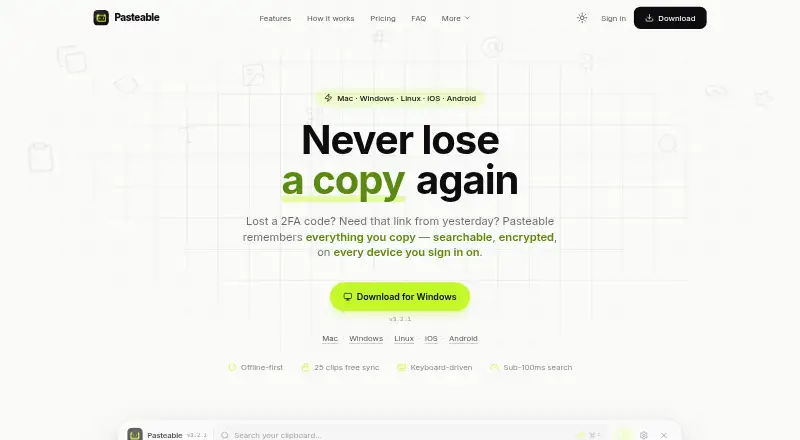
Pasteable saves copied text, rich text, HTML, images, files, URLs, and code in a searchable clipboard history. It supports full-text and on-device semantic search, including finding images by description. Smart collections sort clips into Photos, Code, Links, Files, and Design, while custom rules let users create other collections. On desktop, a keyboard-driven overlay opens with ⌘/Ctrl+Shift+V, and system-wide snippets can expand saved clips. History is stored locally in SQLite, works offline without an account, and is encrypted at rest with a key sealed by the operating system. The maker says synced clips are encrypted on-device and servers store only ciphertext. The free plan includes unlimited local history, 25 synced clips, and files up to 1 GB. Pasteable Pro costs $6 a month or $60 a year. The site lists macOS 11+, Windows 10 and 11, and 64-bit Linux; it says iOS and Android apps are in App Store and Play Store review.
Good
- Search covers text and images by description.
- Custom rules can create clip collections.
- Local history works offline without an account.
- Saved clips can expand through system-wide snippets.
- Exports, imports, and backups are available.
Watch out
- Free plan syncs only 25 clips.
- Free plan limits files to 1 GB.
- iOS and Android apps are still in store review.
- Free plan does not list shared boards.
Who it suits
Pasteable suits people who reuse copied material and want to search or organize it across clipboard history. Its offline local history may appeal to users who want to use the app without an account.
Verdict
Pasteable combines clipboard history, search, collections, and snippets, with local offline use available on the free plan. Its listed mobile apps are not yet available through the stores, according to the site.
Plans and prices
From Pasteable's own pricing page, checked 30 Sep 2026.
| Plan | Price | What it gives you |
|---|---|---|
| Free | Free | Unlimited local history · 25 synced clips · Files up to 1 GB · Full-text and on-device semantic search · Offline use |
| Pasteable Pro (monthly) | $6 a month | Unlimited clip sync · Files up to 5 GB per file (20 GB/month) · Hosted AI · Shared boards · Full synced library in web app · $6/mo |
| Pasteable Pro (yearly) | $60 a year | Unlimited clip sync · Files up to 5 GB per file (20 GB/month) · Hosted AI · Shared boards · Full synced library in web app · Billed $60/year · $5/mo |
| Lifetime | $80, paid once | Everything in Pro forever · Every future Pro feature included · Launch price; $99 list · $80 one-time |
The facts
Each one read from Pasteable's own pages, with the date it was checked.
What it does
- Data practices
- The maker says it does not sell data or train AI on clips, crash reports omit clipboard content, and telemetry is coarse and opt-out.checked 30 Sep 2026
- Exports
- Users can export and import their database and create backups from Settings.checked 30 Sep 2026
- Integrations
- The maker describes iPhone capture through Back Tap, the Action Button, Shortcuts, and Siri, and Android capture through the keyboard, widget, or share sheet.checked 30 Sep 2026
- Local privacy
- Clip history is stored locally in SQLite, works offline without an account, and is encrypted at rest with a key sealed by the operating system.checked 30 Sep 2026
- Organization
- Smart collections sort clips into Photos, Code, Links, Files, and Design, and users can create collections with custom rules.checked 30 Sep 2026
- Purpose
- Pasteable saves copied text, rich text, HTML, images, files, URLs, and code in a searchable clipboard history.checked 30 Sep 2026
- Retention
- By default, Pasteable keeps the last 90 days and the most recent 5,000 items, whichever is more generous; the setting is configurable and favorites and pinned clips are not auto-deleted.checked 30 Sep 2026
- Search
- It offers full-text and on-device semantic search, including searches for images by description.checked 30 Sep 2026
- Security
- The maker says synced clips are encrypted on the device with AES-256-GCM and its servers store only ciphertext.checked 30 Sep 2026
- Sensitive data
- The maker says password-manager output is skipped automatically, detected secrets are blurred, and apps can be excluded from capture.checked 30 Sep 2026
- Workflow
- Desktop users can open the keyboard-driven overlay with ⌘/Ctrl+Shift+V and expand saved clips with system-wide snippets.checked 30 Sep 2026
The company
- Maker
- The site footer identifies the maker as Dsignable LLC.checked 30 Sep 2026
- Team sharing
- Pro shared boards support real-time multi-cursor presence, and the maker says a workspace owner can invite unlimited members without per-seat fees.checked 30 Sep 2026
Where it runs
- Platform availability
- The site lists macOS 11+, Windows 10 and 11, and 64-bit Linux; it says the iOS and Android apps are in App Store and Play Store review.checked 30 Sep 2026
The full review of Pasteable
Overview
Pasteable is a clipboard manager for people who routinely reuse copied material across apps and devices, rather than relying on the clipboard’s latest item. Its combination of local history, search, and snippets makes it most appealing to users who want a personal archive with optional sync; the free plan is useful on its own, while synced use is capped at 25 clips.
Key features
Pasteable saves text, rich text, HTML, images, files, URLs, and code in a searchable history. Full-text and on-device semantic search, including image searches by description, make it easier to retrieve an old clip when a simple text query is not enough. Smart collections sort clips into Photos, Code, Links, Files, and Design, and custom rules let users shape their own filing system. That breadth is valuable for varied clip libraries, though users who only need a short-lived text history may not need this much organization.
On desktop, ⌘/Ctrl+Shift+V opens a keyboard-driven overlay, and system-wide snippets expand saved clips. Together, these features make Pasteable more than a record of past copies: it can also serve as a reusable-text tool. The maker describes iPhone capture through Back Tap, the Action Button, Shortcuts, and Siri, and Android capture through the keyboard, widget, or share sheet.
Local history is stored in SQLite, works offline without an account, and is encrypted at rest with a key sealed by the operating system. The maker says synced clips are encrypted on-device with AES-256-GCM and its servers store only ciphertext. Password-manager output is skipped automatically, detected secrets are blurred, and apps can be excluded from capture. The maker also says it does not sell data or train AI on clips; crash reports omit clipboard content, and telemetry is coarse and opt-out. These protections address meaningful clipboard risks, although they do not remove the need to decide which apps should be allowed to capture content.
By default, history keeps the last 90 days and the most recent 5,000 items, whichever is more generous. That setting is configurable, and favorites and pinned clips are not automatically deleted. Database import and export and Settings backups offer a way to preserve or move a library.
Pricing
The free plan costs nothing and includes unlimited local history, 25 synced clips, files up to 1 GB, full-text and on-device semantic search, and offline use. It is a credible fit for local-first users, but 25 synced clips is a meaningful constraint for anyone building a cross-device archive. The free-plan file cap is also lower than Pro’s.
Pasteable Pro (monthly) is $6 a month, billed $6/mo. Pasteable Pro (yearly) is $60 a year, billed Billed $60/year · $5/mo. Both include unlimited clip sync, files up to 5 GB per file with a 20 GB monthly allowance, hosted AI, shared boards, and the full synced library in the web app. Monthly is the lower-commitment route for users who need those features; yearly lowers the stated monthly equivalent but requires an annual payment. The shared boards’ unlimited member invitations without per-seat fees make Pro more practical for a workspace that would otherwise grow costly by seat.
The Lifetime plan is $80, paid once, billed $80 one-time; it includes everything in Pro forever and every future Pro feature, at a launch price of $99 list. It suits buyers willing to pay upfront rather than renew, but the value depends on wanting Pro and accepting a one-time purchase instead of a recurring plan. A 7-day trial is offered.
Platforms
Pasteable lists macOS 11+, Windows 10 and 11, and 64-bit Linux as available platforms. The site says its iOS and Android apps are in App Store and Play Store review, so mobile capture methods should not be mistaken for store availability today. That distinction matters most to people choosing Pasteable primarily for phone-based use.
Who it's for
Pasteable is best suited to people who collect diverse clipboard content, need to retrieve it later, and value offline local history alongside optional sync. Snippets and the desktop overlay also serve people who repeatedly enter the same text. It is a weaker fit for anyone whose decision depends on currently downloadable mobile apps, or who needs more than 25 synced clips without upgrading.
Pros and cons
- Pro: Full-text and on-device semantic search are included on the free plan, with image-description search extending retrieval beyond text alone.
- Pro: Offline local history, encryption at rest, export/import, and backups give users control over a substantial clipboard archive.
- Pro: Pro combines unlimited sync with shared boards and no per-seat fee for invited members, a useful structure for teams.
- Con: The free plan syncs only 25 clips, limiting its usefulness as a continuing multi-device library.
- Con: The iOS and Android apps are still in store review, which is a practical barrier for mobile-first buyers.
- Con: Pro file use is capped at 20 GB per month even though individual files can be up to 5 GB.
Alternatives
For a broader comparison, see Clipboard Manager Software.
Choose Relic instead if open-source apps, sync server, encryption code, and self-host stack are priorities; it is freemium and spans desktop, mobile, web, API, and self-hosted use. ClipboardFusion is another freemium option with a free personal plan and a Pro Standard lifetime license for $19, paid once. Clipman is worth considering for a free, MIT-licensed option with an optional self-hosted server across desktop and mobile platforms.
Octoclip offers a free plan with cross-device copy/paste, Nearby Sync, clip history and quick search, quick input, and alias preview. Buddi is free budgeting software, rather than a clipboard manager. LearnWell Languages is a paid language-learning app for iOS and macOS, with a $6.99 a month premium plan. OmniClip is currently free and says storage limits may apply, with notice to users if limits do. Copy 'Em is another option for macOS and iOS.
Verdict
Pasteable is a strong choice for users who want a searchable, privacy-conscious local clipboard archive and are willing to pay for a larger synced library, snippets, and shared boards. Its free local history makes it easy to keep the archive offline, while Pro removes the small sync cap and adds useful workspace features. Look elsewhere if mobile store availability is essential now, or if a free plan must support a substantial synced collection.
Getting started
- Visit https://pasteableapp.com/.
- Choose the platform you use: macOS, Windows, Linux, iOS, Android, or web.
- Use the free plan or select a paid plan; a 7-day trial is offered.
- On iPhone, capture clips through Back Tap, the Action Button, Shortcuts, or Siri.
- On Android, capture through the keyboard, widget, or share sheet.
Limits worth knowing
Free provides 25 synced clips and files up to 1 GB, alongside unlimited local history. Pro raises file support to 5 GB per file with 20 GB per month and includes unlimited clip sync; its plans also include hosted AI, shared boards, and the full synced library in the web app.
Questions
What does Pasteable cost?
The Free plan is free. Pro costs $6 a month or $60 a year, and Lifetime costs 80.00 USD one-time; a 7-day trial is offered.
What does the free plan include?
It includes unlimited local history, 25 synced clips, files up to 1 GB, full-text and on-device semantic search, and offline use.
Which platforms are supported?
The site lists macOS 11+, Windows 10 and 11, and 64-bit Linux. It also lists web, iOS, and Android, with the iOS and Android apps in store review.
How does Pasteable protect clipboard data?
Local history is encrypted at rest with an operating-system-sealed key. The maker says synced clips are encrypted on the device and servers store ciphertext only.
Does Pasteable support team sharing?
Pro includes shared boards with real-time multi-cursor presence. The maker says workspace owners can invite unlimited members without per-seat fees.
Alternatives to Pasteable
- 1

Relic
Free planOpen sourceAndroidiOSWebAPI9.3From $5 a month - 2
Clipman
Free planOpen sourceAndroidiOSAPILinux9.2$1.99 one-time - 3

ClipboardFusion
Free planAndroidiOSWebExtension8.3$19 one-time - 4
OmniClip
Free planAndroidiOSWebExtension8.1Free plan - 5
Pastin
Free planiOSmacOS8.0From $29.99 a year - 6
Octoclip
Free planAndroidiOSmacOSWindows7.9$19.99 one-time