ChronoFlo Calendar
ChronoFlo Calendar creates interactive event calendars for sharing online or embedding on a website.
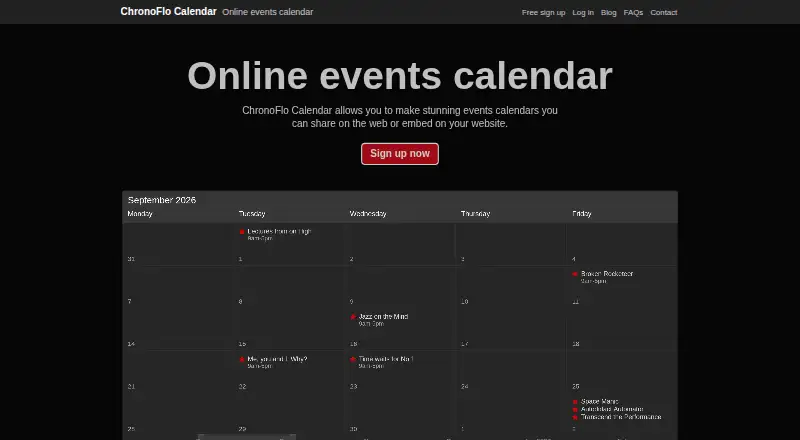
What ChronoFlo Calendar is
ChronoFlo Calendar creates interactive event calendars for sharing online or embedding on a website. Visitors can scroll along a timeline to find events rather than move through month views. Calendar creators can choose a hand-designed theme or build a custom one to match their branding, and add images, video and audio. The browser-based product requires no download. The free plan includes one calendar, web sharing, a custom theme, images and video, category colors, and up to 50 current events. Bronze costs $10.00 per month and includes up to five calendars, embedding, 5,000 monthly embeddable views, RSS and iCal feeds, up to 500 current events and image uploads. Silver costs $27.50 per month and includes up to 25 calendars, 30,000 monthly embeddable views, RSS, iCal and JSON feeds, and up to 1,000 current events. Feed support is premium. A WordPress plugin embeds calendars with a shortcode, but requires a self-hosted or third-party WordPress installation. Accounts cannot be used commercially to make calendars for other companies.
Good
- Free plan includes one calendar and up to 50 current events.
- Timeline navigation lets visitors scroll to events.
- Supports images, video and audio.
- Bronze includes embedding and RSS and iCal feeds.
Watch out
- Free plan is limited to one calendar.
- Feed support is premium.
- WordPress embedding requires a self-hosted or third-party installation.
- Accounts cannot create calendars commercially for other companies.
Who it suits
ChronoFlo Calendar suits people and organizations creating event, school, family, legal or project calendars for web sharing or embedding. The free plan can suit a single calendar; paid plans add calendar and view capacity.
Verdict
ChronoFlo Calendar offers a free starting tier and paid options with higher calendar and view limits. Check the commercial-use restriction and the plan’s feed support before choosing it.
Plans and prices
From ChronoFlo Calendar's own pricing page, checked 4 Oct 2026.
| Plan | Price | What it gives you |
|---|---|---|
| Free | Free | 1 calendar · web sharing · custom theme · images and video · category colors · up to 50 current events |
| Bronze | $10 a month | Up to 5 calendars · embedding · 5,000 monthly embeddable views · RSS and iCal feeds · up to 500 current events · image uploads · $10.00 a month |
| Silver | $27.50 a month | Up to 25 calendars · embedding · 30,000 monthly embeddable views · RSS, iCal and JSON feeds · up to 1,000 current events · image uploads · $27.50 a month |
The facts
Each one read from ChronoFlo Calendar's own pages, with the date it was checked.
What it does
- Account setup
- Premium accounts require first signing up for a free account; annual subscription payment by invoice is available by emailing the maker.checked 4 Oct 2026
- Commercial limit
- Accounts cannot be used commercially to create calendars for other companies; digital and communications agencies are directed to contact the maker.checked 4 Oct 2026
- Design
- Users can choose hand-designed themes or create a custom theme to match their branding.checked 4 Oct 2026
- Feeds
- The product can populate calendars from iCal, RSS and JSON feeds, with feed support marked as a premium feature.checked 4 Oct 2026
- Navigation
- Calendars use a timeline so users can scroll to events instead of clicking through months.checked 4 Oct 2026
- Product
- ChronoFlo Calendar creates interactive event calendars that can be shared on the web or embedded on a website.checked 4 Oct 2026
- Rich media
- Calendars can include images, videos and audio.checked 4 Oct 2026
- Support
- The maker lists [email protected] for product problems and [email protected] for questions, suggestions or feedback.checked 4 Oct 2026
- Use cases
- The maker lists event, school, family, legal and project calendars as suitable uses.checked 4 Oct 2026
- WordPress integration
- A maker-provided WordPress plugin uses a shortcode to embed a ChronoFlo calendar and requires a self-hosted or third-party WordPress installation.checked 4 Oct 2026
Where it runs
- Browser-based
- The maker says ChronoFlo Calendar works in a browser and requires nothing to download.checked 4 Oct 2026
The company
- Maker
- The product site credits Webalon Ltd in its copyright notice.checked 4 Oct 2026
Alternatives to ChronoFlo Calendar
- 1

Fourwaves
Free planAndroidiOSWebAPI8.2From $999 a year - 2

Zoho Backstage
Free planAndroidiOSWebAPI8.2From ₹7,900 a month - 3

pretalx
Free planOpen sourceWebAPILinuxSelf-hosted8.0From €499 a year - 4
Indico
Free planAndroidiOSWebAPI7.4Free plan - 5
Sessionize
Free planAndroidiOSWeb7.3$499 one-time - 6

BagEvent
AndroidiOSWebmacOS7.1From $99 a month