
ChordSequence
ChordSequence is a free collection of music tools for songwriters, producers, students, teachers and other learners.
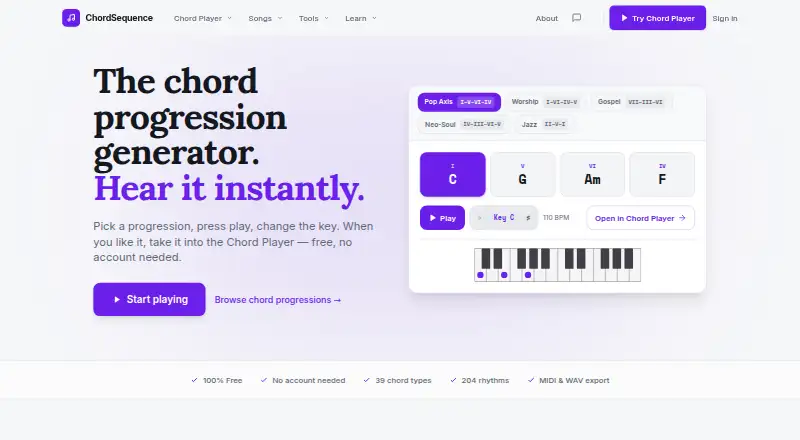
What ChordSequence is
ChordSequence is a free collection of music tools for songwriters, producers, students, teachers and other learners. Its browser chord player plays progressions chosen by the user, with drums, bass, piano, guitar and synth. It offers 548 rhythms spanning styles such as pop, rock, salsa and reggae. Users can reorder chords, arrange them into sections, loop sections and edit instrument parts. Mixing controls include individual volume, pan, mute, solo, EQ and compression, plus reverb for the whole mix. Songs can be exported as WAV audio or MIDI notes for a DAW. The site also lists a chord finder, transposer, key detector, Circle of Fifths, tuner, metronome, guitar and bass tabs, and drum machine. The browser tools use the Web Audio API and are stated to work in Chrome, Firefox, Safari and Edge. An Android app works offline, needs no account and supports Android 8.0 or later. There is no iPhone app; iPhone users can use the browser player. The free plan is listed as free, with no paywall or usage limit.
Good
- 548 rhythms across several styles
- Exports songs as WAV or MIDI
- Includes chord, tuning and rhythm tools
- Android app works offline without an account
- Free plan has no paywall or usage limit
Watch out
- No iPhone app is available
- Android app requires Android 8.0 or later
Who it suits
ChordSequence suits songwriters, producers, music students, worship teams, learners and teachers who want chord playback and related music tools. Android users can use the app offline; iPhone users are directed to the browser player.
Verdict
ChordSequence combines a progression player, editing and mixing controls, exports, and a broad set of supporting tools. Its Android app works offline, while iPhone access is through the browser.
Plans and prices
From ChordSequence's own pricing page, checked 4 Oct 2026.
| Plan | Price | What it gives you |
|---|---|---|
| Free | Free | All features free · no paywall or usage limit · WAV and MIDI export |
The facts
Each one read from ChordSequence's own pages, with the date it was checked.
Where it runs
- Android app
- The Android app works offline, requires no account, and supports Android 8.0 or later.checked 4 Oct 2026
- Browser support
- The site says it runs in the browser using the Web Audio API and works on Chrome, Firefox, Safari, and Edge.checked 4 Oct 2026
What it does
- Arrange and edit
- Users can reorder chords, group them into sections, loop sections, and edit instrument parts in a rhythm.checked 4 Oct 2026
- Chord player
- The chord player plays user-selected chord progressions with drums, bass, piano, guitar, and synth.checked 4 Oct 2026
- Export
- The browser player exports songs as WAV audio or MIDI notes for use in a DAW.checked 4 Oct 2026
- iPhone availability
- The site says there is no iPhone app yet and directs iPhone users to the browser player.checked 4 Oct 2026
- Mixer
- The player provides per-instrument volume, pan, mute, solo, EQ, and compression, plus reverb for the whole mix.checked 4 Oct 2026
- Other tools
- The site lists tools including a chord finder, transposer, key detector, Circle of Fifths, tuner, metronome, guitar and bass tabs, and drum machine.checked 4 Oct 2026
- Privacy
- The maker says saved songs are private unless shared, and the Android app stores songs on the phone without uploading them.checked 4 Oct 2026
- Rhythms
- The browser player offers 548 rhythms across styles including pop, rock, salsa, and reggae.checked 4 Oct 2026
- Security and hosting
- The terms say the site is hosted on Netlify and uses Supabase for the community song library database.checked 4 Oct 2026
- Support
- The maker lists [email protected] for contact and invites bug reports and feature ideas.checked 4 Oct 2026
- What it does
- ChordSequence is a free suite of browser-based music tools for songwriters, producers, and students.checked 4 Oct 2026
- Who it is for
- The site describes the tools as being for songwriters, producers, music students, worship teams, learners, and teachers.checked 4 Oct 2026
The company
- Founded
- 2024checked 28 Sep 2026
- Maker and origin
- The maker says Elías Corsino Saldaña built the first version in 2024 and is a musician and software developer from the Dominican Republic.checked 4 Oct 2026
The full review of ChordSequence
ChordSequence is a browser-based set of music tools for building and shaping chord progressions. It is best suited to songwriters, producers, students, and teachers who want to hear arrangements and export them without a subscription. Its strongest case is the combination of a full progression player and supporting tools at no cost.
Overview
The central player turns selected chords into an arrangement with drums, bass, piano, guitar, and synth. Chords can be reordered, grouped into song sections, and looped; instrument parts can also be edited within a rhythm. That makes ChordSequence more useful for developing an arrangement than a chord lookup tool alone.
The surrounding toolkit adds a chord finder, transposer, key detector, Circle of Fifths, tuner, metronome, guitar and bass tabs, and drum machine. Reverse chord lookup and progression generation extend its appeal for learners and writers working from either a sound or a starting idea. The breadth is convenient, though musicians who need only one specialized reference tool may prefer a focused alternative.
Key features
Playback and arranging
With 548 rhythms across styles such as pop, rock, salsa, and reggae, the player gives users a substantial range of grooves against which to try a progression. Section grouping and looping help when sketching song form, while the available instruments include guitar, piano, and ukulele. The rhythm count and variety are useful for exploration, but the central purpose remains arranging chord progressions rather than replacing a full production environment.
Mixing and export
Each instrument has its own volume, pan, mute, solo, EQ, and compression controls, with reverb applied to the whole mix. That offers meaningful control over a sketch before it leaves the browser. WAV export provides an audio version, while MIDI notes can be carried into a DAW for further work; chord chart export is also supported.
Additional tools
The site brings common composition and practice utilities together, from transposition and key detection to a tuner, metronome, and tabs. That makes it a practical hub for students, teachers, and songwriters who move between learning chords and testing ideas. It is not necessary to use the larger toolkit to benefit from the player, so users seeking only a progression sketch can stay focused on that core task.
Pricing
The Free plan costs nothing and includes all features, with no paywall or usage limit. WAV and MIDI export are included, so users do not have to move to a paid tier to save a finished sketch or continue it in a DAW. There is no free trial because the full product is free, and there are no stated seat or usage quotas to weigh against the plan.
This is an unusually straightforward fit for learners and independent writers who want to explore without committing to a subscription. The trade-off is not a cheaper tier with reduced functions; rather, users who need an iPhone app will need to work through the browser.
Platforms
ChordSequence runs in the browser using the Web Audio API and supports Chrome, Firefox, Safari, and Edge. The Android app works offline, requires no account, and supports Android 8.0 or later, which makes it the clearest option for composing without a connection. There is no iPhone app; iPhone users can use the browser player instead.
The maker says saved songs are private unless shared, and that the Android app stores songs on the device without uploading them. The site is hosted on Netlify and uses Supabase for its community song library database.
Who it's for
Songwriters and producers get the most from the progression player, arrangement controls, mixer, and exports. Music students, learners, and teachers can use the supporting reference and practice tools alongside playback. Worship teams may also find the ability to organize and loop sections useful when shaping a song structure.
ChordSequence is a weaker fit for anyone who requires a dedicated iPhone app or needs a full-featured DAW rather than a browser-based way to develop and export musical ideas.
Pros and cons
- Pros: The full feature set is free, with no usage limit or paywall, including WAV and MIDI export; that makes it practical for ongoing use rather than just a trial sketch.
- Pros: A 548-rhythm library, section editing, and instrument-level mixing give writers several ways to shape and compare arrangements.
- Pros: The Android app works offline and does not require an account, and songs remain on the phone according to the maker.
- Cons: There is no iPhone app, so iPhone users must rely on browser access.
- Cons: The browser player depends on a supported browser and its Web Audio API, so it is less suitable for users who want a standalone desktop application.
Alternatives
For a broader shortlist of chord lookup tools, browse Chord Finder Software.
ChordU is worth considering if you want a freemium option across Android, iOS, and web, with a paid Premium plan at $5 a month for uploads, MusicOnly mode, and downloads.
Chord Analyser is an Android alternative with a free plan and no free trial.
Chordio is an option for users on iOS or macOS who prefer a free download with built-in sounds, an on-screen keyboard, and real-time MIDI chord detection.
OtoTheory may suit iOS users who want a free starting tier with three local sketch saves, or a one-time Lifetime plan at 99.99 USD for its Pro features.
Autochords is an iOS option with a free tier, though some progressions require PRO.
Chord ai is available on Android and iOS, with basic features and unlimited free use in its free plan; its monthly Pro plan is $9 a month.
Harmony Pro is a free alternative for macOS, Windows, and web users.
Open—Shape is another iOS and web option, with a free plan that includes its chord engine, voicings, built-in tunings, and acoustic playback.
Verdict
Choose ChordSequence if you want a free place to build, hear, edit, and export chord progressions, especially on Android or in a desktop browser. The unlimited access and included WAV and MIDI exports are its clearest advantages. Look elsewhere if a dedicated iPhone app is essential or your work calls for a full production suite rather than an arrangement sketchpad.
Getting started
- Open ChordSequence in Chrome, Firefox, Safari, or Edge
- Choose chords and a rhythm in the browser player
- Arrange sections and adjust instrument parts or mixer controls
- Export the result as WAV audio or MIDI notes for a DAW
- Install the Android app on a device running Android 8.0 or later
Questions
Does ChordSequence cost anything?
The Free plan is listed as free. All features are free, with no paywall or usage limit.
Can I use it on an iPhone?
There is no iPhone app. iPhone users are directed to the browser player.
Which browsers are supported?
The browser tools use the Web Audio API and work on Chrome, Firefox, Safari, and Edge.
Does the Android app require an account?
No. The Android app works offline and requires no account.
Can I export music to a DAW?
Yes. The browser player exports songs as WAV audio or MIDI notes for use in a DAW.
Who built ChordSequence?
Elías Corsino Saldaña built the first version in 2024 and describes himself as a musician and software developer from the Dominican Republic.
Alternatives to ChordSequence
- 1
ChordU
Free planAndroidiOSWeb7.9From $50 a year - 2
Chord Analyser
Free planAndroidiOS7.6$3.49 one-time - 3

Chordio
Free planiOSmacOS7.5$14.99 one-time - 4
Chordify
AndroidiOSWebAPI7.3From $2 a month - 5

Chord ai
Free planAndroidiOS7.1From $69 a year - 6
Reverse Chord Finder Pro
iOSmacOS7.1From $0.99 a month