
ChordProgressions.org
ChordProgressions.org is a free, browser-based studio for creating, hearing, analyzing, and exporting chord progressions for guitar and piano.
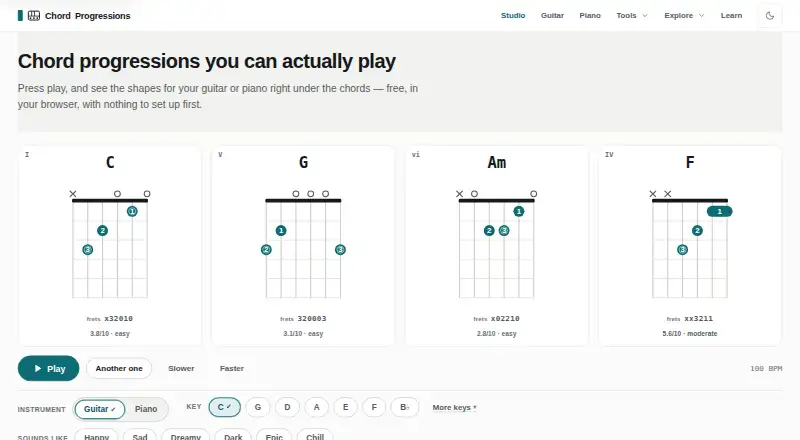
What ChordProgressions.org is
ChordProgressions.org is a free, browser-based studio for creating, hearing, analyzing, and exporting chord progressions for guitar and piano. Its tools include a progression generator, builder, finder, identifier, analyzer, and transposer. Users can generate guitar shapes and piano voicings, with settings for tuning, capo position, difficulty, inversions, and fingering. Theory analysis can show Roman numerals, Nashville numbers, chord functions, cadence points, borrowed chords, and an estimated key with a confidence rating. The studio accepts MIDI input and imports MusicXML, project files, and plain-text chord sheets. Audio analysis runs in the browser, producing an editable chord timeline with a confidence score. Export formats include MIDI, WAV, chord-chart PDF, PNG and SVG diagrams, plain text, CSV, JSON, MusicXML, and a share link. Projects autosave in the browser and stay on the device; imported files are read there rather than uploaded. Practice features loop progressions with a metronome and count-in, and offer ear-recognition and playing practice in every key. JavaScript is needed for studio playback and editing.
Good
- Free browser-based studio for guitar and piano.
- Generates guitar shapes and piano voicings.
- Imports MIDI, MusicXML, project files, and chord sheets.
- Offers multiple audio, diagram, and data exports.
- Projects and imported files stay in the browser.
Watch out
- JavaScript is required for studio playback and editing.
- Audio analysis produces an estimate with a confidence score.
Who it suits
This studio suits guitarists, pianists, songwriters, and people learning music theory who want to build and explore chord progressions. It is also useful for users who want locally stored projects or multiple export formats.
Verdict
ChordProgressions.org brings progression creation, theory analysis, practice, and export into a browser studio. Its JavaScript requirement applies to playback and editing, while its audio analysis remains an editable estimate.
Plans and prices
From ChordProgressions.org's own pricing page, checked 3 Oct 2026.
| Plan | Price | What it gives you |
|---|---|---|
| ChordProgressions.org | Free | Free in-browser studio; JavaScript required for studio playback and editing |
The facts
Each one read from ChordProgressions.org's own pages, with the date it was checked.
What it does
- Audio analysis
- Audio decoding and analysis run in the browser, and the resulting chord timeline is an estimate with a confidence score that remains editable.checked 3 Oct 2026
- Exports
- Export options include MIDI, WAV, chord chart PDF, PNG and SVG diagrams, plain text, CSV, JSON, MusicXML, and a share link.checked 3 Oct 2026
- Guitar and piano
- It generates guitar shapes and piano voicings, with settings for tunings, capo positions, difficulty, inversions, and fingering.checked 3 Oct 2026
- Integrations
- The studio lists MIDI device input and output and imports MIDI and MusicXML files; no third-party service integrations are stated on the opened page.checked 3 Oct 2026
- Intended users
- The site presents tools and learning materials for guitarists, pianists, songwriters, and people learning music theory.checked 3 Oct 2026
- Library size
- The site says its progression library contains more than 130 patterns across genres.checked 3 Oct 2026
- Local storage and privacy
- The site says projects autosave in the browser and stay on the device; imported files are read in the browser and never uploaded.checked 3 Oct 2026
- MIDI and file support
- The studio supports MIDI input and output and imports MusicXML, project files, and plain-text chord sheets.checked 3 Oct 2026
- Practice
- The practice tool loops a progression with a metronome and count-in, and offers ear-recognition and playing practice in every key.checked 3 Oct 2026
- Progression tools
- Its listed tools include a progression generator, builder, finder, identifier, analyzer, and transposer.checked 3 Oct 2026
- Purpose
- The site offers a browser-based studio for creating, hearing, analyzing, customizing, and exporting chord progressions for guitar and piano.checked 3 Oct 2026
- Security limitation
- The studio requires JavaScript for playback and editing; the progression library, key reference, theory articles, and chord tables work as plain HTML without it.checked 3 Oct 2026
- Theory analysis
- The analyzer can show Roman numerals, Nashville numbers, chord functions, cadence points, borrowed chords, and a key estimate with a confidence rating.checked 3 Oct 2026
The full review of ChordProgressions.org
ChordProgressions.org is a free browser studio for guitarists, pianists, songwriters, and music-theory learners working with chord progressions. It is best for people who want creation, analysis, practice, and export tools together rather than a single-purpose chord reference. Its broad workflow comes with one key constraint: studio playback and editing require JavaScript.
Overview
The studio takes a progression from discovery or creation through voicing, theory analysis, practice, and export. That range suits songwriters moving between an idea and a playable arrangement, as well as learners who want to understand why a sequence works. It is less suitable for someone who needs only a static reference or wants a dedicated desktop application.
Projects autosave in the browser and stay on the device; imported files are read there and never uploaded. That local workflow is useful for private or unfinished material. The progression library, key reference, theory articles, and chord tables remain accessible as plain HTML without JavaScript, but playback and editing do not.
Key features
Find, build, and understand
A generator, builder, finder, identifier, analyzer, and transposer cover both starting a progression and investigating one already in hand. Reverse chord lookup helps when a player knows a chord and wants to find progressions that use it. The library offers more than 130 patterns across genres, providing a broad set of starting points without requiring a blank-page approach.
The analyzer can show Roman numerals, Nashville numbers, chord functions, cadence points, borrowed chords, and a key estimate with a confidence rating. This is more useful for learning and revision than a bare chord-name display, though the estimate should be treated as a guide rather than a definitive reading.
Instrument voicings and practice
Guitar shapes and piano voicings can be customized by tuning, capo position, difficulty, inversion, and fingering. Those controls make the same progression more adaptable to different players and arrangements. The practice tool loops progressions with a metronome and count-in, and includes ear-recognition and playing exercises in every key; that gives learners a way to move from analysis to repetition in the same workspace.
Audio, files, and export
The studio supports MIDI input and output, and imports MIDI, MusicXML, project files, and plain-text chord sheets. Audio decoding and analysis happen in the browser; the resulting chord timeline is an editable estimate with a confidence score, so it can help map a recording but should not be mistaken for an unquestionable transcription.
Exports include MIDI, WAV, chord-chart PDF, PNG and SVG diagrams, plain text, CSV, JSON, MusicXML, and a share link. This breadth is a practical advantage for moving material into other workflows. MIDI device input and output are supported, but no third-party service integrations are stated.
Pricing
ChordProgressions.org is free: its ChordProgressions.org plan costs nothing and provides a free in-browser studio. There is no free trial because the plan itself is free. That removes a payment barrier for learners and songwriters exploring a full progression workflow; the trade-off is that JavaScript is required for studio playback and editing. The plan description gives no seat or usage quota, so those should not be assumed.
Platforms
The product runs on the web. Its studio functionality depends on JavaScript, while the progression library, key reference, theory articles, and chord tables work as plain HTML without it. It supports guitar and piano voicings, MIDI device input and output, and imports including MIDI and MusicXML.
Who it's for
Songwriters can use the generator, builder, pattern library, voicing controls, and export formats to develop and carry progressions forward. Guitarists and pianists benefit from instrument-specific shapes and voicings, while theory learners get multiple analytical views and practice in every key. It is a weaker fit for people seeking a JavaScript-free editing studio, a desktop-native application, or only a quick static chord lookup.
Pros and cons
- Pros: A wide set of creation, analysis, practice, and export tools sits in one free browser studio, reducing the need to switch between separate progression tasks.
- Pros: Projects and imported files stay in the browser rather than being uploaded, a useful privacy property for personal work.
- Pros: Instrument voicings, theory views, and editable audio-analysis results give users control over both arrangement and interpretation.
- Cons: Playback and editing require JavaScript, limiting the studio's usefulness in environments where scripts are disabled.
- Cons: Audio analysis produces an estimate with a confidence score, so users must review and edit its timeline rather than rely on it as a final transcription.
Alternatives
For a wider category comparison, see Chord Finder Software. Pick OtoTheory if an iOS app or web access and a lifetime purchase are more important than this free browser studio; its free iOS tier limits sketch saves to three and excludes MIDI and audio export. Choose ChordU for Android or iOS access and song uploads, MusicOnly mode, and downloads through Premium at $5 a month.
Chord Analyser is an Android and iOS option for readers who prefer a mobile app. chords·lol is another free web option for those seeking an educational and reference resource without signup. Choose Chordify if access to songs and its Toolkit across web, iOS, and Android better fits your workflow; its Basic plan costs $24 a year. ChordSequence is a free Android and web alternative with all features and WAV and MIDI export. Chordio is for readers looking for an iOS or macOS app with built-in sounds, an on-screen keyboard, and real-time MIDI chord detection. SongEngine is a macOS and Windows option centered on a core plug-in with 60+ presets.
Verdict
ChordProgressions.org is a strong choice for songwriters and music learners who want a free, locally handled browser workspace spanning progression creation, theory, practice, and flexible export. Its main limitation is the JavaScript dependency for studio playback and editing; look elsewhere if that prevents use or if a native mobile or desktop app is essential.
Alternatives to ChordProgressions.org
- 1
ChordU
Free planAndroidiOSWeb7.9From $50 a year - 2
Chord Analyser
Free planAndroidiOS7.6$3.49 one-time - 3

Chordio
Free planiOSmacOS7.5$14.99 one-time - 4
Chordify
AndroidiOSWebAPI7.3From $2 a month - 5

Chord ai
Free planAndroidiOS7.1From $69 a year - 6
Reverse Chord Finder Pro
iOSmacOS7.1From $0.99 a month