cfiles
cfiles is a free terminal file manager written in C, using ncurses and vim-like keybindings.
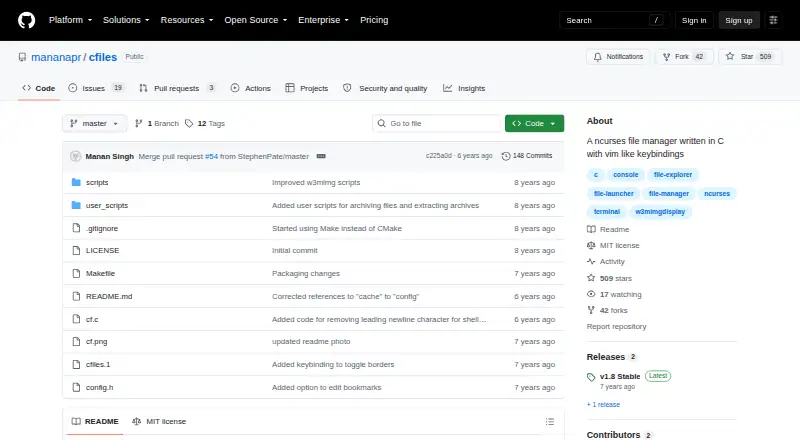
What cfiles is
cfiles is a free terminal file manager written in C, using ncurses and vim-like keybindings. It runs on Linux and macOS and aims for a lightweight, minimal interface. Navigation uses h, j, k, and l, with shortcuts for top, middle, bottom, and page scrolling. The f and F keys search with fzf, while S opens a shell in the current directory. A selection list supports copying, moving, renaming, sending files to trash, and removing selected files. cfiles can display image, media information, archive, and PDF previews with external dependencies. Users can save bookmarks and run executable scripts from its configured directory. The clipboard and bookmarks are stored under XDG_CONFIG_HOME, or under $HOME/.config when that variable is unset. Sending files to trash requires $HOME/.local/share/Trash/files to exist. Preview behavior depends on the selected tool: Überzug has limits with MP3 album art and arrow-key scrolling, while w3mimgdisplay previews may disappear after resizing a terminal or changing workspaces. cfiles is licensed under the MIT License.
Good
- Free under the MIT License.
- Runs on Linux and macOS.
- Supports vim-like navigation and fzf search.
- Can preview images, media, archives, and PDFs.
- Includes bookmarks and external script execution.
Watch out
- Features rely on external dependencies.
- Trash requires a specific directory to exist.
- Preview behavior has tool-specific limitations.
Who it suits
cfiles suits Linux or macOS users who prefer managing files from a terminal with vim-like keys. It may also fit users who want previews, bookmarks, and script support and are comfortable installing external dependencies.
Verdict
cfiles offers terminal-based file operations with familiar navigation keys and several preview types. Its dependence on external tools and specific preview limitations are worth considering before setup.
Plans and prices
From cfiles's own pricing page, checked 8 Oct 2026.
| Plan | Price | What it gives you |
|---|---|---|
| cfiles | Free | Free software under the MIT License |
The facts
Each one read from cfiles's own pages, with the date it was checked.
What it does
- Bookmarks and scripts
- Users can store bookmarks and run executable external scripts from the configured cfiles directory.checked 8 Oct 2026
- Dependencies
- The README lists ncursesw, cp and mv, fzf, w3mimgdisplay or Überzug, mediainfo, atool, and poppler's pdftoppm as dependencies.checked 8 Oct 2026
- Design goal
- The project aims to provide an interface like ranger while being lightweight, fast, and minimal.checked 8 Oct 2026
- File operations
- The selection list supports copying, moving, renaming, moving files to trash, and removing selected files.checked 8 Oct 2026
- License
- The software is licensed under the MIT License, which grants permission to use, copy, modify, publish, distribute, sublicense, and sell copies subject to its terms.checked 8 Oct 2026
- Local storage
- The clipboard and bookmarks use the cfiles directory under XDG_CONFIG_HOME, falling back to $HOME/.config when XDG_CONFIG_HOME is unset.checked 8 Oct 2026
- Navigation
- It supports h, j, k, and l navigation keys and offers top, middle, bottom, and page scrolling shortcuts.checked 8 Oct 2026
- Preview limitation
- Überzug cannot generate previews for MP3 album art and has nonfunctional arrow-key scrolling, while w3mimgdisplay previews may disappear when resizing the terminal or changing workspaces.checked 8 Oct 2026
- Preview pane
- Yeschecked 21 Sep 2026
- Previews and metadata
- It can show image previews, media information, archive previews, and PDF previews using listed external dependencies.checked 8 Oct 2026
- Product
- cfiles is a terminal file manager written in C with vim-like keybindings and the ncurses library.checked 8 Oct 2026
- Search and shell
- The f and F keys search with fzf, and S opens a shell in the current directory.checked 8 Oct 2026
- Trash requirement
- The README says $HOME/.local/share/Trash/files must exist before deleting a file to trash.checked 8 Oct 2026
The company
- Founded
- 2018checked 28 Sep 2026
- Maker
- The license file credits Manan Singh with copyright in 2018.checked 8 Oct 2026
Money
- Free plan
- Yeschecked 21 Sep 2026
Where it runs
- Linux support
- Yeschecked 21 Sep 2026
- macOS support
- Yeschecked 21 Sep 2026
- Platforms
- The README gives installation instructions for Arch Linux and macOS, and says other users can compile it with make and install with sudo make install.checked 8 Oct 2026
Alternatives to cfiles
- 1
FileManagerTUI
Free planOpen sourceLinuxmacOSWindows7.9Free plan - 2
Newt
Free planOpen sourceLinuxmacOSWindows7.8Free plan - 3
nnn
Free planAndroidLinuxmacOSWindows7.8Free plan - 4

Rat Commander
Free planLinuxmacOSWindows7.6Free plan - 5
TUIFIManager
Free planOpen sourceAndroidLinuxmacOSWindows7.6Free plan - 6
far2l
Free planLinuxmacOS7.4Free plan