Case Crafter
Case Crafter combines trial preparation, legal timelines, and courtroom presentation in an application for attorneys.
What Case Crafter is
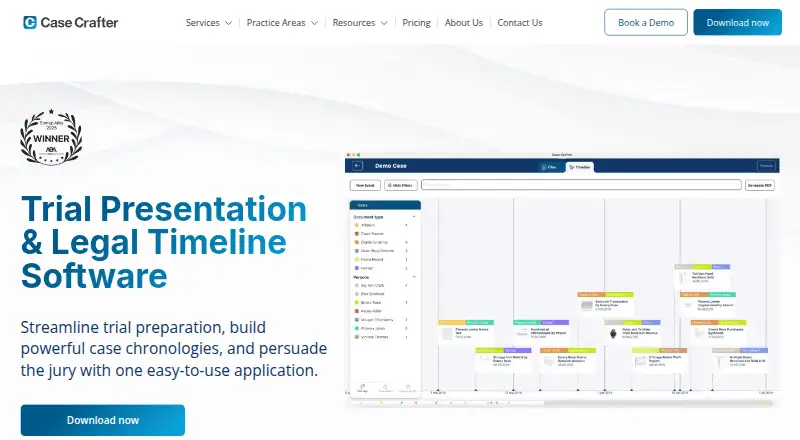
Case Crafter combines trial preparation, legal timelines, and courtroom presentation in an application for attorneys. Users can import PDFs, images, video, and audio, then highlight, annotate, and tag case material. Its interactive chronology brings case events together with evidence and testimony. During presentation mode, notes, search, and notifications remain on the user's screen while evidence is shown in court. A compare view places two documents side by side during review, in timeline events, and in presentation mode. Imported documents are OCRed and indexed for full-text search; scanned PDFs are recognized on the device without being uploaded for reading. Cases can be stored locally for offline use or synced to the cloud and shared with invited team members. The privacy policy describes encryption in transit and at rest, client-side file encryption before upload, and mandatory SMS multi-factor authentication. Case Crafter is available for iOS, macOS, and Windows. It has no free plan and offers a 7-day trial. Annual plans are $50 a month for Basic, $62 a month for Pro, and $75 a month for Unlimited, billed yearly; monthly plans are $99.00, $129.00, and $149 a month, respectively.
Good
- Imports PDF, image, video, and audio files.
- Interactive chronology combines events and evidence.
- Scanned PDFs are recognized on-device.
- Cases can be stored locally for offline use.
- Cloud files are encrypted client-side before upload.
Watch out
- No free plan is listed.
- Basic includes 10 active cases.
- Pro includes 25 active cases.
- Technical support hours exclude holidays.
Who it suits
Case Crafter is designed for trial attorneys who need document review, legal timelines, and courtroom presentation in one application. Its plan limits may suit solo practitioners, firms, or academic users with different active-case needs.
Verdict
Case Crafter combines case review, chronology building, and courtroom presentation, with offline storage and cloud collaboration options. Compare the active-case limits and billing terms before choosing a plan.
Plans and prices
From Case Crafter's own pricing page, checked 30 Sep 2026.
| Plan | Price | What it gives you |
|---|---|---|
| Basic Plan (annual) | $50 a month | 10 Active Cases · Direct presentation with no restrictions · E-mail support · $599/ yearly |
| Pro Plan (annual) | $62 a month | 25 Active Cases · Direct presentation with no restrictions · E-mail support · $749/ yearly |
| Unlimited Plan (annual) | $75 a month | Unlimited Active Cases · Direct presentation with no restrictions · Phone and E-mail support · $899/ yearly |
| Basic Plan (monthly) | $99 a month | 10 Active Cases · Direct presentation with no restrictions · E-mail support |
| Pro Plan (monthly) | $129 a month | 25 Active Cases · Direct presentation with no restrictions · E-mail support |
| Unlimited Plan (monthly) | $149 a month | Unlimited Active Cases · Direct presentation with no restrictions · Phone and E-mail support |
| Enterprise Plan | Priced on request | Customized plan · Consolidated billing · Volume discounts · Branding · Custom integrations |
The facts
Each one read from Case Crafter's own pages, with the date it was checked.
The company
- Company history
- The maker's timeline says Case Crafter launched in 2024 as a multi-platform application for case review, legal timelines, and trial presentation.checked 30 Sep 2026
- Headquarters
- Kongshavn, Norwaychecked 28 Sep 2026
What it does
- Compare view
- Compare view places two documents side by side in file review, timeline events, and presentation mode.checked 30 Sep 2026
- Document review
- Users can import case documents, highlight and annotate details, and tag evidence for organization.checked 30 Sep 2026
- Integrations and service providers
- The privacy policy names AWS, Sentry.io, Mixpanel, Customer.io, Pipedrive, Stripe, and Apple as service providers for infrastructure, monitoring, analytics, communications, CRM, or payments.checked 30 Sep 2026
- Intended users
- The maker describes Case Crafter as trial presentation and legal timeline software built for trial attorneys and says its plans serve solo practitioners, large firms, and academic users.checked 30 Sep 2026
- Offline and cloud
- Cases can be stored locally for offline use or synced to the cloud across devices and shared with invited team members.checked 30 Sep 2026
- Presentation
- Presentation mode keeps notes, search, and notifications on the user's screen while showing evidence to the courtroom.checked 30 Sep 2026
- Product
- Case Crafter combines trial preparation, legal timelines, and courtroom presentation in one application for attorneys.checked 30 Sep 2026
- Search and OCR
- Imported documents are OCRed and indexed for full-text search, and the homepage says scanned PDFs are recognized on the device without being uploaded for reading.checked 30 Sep 2026
- Security
- The privacy policy says cloud data is encrypted in transit and at rest, files are encrypted client-side before upload, and SMS multi-factor authentication is mandatory.checked 30 Sep 2026
- Support
- Technical support is provided during the subscription term, Monday through Friday excluding holidays, from 9 a.m. to 4 p.m. CET, with best efforts outside those hours.checked 30 Sep 2026
- Supported media
- Users can import PDFs, images, video, and audio files into a case.checked 30 Sep 2026
- Timelines
- The software creates an interactive chronology of case events and displays evidence, testimony, and events together.checked 30 Sep 2026
Money
- Plan limits
- The Basic plan includes 10 active cases, the Pro plan 25, and the Unlimited plan unlimited active cases.checked 30 Sep 2026
The full review of Case Crafter
Case Crafter is a trial-preparation application for attorneys who need to review evidence, build legal chronologies and present material in court. It suits solo practitioners and teams that want offline case access as well as cloud collaboration, though active-case caps make plan choice important.
Overview
Case Crafter brings document review, chronology building and courtroom presentation into one application. It launched in 2024 and runs on iOS, macOS and Windows, giving attorneys working across those platforms a common tool for case preparation.
Its strongest practical idea is continuity: evidence can be annotated, placed alongside case events, and shown in presentation mode without switching to a separate presentation tool. That breadth is useful for trial work, but buyers should weigh the active-case limits and the annual commitment against their caseload.
Key features
Review and organize evidence
Users can import PDFs, images, video and audio, then highlight, annotate and tag evidence. OCR and full-text indexing make imported documents searchable; scanned PDFs are recognized on-device without being uploaded for reading. That combination should help teams locate material across mixed case files, while the range of supported media keeps evidence in one case workspace.
Build and present the case
The interactive chronology brings events, testimony and evidence together. Compare view places two documents side by side during file review, timeline work and presentation, a useful way to examine competing materials without losing the case context. Presentation mode keeps notes, search and notifications on the user's screen while evidence is shown to the courtroom; every listed plan includes direct presentation without restrictions.
Work offline or with a team
Cases can be stored locally for offline use or synced to the cloud across devices and shared with invited team members. The privacy policy says cloud data is encrypted in transit and at rest, files are encrypted client-side before upload, and SMS multi-factor authentication is mandatory. Cloud operations use named providers including AWS, Sentry.io, Mixpanel, Customer.io, Pipedrive, Stripe and Apple, so firms should consider those service relationships alongside their own security requirements.
Technical support runs Monday through Friday, excluding holidays, from 9 a.m. to 4 p.m. CET during the subscription term, with best efforts outside those hours. Basic and Pro include email support; Unlimited includes phone and email support.
Pricing
There is no free plan, but Case Crafter offers a 7-day trial. All annual plans are billed yearly and cost less per month than their monthly counterparts, in exchange for an upfront annual payment:
- Basic Plan (annual): $50 a month (billed $599/ yearly), with 10 active cases, unrestricted direct presentation and email support. It is the entry option for solo attorneys or small caseloads, but the cap may be restrictive as work grows.
- Pro Plan (annual): $62 a month (billed $749/ yearly), with 25 active cases, unrestricted direct presentation and email support. The extra case capacity suits a busier practice without paying for unlimited cases.
- Unlimited Plan (annual): $75 a month (billed $899/ yearly), with unlimited active cases, unrestricted direct presentation, and phone and email support. It is the clearest fit for high-volume work or users who value phone support.
Monthly billing keeps the same case caps and presentation terms but costs more: Basic is $99 a month for 10 active cases, Pro is $129 a month for 25, and Unlimited is $149 a month for unlimited active cases. Each includes email support, with phone support also included on Unlimited. The monthly option avoids a yearly billing commitment, but the higher rates add up quickly.
Enterprise Plan has custom pricing and offers a customized plan, consolidated billing, volume discounts, branding and custom integrations. Those options target firms whose needs go beyond the fixed plans, rather than individuals looking for a published per-user rate.
Platforms
Case Crafter supports iOS, macOS and Windows. Full offline access is a notable advantage for work away from a reliable connection, while cloud sync provides a route to sharing cases across devices and with invited colleagues.
Who it's for
Solo practitioners can start with Basic if 10 active cases are enough; firms handling more concurrent matters may prefer Pro or Unlimited. Academic users are also among the audiences the maker says its plans serve. Teams that need a custom integration, branding or consolidated billing should consider Enterprise. The product is less compelling for anyone seeking a free ongoing tier, and the annual plans are a poor fit for buyers unwilling to commit a year upfront.
Pros and cons
- Pros: Review, chronology and courtroom presentation are combined, reducing the need to move between separate tools for those tasks.
- Pros: On-device OCR, full-text search, annotations and support for documents, images, video and audio help organize and retrieve varied evidence.
- Pros: Full offline access and optional cloud sharing cover both disconnected work and team collaboration.
- Cons: There is no free plan, and the trial lasts only 7 days, leaving little time to evaluate a full case workflow.
- Cons: Basic and Pro cap active cases at 10 and 25 respectively; practices that exceed those ceilings need Unlimited or a custom Enterprise plan.
- Cons: Monthly pricing is substantially higher than the annual monthly-equivalent rates, while annual billing requires payment for the year.
Alternatives
For a broader category comparison, see Legal Trial Presentation Software.
- eTrialToolkit is worth considering if a free license for judges and court registrars or self-hosted and web platforms matter more than Case Crafter's iOS, macOS and Windows coverage.
- TrialPad suits iOS and macOS users who want TrialPad alongside TranscriptPad, DocReviewPad, TimelinePad and ExhibitsPad in one Solo Litigator plan.
- LIT SUITE is an option for iOS and macOS users who want five litigation apps and a free-plan option.
- OnCue is a Windows-only alternative for firms able to meet its 100-license minimum and annual commitment.
- AgileLaw may suit teams needing on-demand depositions and a platform spanning Android, iOS, macOS, web and Windows.
- InTrial is another paid option for iOS, web and Windows.
- Lexel is worth a look for teams seeking a free-plan option across iOS, web and self-hosted platforms.
- TrialView is another paid, web-based option.
Verdict
Case Crafter is a strong fit for trial attorneys who want evidence review, interactive timelines and courtroom presentation in one cross-platform tool, with offline use and optional cloud collaboration. Its main trade-offs are the lack of a free plan, higher monthly rates and active-case ceilings on the lower tiers. Choose it if its integrated workflow fits your practice; look elsewhere if you need a free ongoing plan, a different platform mix or less restrictive entry-level capacity.
Alternatives to Case Crafter
- 1

AgileLaw
Free planAndroidiOSWebLinux8.1From $200 a month - 2
Lexel
Free planAndroidiOSWebSelf-hosted7.9Free plan - 3

Exhibit Presenter Plus
Free planWindows7.2From $249 a year - 4
Nextpoint
AndroidiOSWebAPI7.1 - 5
Visiodocs
Free planWebmacOSWindows6.9From €107 a month - 6

eTrialToolkit
Free planWebSelf-hosted6.8Free plan