
AgileLaw
AgileLaw manages litigation exhibits across witness preparation, depositions, briefing, trial, and arbitration.
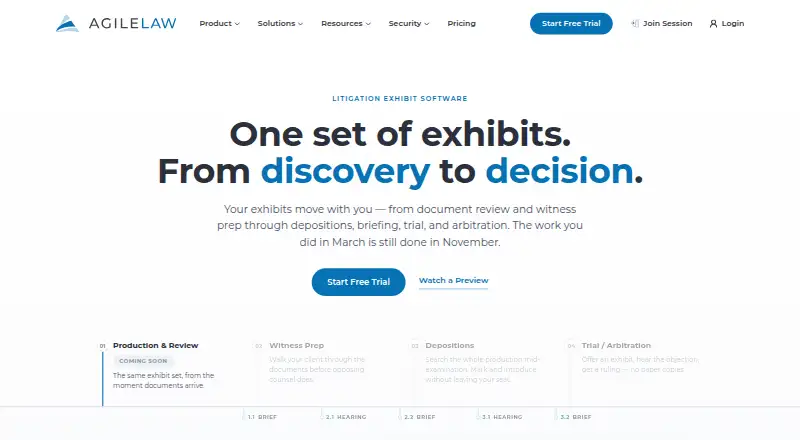
What AgileLaw is
AgileLaw manages litigation exhibits across witness preparation, depositions, briefing, trial, and arbitration. Its repository supports full-text keyword search and real-time exhibit sharing with proceeding participants. Supported files include PDFs, TIFFs, images, Word and PowerPoint documents, video, audio, and Excel files that can be viewed in a built-in spreadsheet viewer; uploads can be up to 1 GB. AgileLaw integrates with Relativity, Clio, Box, and Dropbox. Its Microsoft Word add-in creates exhibit citations, an index, and a cover sheet, and works on Windows, Mac, and Word for the web. The product is listed for Android, iOS, macOS, web, and Windows, and its FAQ describes browser and tablet access without installing software on those devices. Starter costs $195 per host session. Essentials costs $200 a month and Advantage costs $500 a month; Enterprise pricing is custom. The homepage labels Production & Review as “Coming Soon.”
Good
- Search spans the exhibit repository.
- Exhibits can be shared with proceeding participants in real time.
- Integrates with Relativity, Clio, Box, and Dropbox.
- The Word add-in generates citations, an index, and a cover sheet.
Watch out
- Starter costs $195 per host session.
- Offline access is not available.
- Production & Review is marked “Coming Soon.”
Who it suits
AgileLaw suits solo attorneys, law firms, and litigation teams managing exhibits for proceedings. Its plans range from on-demand host sessions to monthly options for teams needing more sessions and active cases.
Verdict
AgileLaw combines exhibit organization, sharing, and citation tools for litigation proceedings. Consider the per-session Starter option or monthly plans, and note that Production & Review is not yet available.
Plans and prices
From AgileLaw's own pricing page, checked 15 Oct 2026.
| Plan | Price | What it gives you |
|---|---|---|
| Starter | Free | $195 per Host session · 1 active case · 1 user · 5 GB storage · unlimited participant sessions · pay per Host session |
| Essentials | $200 a month | 5 Host sessions/month · 10 active cases · 5 monthly active host users · 50 GB storage · 14-day trial · billed month-to-month |
| Advantage | $500 a month | 20 Host sessions/month · 30 active cases · 10 monthly active host users · 200 GB storage · 5 Briefs seats included · billed month-to-month |
| Enterprise | Priced on request | custom sessions · custom user limits · custom storage · dedicated account manager · SSO · SOC 2 report available · HIPAA compliance · Get a Quote |
The facts
Each one read from AgileLaw's own pages, with the date it was checked.
What it does
- Access controls
- The security page describes role-based permissions, audit trails, and logical isolation of each firm's data from other customers.checked 2 Oct 2026
- Advanced file support
- AgileLaw supports PDFs, TIFFs, images, Word, PowerPoint, video and audio files.checked 15 Oct 2026
- Arbitration workflow
- In arbitrations, each side can introduce exhibits from its own private repository.checked 15 Oct 2026
- Availability commitment
- The security page describes documented 99.9% uptime SLA commitments and annual independent SOC 2 audits.checked 15 Oct 2026
- Briefs Word add-in
- AgileLaw for Microsoft Word automates exhibit citations, renumbering references and updating attachments when exhibits change.checked 15 Oct 2026
- Cancellation terms
- The FAQ says monthly and annual plans can be canceled at any time without further billing after the subscription ends.checked 15 Oct 2026
- Compliance
- AgileLaw describes itself as HIPAA compliant and GDPR ready, and says its current audit report is available to qualified prospects under NDA.checked 2 Oct 2026
- Deposition workflow
- Counsel can upload, organize, annotate and reveal exhibits, assign participant roles, direct the witness to pages and add exhibit stickers.checked 15 Oct 2026
- Documentation and support
- Official resources include a searchable knowledge base, short training videos, chat and email support, with phone support on higher tiers.checked 15 Oct 2026
- Exhibit workspace
- The product lets teams upload documents, images, video, presentations and other case material into an organized workspace.checked 15 Oct 2026
- File size
- The FAQ says users can upload files up to 1 GB.checked 2 Oct 2026
- File-size limit
- The FAQ says individual files can be uploaded at up to 1 GB.checked 15 Oct 2026
- File support
- Supported files include PDFs, TIFFs, images, Word, PowerPoint, video, audio, and Excel files viewable in a built-in spreadsheet viewer.checked 2 Oct 2026
- Google Play data disclosure
- Google Play says the app may share personal information and app activity, encrypts data in transit and does not allow data deletion.checked 15 Oct 2026
- Independent feature description
- Slashdot describes AgileLaw as supporting web, iPad, Android and Surface access, rapid exhibit locating and sharing, remote depositions, non-PDF exhibits and cost-allocation statements.checked 15 Oct 2026
- Integrations
- The FAQ names Relativity, Clio, Box and Dropbox as integrations.checked 15 Oct 2026
- Intended users
- AgileLaw says it serves firms of all sizes, from solo attorneys to AmLaw 200 firms, as well as litigation teams handling proceedings.checked 2 Oct 2026
- Keyword search
- The service provides keyword searching across exhibit sets, including Boolean search on the Advantage plan.checked 15 Oct 2026
The company
- Company founding
- LinkedIn lists AgileLaw as founded in 2012.checked 15 Oct 2026
- Company profile
- LinkedIn lists AgileLaw as a privately held legal-services company with 2–10 employees headquartered in Austin, Texas.checked 15 Oct 2026
- Headquarters
- Austin, Texas, United Stateschecked 28 Sep 2026
Where it runs
- Device support
- The FAQ lists Chrome, Safari, Firefox, and Edge, plus iPad, Android, Surface, and Kindle Fire tablets, with no software installation required on those devices.checked 2 Oct 2026
- Google Play app
- The Android app lets witnesses and participants join depositions, receive final exhibit PDFs, annotate when requested and follow the witness’s page.checked 15 Oct 2026
Money
- Independent price listing
- Slashdot’s software catalog lists AgileLaw at $250 per month.checked 15 Oct 2026
The full review of AgileLaw
AgileLaw is litigation exhibit software for organizing and presenting evidence across depositions, trials, and other proceedings. It is best suited to legal teams that need shared, searchable exhibits and a Word-based citation workflow. Its broad file support and session-based entry option are useful, but monthly quotas and no offline access limit its appeal.
Overview
AgileLaw carries exhibits from witness preparation through depositions, briefing, trial, and arbitration. Full-text repository search and real-time sharing give teams a common way to find and present material. Exhibit management, annotation, and video playback cover central presentation tasks, though work depends on an online connection: offline access is not offered. Production & Review is marked “Coming Soon,” so it should not be part of a buying decision today.
Key features
Its file range is a practical strength: PDFs, TIFFs, images, Word and PowerPoint files, video, audio, and Excel files are supported, with spreadsheets viewable in a built-in viewer. Uploads can reach 1 GB. The Microsoft Word add-in generates exhibit citations, an index, and a cover sheet, and works with Word on Windows, Mac, and the web. Integrations with Relativity, Clio, Box, and Dropbox may help firms fit exhibit work into existing services.
AgileLaw says documents are encrypted at rest with AES-256 and in transit with TLS. Its security measures also include role-based permissions, audit trails, and logical isolation between firms' data; it reports SOC 2 Type II certification, HIPAA compliance, and GDPR readiness. Qualified prospects can review its current audit report under NDA.
Browser support includes Chrome, Safari, Firefox, and Edge. The FAQ also identifies iPad, Android, Surface, and Kindle Fire tablets as supported without software installation. Support includes a self-serve knowledge base, recorded training, tutorials, and chat or email; Advantage and Enterprise add phone support.
Pricing
AgileLaw is paid, with no free plan, and offers a 14-day trial. The Advantage trial continues until the first hosted session, and a free credit covers one host session. That makes the trial relevant to teams evaluating Advantage, but it is not a substitute for an ongoing free tier.
- Starter — $195, paid once: $195 per host session, on-demand depositions, one monthly active host, 5 GB storage, and one active case. It avoids a recurring bill and suits occasional hosts, but the single-host, single-case, and storage limits constrain sustained team use.
- Essentials — $200 a month: five sessions a month, unlimited participants, 10 active cases, five monthly active hosts, and 50 GB storage. It fits a small team with regular proceedings; the session quota is the key trade-off.
- Advantage — $500 a month: ten sessions a month, unlimited participants, 30 active cases, 10 monthly active hosts, and 200 GB storage. The larger case, host, and storage allowances suit busier teams, but the higher recurring cost is hard to justify for occasional use.
- Enterprise — custom pricing: a custom package with custom storage and active cases and unlimited participants. It is the plan for firms whose needs exceed the fixed packages, though it requires a tailored quote.
Platforms
AgileLaw supports Android, iOS, macOS, web, and Windows. Its tablet support and browser access reduce installation needs on supported devices, but the absence of offline access remains a meaningful constraint for proceedings where connectivity is uncertain.
Who it's for
AgileLaw says it serves firms from solo attorneys to AmLaw 200 firms, as well as litigation teams handling proceedings. The per-session Starter plan is the clearest fit for sporadic deposition work; Essentials and Advantage make more sense when multiple hosts and active cases justify a monthly commitment. Firms that require offline presentation or Production & Review now should look elsewhere.
Pros and cons
- Pro: Search, real-time sharing, annotation, and video playback bring useful exhibit tasks together for teams presenting evidence.
- Pro: Broad file support, 1 GB uploads, and the Word add-in cover varied evidence and common citation materials.
- Pro: Multiple security controls and reported SOC 2 Type II certification provide concrete safeguards for sensitive case material.
- Con: There is no offline access, leaving teams dependent on connectivity during proceedings.
- Con: Fixed monthly plans cap sessions, hosts, cases, and storage; frequent users may need the more expensive Advantage tier or custom Enterprise pricing.
- Con: Production & Review is not yet available, so teams needing it immediately cannot rely on AgileLaw for that workflow.
Alternatives
For a broader comparison, see Legal Trial Presentation Software and Legal Deposition Software.
- Visiodocs is worth considering if a free reviewer plan matters: it includes 1 GB storage, 25 documents total, unlimited projects, review and annotation, and OCR.
- Lexel offers a free basic plan with one user, 3 TB storage, and support for files up to 100 GB; consider it if those limits and its iOS, web, or self-hosted platforms fit your needs.
- eTrialToolkit offers free licenses for judges and court registrars; its SaaS software and hosting plan has no data fees or surcharges.
- Exhibit Presenter Plus has a free demonstration version and a $99 one-time paid plan, making it an option for Windows users comparing a lower upfront price.
- LiveLitigation may suit teams that prioritize offline work: its Local Only plan is $399/year and includes unlimited local sessions, detailed usage reports, full offline access, and pay-as-you-go remote usage.
- Case Crafter is another paid option for readers comparing litigation presentation software.
- InTrial is another paid option for readers comparing litigation software across iOS, web, and Windows.
- LIT SUITE is another option for readers comparing litigation tools on iOS and macOS.
Verdict
AgileLaw is a strong fit for litigation teams that need searchable, shareable exhibits, varied file support, and a Word citation workflow across proceedings. Its strongest reason to choose it is the combination of evidence handling and collaborative presentation; its strongest reason to look elsewhere is the lack of offline access, compounded by capped monthly sessions and hosts. Choose Starter for occasional sessions, or a monthly tier when the included capacity matches your workload.
Alternatives to AgileLaw
- 1
DepoFlow
Free planWebmacOSWindows7.6$99 one-time - 2
MyVeritext
Free planAndroidiOSWeb7.2Free plan - 3

DepoDash
Free planWebmacOSWindows7.1Free plan - 4
eDepoze
Free planiOSWeb7.0$50 one-time - 5

Filevine
Free planWebAPI6.8Free plan - 6

LiveLitigation
AndroidiOSWebmacOS6.7From $399 a year