Camo Studio
Camo Studio uses cameras you already own as video sources for meetings, streaming, and recording.
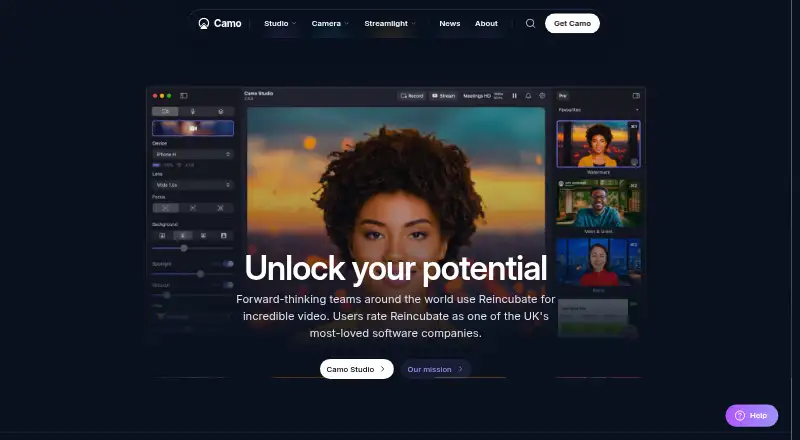
What Camo Studio is
Camo Studio uses cameras you already own as video sources for meetings, streaming, and recording. Supported sources include phones, built-in cameras, webcams, DSLRs, action cameras, and Continuity Camera connected to a computer. Image tools include background softening or replacement, lighting correction, LUTs, framing, and AI-powered image analysis. A scene editor lets users combine text, logos, and overlays or choose default scenes. Camo works as a virtual camera in over 40 apps, including Zoom, Google Meet, Microsoft Teams, Slack, Discord, and OBS. Camo Studio runs on macOS 12.3 or later and Windows 10 or later; Camo Camera runs on iOS 15 or later and Android 7.0 or later. The free plan supports up to 720p, while Pro supports resolutions up to and including 4K. Camo says video and audio processing occurs in device memory and that this media does not leave users’ devices. Its privacy information also says it may send device metadata; some optional features may process necessary face or object data on-device.
Good
- Supports phones, webcams, DSLRs, and action cameras.
- Scene editor combines text, logos, and overlays.
- Works as a virtual camera in over 40 apps.
- Free plan supports up to 720p without a watermark.
Watch out
- Free plan resolution is capped at 720p.
- Studio requires macOS 12.3 or Windows 10 or later.
- Some features are marked as coming soon on Android or Windows.
Who it suits
Camo may suit people who want to use an existing camera for meetings, streams, or recordings. The site names sales and marketing, education, streaming, content creation, and enterprise among its use cases.
Verdict
Camo Studio offers camera inputs, image controls, and scene composition for video apps. The free plan is limited to 720p; Pro supports up to and including 4K, though its price is not listed here.
Plans and prices
From Camo Studio's own pricing page, checked 14 Oct 2026.
| Plan | Price | What it gives you |
|---|---|---|
| Camo | Free | 720p and below · standard features |
| Camo Pro monthly | $9.99 a month | pro features · activate on up to 2 computers · monthly |
| Camo Pro annual | $49.99 a year | up to 4K · pro features · activate on up to 2 computers · 30-day money-back guarantee · 12-month license |
| Camo Pro lifetime | $99.99, paid once | pro features · lifetime license |
| Camo Pro | — | Up to and including 4K (UHD) · Activate on up to 2 computers · 30-day money back guarantee · Monthly pricing is selectable on the pricing page; checkout did not display a price. |
| Camo Pro | — | Up to and including 4K (UHD) · Activate on up to 2 computers · 30-day money back guarantee · Annual pricing is selectable on the pricing page; checkout did not display a price. |
| Camo Pro lifetime license | — | Lifetime license · Lifetime license offered; the opened checkout page did not display a price. |
| Camo Enterprise | Priced on request | user management · dedicated account manager · priority expert support |
The facts
Each one read from Camo Studio's own pages, with the date it was checked.
Where it runs
- Automatic app integration
- Camo Studio can install integrations for apps that do not automatically expose Camo Camera, while major modern macOS and Windows apps generally work after restarting.checked 14 Oct 2026
- Limit: Android disconnections
- A Google Play reviewer said the app sometimes connected and then disconnected across multiple laptops and Android phones, incorrectly citing a USB hub.checked 14 Oct 2026
- Notable news: Apple lawsuit
- 9to5Mac reported on January 27, 2026 that Reincubate sued Apple, alleging Continuity Camera copied Camo technology; Apple denied the allegations.checked 14 Oct 2026
What it does
- Background effects
- Camo provides portrait bokeh, privacy blur, virtual replacement, physical green-screen controls and background removal.checked 14 Oct 2026
- Camera compatibility
- Camo supports phones, built-in cameras, webcams, DSLRs, action cameras, and Continuity Camera connected to a computer.checked 30 Sep 2026
- Compatibility limits
- USB webcams and DSLRs may lack audio pass-through, advanced controls and stabilization, and macOS background effects are limited to some devices.checked 14 Oct 2026
- Documentation and support
- The help center organizes tutorials, release notes, FAQs and sample code by product, and support targets replies within one working day during weekday GMT office hours.checked 14 Oct 2026
- Enterprise SDK
- The Camo SDK is listed as Enterprise only and can integrate Camo functionality into an app or platform for iOS and Android devices.checked 30 Sep 2026
- Filters and LUTs
- Users can apply built-in creative or calibration LUTs and import Cube, 3DL or LUT presets.checked 14 Oct 2026
- Framing
- Auto framing uses face tracking to keep the subject centered, with an option that also maintains face size through auto zoom.checked 14 Oct 2026
- Image tools
- Features include background softening or replacement, lighting correction, LUTs, framing, and AI-powered image analysis.checked 30 Sep 2026
- Integrations
- Camo lists compatibility with more than 40 apps, including Zoom, Google Meet, Microsoft Teams, FaceTime, browsers, Cisco Webex, Slack, Discord, WhatsApp and OBS.checked 14 Oct 2026
- Intended users
- The site names sales and marketing, education, streaming, content creation, and enterprise among Camo’s use cases.checked 30 Sep 2026
- Lighting controls
- Spotlight brightens the subject relative to the background, while exposure, ISO, white balance, brightness, contrast and related controls provide manual tuning.checked 14 Oct 2026
- Limit: connection failures
- A Trustpilot reviewer reported that Camo increasingly failed to detect an iPhone when streaming to Windows.checked 14 Oct 2026
- Limit: iPad audio and plugin gaps
- App Store feedback requested multiple audio inputs, mono recording and community plugins, with the developer confirming mono audio was not supported.checked 14 Oct 2026
- Limit: iPad recording failures
- An App Store reviewer reported lost iPad recordings when Camo failed to save files and provided no retry option.checked 14 Oct 2026
- Limit: missing audio at launch
- Macworld's review identified the lack of audio support as a limitation at the time of testing.checked 14 Oct 2026
- Notable release
- Camo Studio 2.9.2.25892 for Windows was released October 8, 2026 with improved performance under load and fixes for dropped frames and resource warnings.checked 14 Oct 2026
The company
- Company facts
- LinkedIn lists Reincubate as a privately held software company founded in 2008, headquartered in London and employing 11–50 people.checked 14 Oct 2026
- Company identity
- The Camo software is operated by Reincubate Ltd, registered in England and Wales under company number 5189175.checked 14 Oct 2026
- Founded
- 2008checked 23 Sep 2026
- Headquarters
- London, Englandchecked 23 Sep 2026
Money
- Limit: subscription cost
- Macworld criticized the recurring price as steep and listed $40 per year as a major drawback in its 2020 review.checked 14 Oct 2026
The full review of Camo Studio
Overview
Camo Studio makes cameras you already own available as video sources for meetings, streaming, and recording. The desktop app works with the companion Camo Camera app on iOS and Android, and supports built-in cameras, webcams, DSLRs, action cameras, and Continuity Camera connected to a computer. Its image controls and scene tools let users adjust the picture and arrange overlays before sending the result to other apps.
Camo functions as a virtual camera in more than 40 apps. Named integrations include Zoom, Google Meet, Microsoft Teams, Slack, Discord, and OBS. For a wider view of this category, browse our guides to Virtual Camera Software and Webcam Software.
Key features
Picture controls and scene composition
Available image tools include background softening or replacement, lighting correction, LUTs, framing, and AI-powered image analysis. A built-in scene editor combines text, logos, and other overlay elements. Users can make their own scenes or select defaults. Scene composition, background effects, and audio routing are listed capabilities.
Virtual camera and privacy
Camo presents its camera feed to supported apps as a virtual camera, so it can fit video-call, streaming, and recording workflows. The company says video and audio processing occurs in memory on the user’s device and that those media do not leave the device. Its privacy information also says Camo may send device metadata. Optional features such as Snap Lenses or Portrait Mode may process the face or object data they need on-device.
Enterprise SDK
The Camo SDK is available only to Enterprise customers. It can add Camo functionality to an app or platform for iOS and Android devices. Enterprise also includes user management tools, a dedicated account manager, and priority expert support.
Pricing
Camo uses a freemium model. The free Camo plan costs nothing and supports resolutions up to 720p (HD), with no watermark, ads, or spam. Camo Pro supports resolutions up to and including 4K (UHD), activation on up to two computers, a 30-day money-back guarantee, and priority support. The listed paid starting price is $9.99/mo, but the Pro price was not displayed at checkout; annual pricing can be selected on the pricing page.
Camo Enterprise is quote-based, with pricing not listed. A Pro lifetime license is offered, but its price was also not displayed at checkout. The plan comparison identifies the lifetime license option without publishing a price.
Platforms
Camo Studio runs on macOS 12.3 or later and Windows 10 or later. Camo Camera runs on iOS 15 or later and Android 7.0 or later. The broader platform listing includes Android, iOS, macOS, and Windows, while the supported-platforms listing for the desktop product names macOS and Windows. Some listed features are marked as coming soon on Android or Windows.
Who it's for
Camo’s stated use cases include sales and marketing, education, streaming, content creation, and enterprise. It may suit people who want to use an existing phone or camera with desktop video apps, or who need image adjustments and overlays alongside a virtual-camera feed. The Enterprise SDK is aimed at organizations integrating Camo functionality into their own iOS or Android apps and platforms.
Pros and cons
- Pros: Supports several kinds of cameras and works as a virtual camera in more than 40 apps.
- Pros: Offers image adjustments, background effects, scene composition, and audio routing.
- Pros: The free plan includes up to 720p and does not add a watermark, ads, or spam.
- Cons: The listed Pro and lifetime-license checkouts did not display prices, so their costs are not specified here.
- Cons: Some features are marked as coming soon on Android or Windows.
Alternatives
For other virtual camera, webcam, streaming, and video tools, consider ManyCam, FineCam, OBS Studio, PhotoDirector, PRISM Live Studio, Webcamoid, VCam, and Streamlabs Desktop.
Verdict
Camo brings camera compatibility, picture controls, scene composition, and virtual-camera support together for desktop workflows spanning calls, streaming, and recording. The free plan provides a clear entry point at up to 720p, while Pro raises the supported resolution to 4K and Enterprise adds management and support services. Prospective paid users should note that the Pro, Enterprise, and lifetime-license prices are not fully listed in the available plan details.
Getting started
- Visit https://camo.com/.
- Install Camo Studio on macOS 12.3 or later or Windows 10 or later.
- Install Camo Camera on iOS 15 or later or Android 7.0 or later if using a phone.
- Connect a supported camera to a computer.
- Choose the free plan or review Pro and Enterprise options.
- Select Camo as the virtual camera in a supported app.
Limits worth knowing
The free plan supports up to 720p. Pro supports up to and including 4K and can be activated on up to two computers.
Questions
Is Camo Studio free?
Yes. The Camo plan is free and includes 720p and below, without a watermark, ads, or spam.
How much does Camo Pro cost?
The Pro plan supports up to and including 4K and activation on up to two computers.
Which platforms does Camo support?
Camo Studio runs on macOS 12.3 or later and Windows 10 or later. Camo Camera runs on iOS 15 or later and Android 7.0 or later.
Which apps work with Camo?
Camo works as a virtual camera in over 40 apps, including Zoom, Google Meet, Microsoft Teams, Slack, Discord, and OBS.
Does Camo offer an enterprise plan?
Yes. Enterprise includes user management tools, a dedicated account manager, and priority expert support; pricing is by quote.
What does Camo say about privacy?
Camo says video and audio processing occurs in memory on users’ devices and that the media does not leave those devices. Its privacy page says device metadata may be sent, and some optional features may process necessary face or object data on-device.
Alternatives to Camo Studio
- 1
Webcamoid
Free planOpen sourceAndroidAPILinuxmacOS8.2$1.99 one-time - 2

FineCam
Free planAndroidiOSmacOSWindows8.0From $29.99 a year - 3
mimoLive
Free planiOSWebAPImacOS7.9From $70 a month - 4

VCam
Free planWebmacOSSelf-hostedWindows7.8Free plan - 5

PRISM Live Studio
Free planAndroidiOSmacOSWindows7.6From $79.99 a year - 6

DeskBroadcast
Free planmacOS7.3$79 one-time