Caligare Flow Inspector
Caligare Flow Inspector monitors and analyzes NetFlow exports from existing routers, without requiring deployed probes.
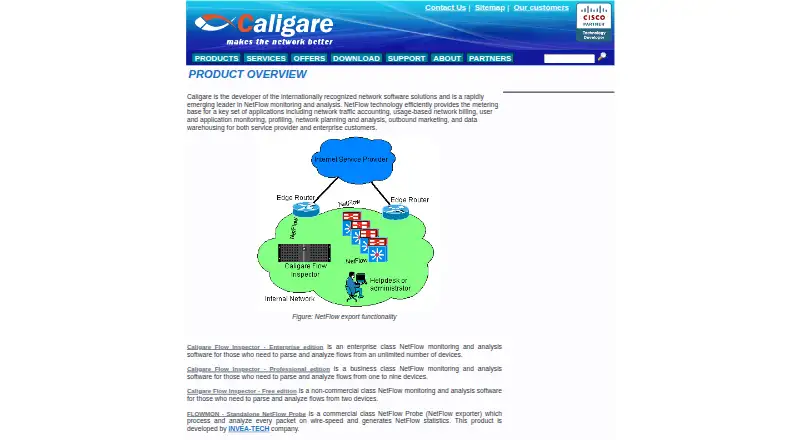
What Caligare Flow Inspector is
Caligare Flow Inspector monitors and analyzes NetFlow exports from existing routers, without requiring deployed probes. Its web-based management interface configures collectors, network devices, application groups, and anomaly detection. The software provides real-time analysis, user data tracking, and statistics for top hosts, protocols, applications, and conversations. Its free edition supports NetFlow versions 1, 5, 6, 7, and 9, as well as low-level traffic search, interface utilization maps, filtering, and forwarding. It also includes local, LDAP, or external authentication and user and group management. The free plan is for non-commercial use, supports up to two devices, retains 24 hours of history, and has a 250 flows-per-second maximum. Professional and Enterprise editions add longer historical trends, anomaly detection, unrestricted NetFlow parsing, and commercial use. A 30-day trial license can be requested by email. Linux packages are listed, and the latest version requires MySQL 5.1 or newer.
Good
- Analyzes exports from existing routers without probes.
- Free edition supports five NetFlow versions.
- Tracks hosts, protocols, applications, and conversations.
- Includes filtering, forwarding, and utilization maps.
Watch out
- Free edition is limited to non-commercial use.
- Free plan supports at most two devices.
- Free plan retains 24-hour history.
- Latest version requires MySQL 5.1 or newer.
Who it suits
It suits non-commercial users monitoring up to two devices, businesses monitoring one to nine devices, and enterprise users with unlimited devices. Linux and self-hosted deployment are listed.
Verdict
Flow Inspector combines NetFlow monitoring with a web-based interface and real-time traffic analysis. The free edition has clear device, history, and throughput limits; commercial use and longer-term analysis are listed for paid editions.
Plans and prices
From Caligare Flow Inspector's own pricing page, checked 30 Sep 2026.
| Plan | Price | What it gives you |
|---|---|---|
| Caligare Flow Inspector Free Edition | Free | Non-commercial use · maximum 2 devices · 24-hour history · 250 flows/sec maximum |
| Caligare Flow Inspector Enterprise edition | Priced on request | Unlimited monitored devices · commercial use |
| Caligare Flow Inspector Professional edition | Priced on request | 1–9 monitored devices · commercial use |
The facts
Each one read from Caligare Flow Inspector's own pages, with the date it was checked.
What it does
- Analysis
- The product provides real-time network analysis, user data tracking, and statistics for top hosts, protocols, applications, and conversations.checked 30 Sep 2026
- Audience
- Caligare describes the product editions for enterprise users with unlimited devices, businesses monitoring one to nine devices, and non-commercial users monitoring up to two devices.checked 30 Sep 2026
- Authentication
- The free edition lists local, LDAP, or external user authentication and user and group management.checked 30 Sep 2026
- Cisco compatibility
- Caligare says Flow Inspector met the requirements for inclusion in Cisco's Technology Developer Program and is distributed with a Cisco Compatible logo.checked 30 Sep 2026
- Paid edition additions
- The maker says Professional and Enterprise add longer-term historical trends, network anomaly detection, unrestricted NetFlow parsing, and commercial use.checked 30 Sep 2026
- Purpose
- Caligare Flow Inspector monitors and analyzes NetFlow exports sent by existing routers, without requiring deployed probes.checked 30 Sep 2026
- Support
- The maker says one year of technical support for the free version can be purchased online.checked 30 Sep 2026
- Threat visibility
- Caligare says the analyzer can help identify suspicious activity, denial-of-service attacks, worm-infected stations, bottlenecks, and routing trouble.checked 30 Sep 2026
- Web interface
- Its management interface is described as 100% web-based and configures collectors, network devices, application groups, and anomaly detection.checked 30 Sep 2026
The company
- Founded
- 2004checked 28 Sep 2026
- Headquarters
- Prague, Czech Republicchecked 28 Sep 2026
Money
- Free edition features
- The free edition lists NetFlow versions 1, 5, 6, 7, and 9, low-level traffic search, interface utilization, utilization maps, filtering, and forwarding.checked 30 Sep 2026
- Trial
- The download page says users can request a 30-day trial license key, which Caligare sends by email.checked 30 Sep 2026
Where it runs
- Linux requirements
- The download page lists Debian, RedHat, Fedora, SuSE, and other Linux distribution packages, and says the latest version requires MySQL 5.1 or newer.checked 30 Sep 2026
The full review of Caligare Flow Inspector
Caligare Flow Inspector is a self-hosted Linux analyzer for NetFlow exports, using the routers you already have rather than requiring separate probes. It suits network administrators who want browser-based traffic visibility and control over a small or enterprise deployment. The free edition is a sensible non-commercial starting point, but its tight device, retention, and throughput ceilings quickly matter.
Overview
Flow Inspector receives NetFlow versions 1, 5, 6, 7, and 9 from existing routers and turns them into real-time views, traffic statistics, and investigation tools. Because collection and administration run on your own Linux server, it fits organizations that prefer on-premises control and can manage the underlying host and database. Caligare, founded in 2004 and headquartered in Prague, presents the product in editions for individual non-commercial monitoring, smaller businesses, and enterprises.
The browser interface is a practical center for configuring collectors, network devices, application groups, and anomaly detection. That approach avoids deploying probes throughout the network, although it still depends on routers exporting usable flow data.
Key features
Analysis covers top hosts, protocols, applications, and conversations, alongside user data tracking and bandwidth and interface-utilization views. Low-level traffic search, filtering, forwarding, utilization maps, and real-time analysis give an administrator several ways to move from an overall traffic spike to the devices and conversations responsible.
Caligare positions the analyzer as an aid for spotting suspicious activity, denial-of-service attacks, worm-infected stations, bottlenecks, and routing trouble. These indicators can focus an investigation; they are not a substitute for diagnosing or remediating the underlying incident.
Authentication can be local, LDAP, or external, with user and group management included in the free edition. That makes the product more suitable for shared administration than a single-operator tool. Professional and Enterprise add longer-term historical trends, network anomaly detection, unrestricted NetFlow parsing, and commercial use. Those additions are significant when a 24-hour window cannot support capacity planning, incident review, or business operations.
Caligare says Flow Inspector met the requirements for Cisco's Technology Developer Program and is distributed with a Cisco Compatible logo, a useful signal for environments centered on Cisco equipment.
Pricing
Caligare Flow Inspector Free Edition — free. This is for non-commercial use, up to two devices, with 24-hour history and a maximum of 250 flows per second. It includes the core protocol support, searches, utilization views, forwarding, and authentication features. The device and throughput caps make it appropriate for a home lab or very small non-commercial network, not a growing business or sustained high-volume collector. One year of technical support for the free version can be purchased separately online.
Professional edition — custom pricing. It supports one to nine monitored devices and commercial use, while adding longer-term trends, anomaly detection, and unrestricted parsing. This is the natural tier for a small business that has outgrown the free edition's legal and capacity limits.
Enterprise edition — custom pricing. It allows unlimited monitored devices and includes the paid-edition additions. Choose it when a larger organization needs commercial deployment across an unrestricted device estate.
A 30-day trial license key can be requested; Caligare sends the key by email. That gives prospective commercial users time to assess fit before committing to custom-priced licensing.
Platforms
Flow Inspector is self-hosted and web-based on Linux. Caligare provides packages for Debian, RedHat, Fedora, SuSE, and other Linux distributions. The latest version requires MySQL 5.1 or newer, so deployment includes maintaining a compatible database as well as the collector and web service.
Who it's for
Choose it for non-commercial monitoring of one or two devices, a Linux-administered small business installation, or an enterprise that needs router-based flow analysis without installing probes. It is less suitable when you need a cloud service, broad desktop and mobile clients, or a free commercial deployment with more than two devices and more than one day's history.
Pros and cons
Pros
- Uses existing router exports, avoiding a separate probe rollout.
- Real-time analysis reaches hosts, applications, protocols, conversations, and interfaces, supporting targeted bandwidth investigations.
- Browser administration plus LDAP or external authentication and group management suit shared network operations.
- Free support for NetFlow 1, 5, 6, 7, and 9 and includes useful search, mapping, filtering, and forwarding tools.
- Paid editions add the retention and parsing capacity needed for commercial and longer-term work.
Cons
- The free edition is non-commercial, limited to two devices, retains only 24 hours, and caps intake at 250 flows per second.
- Professional and Enterprise pricing is custom, making budgeting less predictable.
- Linux and MySQL requirements place server administration on the customer.
- Threat visibility supports investigation but does not guarantee diagnosis of an attack or routing fault.
Alternatives
ntopng is a stronger alternative when you need broader platform coverage, including Windows and macOS, alongside Linux, web, API, and self-hosted options; its Community edition is free and aimed at small networks.
ManageEngine NetFlow Analyzer fits teams that want a commercial product with published interface-based tiers, including a free two-interface edition and paid monthly plans.
FlowViewer is worth considering if free Unix-server software is the priority and you are comfortable arranging hourly support separately.
Nagios XI is a better direction for broader infrastructure monitoring rather than a NetFlow-focused deployment.
ElastiFlow suits users seeking a free tier with higher stated record throughput, SNMP device coverage, dashboards, and machine-learning detections.
Riverbed Aternity is an enterprise digital-experience offering for organizations seeking that wider scope.
nfdump is the leaner choice for free, BSD-licensed Linux flow processing without stated paid plans or usage limits.
Akvorado is another free self-hosted option, developed by French ISP Free.
Browse the Network Traffic Analysis Software category for more choices.
Verdict
Caligare Flow Inspector is a good pick for Linux-based administrators who want router-fed, web-managed NetFlow analysis and can fit within the free edition's two-device, 24-hour, and 250-flows-per-second boundaries.
Alternatives to Caligare Flow Inspector
- 1

ntopng
Free planOpen sourceWebAPILinuxmacOS8.3€299.95 one-time - 2

ManageEngine NetFlow Analyzer
Free planAndroidiOSWebLinux7.1From $172 a month - 3

ElastiFlow
Free planWebAPILinuxSelf-hosted6.9Free plan - 4
FlowViewer
Free planWebLinux6.8$500 one-time - 5
SparrowIQ
AndroidiOSWebWindows6.6 - 6
Plixer Scrutinizer
WebAPISelf-hosted6.5From $12,996 a year