SparrowIQ
SparrowIQ analyzes network traffic and provides visibility alongside existing network management systems.
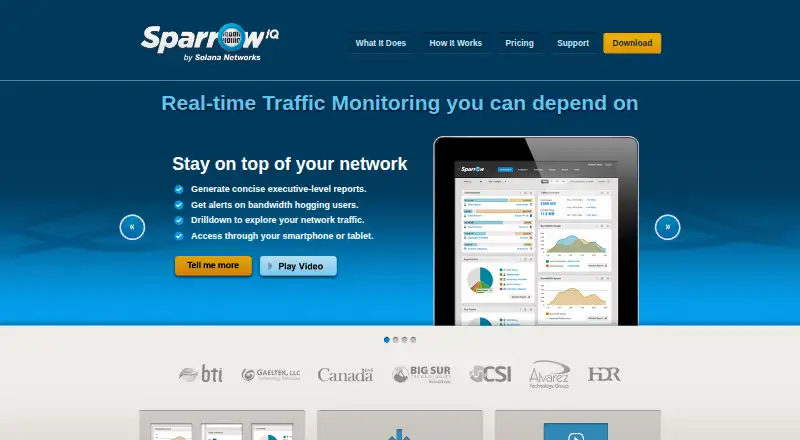
What SparrowIQ is
SparrowIQ analyzes network traffic and provides visibility alongside existing network management systems. Its auto-updating dashboard summarizes traffic, bandwidth use, applications, destinations, and timing, with interactive drilldowns. Users can configure email alerts when a user, group, or application exceeds its share of network resources. Historical reports can be generated daily, weekly, or monthly, from executive summaries to individual user activity. Monitoring uses a switch SPAN or mirror port, or a network tap. SparrowIQ examines traffic header segments and says it does not inspect payload data; analyzed information is stored in a database on the local PC. It is installed on a Windows PC, while its browser interface can be accessed on a PC, Mac, or mobile device, including remotely by connecting to the machine running SparrowIQ. The product is designed for smaller businesses with limited technical resources, time, and budget. Plans require a quote and can be billed monthly or annually; their throughput, concurrent-user, reporting, and alert limits differ. A free 15-day trial is available without a credit card.
Good
- Dashboard summarizes applications, destinations, and bandwidth use.
- Email alerts can flag resource-share exceedances.
- Reports range from executive summaries to individual activity.
- Does not inspect payload data, according to the maker.
- Trial lasts 15 days and requires no credit card.
Watch out
- Installation is on a Windows PC.
- Plan throughput, user, reporting, and alert limits vary.
Who it suits
It suits smaller businesses seeking network traffic visibility alongside existing management systems, particularly those with limited technical resources. It may also fit teams that need browser access to traffic summaries and configurable alerts.
Verdict
SparrowIQ combines traffic summaries, alerts, and historical reports with local-PC data storage. Request a quote to confirm which plan limits fit the network being monitored.
Plans and prices
From SparrowIQ's own pricing page, checked 7 Oct 2026.
| Plan | Price | What it gives you |
|---|---|---|
| SparrowIQ 15 | Priced on request | 15 Mbps throughput · 2 concurrent users · 2 months historical reporting · 7 configured alerts · 50 stored alerts · Monthly or annual subscription; quote required |
| SparrowIQ 30 | Priced on request | 30 Mbps throughput · 2 concurrent users · 3 months historical reporting · 15 configured alerts · 100 stored alerts · Monthly or annual subscription; quote required |
| SparrowIQ 30+ | Priced on request | 100 Mbps throughput · 2 concurrent users · 3 months historical reporting · 15 configured alerts · 100 stored alerts · Monthly or annual subscription; quote required |
| SparrowIQ 7 | Priced on request | 7 Mbps throughput · 1 concurrent user · 1 month historical reporting · 3 configured alerts · 30 stored alerts · Monthly or annual subscription; quote required |
The facts
Each one read from SparrowIQ's own pages, with the date it was checked.
What it does
- Alerts
- Users can configure email alerts when a user, group, or application exceeds its share of network resources.checked 7 Oct 2026
- Audience
- The product is designed for smaller businesses with limited technical resources, time, and budget.checked 7 Oct 2026
- Dashboard
- Its auto-updating dashboard summarizes traffic, bandwidth use, applications, destinations, and timing, with interactive drilldowns.checked 7 Oct 2026
- Data handling
- The product examines traffic header segments and says it does not inspect payload data; it stores analyzed information in a database on the local PC.checked 7 Oct 2026
- Deployment
- The network can be monitored through a switch SPAN or mirror port, or through a network tap.checked 7 Oct 2026
- Purpose
- SparrowIQ provides network traffic analysis and visibility alongside existing network management systems.checked 7 Oct 2026
- Reports
- It generates historical daily, weekly, or monthly reports, from executive summaries to individual user activity.checked 7 Oct 2026
- Support
- Technical support is available by email, and customers with an active maintenance package can open a support ticket.checked 7 Oct 2026
Where it runs
- Browser access
- The interface is accessed through a browser on a PC, Mac, or mobile device, including remotely by connecting to the machine where SparrowIQ is installed.checked 7 Oct 2026
- Windows requirements
- The maker describes installation on Windows PCs and lists Windows Vista, 7, 8, Server, or a virtual machine running one of those versions.checked 7 Oct 2026
The company
- Company
- Solana Networks says it was founded in 2003 and gives its address as Nepean, Ontario, Canada.checked 7 Oct 2026
- Founded
- 2003checked 28 Sep 2026
- Headquarters
- Nepean, Ontario, Canadachecked 28 Sep 2026
Money
- Trial
- The maker offers a free 15-day trial to evaluate network needs; the pricing page says no credit card is needed to try it.checked 7 Oct 2026
Alternatives to SparrowIQ
- 1

ntopng
Free planOpen sourceWebAPILinuxmacOS8.3€299.95 one-time - 2

ManageEngine NetFlow Analyzer
Free planAndroidiOSWebLinux7.1From $172 a month - 3

ElastiFlow
Free planWebAPILinuxSelf-hosted6.9Free plan - 4
FlowViewer
Free planWebLinux6.8$500 one-time - 5
Plixer Scrutinizer
WebAPISelf-hosted6.5From $12,996 a year - 6

Noction Flow Analyzer
WebAPILinuxSelf-hosted6.4From $2,990 a year