Boot-US
Boot-US is a boot manager for starting existing operating systems independently on x86 machines.
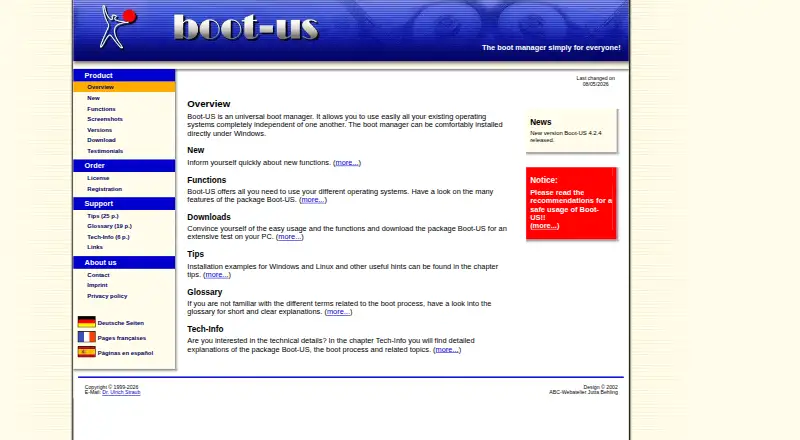
What Boot-US is
Boot-US is a boot manager for starting existing operating systems independently on x86 machines. It supports BIOS and UEFI booting and can start multiple independent Windows systems. The package includes a graphical configuration program for Windows, plus command-line versions for Windows and 64-bit Linux. Boot-US supports MBR and GPT disks of any size, and includes tools to inspect partition details, hide partitions, and back up or restore whole disks and partitions. The site lists version 4.2.4, with a 64-bit Linux command-line version and a service that restores UEFI variables when Windows starts and shuts down. SHA256 values are provided for downloads of that release. The non-licensed package is free for private PCs and public schools, and can be tried free for one month. Commercially used PCs require a license after the trial; licenses apply to a specified number of PCs. A one-PC license costs €24.50 once. The software is supplied without warranty and used at the user's own risk.
Good
- Supports BIOS and UEFI booting.
- Can boot multiple independent Windows systems.
- Works with MBR and GPT disks of any size.
- Includes partition inspection and disk backup and restore tools.
- Free for private PCs and public schools.
Watch out
- Commercial PCs require a license after the one-month trial.
- Licenses cover a specified number of PCs.
- Provided without warranty and used at the user's own risk.
Who it suits
Boot-US may suit people who need to choose among existing operating systems on an x86 PC, including users running multiple independent Windows systems. Its free non-licensed use is limited to private PCs and public schools.
Verdict
Boot-US offers boot management for BIOS and UEFI systems alongside partition and disk tools. Check the license conditions for commercial use, and note that the software is supplied without warranty.
Plans and prices
From Boot-US's own pricing page, checked 14 Oct 2026.
| Plan | Price | What it gives you |
|---|---|---|
| Private PC / public school use | Free | Private PCs and public schools · non-licensed package · free use |
| Boot-US 4.x.x · 1 PC | €24.50, paid once | 1 PC · version 4 license · one-time final price including tax and transportation |
| Boot-US 4.x.x, 1 PC | $24.50, paid once | 1 PC · Upgrade from V3: 10.50 EUR · Final price including tax and transportation |
| Boot-US 4.x.x · 5 PCs | €59.50, paid once | 5 PCs · version 4 license · one-time final price including tax and transportation |
| Boot-US 4.x.x, 5 PCs | $59.50, paid once | 5 PCs · Upgrade from V3: 19.50 EUR · School license available · Final price including tax and transportation |
| Boot-US 4.x.x · 20 PCs | €119.50, paid once | 20 PCs · version 4 license · one-time final price including tax and transportation |
| Boot-US 4.x.x, 20 PCs | $119.50, paid once | 20 PCs · Upgrade from V3: 39.50 EUR · School license available · Final price including tax and transportation |
| Boot-US 4.x.x · 100 PCs | €299.50, paid once | 100 PCs · version 4 license · one-time final price including tax and transportation |
| Boot-US 4.x.x, 100 PCs | $299.50, paid once | 100 PCs · Upgrade from V3: 79.50 EUR · School license available · Final price including tax and transportation |
The facts
Each one read from Boot-US's own pages, with the date it was checked.
What it does
- Backup and restore
- Boot-US includes backup and restoration of complete disks and individual partitions.checked 14 Oct 2026
- Boot support
- Boot-US supports BIOS and UEFI booting on x86 machines.checked 3 Oct 2026
- Commercial-use rule
- Commercial use after the one-month trial requires a per-PC license, while private-PC and public-school use can remain free.checked 14 Oct 2026
- Configuration
- The package includes a graphical Windows configuration program and command-line versions for Windows and 64-bit Linux.checked 3 Oct 2026
- Configuration interfaces
- The package contains a Windows graphical configurator plus command-line tools for Windows and 64-bit Linux.checked 14 Oct 2026
- Configuration storage
- The Windows configurator stores settings in an INI file rather than the registry, except that an optional configuration password may be stored in the registry.checked 14 Oct 2026
- Developer interface
- The command-line executable exposes commands for boot-manager operations, partition changes, UEFI variables, encryption, rebooting and status reporting.checked 14 Oct 2026
- Disk formats
- Boot-US supports disks of any size using MBR and GPT.checked 3 Oct 2026
- Disk partitioning
- The product supports MBR and GPT disks of any size.checked 14 Oct 2026
- Documentation depth
- Documentation includes a 187-page manual, context-sensitive online help, installation guidance, tips, glossary and technical background chapters.checked 14 Oct 2026
- Download contents
- The download page provides 32-bit and 64-bit Windows installers, a DOS/Windows/Linux64 command-line archive, a Boot-US service archive, a PDF manual and SHA-256 files.checked 14 Oct 2026
- Download verification
- The download page provides SHA256 values for Boot-US version 4.2.4.checked 3 Oct 2026
- Extensibility
- The manual documents example INI files for the command-line tool and boot-manager setup, but the maker does not publish an SDK or web API.checked 14 Oct 2026
- Independent assessment
- A third-party boot-manager survey rated Boot-US “Excellent” in its comparison of 50 boot managers.checked 14 Oct 2026
- Independent complaint
- A Mobile01 forum user reported that partition hiding did not behave as expected when attempting to install a fourth operating system and ultimately could not boot it.checked 14 Oct 2026
- Independent use case
- A ComputerBase forum participant recommended Boot-US for setting up Windows 8.1 and Windows 10 on one SSD and described it as easy to use.checked 14 Oct 2026
- Independent version history
- The survey recorded Boot-US shareware releases from version 2.18 through 4.1.0 and separate DOS command-line releases through 4.1.0.checked 14 Oct 2026
- Latest release
- Version 4.2.4 was released on August 5, 2026.checked 14 Oct 2026
- Licence model
- Boot-US is proprietary shareware rather than open-source software; redistribution of the non-licensed package is allowed, but the license file may not be distributed.checked 14 Oct 2026
- License restrictions
- A license is required to continue using Boot-US on commercially used PCs after the one-month trial, and licenses apply to a corresponding number of PCs.checked 3 Oct 2026
Where it runs
- BIOS and UEFI
- The boot manager supports both BIOS and UEFI booting on x86 machines.checked 14 Oct 2026
The company
- Company contact
- The maker identifies Dr. Ulrich Straub as the contact and gives a postal address in Gärtringen, Germany.checked 14 Oct 2026
- Headquarters
- Gärtringen, Germanychecked 23 Sep 2026
Money
- Free use and trial
- The non-licensed package may be used free on private PCs and by public schools, and may be tested free for one month.checked 3 Oct 2026
The full review of Boot-US
Overview
Boot-US is a boot manager for starting existing operating systems independently on the same x86 machine. It supports both BIOS and UEFI, and can manage multiple separate Windows installations alongside other operating systems. Its scope extends beyond choosing what to boot: the package also includes tools for viewing partition details, hiding partitions, and backing up or restoring entire disks and partitions.
The program supports disks of any size formatted with MBR or GPT. Configuration is handled through a graphical program for Windows or command-line versions for Windows and 64-bit Linux. The site identifies version 4.2.4 as its current release, including a 64-bit Linux command-line version and a service that restores UEFI variables when Windows starts and shuts down. SHA256 values are provided for downloads of that version.
Boot-US is made by Dr. Ulrich Straub in Gärtringen, Germany. The license information says the software is provided as-is, without warranty, and used at the user's own risk; the site recommends reviewing its safe-use guidance before installation.
Key features
- BIOS and UEFI booting: Supports both firmware modes on x86 machines, with boot-entry editing, boot repair, and boot-menu customization listed among its capabilities.
- Independent operating systems: Lets users select operating systems independently and supports multiple separate Windows systems.
- MBR and GPT disks: Works with disks of any size using either partitioning format.
- Partition and disk tools: Provides partition-detail viewing and partition hiding, along with whole-disk and partition backup and restore functions.
- Windows and Linux configuration: Combines a graphical Windows configuration program with command-line programs for Windows and 64-bit Linux.
- Password protection: Password protection is available for the boot manager and configuration program, though several password-related functions require a version 4 license.
Pricing
Boot-US is freemium, with a free plan for private PCs and public schools. The non-licensed package may be used without charge in those settings and may be tested free for one month. A license is required to keep using it on commercially used PCs after the trial. Licenses cover a specified number of PCs.
| Plan | Price | Coverage and notes |
|---|---|---|
| Private PC / public school use | free | Private PCs and public schools; non-licensed version. |
| Boot-US 4.x.x, 1 PC | $24.50, paid once | 1 PC; final price including tax and transportation. Upgrade from V3: 10.50 EUR. |
| Boot-US 4.x.x, 5 PCs | $59.50, paid once | 5 PCs; final price including tax and transportation. Upgrade from V3: 19.50 EUR. School license available. |
| Boot-US 4.x.x, 20 PCs | $119.50, paid once | 20 PCs; final price including tax and transportation. Upgrade from V3: 39.50 EUR. School license available. |
| Boot-US 4.x.x, 100 PCs | $299.50, paid once | 100 PCs; final price including tax and transportation. Upgrade from V3: 79.50 EUR. School license available. |
The listed pricing note says paid plans start from €24.50, while the plan details list prices in USD. Licensed users' questions are expected to receive an answer within a working day; responses to non-licensed users may take from one day to a week.
Platforms
Boot-US supports Linux and Windows. Its graphical configuration program is for Windows; command-line versions are available for Windows and 64-bit Linux. Booting support covers BIOS and UEFI on x86 machines.
Who it's for
Boot-US is suited to people who need to manage multiple operating systems on one x86 computer, particularly separate Windows installations, and want boot management combined with partition and disk backup tools. The free-use terms cover private PCs and public schools, while commercial use beyond the one-month trial requires an appropriately sized license. Schools can also ask about school licenses on the listed multi-PC plans.
Pros and cons
- Pros: BIOS and UEFI support; MBR and GPT support; configuration options for Windows and 64-bit Linux; partition and whole-disk backup and restore; a free-use option for private PCs and public schools.
- Cons: Commercial use requires a license after one month; several password-protection functions require a version 4 license; the software is provided without warranty and used at the user's own risk.
Alternatives
For other options, compare Clover Bootloader, rEFInd, Visor Boot Manager, EasyBCD, and EasyUEFI. For bootable media and repair-oriented tools, see Ventoy, Boot-Repair, and Easy2Boot. Browse more options in Boot Manager Software.
Verdict
Boot-US brings multiboot management and practical disk utilities into one package, with both BIOS and UEFI support and configuration routes for Windows and 64-bit Linux. Its free terms are narrow but useful for private PCs and public schools; commercial users should account for the one-month trial and per-PC licensing. The disk backup and restore tools broaden its role beyond boot selection, but the no-warranty terms make it important to read the safe-use guidance before installing or changing boot and partition settings.
Getting started
- Visit the Boot-US website.
- Choose the Windows graphical configuration program or a command-line version for Windows or 64-bit Linux.
- Use the non-licensed package free for private PC or public school use, or test it free for one month.
- Choose a license covering the number of PCs if continuing commercial use after the trial.
- Read the safe-use guidance before installation.
Limits worth knowing
The non-licensed package is free for private PCs and public schools. Commercially used PCs require a license after the one-month trial, and licenses cover a corresponding number of PCs; several password protection functions require a version 4 license.
Questions
What does Boot-US cost?
The listed one-PC license is 24.50 USD once. Other one-time options are 59.50 USD for 5 PCs, 119.50 USD for 20 PCs, and 299.50 USD for 100 PCs.
Can I use Boot-US for free?
Yes. The non-licensed package may be used free on private PCs and by public schools. It may also be tested free for one month.
Which operating systems and boot modes does it support?
Boot-US supports BIOS and UEFI booting on x86 machines and can boot all operating systems. Its configuration tools include a graphical Windows program and command-line versions for Windows and 64-bit Linux.
Does it support multiboot and disk tools?
Yes. It supports multiple independent Windows systems and includes tools to view partition details, hide partitions, and back up or restore disks and partitions.
Who makes Boot-US?
The contact page names Dr. Ulrich Straub and gives a postal address in Gärtringen, Germany.
Alternatives to Boot-US
- 1

GitHub CodeQL
Free planWebExtensionLinuxmacOS7.5From $30 a month - 2
Avidemux
Free planOpen sourceWebLinuxmacOSWindows7.3Free plan - 3
rEFInd
Free planOpen sourceLinuxmacOSSelf-hostedWindows7.1Free plan - 4

Launchpad
Free planWebAPILinuxSelf-hosted7.0Free plan - 5
EasyBCD
Free planWindows6.5$39.99 one-time - 6

BootIt Bare Metal
LinuxWindows6.3$39.95 one-time