boofuzz
boofuzz is a free, open-source framework for fuzzing network protocols, and a fork and successor to Sulley.
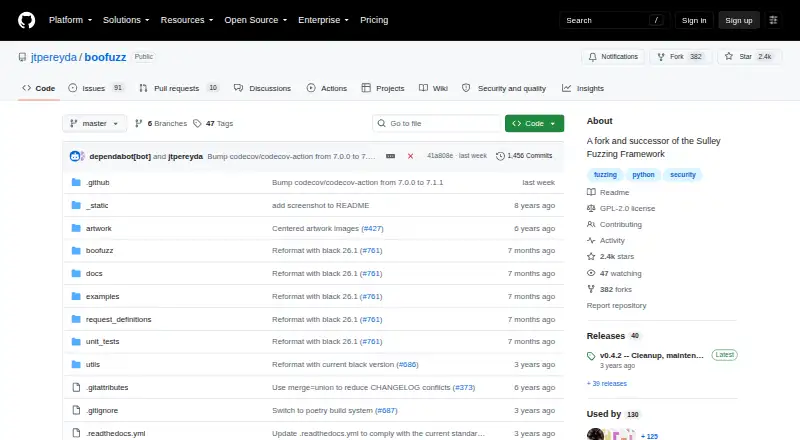
What boofuzz is
boofuzz is a free, open-source framework for fuzzing network protocols, and a fork and successor to Sulley. It installs as a Python library with `pip install boofuzz` and requires Python 3.9 or later. Its workflow generates data, detects failures, resets targets after failures, and records test data. Documented connections include TCP, UDP, SSL, raw sockets, and serial; it also supports Ethernet and IP-layer communication and UDP broadcast fuzzing. Run logs are stored in a SQLite database in the boofuzz-results directory, and saved runs can be reopened in the web interface with `boo open`. Results can be exported as CSV. The process monitor detects crashes and restarts applications on Windows or Linux, but must run on the target machine. The optional network monitor requires Pcapy and Impacket, which are not installed automatically. Public FTP and HTTP protocol libraries are available, though their implementations do not cover the full protocols. The project uses the GPL-2.0 license and directs usage questions to Stack Overflow and bug reports to GitHub issues.
Good
- Free and open source under GPL-2.0.
- Supports TCP, UDP, SSL, raw sockets, and serial.
- Records run logs in SQLite.
- Exports test results as CSV.
- Can detect crashes and restart applications.
Watch out
- Requires Python 3.9 or later.
- Network monitoring requires separately installed Pcapy and Impacket.
- Process monitoring must run on the target machine.
- FTP and HTTP libraries do not provide full protocol coverage.
Who it suits
boofuzz suits Python developers working with protocol fuzzing across network and serial connections. It may also fit users who need crash monitoring, target resets, and saved run logs.
Verdict
boofuzz provides a Python-based workflow for generating test data, detecting failures, resetting targets, and preserving run results. Users should account for its Python requirement, optional network-monitor dependencies, and the limited coverage of its public FTP and HTTP libraries.
Plans and prices
From boofuzz's own pricing page, checked 5 Oct 2026.
| Plan | Price | What it gives you |
|---|---|---|
| Free and open source | Free | Python library for building fuzzer scripts · GPL-2.0 license |
The facts
Each one read from boofuzz's own pages, with the date it was checked.
What it does
- Communications
- It supports arbitrary communications media, including serial, Ethernet and IP layer, and UDP broadcast fuzzing.checked 4 Oct 2026
- Community support
- The project directs bug reports and improvement ideas to GitHub issues or pull requests and suggests Stack Overflow for usage questions.checked 5 Oct 2026
- Connections
- Documented connection options include TCP, UDP, SSL, raw sockets, and serial connections.checked 5 Oct 2026
- Documentation
- The project provides online documentation with quickstarts and API documentation.checked 4 Oct 2026
- Extensibility
- The project describes extensibility as a goal and supports extending instrumentation and failure detection.checked 5 Oct 2026
- Fuzzer workflow
- It provides data generation, failure detection instrumentation, target reset after failure, and test data recording.checked 5 Oct 2026
- Fuzzing workflow
- Its core capabilities include data generation, failure detection, target reset after failure, and recording test data.checked 4 Oct 2026
- Installation
- Boofuzz installs with pip as a Python library used to build fuzzer scripts.checked 5 Oct 2026
- License
- The GitHub repository identifies the project license as GPL-2.0.checked 4 Oct 2026
- Monitoring
- The process monitor detects crashes and restarts applications on Windows or Linux, and must run on the target machine.checked 4 Oct 2026
- Optional dependency
- The network monitor requires Pcapy and Impacket, which are not installed automatically with boofuzz.checked 4 Oct 2026
- Protocol libraries
- The documentation links free, open-source FTP and HTTP protocol libraries and says their implementations do not provide full protocol coverage.checked 5 Oct 2026
- Protocol suites
- The documentation lists public boofuzz FTP and HTTP protocol libraries and says their implementations do not approach full protocol coverage.checked 4 Oct 2026
- Protocol support
- It supports arbitrary communication media and includes serial, Ethernet and IP-layer, and UDP broadcast fuzzing.checked 5 Oct 2026
- Purpose
- Boofuzz is a network protocol fuzzing framework and a fork and successor to Sulley.checked 5 Oct 2026
- Python requirement
- The installation guide requires Python 3.8 or later and recommends pip.checked 5 Oct 2026
- Results
- Boofuzz records test data and can export test results as CSV.checked 5 Oct 2026
- Run logs
- Each run's log data is saved to a SQLite database in the boofuzz-results directory.checked 5 Oct 2026
- Security and license
- GitHub identifies the repository license as GPL-2.0.checked 5 Oct 2026
- Support
- The project directs users to Stack Overflow for usage questions and GitHub issues for bugs and suggestions.checked 4 Oct 2026
- Target monitoring
- The process monitor detects crashes and restarts applications on Windows or Linux, and must run on the target machine.checked 5 Oct 2026
- Web interface
- The quickstart says users can reopen the web interface on a saved run database with the boo open command.checked 5 Oct 2026
The full review of boofuzz
Overview
boofuzz is a Python framework for constructing and running network-protocol fuzzers, descended from Sulley. It is aimed at developers who can write Python and need configurable testing across network, serial, or device-facing connections. Its strongest case is a flexible, recorded workflow with crash handling; it is a weaker fit when you need complete protocol libraries or monitoring managed off the target.
Key features
The workflow combines hybrid input generation, failure detection, target reset after a failure, and test-data recording. That combination supports repeatable protocol testing and gives teams a practical way to triage crashes rather than merely produce malformed input. Extensibility is an explicit goal: instrumentation and failure detection can be extended for targets that do not fit a stock setup.
Connection options include TCP, UDP, SSL, raw sockets, and serial, with broader support for Ethernet and IP-layer communications and UDP broadcast. This range suits network appliances, services, and connected devices with unusual transports. The benefit depends on your willingness to build and maintain the appropriate Python fuzzer script; boofuzz is a framework, not a turnkey test catalog.
Every run is saved in a SQLite database under boofuzz-results. CSV export is available for analysis or handoff, and boo open can reopen the web interface for a saved run. Those records make failures easier to revisit than transient terminal output and provide a useful audit trail for iterative fuzzing.
The process monitor detects crashes and restarts applications on Windows or Linux, but it must run on the target machine. The optional network monitor requires Pcapy and Impacket, neither of which boofuzz installs automatically. Plan for that dependency work when packet-level monitoring is part of your design.
The public FTP and HTTP protocol libraries are free and open source, but their implementations do not approach full protocol coverage. They are starting points rather than assurances that a protocol is comprehensively exercised.
Pricing
| Plan | Price | What it includes |
|---|---|---|
| Free and open source | free | Python library for building fuzzer scripts under the GPL-2.0 license |
There is no free trial because the software is already free, and no paid tier or seat-based allowance is stated. The trade-off is engineering effort: you supply Python 3.9 or later, configure targets, and install optional monitoring dependencies yourself.
Platforms
boofuzz is delivered as an API and Python library for Linux and Windows, including self-hosted deployments. Installation uses pip install boofuzz; Python 3.9 or later is required. The process monitor supports applications on Windows or Linux, while the documented target connections span network and serial environments.
Who it's for
Choose boofuzz if you are a Python-capable security, QA, or embedded-development team that needs to create protocol-specific fuzzers, reset crashing targets, and retain run history. It is particularly suitable for self-hosted work where transport flexibility and extensible instrumentation matter more than a polished, prebuilt protocol catalog.
It is not the best choice for teams seeking broad, ready-made FTP or HTTP coverage, a managed monitoring service, or a no-code workflow. The target-side monitor and manual dependency setup also make it less convenient for lightly staffed projects.
Pros and cons
Pros
- Flexible transports: TCP, UDP, SSL, raw sockets, serial, Ethernet/IP, and UDP broadcast cover varied network and device targets.
- Complete run loop: generation, failure detection, reset, crash triage, and recording are connected in one workflow.
- Useful result handling: SQLite run databases, CSV export, and the reopenable web interface preserve investigation context.
- Extensible and free: Python scripting and GPL-2.0 licensing allow adaptation without a subscription cost.
Cons
- Python commitment: Python 3.9 or later and script construction are prerequisites, so it is not a turnkey tool for non-Python users.
- Monitoring setup: process monitoring must run on the target, and network monitoring adds Pcapy and Impacket installation.
- Incomplete public libraries: the FTP and HTTP implementations do not provide full protocol coverage.
Alternatives
ClusterFuzz is a free, Apache-2.0 open-source option across Linux, macOS, Windows, web, and self-hosted environments; choose it when that platform mix and Google Cloud-dependent production deployment suit your operation.
AFL++ is another free choice for Android, Linux, macOS, Windows, and self-hosting under AGPL-3.0-or-later; pick it when its licensing and platform coverage align better with your fuzzing stack.
cargo-fuzz is free on Linux, macOS, and Windows under MIT and Apache 2.0 terms; choose it when you want that Rust-oriented distribution model.
Mayhem offers a free API tier capped at 50 scans per month and paid plans from $236 a month; select it when a hosted, paid service is preferable to maintaining boofuzz infrastructure.
Fuzzilli is free Apache-2.0 source for self-hosted Linux and macOS, but requires building the fuzzer and a supported instrumented JavaScript engine.
Fuzzinator is a free option for Linux, macOS, web, and Windows with no paid plans or usage limits stated.
Jazzer is free coverage-guided, in-process fuzzing for the JVM on Linux, macOS, and Windows; choose it for JVM-focused work rather than Python protocol scripting.
Accessibility Test Framework for Android is a free Android-focused testing project for Linux, macOS, and Windows.
See the Fuzz Testing Software list for more choices.
Verdict
boofuzz is a strong recommendation for Python developers who need extensible protocol fuzzing, target resets, and durable run records across varied transports. Choose it for that control and its zero cost; look elsewhere if complete protocol coverage, managed monitoring, or a non-Python workflow is the priority.
Alternatives to boofuzz
- 1
Jazzer
Free planOpen sourceAPILinuxmacOSSelf-hosted7.3Free plan - 2
AFL++
Free planAndroidLinuxmacOSSelf-hosted7.2From €20,000 a year - 3

Mayhem
Free planWebAPILinuxmacOS7.0From $236 a month - 4

ClusterFuzz
Free planWebLinuxmacOSSelf-hosted6.8Free plan - 5
cargo-fuzz
Free planLinuxmacOSWindows6.7Free plan - 6
EvoMaster
Free planAPILinuxmacOSSelf-hosted6.4Free plan