AFL++
AFL++ is a free, coverage-guided fuzzer that changes program inputs and checks whether a target binary reaches previously unseen execution paths.
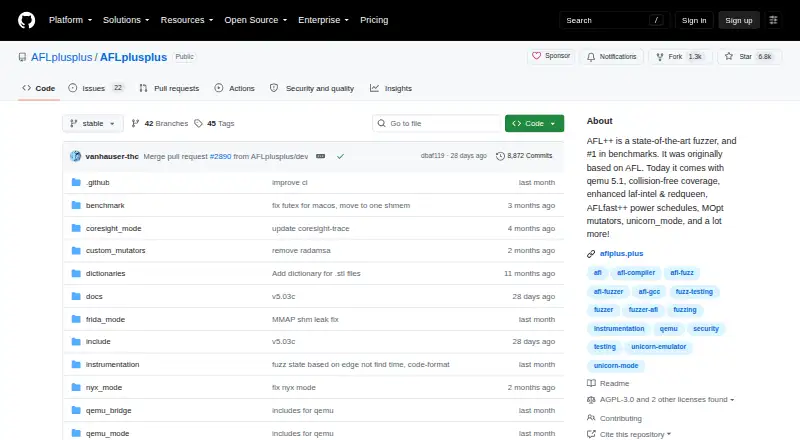
What AFL++ is
AFL++ is a free, coverage-guided fuzzer that changes program inputs and checks whether a target binary reaches previously unseen execution paths. Its afl-cc compiler supports LTO, LLVM, and GCC_PLUGIN instrumentation. The project also lists collision-free coverage, AFLfast++ power schedules, MOpt mutators, laf-intel, and redqueen. Documentation covers fuzzing programs with available source, binary-only targets, network services, and GUI programs. Builds can target source-only fuzzing, binary-only fuzzing, or a distribution containing both. A Docker image is provided for x86_64 and arm64, with an example that mounts target source at /src. On Linux, the installation guide recommends LLVM 18 or newer and gives LLVM 14 as the minimum. macOS build guidance covers x86_64 and arm64, but says afl-clang-lto, afl-gcc-fast, and qemu_mode do not work there. The project warns that fuzzing can tax hardware, use substantial memory or disk, and create heavy filesystem activity. The combined afl-fuzz program is AGPL-licensed; modified versions offered as network services must provide users the corresponding source. A commercial license is listed at €20,000 a year.
Good
- Supports multiple compiler instrumentation modes.
- Covers source, binary, network, and GUI targets.
- Docker image supports x86_64 and arm64.
- Free under AGPL-3.0-or-later.
- Includes guidance for crash triage and coverage.
Watch out
- Fuzzing can consume substantial memory or disk.
- Fuzzing can create heavy filesystem activity.
- Several listed modes do not work on macOS.
- Modified network services must offer corresponding source under AGPL.
Who it suits
AFL++ is for developers and security practitioners fuzzing source-available software, binary-only targets, network services, or GUI programs. Users should be comfortable with its AGPL obligations or the separately listed commercial license.
Verdict
AFL++ offers a broad set of fuzzing targets and instrumentation options, with a free AGPL license. Review the license obligations, platform-specific limitations, and resource demands before using it.
Plans and prices
From AFL++'s own pricing page, checked 28 Sep 2026.
| Plan | Price | What it gives you |
|---|---|---|
| AGPL-3.0-or-later | Free | Use, study, modify, and distribute under AGPL terms · modified network services must offer corresponding source |
| Commercial license | €20,000 a year | For organizations that cannot or do not want to comply with AGPL · proof of donation must be emailed · Donation to EFF or CCC; license lasts one year and can be renewed by donating again |
The facts
Each one read from AFL++'s own pages, with the date it was checked.
What it does
- Build modes
- Build targets include source-only fuzzing, binary-only fuzzing, or a distribution build with both.checked 28 Sep 2026
- Compiler instrumentation
- Its central afl-cc compiler supports LTO, LLVM, and GCC_PLUGIN instrumentation modes.checked 28 Sep 2026
- Container image
- The project provides a Docker image for x86_64 and arm64, with the target source mounted at /src in its example command.checked 28 Sep 2026
- Hardware and storage limits
- The project warns that fuzzing can strain hardware, consume large amounts of memory or disk, and generate heavy filesystem I/O.checked 28 Sep 2026
- License exceptions
- Individual source files marked Apache-2.0 may be reused under that license, while bundled third-party components retain their own licenses.checked 28 Sep 2026
- License obligations
- The combined afl-fuzz program is AGPL as a whole, and modified versions offered as network services must offer users the corresponding source.checked 28 Sep 2026
- Mutation and coverage
- The project lists collision-free coverage, AFLfast++ power schedules, MOpt mutators, laf-intel, and redqueen among its features.checked 28 Sep 2026
- Purpose
- AFL++ is a coverage-guided fuzzer that mutates input and checks whether it reaches a new path in the target binary.checked 28 Sep 2026
- Release channels
- The stable branch is described as the stability-focused default, while dev is bleeding edge and may fail to compile or contain bugs.checked 28 Sep 2026
- Support
- The maintainers direct users to GitHub issues for AFL++ defects, the FAQ and best practices, and the Fuzzing Zulip server.checked 28 Sep 2026
- Target types
- The documentation covers fuzzing source-available programs, binary-only targets, network services, and GUI programs.checked 28 Sep 2026
The company
- Founded
- 2019checked 28 Sep 2026
Money
- Free plan
- Yeschecked 20 Sep 2026
Where it runs
- Linux requirements
- The installation guide recommends LLVM 18 or newer and gives LLVM 14 as the minimum.checked 28 Sep 2026
- macOS support
- The guide documents building on macOS x86_64 and arm64, but says afl-clang-lto, afl-gcc-fast, and qemu_mode do not work there.checked 28 Sep 2026
The full review of AFL++
AFL++ is a local, coverage-guided fuzzer for developers and security teams looking to uncover execution paths ordinary inputs may miss. Its broad target and instrumentation support is compelling, provided you can manage the resource load and choose a license that fits your deployment.
Overview
AFL++ mutates program inputs and checks whether execution reaches a new path in the target binary. That makes it useful for probing software beyond its existing test cases, with documentation spanning source-available programs, binary-only targets, network services, and GUI programs. Source-only, binary-only, and combined distribution builds accommodate different target setups.
This is a local tool, not a managed fuzzing service. The project warns that fuzzing can strain hardware, consume substantial memory and disk, and generate heavy filesystem I/O. Teams should account for those costs when deciding where to run it and how much capacity to allocate.
Key features
Instrumentation and mutation
The central afl-cc compiler supports LTO, LLVM, and GCC_PLUGIN instrumentation modes. AFL++ also includes collision-free coverage, AFLfast++ power schedules, MOpt mutators, laf-intel, and redqueen. Together with coverage guidance and crash triage, these options make it a substantial toolkit for users who want to adapt how targets are instrumented and inputs are explored, rather than a narrow, single-method fuzzer.
Targets and deployment
The range of documented targets is a practical advantage for teams working across source code, standalone binaries, services, and GUI programs. A Docker image is provided for x86_64 and arm64; its example command mounts target source at /src. That offers a container-based way to run AFL++, though it does not change the local execution model.
Platforms and release channels
Linux installation guidance recommends LLVM 18 or newer and sets LLVM 14 as the minimum. macOS builds are documented for x86_64 and arm64, but afl-clang-lto, afl-gcc-fast, and qemu_mode do not work there. Those exclusions matter if your workflow depends on any of those components. The stable branch is the sensible default when reliability matters; the dev branch is bleeding edge and may fail to compile or contain bugs.
Pricing
AFL++ has a free AGPL-3.0-or-later plan at no cost. It permits use, study, modification, and distribution under AGPL terms. The key caveat is that modified versions offered as network services must offer users the corresponding source.
The commercial license costs €20,000 a year. It is aimed at organizations unable or unwilling to comply with AGPL, lasts one year, and can be renewed by donating again. The donation must go to EFF or CCC, and proof must be emailed. This is a substantial annual commitment, so the free AGPL plan is the practical fit for users whose use and distribution meet its terms.
Platforms
AFL++ supports Android, Linux, macOS, self-hosted environments, and Windows. The documented macOS builds and their component exclusions are especially relevant when comparing platform support: the platform is supported, but not every mode works there.
Who it's for
AFL++ is best suited to developers, security engineers, and research teams who can run targets locally, understand the implications of fuzzing resource use, and want multiple instrumentation and mutation options. CI/CD support can fit it into an automated development workflow. It is a weaker fit for organizations that need a managed service, cannot budget for local compute and storage demands, or need the excluded macOS components.
Supported languages include C, C++, Python, and Rust. Maintainers direct users to GitHub issues for defects, the FAQ and best practices, and the Fuzzing Zulip server for community discussion.
Pros and cons
Pros
- Broad target coverage spans source-available software, binary-only programs, network services, and GUI applications, which helps teams with varied target types.
- Multiple instrumentation modes and mutation-related features give experienced users options for tailoring fuzzing workflows.
- The free AGPL plan allows use, study, modification, and distribution, with a separate commercial license for organizations that cannot comply with AGPL.
- Docker images for x86_64 and arm64 provide a container option for local runs.
Cons
- Fuzzing can consume significant hardware, memory, disk, and filesystem I/O, making resource planning part of adoption.
- Modified network-service versions must offer corresponding source under the AGPL plan, which may conflict with some deployment models.
- Several components do not work on macOS, limiting workflows that depend on afl-clang-lto, afl-gcc-fast, or qemu_mode.
- The commercial license is costly at €20,000 a year and requires a donation plus emailed proof.
Alternatives
AFL++ is the relevant choice among these options for coverage-guided fuzzing; the alternatives below are stream-processing tools, not direct fuzzing substitutes. Consider Feldera if you need a freemium streaming SQL platform: its free open-source edition is single-node and single-container, with full SQL support, all connectors, and datasets larger than memory.
Apache Storm is another free, open-source option for stream processing under Apache License 2.0. Timeplus offers a free Apache 2.0 lightweight streaming SQL engine as a single binary under 500MB, with a free trial also available. For an open-source programming model whose execution costs depend on the chosen runner and infrastructure, consider Apache Beam.
Apache NiFi is free to download under Apache License 2.0, with no commercial plan or usage limits stated on its official pages. Arroyo offers a free, self-hosted, single-binary engine under Apache 2.0. Confluent Cloud is a freemium, fully managed Kafka option with autoscaling resources and more than 80 managed connectors; its Basic plan starts at $0/Month. Kafka Streams is free to download, but has no formal or commercial support.
Browse Stream Processing Software, Fuzz Testing Software, and Game Mod Managers for related categories.
Verdict
Choose AFL++ if you need a local coverage-guided fuzzer with broad target support and a range of instrumentation and mutation options, and can accommodate its resource demands. Look elsewhere if you need managed execution, cannot accept AGPL obligations, or rely on the components unavailable on macOS.
Getting started
- Visit https://github.com/AFLplusplus/AFLplusplus.
- Use the Linux installation guide, which recommends LLVM 18 or newer and requires at least LLVM 14.
- Choose a source-only, binary-only, or combined build mode.
- Use the provided Docker image for x86_64 or arm64, mounting target source at /src in the example setup.
- Choose the free AGPL-3.0-or-later terms or the one-year commercial license.
Limits worth knowing
AFL++ fuzzing can strain hardware, use large amounts of memory or disk, and create heavy filesystem I/O. On macOS, afl-clang-lto, afl-gcc-fast, and qemu_mode do not work.
Questions
Is AFL++ free?
Yes. AFL++ is available under AGPL-3.0-or-later. Modified versions of the combined afl-fuzz program offered as network services must provide users the corresponding source.
Is there a commercial license?
A commercial license is listed at €20,000 a year. It lasts one year and can be renewed by donating again; proof of donation must be emailed.
Which platforms does AFL++ support?
The listed platforms are Android, Linux, macOS, self-hosted environments, and Windows. macOS builds are documented for x86_64 and arm64, with some components unavailable there.
What kinds of programs can AFL++ fuzz?
Its documentation covers source-available programs, binary-only targets, network services, and GUI programs.
What build modes are available?
Build targets include source-only fuzzing, binary-only fuzzing, or a distribution build with both.
What are the Linux LLVM requirements?
The installation guide recommends LLVM 18 or newer and gives LLVM 14 as the minimum.
Alternatives to AFL++
- 15.9From $5 a month
- 2
PolicyForge
AndroidiOSWeb5.2 - 34.7
- 4
Ligalio
Web4.7 - 54.6
- 6
Codepliant
Web4.6