BOMIST
BOMIST is inventory and bill of materials software for hardware teams and electronics manufacturing.
What BOMIST is
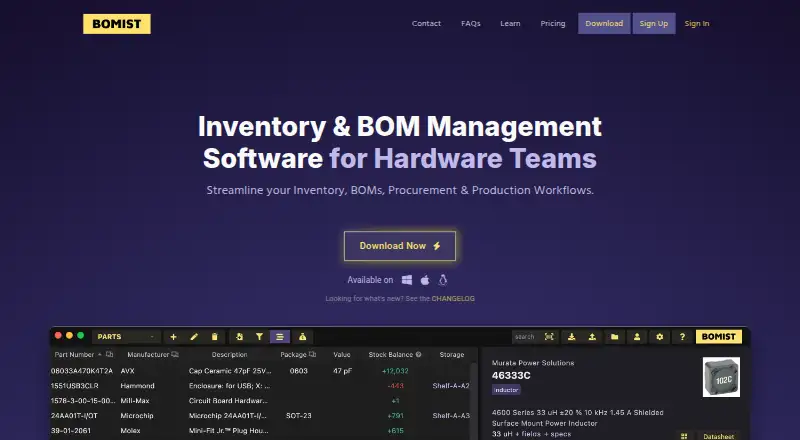
BOMIST is inventory and bill of materials software for hardware teams and electronics manufacturing. It tracks parts, specifications, datasheets, usage, and stock across multiple locations, and supports BOM revisions, comparisons, batch cost estimates, and checks for missing production parts. It can create purchase lists when builds need stock and combine them into supplier orders. Production tools cover reservations and kit lists, inventory adjustments after production, and customer and sales-order tracking. Supplier pricing and availability integrations include Octopart and distributor APIs such as DigiKey, Mouser, and TME. CSV bulk imports, CSV/JSON/HTML/PDF exports, barcode printing and scanning, and a local REST API are also available. Data stays locally accessible offline, while workspaces can sync through the cloud in real time. Platforms include Linux, macOS, and Windows, with API and self-hosted options listed. A free plan is available; the listed MAKER plan is $15.00 per year, billed per month, with up to 1,000 parts and unlimited products.
Good
- Tracks parts and stock across multiple locations.
- Supports BOM revision and comparison.
- Creates purchase lists and supplier orders.
- Offline local data and real-time cloud workspace sync.
- Imports CSV and exports four listed formats.
Watch out
- Free plan is limited to 100 parts.
- Free plan is limited to one user.
- MAKER is listed at $15.00 per year, billed per month.
Who it suits
BOMIST suits electronics makers and hardware teams managing parts, BOMs, purchasing, and production. Its plans range from single-user use to team and enterprise workspaces.
Verdict
BOMIST brings inventory, BOM, purchasing, and production tasks into one tool for hardware work. The free plan is limited to 100 parts and three products; broader capacity is available on paid plans.
Plans and prices
From BOMIST's own pricing page, checked 29 Sep 2026.
| Plan | Price | What it gives you |
|---|---|---|
| Free | Free | Single user · 100 parts · 3 products |
| PRO | $50 | Single user · No limits · per month, billed yearly |
| TEAM | $175 | Unlimited users · 1× Team Workspace · 5GB document storage · per month, billed yearly |
| MAKER | $180 a year | Single user · Up to 1000 parts · Unlimited products · $180.00 per year (= $15.00/month, billed annually) |
| ENTERPRISE | $350 a month | On-premises · Offline license · Priority support · Multiple Team Workspaces · Starting at $350 per month, billed yearly |
The facts
Each one read from BOMIST's own pages, with the date it was checked.
What it does
- Analytics
- The privacy policy names Google Analytics and Mixpanel, and says crash reports may be sent automatically to improve the app.checked 29 Sep 2026
- BOMs
- It supports BOM revisions, comparisons, batch cost estimates, and identifying missing parts for production.checked 29 Sep 2026
- Data tools
- It supports CSV bulk imports, CSV/JSON/HTML/PDF exports, barcode printing and scanning, and a local REST API.checked 29 Sep 2026
- Integrations
- The site names Octopart and distributor APIs including DigiKey, Mouser, and TME for supplier pricing and availability.checked 29 Sep 2026
- Intended users
- The maker describes BOMIST as built for electronics manufacturing and hardware teams, with plans for makers, individuals, teams, and enterprises.checked 29 Sep 2026
- Inventory
- It tracks parts, storage locations, usage, specifications, datasheets, and inventory across multiple locations.checked 29 Sep 2026
- Offline and sync
- The product page says data is kept locally and accessible offline, while workspaces can sync through the cloud in real time.checked 29 Sep 2026
- Privacy and servers
- The privacy policy says servers are currently in Frankfurt, Germany, and Northern California, United States, and may be moved or extended elsewhere with notice.checked 29 Sep 2026
- Procurement
- It creates purchase lists, can generate them when builds need inventory, and can combine lists into a supplier purchase order.checked 29 Sep 2026
- Production and sales
- It supports production reservations and kit lists, adjusts inventory when production is finished, and tracks customers and sales orders.checked 29 Sep 2026
- Purpose
- BOMIST is inventory and bill of materials management software for hardware teams and electronics manufacturing.checked 29 Sep 2026
- Support
- The ENTERPRISE plan includes priority support, and the FAQ page directs users with questions to get in touch.checked 29 Sep 2026
The company
- Headquarters
- Lisbon, Portugalchecked 28 Sep 2026
- Team access
- Multiple users on different computers can work on the same workspace, and the TEAM plan includes role-based permissions and one Team Workspace.checked 29 Sep 2026
The full review of BOMIST
BOMIST is a hardware operations tool that connects component records to purchasing, production, and sales orders. It is best suited to electronics makers and hardware teams that need those steps in the same workspace. Its breadth is a strong fit for managing builds, though the free tier is small and shared work requires a paid plan.
Overview
BOMIST combines inventory across storage locations with bills of materials, purchasing, production reservations, and sales orders. Teams can track component specifications and datasheets, compare BOM revisions, estimate batch costs, and identify parts missing for production. That connection between design lists and stock is useful when teams need to know not just what a build requires, but what must be purchased before work can proceed.
Purchase lists can be generated when builds need inventory and combined into supplier purchase orders. Production reservations and kit lists help organize builds; completing production adjusts inventory. Customer and sales-order tracking extends the product beyond stock control, although its strongest fit remains hardware and electronics workflows.
Key features
Octopart and distributor APIs for DigiKey, Mouser, and TME provide supplier pricing and availability. CSV bulk imports help move existing records in, while CSV, JSON, HTML, and PDF exports give teams several ways to take data out. Barcode printing and scanning support physical stock handling, and a local REST API offers an integration point for other tools.
Data is kept locally and accessible offline, while workspaces can sync through the cloud in real time. Multiple users can work in the same workspace from different computers, but that does not make the single-user plans suitable for shared access: the TEAM plan is the option with unlimited users and one Team Workspace, plus role-based permissions.
The hybrid approach may suit teams that want local access with cloud synchronization. ENTERPRISE adds on-premises deployment and an offline license. Servers are currently in Frankfurt, Germany, and Northern California, United States, and may be moved or extended elsewhere with notice. The privacy policy names Google Analytics and Mixpanel, and says crash reports may be sent automatically.
Pricing
The Free plan costs nothing and is limited to one user, 100 parts, and three products. It is a practical starting point for an individual with a small project, but those caps are restrictive for a growing parts catalog or several active products.
PRO costs $50 a year, billed monthly and yearly, for one user with no limits. It removes capacity caps but not the single-user constraint. MAKER costs $180 a year, or $15.00/month billed annually, for one user, up to 1000 parts, and unlimited products. That suits an individual maker who needs room for more products but can stay within the parts ceiling.
TEAM costs $175 a year, billed monthly and yearly, and includes unlimited users, one Team Workspace, and 5GB of document storage. It is the clear fit for shared work, though storage and workspace count are bounded. ENTERPRISE starts at $350 per month, billed yearly, and includes on-premises deployment, an offline license, priority support, and multiple Team Workspaces; it targets organizations that need those deployment and support provisions.
A 14-day trial is available. The listed annual billing terms matter, particularly for MAKER and ENTERPRISE; compare the user, part, product, workspace, and storage limits against the way your team will work before choosing.
Platforms
BOMIST supports API, Linux, macOS, self-hosted, and Windows environments. Its hybrid deployment and ENTERPRISE on-premises option give hardware teams alternatives to relying on cloud-only access.
Who it's for
BOMIST is a strong match for electronics makers and hardware teams managing component stock, BOM changes, purchasing, and builds together. Solo users can start on Free, PRO, or MAKER depending on capacity needs; teams that need shared access should look to TEAM. It is less compelling for a solo user whose needs fit within the free caps, or for teams seeking unlimited document storage or multiple shared workspaces below Enterprise.
Pros and cons
- Pros: BOM revisions, comparisons, cost estimates, and missing-part checks connect product planning to stock readiness.
- Pros: Purchase-list generation, supplier pricing integrations, and inventory adjustments after production support a connected procurement-to-build workflow.
- Pros: Local offline access, cloud sync, and an on-premises Enterprise option accommodate different deployment needs.
- Cons: Free is capped at 100 parts and three products, and supports only one user.
- Cons: PRO and MAKER remain single-user; shared work requires TEAM or Enterprise.
- Cons: TEAM includes one workspace and 5GB storage, while multiple workspaces are reserved for Enterprise.
Alternatives
For a broader comparison, see Bill of Materials Software.
OpenBOM is worth comparing if a free plan with up to 2,000 records is a priority; its record count includes unique part numbers, BOM part records, and managed CAD items.
Cascadia PLM may suit teams looking for a self-hosted core PLM with unlimited editors and viewers under AGPL-3.0, or a managed cloud option.
Dolibarr is a free open-source ERP and CRM for readers who want an on-premise or cloud product, with hosted SaaS provided by third parties.
Dokuly is a free, open-source PLM offered as a self-hosted Docker stack.
MyCompany Manufacturing ERP is a free option with no subscription or renewal; optional implementation and support may cost extra.
Global Shop Solutions ERP is an alternative with tailored pricing, an upfront cost, and ongoing quarterly charges.
IndaBOM is a free, fully managed, single-user option for readers who want an open-source product available on self-hosted or web platforms.
PartsBox offers a free Maker plan for one user, one currency, and personal projects; it is another option to consider for personal parts management.
Verdict
Choose BOMIST if your electronics or hardware work needs inventory, BOM control, purchasing, and production tied together, especially when supplier availability and build readiness matter. Its decisive limitation is that solo plans do not support shared users and the free tier has tight capacity caps; teams needing shared work should budget for TEAM, while those needing multiple workspaces or an offline license should consider Enterprise.
Getting started
- Open https://bomist.com/
- Select Free, PRO, TEAM, MAKER, or ENTERPRISE
- Install on Linux, macOS, or Windows, or use the listed API or self-hosted options
- Import parts in bulk with CSV or enter inventory manually
- Connect Octopart or distributor APIs for supplier pricing and availability
- Create a workspace for shared team access when using the TEAM plan
Limits worth knowing
The Free plan is for one user with 100 parts and three products. MAKER allows one user and up to 1,000 parts, while TEAM includes one Team Workspace and 5GB of document storage.
Questions
Does BOMIST have a free plan?
Yes. Free is for one user and includes 100 parts and three products.
What is the lowest listed paid price?
The MAKER plan is listed at $180 a year.
Which platforms does BOMIST support?
BOMIST lists Linux, macOS, Windows, API, and self-hosted options, with hybrid deployment.
Can BOMIST work offline?
Yes. Product data is kept locally and accessible offline, while workspaces can sync through the cloud in real time.
Which supplier integrations are named?
BOMIST names Octopart and distributor APIs including DigiKey, Mouser, and TME.
What does the TEAM plan include?
TEAM provides unlimited users, one Team Workspace, role-based permissions, and 5GB of document storage.
Alternatives to BOMIST
- 1
Odoo Manufacturing
Free planOpen sourceAndroidiOSWebAPI8.7From $24.90 a month - 2

Cascadia PLM
Free planOpen sourceWebAPILinuxmacOS8.2Free plan - 3

OpenBOM
Free planAndroidiOSWebAPI8.1From $25 a month - 4

Katana
Free planWebAPI7.6Free plan - 5
Microsoft Dynamics 365 Sales
AndroidiOSWebAPI7.6 - 6

MRPeasy
AndroidiOSWebAPI7.2From $49 a month