
Cascadia PLM
Cascadia PLM connects product requirements, parts, bills of materials, engineering changes, and work orders in a lifecycle record for manufacturers.
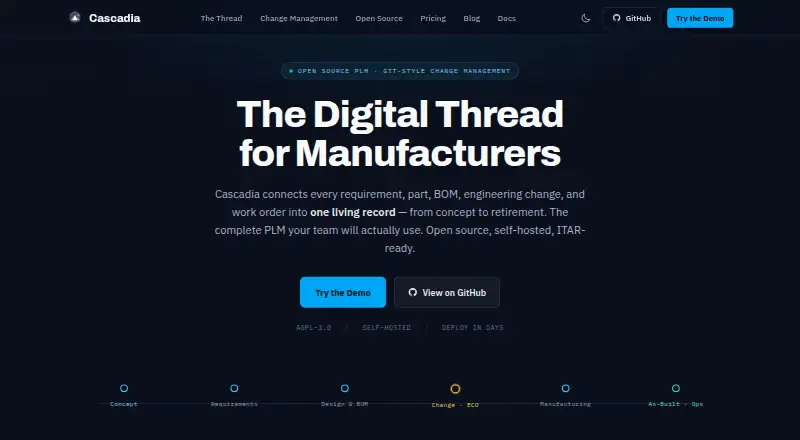
What Cascadia PLM is
Cascadia PLM connects product requirements, parts, bills of materials, engineering changes, and work orders in a lifecycle record for manufacturers. Its core includes documents, multi-level BOMs, workflows, lifecycles, revision schemes, a file vault, search, import and export, APIs, and a 3D viewer. Engineering change orders can be handled in separate workspaces for team review before merging. Item types, workflows, lifecycles, and permissions can be configured through TypeScript files and reviewed through pull requests. Documentation describes converting STEP and IGES files to STL and GLB for browser-based 3D viewing. Cascadia can be self-hosted or run as managed cloud software, with deployment options including Docker Compose, single-server, distributed high-availability, and Kubernetes. Its free core includes REST and SysML v2 APIs; managed-cloud API access is an optional paid add-on. Self-Hosted Core costs nothing.
Good
- Free self-hosted core has unlimited editors and viewers.
- Includes multi-level BOMs, workflows, and revision schemes.
- Engineering changes use reviewable isolated workspaces.
- Supports several documented self-hosted deployment approaches.
- Core includes REST and SysML v2 APIs.
Watch out
- Managed-cloud API access is an optional paid add-on.
- Commercial License — Enterprise is $60,120 a year.
Who it suits
Cascadia PLM suits engineering and manufacturing teams managing product data, requirements, changes, and work orders. It may also suit teams moving from spreadsheets or needing self-hosting.
Verdict
Cascadia PLM combines lifecycle records, configurable workflows, and change management for manufacturing teams. Its free self-hosted core is distinct from managed cloud, which starts at $850 a month.
Plans and prices
From Cascadia PLM's own pricing page, checked 14 Oct 2026.
| Plan | Price | What it gives you |
|---|---|---|
| Self-Hosted Core | Free | Unlimited users · Core PLM · AGPL-3.0 · Customer infrastructure · Free forever |
| Managed Cloud | $850 a month | Dedicated instance · Editor-seat pricing · Unlimited viewers · Upfront add-ons · From $850/mo |
| Managed Cloud — up to 20 editors | $850 a month | Up to 20 editor seats · unlimited viewers · $10,200/yr · billed annually |
| Managed Cloud — up to 50 editors | $1,750 a month | Up to 50 editor seats · unlimited viewers |
| Commercial License — Pilot | $2,090, paid once | 90-day pilot · credited toward year one on conversion |
| Managed Cloud — up to 100 editors | $3,000 a month | Up to 100 editor seats · unlimited viewers |
| Commercial License — Growth | $3,050 a year | Teams up to 50 · self-hosted or managed hosting on customer hardware · Annual |
| Commercial License | $30,000 a year | No AGPL obligations · Self-host or vendor-managed · On-premises, private cloud, or GovCloud · From $30K/yr |
| Commercial License — Enterprise | $60,120 a year | Unlimited editors and viewers · CAD, enterprise connectors and SSO included · ITAR / AWS GovCloud add-on: +$30–50K/yr · Annual |
| Managed Cloud — 100+ editors | Priced on request | 100+ editor seats · unlimited viewers |
The facts
Each one read from Cascadia PLM's own pages, with the date it was checked.
What it does
- AI assistant
- The LLM assistant can search and modify PLM records, create ECOs, analyze change impact, and launch design sessions, with permission checks and audit logs.checked 14 Oct 2026
- AI providers
- The assistant documents Anthropic and OpenAI adapters as supported, while Google Gemini and Ollama adapters are listed as planned.checked 14 Oct 2026
- API
- The free core includes REST and SysML v2 APIs; managed-cloud API access is an optional paid add-on.checked 3 Oct 2026
- API authentication
- API tokens are supported alongside database-backed sessions and OAuth providers such as GitHub, Google, and Microsoft.checked 14 Oct 2026
- CAD
- The documentation describes STEP and IGES conversion to STL and GLB, plus browser-based 3D viewing.checked 3 Oct 2026
- CAD generation
- Natural-language CAD generation uses the Zoo API, while simpler parametric parts can be generated through CadQuery workers.checked 14 Oct 2026
- CAD viewing
- STEP and IGES files can be converted to STL and GLB for browser viewing, with Three.js used for visualization.checked 14 Oct 2026
- Change management
- Each engineering change order can use an isolated workspace that teams review and merge when ready.checked 3 Oct 2026
- Compliance positioning
- The maker describes Cascadia as ITAR-ready and says self-hosting within the customer’s own boundary supports its ITAR deployment approach.checked 3 Oct 2026
- Configuration
- Item types, workflows, lifecycles, and permissions can be configured in TypeScript files and reviewed through pull requests.checked 3 Oct 2026
- Core capabilities
- The core includes parts, documents, requirements, multi-level BOMs, workflows, lifecycles, revision schemes, file vault, search, import/export, APIs, and a 3D viewer.checked 3 Oct 2026
- Deployment
- Cascadia is self-hostable and documents Docker Compose, single-server, distributed high-availability, and Kubernetes deployments.checked 3 Oct 2026
- Documentation depth
- The public documentation includes installation, quick start, architecture, API references, deployment guides, feature manuals, FAQ, and troubleshooting pages.checked 14 Oct 2026
- Document control
- Documents are version-controlled in a vault with check-in and check-out operations.checked 14 Oct 2026
- ECO-as-Branch
- Each engineering change order receives an isolated branch so teams can work in parallel and merge approved revisions later.checked 14 Oct 2026
- Enterprise search
- A global search endpoint searches across item types while scoping results to the user's program and design permissions.checked 14 Oct 2026
- Extensibility model
- Item types, workflows, lifecycles, and permissions are defined in TypeScript and can be reviewed through pull requests.checked 14 Oct 2026
- GitHub activity
- The public GitHub organization lists Cascadia-App, Demo-Data, and FreeCAD-Connector repositories; Cascadia-App showed 33 stars and 10 forks when opened.checked 14 Oct 2026
- Import limits
- Excel and CSV imports support files up to 10 MB and batches of up to 500 items, including BOM parsing.checked 14 Oct 2026
- Installation requirements
- The installation guide recommends Node.js 22 LTS, npm 10+, PostgreSQL 18+, and Git 2.x; Docker Desktop is optional for queues, CAD conversion, and containers.checked 14 Oct 2026
- Integrations
- The pricing page lists optional Solid Edge and SolidWorks add-ins, and configurable ERP, MES, or CRM connectors including Epicor, Global Shop, and Odoo.checked 3 Oct 2026
The company
- Company size signal
- The Cascadia PLM LinkedIn organization page displayed 26 followers when crawled.checked 14 Oct 2026
- Independent company statement
- Founder Kai Kircher said he started Cascadia PLM to solve his own change-management and PLM architecture problems and is building it openly.checked 14 Oct 2026
Money
- FreeCAD integration
- A public FreeCAD 1.x workbench provides linking, check-in/check-out, property synchronization, and guided ECO workflows; assembly/BOM push is marked a Phase 2 placeholder.checked 14 Oct 2026
The full review of Cascadia PLM
Overview
Cascadia PLM brings product requirements, parts, bills of materials, engineering changes, and work orders into a connected product lifecycle management record. Its core combines structured product data with documents, revision schemes, workflows, file storage, search, import and export, APIs, and a browser-based 3D viewer.
Teams can self-host Cascadia or use its managed cloud service. The maker describes it as software for engineering and manufacturing teams, including organizations moving from spreadsheets and defense or maritime engineering groups. For category browsing, see our Product Lifecycle Management Software and Bill of Materials Software lists.
Key features
Product records and revisions
The core includes parts, documents, requirements, and multi-level BOMs, supported by workflows, lifecycles, and revision schemes. Search and import/export tools support working with those records, while revision control, requirements management, BOM management, and workflow automation are listed capabilities.
Engineering change workspaces
Each engineering change order can be developed in an isolated workspace. Teams can review the proposed work and merge it when ready, keeping a change separate from the main record until that point.
Configurable workflows and access
Item types, workflows, lifecycles, and permissions can be set in TypeScript configuration files and reviewed through pull requests. Security documentation describes role-based and program-based access controls, session security, CSRF checks, and same-origin CORS by default.
CAD, integrations, and AI
Cascadia documents conversion of STEP and IGES files to STL and GLB, with browser-based 3D viewing. Optional Solid Edge and SolidWorks add-ins are listed on the pricing page. Configurable ERP, MES, and CRM connectors are also available, including connectors for Epicor, Global Shop, and Odoo.
The documentation says AI features work with OpenAI, Anthropic, Gemini, and Ollama. The free core includes REST and SysML v2 APIs; managed-cloud API access is an optional paid add-on.
Deployment and support
Self-hosting documentation covers Docker Compose, single-server, distributed high-availability, and Kubernetes deployments. The maker describes Cascadia as ITAR-ready and says deployment within a customer's own boundary supports its ITAR approach. Support materials include installation and quick-start guides, troubleshooting, FAQs, GitHub Discussions, and GitHub Issues.
Pricing
Cascadia has a free self-hosted core and paid commercial and managed-cloud plans. The free plan includes unlimited editors and viewers, with core PLM under AGPL-3.0. Managed-cloud API access is a separate paid add-on.
| Plan | Price | Listed details |
|---|---|---|
| Self-Hosted Core | free | Unlimited editors and viewers; core PLM under AGPL-3.0 |
| Managed Cloud — up to 20 editors | $850 a month | Billed $10,200/yr, billed annually; up to 20 editor seats and unlimited viewers |
| Managed Cloud — up to 50 editors | $1,750 a month | Up to 50 editor seats and unlimited viewers |
| Commercial License — Pilot | $2,090, paid once | 90-day pilot, credited toward year one on conversion |
| Managed Cloud — up to 100 editors | $3,000 a month | Up to 100 editor seats and unlimited viewers |
| Commercial License — Growth | $3,050 a year | Billed Annual; teams up to 50; self-hosted or managed hosting on customer hardware |
| Commercial License — Enterprise | $60,120 a year | Billed Annual; unlimited editors and viewers; CAD, enterprise connectors, and SSO included; ITAR / AWS GovCloud add-on: +$30–50K/yr |
| Managed Cloud — 100+ editors | Price not listed | 100+ editor seats and unlimited viewers |
A free trial is not listed.
Platforms
Cascadia lists API, Linux, macOS, self-hosted, web, and Windows platforms. Its deployment options range from single-server installations to distributed high-availability and Kubernetes setups.
Who it's for
Cascadia is aimed at engineering and manufacturing teams that need to manage product records, revisions, requirements, and bills of materials together. Its configurable workflows and change workspaces may suit teams formalizing processes previously handled in spreadsheets. The maker also identifies defense and maritime engineering teams as intended users; its ITAR positioning is tied to self-hosting within the customer's own boundary.
Pros and cons
- Pros: The free self-hosted core includes unlimited editors and viewers, with REST and SysML v2 APIs.
- Pros: Product records, requirements, multi-level BOMs, revision control, workflows, and change workspaces sit within one PLM system.
- Pros: Self-hosting and several documented deployment patterns give teams deployment choices.
- Cons: Managed-cloud API access is an optional paid add-on.
- Cons: The Managed Cloud — 100+ editors price is not listed.
- Cons: The Enterprise plan's ITAR / AWS GovCloud add-on is listed at +$30–50K/yr.
Alternatives
For other PLM and engineering options, consider NETVIBES, Dokuly, Autodesk Fusion, Oracle Fusion Cloud PLM, Aras Innovator, Centric PLM, and Creo. For a manufacturing ERP option, see Aptean Industrial Manufacturing ERP Traverse Edition.
Verdict
Cascadia PLM brings product records, requirements, BOMs, revisions, and engineering change workflows into a shared system, with both self-hosted and managed-cloud deployment. Its free core offers a way to start with self-hosting, while the paid plans add commercial licensing or managed hosting at listed seat tiers. Teams should weigh the self-hosting and configuration options against their deployment and integration needs, and note that cloud API access costs extra and the largest cloud tier has no listed price.
Getting started
- Open the Cascadia PLM website.
- Choose the free Self-Hosted Core or a managed-cloud plan.
- For self-hosting, use the installation and quick-start guides.
- Select a documented deployment approach, such as Docker Compose or Kubernetes.
- Configure item types, workflows, lifecycles, and permissions in TypeScript files.
Limits worth knowing
The free Self-Hosted Core is provided under AGPL-3.0. Managed Cloud plans specify editor-seat caps of 20, 50, or 100 for their listed tiers; managed-cloud API access is an optional paid add-on.
Questions
Is Cascadia PLM free?
Yes. Self-Hosted Core costs nothing and includes unlimited editors, unlimited viewers, and core PLM under AGPL-3.0.
How much does managed cloud cost?
Managed Cloud for up to 20 editors costs $850 a month, billed $10,200/yr annually. The up-to-50-editor plan costs $1,750 a month, and the up-to-100-editor plan costs $3,000 a month.
Can Cascadia be self-hosted?
Yes. Documented deployment options include Docker Compose, single-server, distributed high-availability, and Kubernetes deployments.
Which APIs are included?
The free core includes REST and SysML v2 APIs. Managed-cloud API access is an optional paid add-on.
What integrations are available?
Optional Solid Edge and SolidWorks add-ins are listed, along with configurable ERP, MES, and CRM connectors including Epicor, Global Shop, and Odoo.
Does Cascadia have a free trial?
No. The listed pricing model is freemium, with a free Self-Hosted Core and paid plans.
Alternatives to Cascadia PLM
- 1

Oracle Fusion Cloud PLM
AndroidiOSWebAPI7.2 - 2
Exenta
AndroidiOSWebAPI6.7 - 3

PDXpert PLM
Free planAPISelf-hostedWindows6.7From $3.50 a month - 4
Infor Public Sector
AndroidiOSWebAPI6.6 - 5
Centric PLM
AndroidiOSWebAPI6.5 - 6
Aligni PLM
WebAPI6.4From $187 a month