
BeMusic AI Cover
BeMusic AI Cover creates style covers or voice covers from audio users own or have permission to transform.
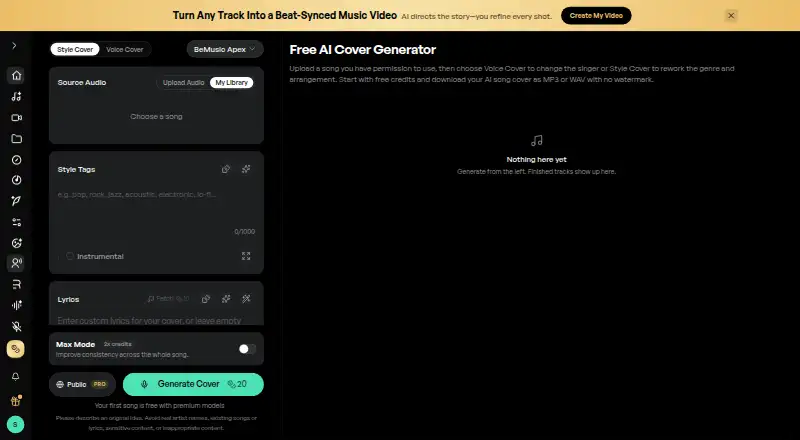
What BeMusic AI Cover is
BeMusic AI Cover creates style covers or voice covers from audio users own or have permission to transform. Voice Cover applies a selected voice model to a vocal performance; Style Cover changes genre, arrangement, instruments, and production. Users can choose preset voices or create a private model from recordings they own or are authorized to use. Style Cover accepts MP3 and WAV files up to 50 MB, while Voice Cover accepts MP3, WAV, FLAC, and M4A files up to 10 MB. Style Cover also supports supplied lyrics and an instrumental-only option. Finished tracks can be downloaded as MP3 or WAV without an audio watermark, including free downloads. Core, Open, and Lite Style Cover models are available without a subscription; Apex, Pro, and Plus require one. Free and Creator output is for personal, non-commercial use unless later licensed; eligible output can receive a commercial-use license with active Pro or Studio. Free starter credits are listed, and Creator costs $12 a month, billed $144 billed yearly and renewing at $144/year. Users must have the necessary rights to source recordings, compositions, lyrics, and voices for their intended use.
Good
- Supports style and voice cover modes
- Private voice models can use authorized recordings
- Instrumental-only arrangements are available
- MP3 and WAV downloads have no audio watermark
- Available on Android, iOS, Linux, macOS, web, and Windows
Watch out
- Style Cover uploads are limited to 50 MB
- Voice Cover uploads are limited to 10 MB
- Free and Creator output is non-commercial unless later licensed
- Some Style Cover models require a subscription
Who it suits
It suits people seeking style or voice transformations of audio they own or are authorized to use. Users planning commercial use should review the stated plan licensing conditions.
Verdict
BeMusic AI Cover offers distinct style and voice workflows, with downloadable MP3 and WAV output. Confirm rights to the source material and the applicable commercial-use terms before using a cover beyond personal projects.
Plans and prices
From BeMusic AI Cover's own pricing page, checked 15 Oct 2026.
| Plan | Price | What it gives you |
|---|---|---|
| Creator | $12 a month | 1,600 credits · up to 160 songs · 2 parallel generations · MP3/WAV downloads · personal use · $144 billed yearly · renews at $144/year |
| Pro | $16 a month | 4,500 credits · up to 450 songs · 4 parallel generations · commercial-use license · priority generation · $192 billed for the first year · renews at $384/year · 50% first-year promotion |
| Studio | $64 a month | 14,000 credits · up to 1,400 songs · 8 parallel generations · commercial-use license · priority generation · $768 billed yearly · renews at $768/year |
| Free starter credits | Free | Credits are limited; personal, non-commercial use · Free starter credits; no credit card required |
The facts
Each one read from BeMusic AI Cover's own pages, with the date it was checked.
What it does
- Audio retention
- Audio-tool pages state uploaded files may be retained for up to 30 days after processing or until the user deletes them.checked 15 Oct 2026
- Commercial rights
- Commercial use of eligible output requires an active Pro or Studio subscription plus rights to the source recording, composition, lyrics, and voice.checked 15 Oct 2026
- Commercial use
- Free and Creator covers are for personal, non-commercial use unless later licensed; eligible output can receive a commercial-use license with active Pro or Studio.checked 28 Sep 2026
- Copyright responsibility
- BeMusic requires users to own or obtain all permissions for uploaded, transformed, published, shared, or distributed material.checked 15 Oct 2026
- Cover modes
- Voice Cover applies a selected voice model to a vocal performance, while Style Cover reworks genre, arrangement, instruments and production.checked 28 Sep 2026
- Custom voices
- Users may select preset voices or train private voice models only from recordings they own or are authorized to use.checked 15 Oct 2026
- Daily-credit change
- The October 11, 2026 update changed daily credits to a three-day trial with 20 credits per day for three consecutive UTC dates.checked 15 Oct 2026
- Directory coverage
- AI Apps lists 30 alternative tools for BeMusic AI in its AI audio-generator category.checked 15 Oct 2026
- Downloads
- Finished covers can be downloaded as MP3 or WAV without an audio watermark, including on free downloads.checked 28 Sep 2026
- Exports
- Finished covers can be downloaded as MP3 or WAV files.checked 15 Oct 2026
- Feature suite
- The paid plans include text-to-music, lyrics-to-music, lyrics generation, covers, instrumental generation, vocal removal, stem splitting, voice tools, singing photos, and music videos.checked 15 Oct 2026
- Generation time
- Most cover generations usually finish within a few minutes, while custom voice training generally takes 5–15 minutes.checked 15 Oct 2026
- Licence
- Terms assign ownership of the website design, AI technology, logos, and brand materials to BeMusic and prohibit copying or redistribution; no open-source licence is stated.checked 15 Oct 2026
- Limit: generation reliability
- The same Trustpilot review reported that some songs became stuck during generation.checked 15 Oct 2026
- Limit: independent validation
- HokAI characterizes BeMusic's third-party validation as thin because its Trustpilot listing had only one review when that page was checked.checked 15 Oct 2026
- Limit: site trust signals
- ScamAdviser assigns bemusic.ai a fair trust assessment and flags hidden WHOIS ownership and a relatively low traffic rank.checked 15 Oct 2026
- Lyrics and instrumentals
- Cover workflows support user-supplied lyrics and an instrumental-only option.checked 15 Oct 2026
- MIDI editor
- The MIDI editor runs locally with the Web Audio API, supports up to 16 bars on one track, and does not yet accept MIDI-keyboard input.checked 15 Oct 2026
Where it runs
- Browser deployment
- BeMusic describes its tools as browser based and says no studio software or installation is required.checked 15 Oct 2026
The company
- Company disclosure
- HokAI reports that BeMusic does not publish a founding date, funding round, or team size.checked 15 Oct 2026
- Headquarters
- The registered address is Room 617A, 6/F, Global Plaza, No. 1 Sha Tsui Road, Tsuen Wan, Hong Kong.checked 15 Oct 2026
- Maker
- The service is operated by CEDAR ORBIT TECHNOLOGY LIMITED, incorporated in Hong Kong.checked 15 Oct 2026
Money
- Free access
- New accounts receive free starter credits without a credit card, and the site currently describes a three-day trial of 20 credits per UTC day.checked 15 Oct 2026
- Free plan
- Nochecked 22 Sep 2026
The full review of BeMusic AI Cover
Overview
BeMusic AI Cover turns audio you own or are authorized to transform into either a voice-based cover or a reworked musical arrangement. It best suits creators who want those two distinct workflows and downloadable MP3 or WAV files; its strongest appeal is flexibility, while rights and commercial-use restrictions make it a poor shortcut for unlicensed releases.
Voice Cover applies a selected model to a vocal performance; Style Cover changes genre, arrangement, instruments and production. BeMusic offers preset voices and private models trained from recordings users own or are expressly authorized to use, but no named celebrity voices. That keeps the tool focused on authorized voice and style transformations rather than celebrity impersonation.
Style Cover accepts user-provided lyrics and can generate an instrumental arrangement without vocals. The upload limits differ meaningfully: Style Cover takes MP3 and WAV files up to 50 MB, while Voice Cover supports MP3, WAV, FLAC and M4A up to 10 MB. Finished work downloads as MP3 or WAV without an audio watermark, including free downloads.
Key features
Cover modes and model choice
The split between vocal transformation and arrangement changes is useful for creators who know whether they want to change the singer or the sound of the track. Core, Open and Lite Style Cover models are available without a subscription; Apex, Pro and Plus require one. That makes the free entry point useful for exploring basic style options, but access to the higher-tier models depends on paying.
Rights, privacy and security
Users need rights to the source recording, composition, lyrics and voice for their intended use. Free and Creator covers are personal and non-commercial unless licensed later; eligible output can receive a commercial-use license with active Pro or Studio. BeMusic says uploads are stored securely, processed on encrypted servers and not used to train its models. Its Terms specify TLS 1.2+ for data in transit and AES-256 for data at rest. These protections address handling, not permission: they do not clear a song or voice for use.
Pricing
BeMusic offers limited free starter credits with no credit card required, for personal, non-commercial use. The free tier provides a way to try the workflow, but its credit cap limits ongoing use and it does not grant commercial rights.
- Creator: $12 a month, billed $144 billed yearly and renewing at $144/year. It includes 1,600 credits, up to 160 songs, and personal-project use. This is the entry paid tier for regular personal output, but it still excludes commercial use unless separately licensed.
- Pro: $16 a month, billed $192 billed for the first year and renewing at $384/year. It includes 4,500 credits, up to 450 songs, and a commercial-use license. The first-year price rises sharply on renewal, so budget against the $384 annual renewal rather than the introductory bill.
- Studio: $64 a month, billed $768 billed yearly and renewing at $768/year. It includes 14,000 credits monthly, up to 1,400 songs, and a commercial-use license. Its larger monthly allowance is aimed at high-volume work; occasional creators are unlikely to need that capacity.
Commercial licensing is the decisive distinction between Creator and the upper plans. Pro is the lower-cost option for eligible commercial output, while Studio makes sense when its larger monthly credit pool is needed.
Platforms
BeMusic AI Cover is available on Android, iOS, Linux, macOS, web and Windows. That range suits users moving between desktop and mobile devices, though the stated platform coverage does not remove the different file-size limits between cover modes.
Who it's for
BeMusic fits musicians and creators who have authorized source material and want to change either the vocal identity or the arrangement, with MP3 and WAV exports for finished covers. The free credits and Creator plan suit personal projects; Pro or Studio is the appropriate starting point for eligible commercial use. It is not the right choice for users who lack rights to a recording, composition, lyrics or voice, or who specifically want a named celebrity voice.
Pros and cons
- Pros: Two distinct cover workflows let users choose between changing a vocal performance and reshaping the musical treatment.
- Pros: MP3 and WAV downloads have no audio watermark, even on free downloads.
- Pros: Style Cover accepts larger files than Voice Cover and supports user lyrics and instrumental-only arrangements.
- Cons: Voice Cover uploads are capped at 10 MB, versus 50 MB for Style Cover, which can constrain longer or larger source files.
- Cons: Commercial use requires active Pro or Studio or a later license; Creator and free output are personal-use only by default.
- Cons: Pro renews at $384/year after a first-year $192 bill, so renewal costs are substantially higher.
Alternatives
For a voice-conversion service with a free plan and a free trial, consider Revocalize AI; its Free plan includes 5 conversion minutes per month and one Starter AI voice. If open-source software with no accounts or paywalls matters more than BeMusic’s subscription model, Applio is free forever under the MIT license.
For beat-making rather than cover transformation, InsMelo AI Beat Maker is a freemium alternative with Android, iOS and web support. Kits AI is another freemium option, with API, web and Windows support and a Free plan offering 15 conversion minutes, voice tools and generative vocals.
SoulX-Singer is free for researchers and developers to use under the Apache 2.0 license, with Linux, self-hosted and web availability. For a web-based alternative with a $9.99/month Basic plan, choose FineShare Singify. AI Song Creator offers a free plan with two songs per month, one music generation per month and personal-use downloads, making it a limited free option for song creation rather than BeMusic’s cover-focused workflows. For free web-based voice conversion, CoverFlows includes 10 conversion minutes per month, unlimited WAV or MP3 export and two private voice model uploads total.
Readers comparing category options can browse AI Song Cover Generators or AI Music Generators.
Verdict
BeMusic AI Cover is a strong fit for creators with authorized audio who want a choice between voice transformation and broader style changes, plus clean MP3 or WAV exports. Choose it for that two-mode workflow and its personal-to-commercial plan ladder; look elsewhere if you need unlicensed material cleared, celebrity voices, or a lower-cost commercial tier than Pro.
Getting started
- Open https://bemusic.ai/ai-cover on the web, or use Android, iOS, Linux, macOS or Windows.
- Start with free starter credits without a credit card, or choose a paid plan.
- Choose Voice Cover or Style Cover and upload a file within that mode’s format and size limits.
- Select an available voice model, or use a private model made from authorized recordings.
- For Style Cover, optionally provide lyrics or choose Instrumental Only.
- Download the finished cover as MP3 or WAV.
Limits worth knowing
Free starter credits are limited and allow personal, non-commercial use. Creator includes 1,600 credits for up to 160 songs and personal projects; commercial-use licensing for eligible output is available with active Pro or Studio.
Questions
Is BeMusic AI Cover free?
It offers limited free starter credits with no credit card required. The Creator plan is $12 a month, billed $144 yearly.
What do the paid plans cost?
Creator is $12 a month, billed $144 yearly. Pro is $16 a month, billed $192 for the first year and renewing at $384/year; Studio is $64 a month, billed and renewing at $768/year.
Which file types can I upload?
Style Cover accepts MP3 and WAV files up to 50 MB. Voice Cover accepts MP3, WAV, FLAC and M4A files up to 10 MB.
What formats can I download?
Finished covers are available as MP3 or WAV without an audio watermark, including free downloads.
Can I use the covers commercially?
Free and Creator covers are for personal, non-commercial use unless later licensed. Eligible output can receive a commercial-use license with active Pro or Studio.
What rights do I need for an upload?
You need the necessary rights to the source recording, composition, lyrics and voice for your intended use.
Alternatives to BeMusic AI Cover
- 1

Revocalize AI
Free planAndroidiOSWebAPI8.1From $9 a month - 2
Media.io AI Song Cover Generator
Free planAndroidiOSWebAPI8.0From $59.90 a year - 3
Kits AI
Free planWebAPIWindows7.7From $10 a month - 4

Applio
Free planOpen sourceWebAPILinuxmacOS7.6Free plan - 5

Audjust AI Song Cover Generator
Free planWebAPI7.3From $10 a month - 6
Solmi AI Cover Generator
Free planAndroidiOSWeb7.3From $35 a month