
Applio
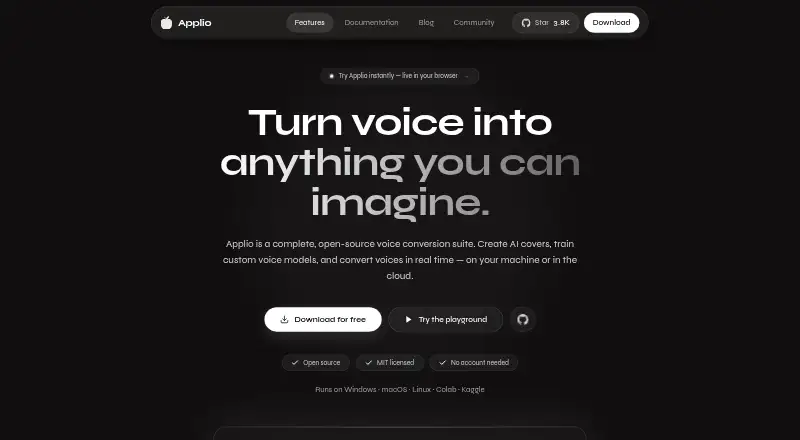
Applio is a free, open-source voice conversion suite for making covers, training voice models, and changing voices live.
What Applio is
Applio is a free, open-source voice conversion suite for making covers, training voice models, and changing voices live. For recorded audio, it offers ready-made models along with pitch adjustment, cleanup, upscaling, and batch processing. Live conversion is intended for songs, streams, and calls, with low-latency inference. Model tools include training, a voice blender, text-to-speech, and an audio analyzer for checking dataset readiness. Applio is available on Linux, macOS, Windows, the web, and self-hosted setups. Google Colab, Pinokio, and Hugging Face are linked as additional ways to run it. The MIT license permits personal, research, and commercial use. Audio and models stay on the device unless shared; core features do not require an account, telemetry, or cloud service. Local voice training guidance recommends an Nvidia RTX 20-series GPU or newer, while most modern computers can handle inference with existing models. Its listed plan is free, with free use and no paywalls.
Good
- Free plan listed as free.
- Converts recorded audio and supports live voice conversion.
- Includes model training and dataset-readiness analysis.
- MIT license permits commercial use.
- Core features need no account or cloud service.
Watch out
- Local training guidance recommends an Nvidia RTX 20-series GPU or newer.
- Downloaded models come from external sources and should be verified.
Who it suits
Applio suits people who want to convert recorded or live audio, or build and prepare voice models. It offers options for beginners through experienced users, with local training guidance for those preparing models.
Verdict
Applio combines recorded and live voice conversion with tools for model creation and audio preparation. Its local-first core and MIT license may suit users who want commercial-use flexibility, while local training has a specific hardware recommendation.
Plans and prices
From Applio's own pricing page, checked 15 Oct 2026.
| Plan | Price | What it gives you |
|---|---|---|
| Applio | Free | No accounts · no paywalls · local core features · free forever |
The facts
Each one read from Applio's own pages, with the date it was checked.
What it does
- API
- The App development workflow starts a local API on port 8000 alongside a web UI on port 3000, and the Python app can mount a FastAPI realtime API.checked 15 Oct 2026
- Audience
- The documentation describes Applio as designed for everyone from beginners to experienced users.checked 2 Oct 2026
- Audio Analyzer
- The Audio Analyzer checks dataset audio health and readiness before training.checked 15 Oct 2026
- CLI
- The CLI exposes inference, batch inference, TTS, training, audio separation and model-download commands.checked 15 Oct 2026
- Cloud options
- The download page links to Google Colab, Pinokio, and Hugging Face as cloud or one-click ways to run Applio.checked 2 Oct 2026
- Cloud workflows
- Documentation covers running Applio in cloud notebooks and retaining checkpoints, configuration, feature files and datasets for continuation.checked 15 Oct 2026
- Developer prerequisites
- Building Applio-App requires Git, Node.js 22 or newer, pnpm 11, Python 3.12 and FFmpeg.checked 15 Oct 2026
- Documentation depth
- Documentation includes installation, desktop, conversion, realtime, TTS, models, training, audio tools, migration, troubleshooting, cloud workflows, CLI and glossary sections.checked 15 Oct 2026
- Hardware guidance
- Official documentation says GPU, memory and disk needs vary by model and workload; training and realtime use substantially more compute than simple conversion.checked 15 Oct 2026
- Integrations
- Official download materials link Google Colab, Pinokio and Hugging Face as cloud or one-click launch options.checked 15 Oct 2026
- Interfaces
- Applio is offered as a Desktop application, a Python/Gradio browser interface and a command-line workflow.checked 15 Oct 2026
- License
- The source code and model weights are released under the permissive MIT license, including modification, redistribution and commercial use subject to the project terms.checked 15 Oct 2026
- Limit: consent enforcement
- Independent analysis notes Applio cannot technically prevent non-consensual voice reproduction, leaving ethical and legal responsibility with the operator.checked 15 Oct 2026
- Limit: hardware dependence
- Independent reviewers advise using an Nvidia RTX 20-series-or-newer GPU for local training and using inference or cloud notebooks without one.checked 15 Oct 2026
- Limit: maintenance cadence
- Independent coverage notes the project says it will no longer receive frequent updates, concentrating on security patches, dependency updates and occasional improvements.checked 15 Oct 2026
- Limit: output quality
- Reviewers report that results depend strongly on clean authorized recordings, suitable models and careful pitch and index settings, with artifacts possible from poor settings.checked 15 Oct 2026
- Limit: setup complexity
- Independent reviewers say installation remains technical and is unsuitable for buyers seeking a polished hosted service with nothing to install.checked 15 Oct 2026
- Local privacy
- Applio states that audio and models remain on the device unless users share them, with no account, telemetry or core cloud dependency.checked 15 Oct 2026
- Model-access change
- On December 9, 2024, Applio announced removal of direct model access to reduce potential misuse while leaving other features available.checked 15 Oct 2026
- Model safety
- The security page advises users to use trusted model sources and verify downloaded files because models come from external sources.checked 2 Oct 2026
Where it runs
- Linux packages
- Linux users can download an AppImage or Debian/Ubuntu package.checked 15 Oct 2026
- macOS requirements
- Official Desktop builds support Apple Silicon and Intel Macs running macOS 12 or newer.checked 15 Oct 2026
The company
- Maker headquarters
- The IAHispano GitHub organization lists Spain as its location.checked 15 Oct 2026
- Maker identity
- The official site identifies the maker/community as IAHispano and describes Applio as an independent community-driven project.checked 15 Oct 2026
The full review of Applio
Applio is a free voice-conversion suite for people who want to change recorded audio, alter a voice live, or build voice models. Its breadth and local-first approach are compelling; users who want to train locally should have an Nvidia RTX 20-series GPU or newer.
It is a better fit for creators who want a configurable workflow than for someone seeking only a quick, hosted conversion.
Overview
Applio handles conversion with ready-made models and adds pitch tuning, cleaning, upscaling, and batch processing for recorded audio. Live conversion uses low-latency inference for songs, streams, and calls. That range makes it useful across editing and real-time work, though its model-building tools may be more than a casual user needs.
Audio and models stay on the device unless users choose to share them, and core features require no account, telemetry, or cloud service. This gives privacy-conscious users a meaningful degree of control. The MIT license permits use, modification, and redistribution for personal, research, and commercial work, a notable advantage for creators who need commercial-use flexibility.
Key features
Conversion and model workflow
Batch processing and several recorded-audio adjustments make Applio suitable for working through multiple clips rather than only changing a single voice. Low-latency live conversion extends that workflow to calls and streams. The suite also includes model training, a voice blender, text-to-speech, and an audio analyzer to assess dataset readiness. These tools provide a wider path from preparing audio to creating a model, but local training has a substantially higher hardware bar than inference with existing models, which most modern computers can handle.
Running Applio and model safety
Google Colab, Pinokio, and Hugging Face offer cloud or one-click ways to run Applio, useful for users who do not want to set up a conventional local workflow. Models come from external sources, so users should choose trusted sources and verify downloaded files. The security guidance also asks vulnerability reporters to contact maintainers privately through GitHub; maintainers usually acknowledge reports within a few days.
Pricing
Applio costs nothing, billed Free forever. The single Applio plan is open source and MIT licensed, with no accounts or paywalls. There are no paid tiers that trade away features or impose separate plan limits, making it a straightforward option for users who want to try voice conversion and model tools without a subscription. Its practical cost is the hardware needed for local training, not a plan fee.
Platforms
Applio supports Linux, macOS, Windows, web, and self-hosted use. The range suits people choosing between desktop and web-based setups, while the local privacy model may matter most to those who run it on their own device.
Who it's for
Applio suits creators who want recorded and live voice conversion, custom model training, and commercial-use flexibility in one free tool. It is also a strong candidate for users who prefer to keep audio and models local and avoid accounts. If the goal is simply to make a few quick conversions without learning a broader model workflow, a more focused alternative may be a better fit.
Pros and cons
- Pros: Recorded and low-latency live conversion serve both editing and calls or streams.
- Pros: Training, a voice blender, text-to-speech, and dataset analysis support more than basic conversion.
- Pros: MIT licensing permits commercial use, modification, and redistribution.
- Pros: Core features need no account or cloud dependency, and audio stays local unless shared.
- Cons: Local model training is recommended for Nvidia RTX 20-series or newer hardware.
- Cons: Users must take care with external models and verify downloaded files.
Alternatives
Altered Studio is worth considering if you want a freemium option with local voice cloning and a free tier capped at 3 minutes per month of Voice Morphing, 10,000 AI Tokens, and noncommercial attribution licensing.
Kits AI may suit users who prefer a web- or API-oriented service: its free plan includes 15 conversion minutes and voice designer and blender tools, but no voice slots or download minutes.
ElevenLabs is an option for users seeking a web or API freemium service, with a free plan that includes 10,000 monthly credits and three Studio projects.
Voice Morph offers a no-signup free option with three daily conversions without ads, clips up to 30 seconds, standard voices, and WAV downloads.
Audimee may fit web users focused on royalty-free voices: its free plan includes 15 conversion minutes and 11 voices, but no custom model slots and personal-use-only downloads.
IK Multimedia ReSing is a desktop alternative for macOS and Windows; its free tier includes two voices, two instruments, and one RVC import, with no model generation.
Respeecher is another alternative to consider.
Voice-Swap is another alternative to consider.
Browse AI Voice Conversion Software, Voice Changer Software, AI Voice Changer Software, AI Song Cover Generators, and AI Voice Cloning Software for more options by category.
Verdict
Choose Applio if you want a free, MIT-licensed suite for recorded and live conversion, model creation, and local control without an account. Its main limitation is the hardware recommendation for local training; users who do not need that broader workflow, or who lack suitable hardware, should consider a more focused alternative.
Getting started
- Visit https://applio.org/.
- Choose a supported route: Linux, macOS, Windows, web, or self-hosted.
- Alternatively, use the linked Google Colab, Pinokio, or Hugging Face options.
- Use a ready-made voice model for conversion, or explore the model tools.
Questions
How much does Applio cost?
The Applio plan is listed as free, with no accounts or paywalls.
Is Applio open source?
Yes. It is MIT licensed and may be used, modified, and redistributed for personal projects, research, or commercial work.
Which platforms can run Applio?
It supports Linux, macOS, Windows, web, and self-hosted setups. The download page also links to Google Colab, Pinokio, and Hugging Face.
Can Applio convert recorded audio and change voices live?
Yes. It converts recorded audio with ready-made models and supports low-latency live conversion for songs, streams, and calls.
Does Applio require an account or cloud service?
Core features do not require an account, telemetry, or a cloud dependency. Audio and models stay on the device unless users choose to share them.
What hardware is recommended for voice training?
Documentation recommends an Nvidia RTX 20-series GPU or newer for local voice training. Most modern computers can handle inference with existing models.
Alternatives to Applio
- 1

BeMusic AI Cover
Free planAndroidiOSWebLinux8.2From $12 a month - 2

Revocalize AI
Free planAndroidiOSWebAPI8.1From $9 a month - 3
Media.io AI Song Cover Generator
Free planAndroidiOSWebAPI8.0From $59.90 a year - 4
Kits AI
Free planWebAPIWindows7.7From $10 a month - 5
Audjust AI Song Cover Generator
Free planWebAPI7.3From $10 a month - 6
Solmi AI Cover Generator
Free planAndroidiOSWeb7.3From $35 a month