
Bedrock JSON UI Editor
Bedrock JSON UI Editor is a free, open-source web editor for Minecraft Bedrock Edition interface files.
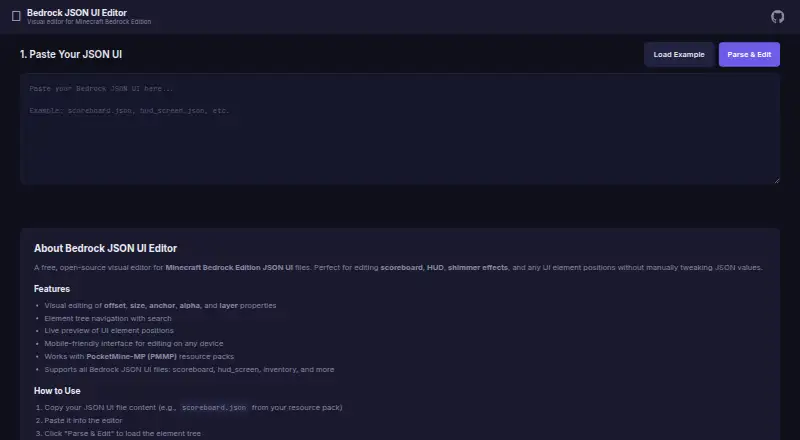
What Bedrock JSON UI Editor is
Bedrock JSON UI Editor is a free, open-source web editor for Minecraft Bedrock Edition interface files. Paste in JSON UI, parse it, then adjust elements visually and copy or download the revised JSON. Supported files include scoreboard, HUD, and inventory interfaces. An element tree with search helps locate items, while a live preview shows their positions. Controls cover offsets, size, anchors, alpha, layer, visibility, enabled state, animation values, variables, and text. The editor runs in the browser without a backend and works offline; draft work is stored in the browser and restored on a later visit. Its mobile-friendly tab navigation is optimized for phones and tablets. The maker says it works with PocketMine-MP resource packs and is compatible with PocketMine-MP, Nukkit, and other Bedrock servers. The README identifies the project as MIT licensed and invites issue reports for bugs or feature ideas. The maker lists Bedrock Edition on Windows 10/11, Android, iOS, Xbox, PlayStation, and Nintendo Switch as compatible; the editor itself is web-based.
Good
- Free, open-source editor with no backend
- Live preview and searchable element tree
- Works offline and restores browser drafts
- Mobile-friendly tabs for phones and tablets
Watch out
- The editor is web-based, not a listed native app
- Version targeting is unspecified
Who it suits
It suits Minecraft Bedrock creators who want to edit JSON UI files visually, including on a phone or tablet. It may also fit developers working with PocketMine-MP, Nukkit, or other Bedrock servers.
Verdict
Bedrock JSON UI Editor combines visual controls, file navigation, and preview in a browser-based workflow for Bedrock UI JSON.
Plans and prices
From Bedrock JSON UI Editor's own pricing page, checked 8 Oct 2026.
| Plan | Price | What it gives you |
|---|---|---|
| Free | Free | Free, open-source editor |
The facts
Each one read from Bedrock JSON UI Editor's own pages, with the date it was checked.
What it does
- Draft autosave
- Draft work is kept in the browser and restored on the next visit.checked 8 Oct 2026
- File workflow
- Users paste JSON UI into the editor, parse and edit elements, then copy or download the modified JSON.checked 8 Oct 2026
- Integrations and compatibility
- The maker says it works with PocketMine-MP resource packs and is compatible with PocketMine-MP, Nukkit, and other Bedrock servers.checked 8 Oct 2026
- License
- The project README identifies the software as MIT licensed.checked 8 Oct 2026
- Mobile use
- The interface is mobile-friendly and is optimized for phones and tablets with tab navigation.checked 8 Oct 2026
- Navigation and preview
- The editor provides an element tree with search and a live preview of UI element positions.checked 8 Oct 2026
- Offline and backend
- The editor runs entirely in the browser without a backend and works offline.checked 8 Oct 2026
- Purpose
- A free, open-source visual editor for Minecraft Bedrock Edition JSON UI files, including scoreboard, HUD, and shimmer elements.checked 8 Oct 2026
- Support
- The README invites users to open an issue for feature ideas or bug reports.checked 8 Oct 2026
- Supported files
- The editor supports Bedrock JSON UI files such as scoreboard, hud_screen, and inventory files.checked 8 Oct 2026
- Supported properties
- The README lists controls for offsets, size, anchors, alpha, layer, visibility, enabled state, animation values, variables, and text.checked 8 Oct 2026
- Visual editing
- Users can visually edit properties such as offset, size, anchor, alpha, and layer.checked 8 Oct 2026
Where it runs
- Supported game platforms
- The maker lists Minecraft Bedrock Edition on Windows 10/11, Android, iOS, Xbox, PlayStation, and Nintendo Switch as compatible.checked 8 Oct 2026
Alternatives to Bedrock JSON UI Editor
- 1

Blockbench
Free planOpen sourceAndroidiOSWebAPI8.1Free plan - 2

Visual Studio Code
Free planWebLinuxmacOSWindows7.4Free plan - 3
Snowstorm
Free planAndroidiOSWebExtension7.0Free plan - 4

mcbCode
Free planAndroidWeb6.9From $4 a month - 5

Tynker
AndroidiOSWeb6.8From $10 a month - 6

Addons Maker for Minecraft PE
Free planAndroidiOS6.7From $3.99 a month