BackendsideFTP
BackendsideFTP is a free Windows file transfer client for connecting to multiple servers and moving files between a computer and remote locations.
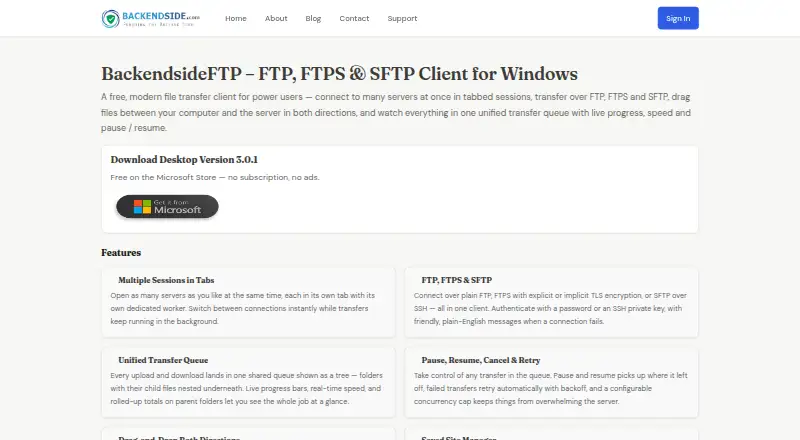
What BackendsideFTP is
BackendsideFTP is a free Windows file transfer client for connecting to multiple servers and moving files between a computer and remote locations. It supports FTP, FTPS with explicit or implicit TLS, and SFTP over SSH. Connections can use a password or an SSH private key, and separate server sessions can remain open in tabs. A unified transfer queue shows live progress and speed, with controls to pause, resume, cancel, retry automatically, and limit concurrent transfers. Users can browse remote directories, drag files and folders in either direction, create folders, rename items, and delete files or folders. Site Manager stores connection details for one-click reconnection, while Quick Connect avoids saving a profile. Saved passwords use Windows encryption tied to the account. Host keys and certificates can be trusted once, always, or rejected, with changed-fingerprint warnings. Other tools include CHMOD editing, history, speed limits, auto-reconnect, keep-alive, and activity logging. It requires 64-bit Windows 10 or 11.
Good
- Supports FTP, FTPS, and SFTP
- Tabbed sessions for multiple servers
- Transfer queue supports pause and resume
- Saved passwords use Windows encryption
- Includes host-key and certificate warnings
Watch out
- Windows 10 or 11 64-bit required
- No free trial listed
- Windows is the only listed platform
Who it suits
It suits Windows users who transfer files through FTP, FTPS, or SFTP. It is also useful for people managing several server connections and wanting saved profiles or quick one-off connections.
Verdict
BackendsideFTP covers common secure and standard file-transfer protocols in one Windows client. Its queue, saved connections, verification controls, and file-management tools make it suited to regular server transfers.
Plans and prices
From BackendsideFTP's own pricing page, checked 20 Sep 2026.
| Plan | Price | What it gives you |
|---|---|---|
| Free | Free | No subscription · No ads |
| BackendsideFTP | Free | Windows 10 / 11 (64-bit) · Free on the Microsoft Store — no subscription, no ads. |
The facts
Each one read from BackendsideFTP's own pages, with the date it was checked.
What it does
- Authentication
- Connections can use a password or an SSH private key.checked 11 Oct 2026
- Connection trust
- SFTP host keys and FTPS certificates are verified, with options to trust once, trust always, or reject, and a warning if a fingerprint changes.checked 11 Oct 2026
- Credential storage
- Saved site passwords are protected with Windows encryption tied to the user's account and are not written to disk in plain text.checked 11 Oct 2026
- Extra tools
- The client includes a visual CHMOD editor, transfer history, an app-wide speed limit, auto-reconnect, keep-alive, and an activity log with verbosity controls.checked 11 Oct 2026
- File operations
- Users can drag files and folders in either direction, browse remote directories, create folders, rename files, and delete files or folders.checked 11 Oct 2026
- Latest release
- The page lists version 3.0.1, released in June 2026.checked 11 Oct 2026
- Protocol coverage
- ftp-ftps-sftpchecked 20 Sep 2026
- Protocols
- It supports FTP, FTPS with explicit or implicit TLS, and SFTP over SSH.checked 11 Oct 2026
- Purpose
- BackendsideFTP is a file transfer client for connecting to multiple servers in tabbed sessions and transferring files between a computer and servers.checked 11 Oct 2026
- Saved connections
- The Site Manager saves connection details and supports one-click reconnection, while Quick Connect allows connecting without saving a profile.checked 11 Oct 2026
- Transfer controls
- Its unified transfer queue provides live progress and speed, pause and resume, cancellation, automatic retries, and a configurable concurrency cap.checked 11 Oct 2026
Money
- Free plan
- Yeschecked 20 Sep 2026
The company
- Maker
- BackendSide describes itself as a small, independent software company building utility software, server-side applications, and database tools.checked 11 Oct 2026
Where it runs
- Platform requirement
- The stated system requirement is Windows 10 or 11, 64-bit.checked 11 Oct 2026
- Supported platforms
- windowschecked 20 Sep 2026
Alternatives to BackendsideFTP
- 1

WinSCP
Free planOpen sourceWindows7.9Free plan - 2
Cyberduck
Free planmacOSWindows7.9Free plan - 3
Serv-U FTP Server
AndroidiOSWebAPI7.8 - 4

FileZilla Client
Free planLinuxmacOSWindows7.7Free plan - 5
FTP Commander
Free planAndroidWindows7.6$49.95 one-time - 6

FTP Rush
Free planAndroidiOSLinuxmacOS7.5Free plan