B1 Archiver
B1 Free Archiver creates and extracts archives, with desktop software for Windows, Linux, and macOS, an Android app, and an online archiver.
What B1 Archiver is
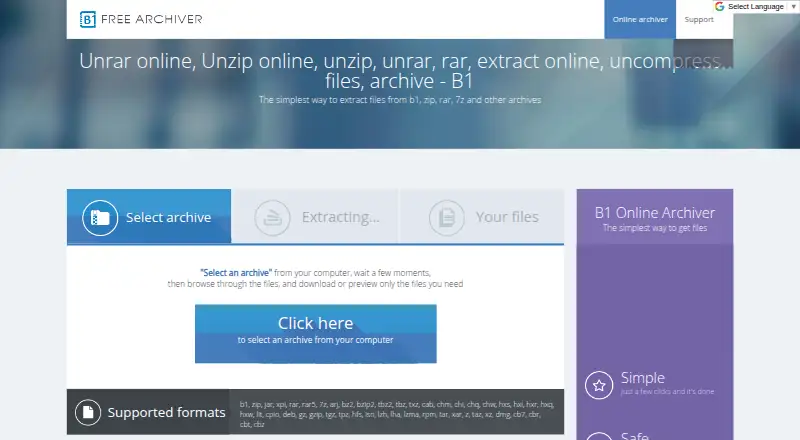
B1 Free Archiver creates and extracts archives, with desktop software for Windows, Linux, and macOS, an Android app, and an online archiver. The desktop application creates B1 and ZIP archives and supports almost 40 formats, including RAR, RAR5, and 7z. The online tool extracts files from B1, ZIP, RAR, 7z, and other archives. On Android, B1 also serves as a file manager. B1 format archives can be password-protected with 256-bit AES encryption, and the desktop archiver checks archive integrity using Adler-32 before unpacking. B1 says files uploaded to its online tool are deleted a few minutes after the page is closed. Its privacy policy says it does not knowingly collect identifying personal data, though it may collect non-identifying server information such as IP address and browser type. The policy also says app and device usage data, potentially including location and network performance, may be collected for anonymous advertising-related use in its mobile apps. The archiver is free for personal and commercial use, with no registration.
Good
- Free for personal and commercial use without registration
- Creates B1 and ZIP archives
- Extracts more than 40 archive formats
- B1 archives support 256-bit AES password protection
- Android version also works as a file manager
Watch out
- Mobile apps may collect usage data for anonymous ad-related use
- Online file deletion is described as occurring a few minutes after closing the page
- Email support is provided in English only
Who it suits
B1 suits people who want a free archive utility across desktop, Android, and web, including users who need to extract several archive formats. Android users can also use it for file management.
Verdict
B1 Free Archiver covers archive creation and extraction across several platforms, with encryption support for its B1 format. Readers concerned about mobile data collection should review the stated privacy details before using the Android app.
Plans and prices
From B1 Archiver's own pricing page, checked 30 Sep 2026.
| Plan | Price | What it gives you |
|---|---|---|
| B1 Free Archiver | Free | 100% free for personal and commercial use; no registration |
The facts
Each one read from B1 Archiver's own pages, with the date it was checked.
What it does
- Archive creation
- The desktop application can create b1 and zip archives.checked 30 Sep 2026
- Encryption
- The b1 format supports password protection using 256-bit AES encryption.checked 30 Sep 2026
- File management
- The Android version works as both a file manager and an archiver.checked 30 Sep 2026
- Format licensing
- The b1 archive format is described as open source and available for personal and commercial use.checked 30 Sep 2026
- Formats
- The desktop archiver supports almost 40 archive formats, including b1, zip, rar, rar5 and 7z.checked 30 Sep 2026
- Integrity check
- B1 checks archive integrity with the Adler-32 algorithm before unpacking.checked 30 Sep 2026
- Online file deletion
- The online archiver says uploaded files are completely deleted a few minutes after the page is closed.checked 30 Sep 2026
- Privacy
- The privacy policy says B1 does not knowingly collect identifying personal data, while it may collect non-personally identifiable server information such as IP address and browser type.checked 30 Sep 2026
- Purpose
- B1 Free Archiver creates and extracts archives, and the online archiver extracts files from b1, zip, rar, 7z and other archives.checked 30 Sep 2026
- Support
- Support is offered by email at [email protected] and is provided in English only.checked 30 Sep 2026
Where it runs
- Desktop platforms
- B1 Archiver works on Windows, Linux, Mac, Android and as a web application.checked 30 Sep 2026
- Mobile app data
- The privacy policy says Epom Ltd. may collect app and device usage data, including location and network performance, for anonymous ad-related use in B1 apps.checked 30 Sep 2026
The company
- Founded
- 2011checked 28 Sep 2026
- Headquarters
- Tallinn, Estoniachecked 28 Sep 2026
The full review of B1 Archiver
Overview
B1 Archiver is a free utility for creating and extracting compressed archives. Its desktop application supports Windows, Linux and macOS, with versions also available for Android and the web. The desktop software creates B1 and ZIP archives, while its extraction support covers more than 40 formats, including B1, ZIP, RAR, RAR5 and 7z. The online archiver is focused on unpacking files and handles B1, ZIP, RAR, 7z and other archive types.
The B1 format is described as open source and available for personal and commercial use. The software checks archive integrity with Adler-32 before unpacking, and B1-format archives can use password protection with 256-bit AES encryption. Those details make B1 relevant to people who need a no-cost way to handle archives across different devices, while its format-creation options remain limited to B1 and ZIP.
Browse more options in File Compression Software.
Key features
Create, extract and split archives
The desktop application can create B1 and ZIP archives, and extract more than 40 archive formats. This broad extraction support is distinct from its narrower creation capability. Split archives are also supported. The browser-based archiver offers extraction without requiring the desktop application.
Password protection and integrity checks
B1-format archives support password protection using 256-bit AES encryption. Before unpacking, B1 checks an archive with the Adler-32 algorithm to verify its integrity. The encryption information applies specifically to the B1 format; the available facts do not establish the same protection for every supported archive type.
Android file management
The Android version combines archive handling with file-management functions. This makes it the mobile option for people who want to manage files as well as extract or create supported archives.
Online extraction and file handling
The online archiver extracts files from B1, ZIP, RAR, 7z and other archives. B1 says uploaded files are completely deleted a few minutes after the page is closed. Its privacy policy says the company does not knowingly collect identifying personal data, though it may collect non-personally identifiable server information such as IP address and browser type.
The privacy policy also says Epom Ltd. may collect app and device usage information in B1 mobile apps, including location and network performance, for anonymous advertising-related use. Users who are weighing the mobile app against the browser option should take that disclosure into account.
Pricing
B1 Free Archiver: free. The plan is 100% free for personal and commercial use and requires no registration. B1 offers no free trial, because the listed plan is free.
Platforms
B1 Archiver is listed for Windows, Linux, macOS, Android and the web. The desktop application handles archive creation and extraction; the web version is described as an online extractor, and the Android app also functions as a file manager.
Who it's for
B1 suits people who want free archive extraction across desktop, mobile and browser platforms, especially when they need support for a wide range of formats. It can also serve users who only need to create B1 or ZIP archives, or who want password-protected B1 files. Those who need to create archives in other formats may need a different tool, since B1's listed creation formats are limited to B1 and ZIP.
The open-source B1 format is available for personal and commercial use. Support is available by email at [email protected], in English only.
Pros and cons
- Pros: Free for personal and commercial use, with no registration; extracts more than 40 formats; available on Windows, Linux, macOS, Android and the web; supports split archives; B1 archives can use 256-bit AES password protection.
- Cons: Archive creation is limited to B1 and ZIP; the online archiver is described as an extraction tool rather than a creation tool; mobile app data may be collected for anonymous advertising-related use; support is English-only.
Alternatives
Other directory entries to consider include 7-Zip, PeaZip, PowerArchiver, Bandizip, IZArc, NanaZip and lzip. Accessibility Test Framework for Android is also listed, though its name indicates an accessibility-testing focus rather than archive management.
Verdict
B1 Archiver's strongest fit is straightforward extraction across many formats, backed by a free plan and availability on five platform types. It also offers B1 and ZIP creation, split-archive support, integrity checking and encrypted B1 archives. The main limitation is the gap between its broad extraction support and its two-format creation support. Users should also consider the stated mobile-app data collection when choosing between Android and the browser-based extractor.
Getting started
- Visit https://b1.org/.
- Choose the version for Windows, Linux, macOS or Android, or use the web application.
- Install the desktop or Android app, or open the online archiver in a browser.
- Use the free service without registration.
Questions
How much does B1 Archiver cost?
The B1 Free Archiver plan is free. It is free for personal and commercial use.
Is there a free plan or trial?
Yes. B1 Archiver is free, and there is no free trial.
Which platforms does it support?
It is available for Windows, Linux, macOS, Android and web.
Which formats can it create and extract?
It creates B1 and ZIP archives and extracts more than 40 formats, including B1, ZIP, RAR, RAR5 and 7z.
Is the B1 format open source?
The B1 archive format is described as open source and available for personal and commercial use.
How can I contact support?
Support is available by email at [email protected], in English.