7-Zip
7-Zip is a free, open-source file archiver for Windows, Linux, and macOS.
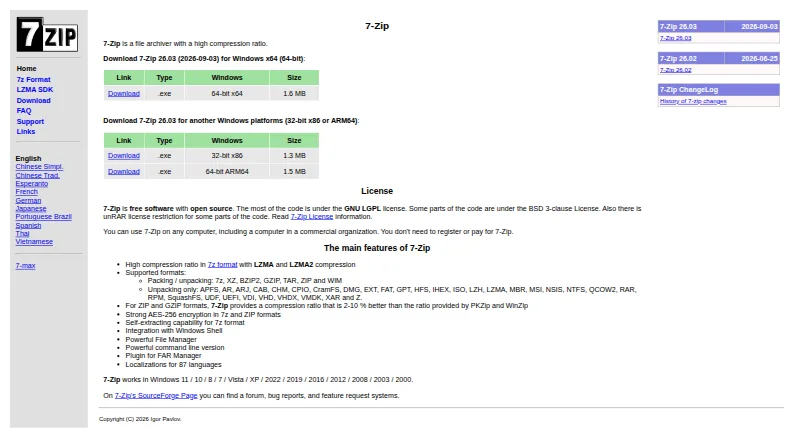
What 7-Zip is
7-Zip is a free, open-source file archiver for Windows, Linux, and macOS. It creates and extracts compressed archives, with its 7z format using LZMA and LZMA2 compression for high compression ratios. The software can pack and unpack 7z, XZ, BZIP2, GZIP, TAR, ZIP, and WIM files, while also unpacking formats such as RAR, ISO, and VHDX. AES-256 encryption is available for 7z and ZIP archives. Other capabilities include split archives, archive repair, portable use, and command-line tools. On Windows, the package adds Shell integration, a file manager, a command-line version, and a FAR Manager plugin. 7-Zip is localized in 87 languages. Most of its code uses the GNU LGPL, with some code under BSD licenses and an unRAR license restriction for certain parts. The maker, identified as Igor Pavlov, says it can be used in commercial organizations without registration or payment. Developers can use the LZMA SDK, which includes documentation, samples, headers, libraries, and tools.
Good
- Free plan requires no registration or payment
- Works on Windows, Linux, and macOS
- Supports AES-256 archive encryption
- Handles many packing and unpacking formats
- Includes split archives, repair, and portable use
- Localized in 87 languages
Watch out
- RAR archives can be unpacked but not created
- Some interface tools are specific to Windows
- Some code carries an unRAR license restriction
Who it suits
7-Zip suits people who need one free archiver across Windows, Linux, and macOS. It also fits users who need encryption, command-line operation, portable use, archive repair, or developer resources for LZMA compression.
Verdict
Choose 7-Zip for a free, open-source archiver with broad format handling, encryption, and command-line support. Windows users also get Shell integration, a file manager, and a FAR Manager plugin. Look elsewhere if creating RAR archives is essential.
Plans and prices
From 7-Zip's own pricing page, checked 29 Sep 2026.
| Plan | Price | What it gives you |
|---|---|---|
| 7-Zip | Free | File archiver · Windows installer, Linux console version, and macOS console version · Free; no registration or payment required |
The facts
Each one read from 7-Zip's own pages, with the date it was checked.
What it does
- Archive formats
- 7-Zip can pack and unpack 7z, XZ, BZIP2, GZIP, TAR, ZIP, and WIM files, and can unpack additional formats including RAR, ISO, and VHDX.checked 29 Sep 2026
- Commercial use
- The maker says 7-Zip can be used on any computer, including in a commercial organization, without registration or payment.checked 29 Sep 2026
- Compression
- The 7z format uses LZMA and LZMA2 compression.checked 29 Sep 2026
- Developer use
- The LZMA SDK provides documentation, samples, headers, libraries, and tools for applications that use LZMA compression.checked 29 Sep 2026
- Encryption
- 7-Zip supports AES-256 encryption in 7z and ZIP formats.checked 29 Sep 2026
- Format limitation
- 7-Zip can unpack RAR archives but does not list RAR as a format it can pack.checked 29 Sep 2026
- Languages
- 7-Zip is localized in 87 languages.checked 29 Sep 2026
- Licensing
- 7-Zip is open-source software; most code is under the GNU LGPL, with some code under BSD licenses and an unRAR license restriction for some parts.checked 29 Sep 2026
- Purpose
- 7-Zip is a file archiver with a high compression ratio.checked 29 Sep 2026
- Support
- The support page directs common questions to the 7-Zip forum and bug reports to its bug tracker on SourceForge.checked 29 Sep 2026
The company
- Maker
- The site copyright identifies Igor Pavlov.checked 29 Sep 2026
Where it runs
- Platforms
- The download page lists Windows installers, a Linux console version, and a macOS console version.checked 29 Sep 2026
- Windows features
- The Windows version includes Windows Shell integration, a file manager, a command-line version, and a FAR Manager plugin.checked 29 Sep 2026
The full review of 7-Zip
7-Zip is an open-source archiver for creating, extracting, encrypting, and splitting compressed files. It is best suited to Windows users who want a capable desktop toolkit, and to Linux or macOS users comfortable with console tools. The bottom line is straightforward: it delivers unusually broad format handling and strong licensing terms at no cost, but it is a poor fit when you must create RAR archives.
Overview
7-Zip centers on its 7z format, which uses LZMA and LZMA2 compression. It can pack and unpack 7z, XZ, BZIP2, GZIP, TAR, ZIP, and WIM files, then unpack additional formats such as RAR, ISO, and VHDX. That makes it dependable for mixed archive collections and routine distribution work. The important boundary is RAR: 7-Zip opens RAR files but does not list RAR among the formats it can create.
The software is open source. Most code is under the GNU LGPL, with some components under BSD licenses and an unRAR license restriction for certain parts. The maker says it can be used on any computer, including inside a commercial organization, without registration or payment. The site identifies Igor Pavlov as maker.
For more options in this category, browse File Compression Software.
Key features
Compression, encryption, and archives
LZMA and LZMA2 give the native 7z format its high-compression focus, while support for ZIP, TAR, GZIP, BZIP2, XZ, and WIM covers common exchange and backup workflows. RAR, ISO, and VHDX extraction is particularly useful when colleagues or downloads arrive in formats 7-Zip cannot produce. It also supports split archives, so a large package can be divided into parts for transfer or storage.
AES-256 encryption is available in 7z and ZIP archives. That is a meaningful option for protecting contents, although encryption is tied to those two formats rather than every format the program can process. Archive repair is listed as supported, adding a recovery-oriented tool for damaged packages.
Windows toolkit and developer support
The Windows release adds Windows Shell integration, a file manager, command-line tools, and a FAR Manager plugin. Shell integration makes archive actions available from the file context menu; the file manager offers a dedicated way to browse and manipulate packages; and command-line access suits scripts and repeatable jobs. A portable version is also available, useful when installation is undesirable. Linux and macOS are represented by console versions rather than the Windows feature set.
Localization covers 87 languages. Developers can use the LZMA SDK, which includes documentation, samples, headers, libraries, and tools for applications that use LZMA compression. Questions are directed to the 7-Zip forum, while bug reports go to its SourceForge bug tracker.
Pricing
7-Zip has one plan: 7-Zip — free, billed Free. It includes the file archiver, a Windows installer, a Linux console version, and a macOS console version. There is no registration or payment requirement, and the maker permits commercial use without a fee. There is no trial period because the product is free rather than time-limited.
This structure suits home users, organizations, and developers who need a reusable archiver without per-seat charges or renewal terms. It does not offer a paid tier with a different interface or additional service level, so readers seeking vendor-backed commercial packaging must look elsewhere. The free plan also does not change the RAR-creation limitation.
Platforms
Supported platforms are Windows, Linux, and macOS. Windows users receive the broadest integration through Shell features, the file manager, command-line version, and FAR Manager plugin. Linux and macOS users get console versions, making 7-Zip a better fit for command-line workflows on those systems than for anyone expecting the Windows interface across platforms.
Who it's for
Choose 7-Zip for personal archiving, commercial file handling, and scripted compression when zero-cost licensing, open-source code, AES-256 protection, and broad extraction support matter. It is also a practical receiving tool for teams that encounter RAR, ISO, VHDX, and other varied archives.
Look elsewhere if your workflow must produce RAR files, or if you need the Windows graphical toolkit on Linux or macOS. Developers building LZMA support into applications can use the included SDK rather than treating 7-Zip only as a desktop utility.
Pros and cons
- Pro: Free commercial use without registration or payment removes licensing friction for organizations.
- Pro: Native 7z compression plus creation and extraction across several mainstream formats handles varied storage and sharing jobs.
- Pro: AES-256 encryption, split archives, archive repair, command-line tools, and a portable version cover more than basic unpacking.
- Pro: Windows Shell integration, a file manager, and a FAR Manager plugin make the Windows edition a fuller toolkit.
- Con: RAR archives can be unpacked but not created, which rules it out for RAR-based publishing workflows.
- Con: Linux and macOS offerings are console versions, so users seeking the Windows feature set on those platforms should choose another tool.
Alternatives
B1 Archiver is a free, no-registration option for personal and commercial use when Android and web access, alongside desktop platforms, is useful.
Accessibility Test Framework for Android is a free choice for Android accessibility testing rather than general archive management.
Zstandard suits developers who want an open-source reference library and command-line utility under BSD or GPLv2 licensing.
ALZip is worth considering if a freemium archiver spanning Android, Linux, and Windows fits your setup.
PeaZip is another free, open-source option for personal, professional, and commercial use across Windows, Linux, and macOS.
PowerArchiver is an alternative for users who want a freemium product, including a non-commercial free edition and a paid Business license.
Bandizip offers a freemium Windows and macOS alternative with a free Standard Edition that includes ads and limited features.
The Unarchiver is a free Mac-focused option, with its Mac plan always free and no in-app purchases for extra features.
Verdict
7-Zip is the right choice for anyone who wants a free, open-source archiver with serious compression, encryption, scripting, and format coverage, especially on Windows. Its commercial-use permission and developer SDK extend that appeal beyond home use. Choose another archiver when creating RAR files is essential or when Linux and macOS users need the Windows graphical feature set.
Getting started
- Open the 7-Zip website
- Choose the package for Windows, Linux, or macOS
- Install the Windows version or use the Linux or macOS console version
- Create or unpack archives with the graphical, portable, or command-line tools
Limits worth knowing
The free 7-Zip plan costs 0.00 USD and has no registration or payment requirement. RAR is supported for extraction, but not for creating archives; Windows-only interface features do not apply across the other platforms.
Questions
Is 7-Zip free for commercial use?
Yes. The listed plan is free, and the maker says it can be used in commercial organizations without registration or payment.
Which systems support 7-Zip?
Supported platforms are Windows, Linux, and macOS.
Does 7-Zip encrypt archives?
Yes. AES-256 encryption is supported for 7z and ZIP formats.
Is 7-Zip open source?
Yes. Most code is under the GNU LGPL, with some code under BSD licenses and an unRAR license restriction for certain parts.
What does the LZMA SDK provide?
It provides documentation, samples, headers, libraries, and tools for applications that use LZMA compression.
Alternatives to 7-Zip
- 1
Keka
Free planOpen sourceAndroidiOSWebAPI8.6$3.99 one-time - 2

PowerArchiver
Free planmacOSWindows6.8$22.95 one-time - 3
B1 Archiver
Free planAndroidWebLinuxmacOS6.7Free plan - 4
WinRAR
AndroidLinuxmacOSWindows6.7$6 one-time - 5

Bandizip
Free planmacOSWindows6.6$20 one-time - 6
Zstandard
Free planAPILinuxmacOSSelf-hosted6.6Free plan