
AWS Threat Composer
AWS Threat Composer is a threat-modeling project for identifying security issues and developing strategies to address them.
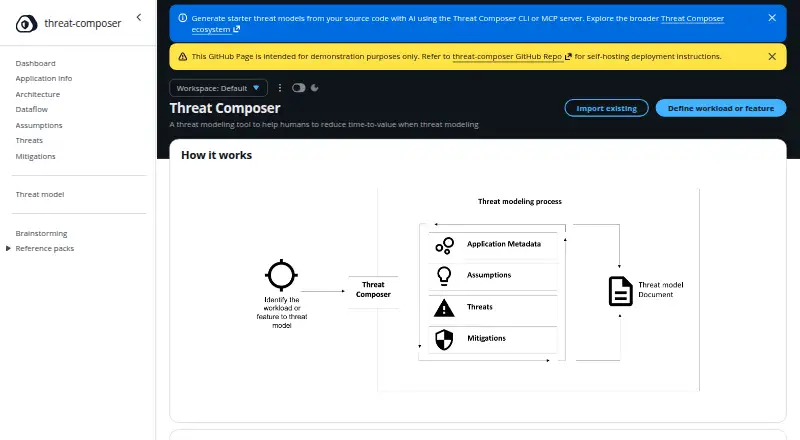
What AWS Threat Composer is
AWS Threat Composer is a threat-modeling project for identifying security issues and developing strategies to address them. Its structured threat grammar offers adaptive suggestions while users compose threat statements. Models can include architecture and data-flow diagrams, tracked assumptions, links between threats and mitigations, and an insights dashboard with quality metrics and improvement suggestions. Users can manage multiple models and export them as JSON, Markdown, DOCX, or PDF. The web application stores data in the browser and supports import and export; it is available as a hosted demo or can be deployed as a static website in an AWS account. The VS Code extension included in AWS Toolkit edits .tc.json files, works offline, and stores data locally. A browser extension displays threat model files on GitHub, GitLab, Bitbucket, and Amazon CodeCatalyst, including configured self-hosted URLs. That extension is read-only, needs internet access for web-hosted files, and may take time with large models. The experimental AI-assisted CLI and MCP server can analyze source code to create starter models; AWS Bedrock inference costs apply.
Good
- Supports diagrams, assumptions, and threat-mitigation links.
- Exports models in four formats.
- VS Code extension works offline and stores data locally.
- Can self-host the web application in an AWS account.
Watch out
- AI CLI and MCP server are experimental.
- AI tools incur AWS Bedrock inference costs.
- Browser extension is read-only and requires internet for web files.
- Browser extension store publication is not yet available.
Who it suits
Threat Composer suits people modeling system threats who want to document architecture, assumptions, risks, and mitigations. Its VS Code integration may suit developers keeping threat models alongside code in version control.
Verdict
Threat Composer offers multiple ways to create, organize, and export threat models, including a local VS Code workflow. Note the browser extension's read-only limits and the experimental status and inference costs of its AI tools.
The facts
Each one read from AWS Threat Composer's own pages, with the date it was checked.
Money
- AI cost
- The project page says AWS Bedrock inference costs apply to the AI-powered CLI and MCP server.checked 2 Oct 2026
- AI usage costs
- The AI CLI and MCP server use AWS Bedrock, and Bedrock inference costs apply.checked 3 Oct 2026
What it does
- AI tools
- The AI-assisted CLI analyzes codebases to generate starter threat models, and the MCP server supports workflow management and schema validation for AI assistants.checked 3 Oct 2026
- Audience and workflow
- The project is designed for people threat modeling systems, and its VS Code integration supports keeping threat models alongside code in version control.checked 2 Oct 2026
- Diagrams and insights
- Features include architecture and data flow diagrams, plus an insights dashboard with quality metrics and improvement suggestions.checked 3 Oct 2026
- Exports
- Threat models can be exported in JSON, Markdown, DOCX, and PDF formats.checked 2 Oct 2026
- Modeling features
- It supports architecture and data flow diagrams, assumptions tracking, threat and mitigation links, and an insights dashboard.checked 2 Oct 2026
- Model management
- Users can track assumptions, link them to threats and mitigations, manage multiple models, and export models as JSON, Markdown, DOCX, or PDF.checked 3 Oct 2026
- Purpose
- Threat Composer is a threat modeling ecosystem for identifying security issues and developing strategies to address them in the context of a system.checked 3 Oct 2026
- Self-hosting
- The web application can be deployed to an AWS account with customization.checked 2 Oct 2026
- Support
- The project directs users to GitHub Issues and GitHub Discussions for bug reports, feature requests, and questions.checked 2 Oct 2026
- Support and security reports
- The project directs users to GitHub Issues and Discussions for feedback and support, and asks that security vulnerabilities be reported through AWS's Vulnerability Disclosure Program or [email protected].checked 3 Oct 2026
- Threat statements
- It uses structured threat grammar with adaptive suggestions to help users compose threat statements.checked 3 Oct 2026
- Threat writing
- It uses structured threat grammar with adaptive suggestions to help compose threat statements.checked 2 Oct 2026
- VS Code
- The AWS Toolkit for Visual Studio Code includes Threat Composer support for creating, viewing, and editing .tc.json files; the extension documentation lists Windows, macOS, and Linux compatibility.checked 3 Oct 2026
Where it runs
- Browser extension integrations
- The browser extension supports GitHub, GitLab, Bitbucket, and Amazon CodeCatalyst, including configurable URL patterns for self-hosted instances.checked 2 Oct 2026
- Browser extension limitation
- The browser extension provides read-only viewing, requires internet access to load web-hosted files, and may take time to load large models.checked 3 Oct 2026
- Browser extension limits
- The browser extension is read-only, requires internet access to load web files, and its documentation says Chrome Web Store and Firefox Add-ons publication is not yet available.checked 2 Oct 2026
- Browser extension privacy
- The browser extension documentation says it does not collect or transmit data, uses no analytics or tracking, and handles viewing locally in the browser.checked 3 Oct 2026
- Browser integrations
- The browser extension supports viewing threat model files on GitHub, GitLab, Bitbucket, and Amazon CodeCatalyst; its documentation says Chrome Web Store and Firefox Add-ons publication is not yet available.checked 3 Oct 2026
- Web app
- The web application is available as a hosted demo or as a static website users can self-host in their AWS account; it supports browser-based storage and import/export.checked 3 Oct 2026
- Web app storage
- The web application uses browser-based storage and supports import and export.checked 2 Oct 2026
The full review of AWS Threat Composer
Overview
AWS Threat Composer is a threat-modeling tool for identifying security issues and planning how to address them. Its workflow combines structured threat writing with diagrams, tracked assumptions, and links between threats and mitigations. An insights dashboard adds quality metrics and suggestions to help improve a model.
People can manage multiple threat models and export them in JSON, Markdown, DOCX, or PDF. The web application stores work in the browser and supports importing and exporting models. It is available as a hosted demo or as a static website that users can deploy to an AWS account and customize.
Alongside the web app, the project offers a VS Code extension for editing model files and a browser extension for viewing files hosted on supported code platforms. It also has an experimental AI-assisted CLI and MCP server that can generate starter models from source code. These options serve different parts of a modeling workflow, and have distinct storage, access, and cost considerations.
For more options in this category, see our Threat Modeling Software list.
Key features
Structured threat statements
Threat Composer uses a defined threat grammar and adaptive suggestions to help users build threat statements. This offers structure while they identify and describe security issues during iterative modeling.
Diagrams, assumptions, and mitigation links
Architecture and data flow diagrams help represent a system and how information moves through it. Users can track assumptions and connect them with relevant threats and mitigations, keeping those parts of a model linked rather than isolated.
Insights and model management
An insights dashboard surfaces quality metrics and suggestions for improving a model. Users can maintain multiple models and export them as JSON, Markdown, DOCX, or PDF, which gives them several formats for retaining or sharing model content.
Editor and repository integrations
The VS Code extension is included in AWS Toolkit and edits .tc.json files. Its documentation says it works offline and keeps data in local files, which suits workflows that keep threat models alongside code in version control.
The browser extension provides read-only viewing for threat model files on GitHub, GitLab, Bitbucket, and Amazon CodeCatalyst. It supports configurable URL patterns for self-hosted instances. It needs an internet connection to load web-hosted files, and large models may take time to load. Its documentation also says publication through the Chrome Web Store and Firefox Add-ons is not yet available.
AI-assisted model starters
The experimental AI-assisted CLI and MCP server analyze source code to create starter threat models. They use AWS Bedrock, and Bedrock inference costs apply. These tools are distinct from the browser-based web app and VS Code extension, so the cost note applies to the AI-powered CLI and MCP server.
Pricing
AWS Threat Composer is free, with a free plan. The project page says AWS Bedrock inference costs apply when using the AI-powered CLI and MCP server, so use of those AI features may involve charges beyond the free offering.
Platforms
Listed platforms include API, extension, Linux, macOS, self-hosted, web, and Windows. The web app is offered as a hosted demo or can be deployed as a static website in an AWS account. The VS Code extension works with local files and is documented to work offline. The browser extension, by contrast, needs internet access to load files from supported web platforms.
The browser extension documentation says it does not collect or transmit data, use analytics or tracking, or make external API calls. For the web app, storage is browser-based, with model import and export supported.
Who it's for
AWS Threat Composer is intended for people modeling threats in systems. Its structured statements, diagrams, assumptions, and threat-to-mitigation links support a workflow that develops a model iteratively. The VS Code integration may suit teams that want to keep model files beside code in version control, while the browser extension offers read-only access to hosted models during review.
The project directs users to GitHub Issues for bug reports and feature requests, and GitHub Discussions for questions. Security vulnerabilities should be reported through AWS's Vulnerability Disclosure Program or to [email protected].
Pros and cons
Pros
- Structured threat writing, diagrams, assumptions, and mitigation links support a connected modeling workflow.
- Models can be managed in multiples and exported in four formats.
- The web app can be used as a hosted demo or deployed and customized in an AWS account.
- The VS Code extension supports offline editing in local files.
- The browser extension documentation states that it uses no tracking, analytics, or external API calls and does not transmit data.
Cons
- The AI-assisted CLI and MCP server are marked experimental, and AWS Bedrock inference costs apply.
- The browser extension is read-only, requires internet access for web-hosted files, and may load large models slowly.
- The browser extension is not yet available through the Chrome Web Store or Firefox Add-ons, according to its documentation.
Alternatives
Other threat-modeling options include CAIRIS, OWASP Threat Dragon, ThreatOpus, IriusRisk, ThreatModeler Nexus, ThreatTree, ThreatForge, and Microsoft Threat Modeling Tool.
Verdict
AWS Threat Composer brings threat statements, system diagrams, assumptions, mitigations, and model exports into one iterative workflow. Its web app, local VS Code editing, and read-only browser viewing offer different ways to work with models, with clear distinctions around storage and internet access. The experimental AI tools can generate starter models from source code, but carry AWS Bedrock inference costs. It is a practical option to consider for people who want to keep threat modeling connected to architecture or code workflows and can choose the integration that fits their needs.
Alternatives to AWS Threat Composer
- 1

Dethernety
Free planOpen sourceWebAPISelf-hosted7.2Free plan - 2

ThreatModeler Nexus
Free planWebAPISelf-hosted6.7From $4,000 a year - 3

ThreatOpus
Free planWebAPI6.7From £129.99 a month - 4
ThreatTree
Free planWebAPI6.6From $29 a month - 5
OWASP Threat Dragon
Free planWebLinuxmacOSSelf-hosted6.4Free plan - 6
CAIRIS
Free planWebAPILinuxmacOS6.3Free plan