
Awakee
Awakee is a routine planner and habit tracker for Apple devices, built around guided, timed routines.
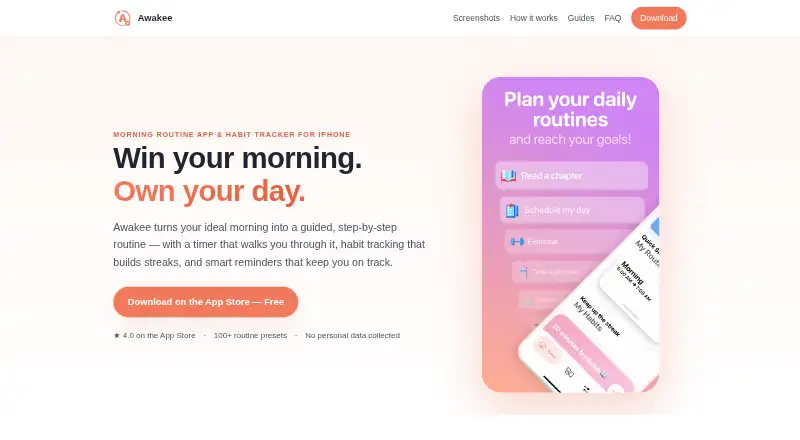
What Awakee is
Awakee is a routine planner and habit tracker for Apple devices, built around guided, timed routines. Users can create routines step by step, set durations for each part, or choose from more than 100 community presets. The timer continues in the background and on the lock screen while other apps are in use. For habits outside routines, Awakee supports flexible schedules and goals, with streak history and progress charts. Reminders can be completed from notifications, and home-screen and lock-screen widgets are available. The app supports Apple Watch and iCloud sync; routines and habits are stored on the device and can sync through a personal iCloud account using CloudKit. Awakee does not require an account. The maker says it collects no personal data and does not use third-party analytics or crash-reporting services. The site describes it as an iPhone morning-routine app, with routines also suited to evening, gym, or study use. The free download limits how many routines and habits users can create. Paid options include an Annual Subscription at $1.99 a year and Awakee Premium Monthly at $4.99 a month, alongside promotional and one-time purchase options.
Good
- Offers more than 100 community routine presets
- Timer works in the background and on the lock screen
- Tracks streak history and progress charts
- Supports Apple Watch and personal iCloud sync
Watch out
- Free download limits routines and habits
- Annual Subscription auto-renews unless turned off
- Monthly subscription auto-renews unless turned off
Who it suits
Awakee suits people who want guided routines and separate habit tracking on Apple devices. Its routine presets, flexible schedules, reminders, and widgets may help users organize morning, evening, gym, or study routines.
Verdict
Awakee combines timed routines with flexible habit tracking and Apple-device features. The free version has creation limits, while paid options include both recurring subscriptions and one-time purchases.
Plans and prices
From Awakee's own pricing page, checked 7 Oct 2026.
| Plan | Price | What it gives you |
|---|---|---|
| Free | Free | Finite number of routines and habits · Free download; without a subscription, only a finite number of routines and habits can be created. |
| Awakee Premium Monthly | $4.99 a month | Premium subscription · 1 month; subscription auto-renews unless auto-renew is turned off at least 24 hours before the current period ends. |
| Promotional Yearly Premium | $4.99 a year | Premium subscription · Promotional yearly option |
| Promotional Annual Premium | $9.99 a year | Premium subscription · Promotional annual option |
| Awakee Premium Unlimited | $19.99, paid once | Premium Unlimited |
| Annual Subscription | $24 a year | Premium subscription · 12 months; subscription auto-renews unless auto-renew is turned off at least 24 hours before the current period ends. |
| Lifetime Subscription | $38.99, paid once | Lifetime access |
The facts
Each one read from Awakee's own pages, with the date it was checked.
What it does
- Account requirement
- Awakee does not require an account.checked 7 Oct 2026
- Background timer
- The routine timer can run in the background and on the lock screen while the user uses other apps.checked 7 Oct 2026
- Habit tracking
- Awakee tracks standalone habits with flexible schedules and goals, and shows streak history and progress charts.checked 7 Oct 2026
- Integrations and storage
- Routines and habits are stored on the device and can sync through the user's personal iCloud account using Apple's CloudKit.checked 7 Oct 2026
- Payments
- Purchases are processed by Apple through the App Store account, and the maker says it does not see payment details.checked 7 Oct 2026
- Privacy
- The maker says it collects no personal data and does not use third-party analytics or crash-reporting services.checked 7 Oct 2026
- Purpose
- Awakee is a routine planner and habit tracker with a guided, step-by-step routine timer, streak tracking, and reminders.checked 7 Oct 2026
- Reminders and widgets
- The app offers reminders that can be completed from notifications, plus home-screen and lock-screen widgets.checked 7 Oct 2026
- Routine builder
- Users can build routines with a guided builder or choose from more than 100 community presets, with durations for individual steps.checked 7 Oct 2026
- Subscription processing
- The privacy policy says subscription status is validated through RevenueCat using an anonymous app-generated identifier, device type, and purchase history.checked 7 Oct 2026
- Support
- The support page says the maker usually responds within 1–2 business days and accepts feedback by email or from inside the app.checked 7 Oct 2026
Where it runs
- Apple ecosystem
- Awakee supports an Apple Watch app and iCloud sync; the App Store lists compatibility with iPhone, iPad, Mac, and Apple Watch.checked 7 Oct 2026
The company
- Maker and audience
- The site describes Awakee as an iPhone morning-routine app built by an independent developer and also describes routines for evening, gym, or study use.checked 7 Oct 2026
The full review of Awakee
Awakee is a routine planner and habit tracker for Apple devices, suited to people who want timed sequences as well as ongoing personal habits. Its strongest case is the combination of background timers, flexible habit goals and Apple Watch support; whether it fits depends on how many routines and habits you need and which purchase option you choose.
Overview
Awakee gives routines a pace: each step can have its own duration, and the timer keeps running in the background or on the lock screen while you switch apps. A guided builder and more than 100 community presets make it practical for repeatable morning, evening, gym or study sequences. People who only want a plain checklist may find the timed structure unnecessary.
Standalone habits have flexible schedules and goals, with streak history and progress charts to follow consistency. Reminders can be completed from notifications, while home-screen and lock-screen widgets keep routines accessible. Together, these features cover both planned sequences and habits that do not belong to a routine.
Key features
- Routine builder and presets: Create a sequence with timed steps or start from one of more than 100 community presets. Presets reduce the work of setting up a routine; custom step durations suit people who want to control its pace.
- Background timer: The timer works on the lock screen and in the background, so following a routine does not require keeping Awakee open.
- Habit tracking: Flexible schedules and goals accommodate standalone habits, while streak history and progress charts show how they are going over time.
- Reminders and widgets: Notifications can be used to complete reminders, and widgets are available for both the home and lock screens.
- Apple ecosystem and storage: Awakee supports Apple Watch and iCloud sync. Routines and habits are stored on the device and can sync through the user's personal iCloud account using CloudKit; no Awakee account is required.
The maker says it collects no personal data and uses no third-party analytics or crash-reporting services. Subscription status is validated through RevenueCat using an anonymous app-generated identifier, device type and purchase history. Apple processes purchases through the App Store account, and the maker says it does not see payment details.
Pricing
The free download costs 0.00 USD and allows only a finite number of routines and habits. That can be enough to try the workflow or maintain a small set, but the cap matters for anyone planning to track many habits or build several routines.
- Annual Subscription: $1.99 a year for Premium. This is the lowest-priced recurring option shown and suits someone who wants ongoing access at a modest annual cost.
- Awakee Premium Monthly: $4.99 a month for Premium. It avoids a year-long commitment, but costs more than the annual subscription over a year.
- Promotional Yearly Premium: $4.99 a year for Premium.
- Promotional Annual Premium: $9.99 a year for Premium.
- Awakee Premium Unlimited: $19.99, paid once for Premium Unlimited.
- Lifetime Subscription: $38.99, paid once for lifetime access. This is the one-time option explicitly described as lifetime access.
The two promotional yearly options have different prices, so compare the purchase terms shown in the App Store before choosing. The recurring subscriptions auto-renew unless auto-renew is turned off at least 24 hours before the current period ends. The cheaper free plan retains finite creation limits; the paid plans are described as Premium, Premium Unlimited or lifetime access, without further feature-by-feature distinctions.
Platforms
Awakee is available for iOS and macOS. The App Store lists compatibility with iPhone, iPad, Mac and Apple Watch, with iCloud sync across the user's Apple devices. It is not a fit for someone who needs an Android or Windows version.
Who it's for
Awakee suits Apple users who want routines broken into timed steps and also value separate habit schedules, streaks and progress charts. The presets are useful for getting a sequence started, and background timing helps when a routine involves moving between apps. Its Apple-only reach and finite free-plan cap make it a weaker choice for people who need cross-platform access or expect to track many items without paying.
Pros and cons
- Pro: Step durations and a background, lock-screen timer give routines a clear pace without requiring the app to stay open.
- Pro: More than 100 presets offer starting points, while standalone habits support flexible schedules and goals.
- Pro: Widgets, Apple Watch support and personal iCloud sync fit naturally into an Apple-device routine.
- Con: The free plan caps how many routines and habits can be created, limiting its usefulness for people with broader tracking needs.
- Con: iOS and macOS support excludes readers who want to share a routine system with Android or Windows devices.
- Con: The recurring options auto-renew, and the promotional yearly prices differ, so buyers should check which purchase they are selecting.
Alternatives
For a wider comparison, browse Routine Planner Apps. Tiimo is a freemium option for readers who want Android and web support alongside Apple platforms; its free plan includes selected planning tools on iOS and Android, with the web app excluded. Routime AI is a free alternative on Android, iOS and web. MyRoutine is another freemium choice available on Android, iOS and macOS. Routinery may suit someone who wants Android support and a free allowance of two routines with unlimited checklists. Thruday offers visual daily planning, priority to-do lists, reminders, images and colors, and breathing exercises across Android, iOS and web. TimeBloc is an Android and iOS option whose premium plan includes unlimited routines and calendars, advanced notifications and statistics. Kiritsu is a free desktop alternative for Linux, macOS and Windows, with no account required. My Morning Routine is an Android and iOS option whose free plan allows up to four complete routines and includes custom themes, dark mode and an Explore tab.
Verdict
Choose Awakee if you use Apple devices and want timed routines, flexible habit tracking and convenient access through widgets or Apple Watch. Its background timer and separate habit progress make it a more rounded personal routine tool than a sequence timer alone. Look elsewhere if you need Android or web support, or if the free creation cap is too restrictive and the paid options do not suit your budget or preference for recurring versus one-time purchases.
Getting started
- Download Awakee from the App Store.
- Choose the free download or a paid option.
- Build a routine with the guided builder or select a community preset.
- Set durations for routine steps and add reminders as needed.
- Create standalone habits with schedules and goals.
Limits worth knowing
The free plan allows only a finite number of routines and habits. Paid options include a $1.99 a year Annual Subscription, a $4.99 a month Awakee Premium Monthly option, other listed subscriptions, and one-time purchases.
Questions
Is Awakee free?
Yes. The free download is 0.00 USD and has a finite limit on the number of routines and habits you can create.
What does a subscription cost?
The listed Annual Subscription is $1.99 a year, and Awakee Premium Monthly is $4.99 a month. Other listed options include promotional yearly subscriptions and one-time purchases.
Which devices does Awakee support?
Awakee supports iOS and macOS. The App Store lists compatibility with iPhone, iPad, Mac, and Apple Watch.
Do I need an account, and does Awakee sync?
An account is not required. Routines and habits are stored on the device and can sync through a personal iCloud account using CloudKit.
Who makes Awakee?
The site describes Awakee as an iPhone morning-routine app built by an independent developer.
Alternatives to Awakee
- 1

TimeBloc
Free planAndroidiOS7.8From $4.99 a month - 2
RoutineLab Universal Interval Timer
Free planAndroid7.2$36 one-time - 3

Tiimo
Free planAndroidiOSWebmacOS7.2Free plan - 4
Routime AI
Free planAndroidiOSWeb7.1Free plan - 5

Routinery
Free planAndroidiOS7.1From $36 a year - 6
Brili Routines
AndroidiOSWeb7.0