Kiritsu
Kiritsu is a desktop study app that brings study planning, focus sessions, spaced repetition, and progress analytics into a private workspace.
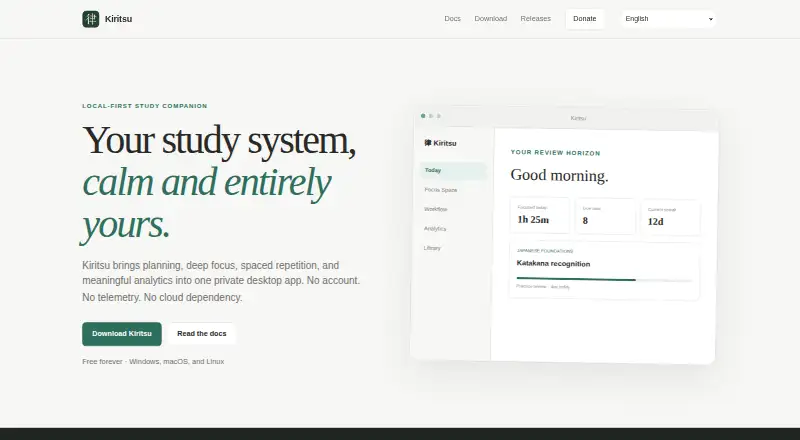
What Kiritsu is
Kiritsu is a desktop study app that brings study planning, focus sessions, spaced repetition, and progress analytics into a private workspace. Its library holds books, courses, articles, videos, and custom materials, which can be arranged in nested sections and linked by topic. Users can organize study tasks in workflow columns, move cards between them, and collect cards into focus groups. Focus Space offers Pomodoro timing, custom focus-and-break cycles, and a stopwatch. Activity history informs separate Study and Practice review tracks, while analytics cover 7-day, 30-day, 90-day, and yearly periods.
On first launch, Kiritsu creates a local SQLite workspace. The maker says it makes no network requests for accounts, telemetry, advertising, or study synchronization; GitHub update checks are the stated exception. Users can make restorable backups and export or import a portable JSON representation of their study setup. The app is free, with Windows, Linux, and macOS installers. On macOS, first launch may require manual confirmation because the app is not notarized through a paid Apple Developer membership.
Good
- Free plan with no account required.
- Supports books, courses, articles, videos, and custom materials.
- Offers several focus timer styles and review tracks.
- Local analytics span four time ranges.
- Restorable backups and portable JSON import/export.
Watch out
- Desktop app only; no mobile platform listed.
- macOS may require manual launch confirmation.
- Automatic updates involve GitHub checks if enabled.
Who it suits
Kiritsu suits learners who want planning, timed study, review scheduling, and analytics in one desktop app. Its local workspace and backup and import/export options may appeal to those who want to manage study data on their own device.
Verdict
Kiritsu combines study organization, focus tools, review scheduling, and analytics in a local desktop workspace. Its macOS first-launch confirmation and desktop-only availability are worth noting when choosing a study app.
Plans and prices
From Kiritsu's own pricing page, checked 8 Oct 2026.
| Plan | Price | What it gives you |
|---|---|---|
| Free forever | Free | No account · desktop app · Free forever |
The facts
Each one read from Kiritsu's own pages, with the date it was checked.
What it does
- Analytics
- Local analytics include 7-day, 30-day, 90-day, and yearly views.checked 8 Oct 2026
- Backups and migration
- Users can create restorable backups and export or import a portable JSON representation of their library, topics, workflow, activities, and related settings.checked 8 Oct 2026
- Data storage
- On first launch, Kiritsu creates a local SQLite workspace in the operating system’s application-data directory.checked 8 Oct 2026
- Focus timers
- Focus Space offers Pomodoro, custom focus-and-break cycles, and a freeform stopwatch.checked 8 Oct 2026
- Privacy
- Kiritsu says it makes no network requests for accounts, telemetry, advertising, or study synchronization; the stated exception is a user-controlled GitHub update check.checked 8 Oct 2026
- Purpose
- Kiritsu combines planning, focus sessions, spaced repetition, and analytics in a private desktop study app.checked 8 Oct 2026
- Spaced repetition
- Kiritsu schedules independent Study and Practice review tracks from relevant activity history.checked 8 Oct 2026
- Study materials
- Its library supports books, courses, articles, videos, and custom materials organized into nested sections and linked topics.checked 8 Oct 2026
- Support
- The documentation directs users to report reproducible problems through the support tracker and asks them not to attach backups containing private study data.checked 8 Oct 2026
- Supported systems
- The download page offers Windows 10 and 11, Linux x86-64, and macOS installers for Apple Silicon and Intel.checked 8 Oct 2026
- Updates
- Kiritsu verifies signed update artifacts before installation and contacts GitHub for updates only when users check manually or enable automatic checks.checked 8 Oct 2026
- Workflow
- Users can create workflow columns, move study task cards between them, and collect cards into focus groups.checked 8 Oct 2026
Where it runs
- macOS limitation
- Kiritsu is not notarized through a paid Apple Developer membership, so macOS may request manual confirmation on first launch.checked 8 Oct 2026
Alternatives to Kiritsu
- 1

TimeBloc
Free planAndroidiOS7.8From $4.99 a month - 2
RoutineLab Universal Interval Timer
Free planAndroid7.2$36 one-time - 3

Tiimo
Free planAndroidiOSWebmacOS7.2Free plan - 4
Routime AI
Free planAndroidiOSWeb7.1Free plan - 5

Routinery
Free planAndroidiOS7.1From $36 a year - 6
Brili Routines
AndroidiOSWeb7.0