
AutoOffload
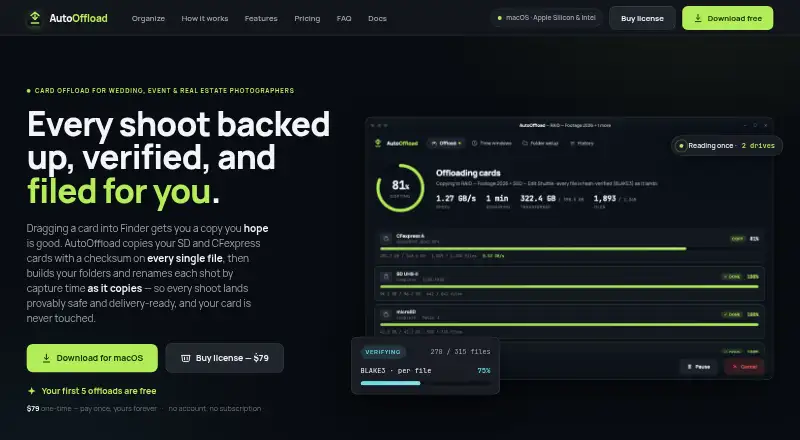
AutoOffload is macOS software that copies photos and video from SD and CFexpress cards, verifies each file, and organizes shoots by capture time while copying.
What AutoOffload is
AutoOffload is macOS software that copies photos and video from SD and CFexpress cards, verifies each file, and organizes shoots by capture time while copying. It can send multiple cards to a working drive and a backup drive in one pass, reading each source file once. After copying, it re-reads files and compares 256-bit BLAKE3 hashes with the source. A saved manifest supports later archive checks for changes or corruption. Capture-time windows and reusable folder and filename templates can use date, type, and sequence tokens. Each offload can include a per-file CSV manifest and shareable HTML report. The maker describes code-enforced write protection for source cards. The app runs without an account, cloud connection, runtime network access, or telemetry, but connects online for one-time license activation. It supports RAW photos and external-drive backups, but does not transcode, create proxies, play back, or cull media. The one-time price is 79.00 USD, with a perpetual license, unlimited offloads, free updates through 1.0, and five initial offloads free.
Good
- Copies to working and backup drives together
- Verifies files with 256-bit BLAKE3 hashes
- Organizes folders by capture time
- Runs without accounts, cloud, or telemetry
- Includes CSV manifests and HTML reports
Watch out
- macOS 11 or newer required
- No free plan; one-time purchase is 79.00 USD
- Does not transcode or generate proxies
- Does not play back or cull media
Who it suits
It suits wedding, event, and real estate photographers, including hybrid shooters, who need verified card offloads. It is for macOS users bringing their own storage and wanting working-drive and backup copies.
Verdict
AutoOffload focuses on verified, organized photo and video offloads with local operation and archive checks. Its limits matter if you need transcoding, proxies, playback, or culling.
Plans and prices
From AutoOffload's own pricing page, checked 9 Oct 2026.
| Plan | Price | What it gives you |
|---|---|---|
| AutoOffload | $79, paid once | macOS 11+ · Apple Silicon & Intel · unlimited offloads · free updates through 1.0 · first 5 offloads free · One-time purchase; perpetual license |
| AutoOffload perpetual license | $79, paid once | macOS 11+ · Apple Silicon & Intel · unlimited offloads · free updates through 1.0 · first 5 offloads free · one payment |
The facts
Each one read from AutoOffload's own pages, with the date it was checked.
What it does
- API and SDKs
- The published documentation does not describe a public API, SDK, plugin system or developer extension mechanism.checked 21 Oct 2026
- Archive checks
- A saved manifest lets users re-hash an archive later to check for changes or corruption.checked 9 Oct 2026
- Archive re-verification
- Saved manifests allow later re-hashing of archived files to detect corruption or bit rot.checked 21 Oct 2026
- Atomic publishing
- Files are written under temporary names and moved into place only after copy and verification succeed.checked 21 Oct 2026
- Capture-time organization
- Files can be routed by capture time using embedded photo metadata or file timestamps where metadata is unavailable.checked 21 Oct 2026
- Card health check
- A read-only scan can check every byte on a card without copying its files.checked 21 Oct 2026
- Checksum verification
- Each copied file is hashed with 256-bit BLAKE3 and read back at the destination for comparison.checked 21 Oct 2026
- Duplicate handling
- Identical files are skipped, while same-name files with different contents receive numbered names instead of overwriting.checked 21 Oct 2026
- File verification
- After copying, AutoOffload re-reads each file and compares its 256-bit BLAKE3 hash with the source.checked 9 Oct 2026
- Folder and filename templates
- Users can create reusable folder trees and filename patterns with date, type and sequence tokens.checked 21 Oct 2026
- Installation and notarization
- The app is distributed as a direct macOS download and is described as Apple-notarized.checked 21 Oct 2026
- Licence information
- The public pages describe a perpetual commercial license but do not state an open-source license.checked 21 Oct 2026
- Limit: manual card formatting
- Users must verify the destination and format or erase cards themselves; the app does not perform that action.checked 21 Oct 2026
- Limit: no cloud or NAS service
- AutoOffload does not copy media to cloud storage, NAS-as-a-service or LTO tape.checked 21 Oct 2026
- Limit: no editing workflow
- The product does not transcode, generate proxies, play back or cull media.checked 21 Oct 2026
- Limits
- AutoOffload does not transcode, generate proxies, or play back or cull media.checked 9 Oct 2026
- Limit: slow hardware bottleneck
- Transfer speed is limited by the slowest card, reader, hub or destination drive.checked 21 Oct 2026
- Manifests and reports
- Each run can produce a per-file CSV manifest and shareable HTML report in a hidden _autooffload folder.checked 21 Oct 2026
- Multi-drive copies
- It can copy multiple cards to a working drive and a backup drive in one pass, reading each source file once.checked 9 Oct 2026
- Offline and privacy
- AutoOffload runs without an account, cloud connection, runtime network access, or telemetry; the FAQ says it connects online for one-time license activation.checked 9 Oct 2026
Where it runs
- Event time windows
- Named time windows such as preparation, ceremony or reception can route files into event folders, including overnight and multi-day shoots.checked 21 Oct 2026
- Limit: macOS production only
- Production support is limited to macOS, with Windows still described as beta.checked 21 Oct 2026
Money
- Limit: optional final verification cost
- The optional full destination reread can roughly double read time on large offloads and is disabled by default.checked 21 Oct 2026
The company
- Maker identity
- The public product pages identify the product as AutoOffload but do not publish a legal company name, headquarters, founding year, employee count or funding information.checked 21 Oct 2026
Alternatives to AutoOffload
- 1

Ente Photos
Free planOpen sourceAndroidiOSWebLinux8.6From $2.49 a month - 2

IDrive
Free planAndroidiOSWebLinux8.4From $0.25 a month - 3

PhoneCopy
Free planAndroidiOSWebLinux8.2From €1.99 a month - 4

PhotoSync
Free planAndroidiOSWebLinux8.0From $6.49 a year - 5

Rawback
Free planiOSWebAPILinux8.0From $1.99 a month - 6
Tonfotos
Free planAndroidiOSLinuxmacOS8.0$59 one-time