
Rawback
Rawback is an AI platform for photographers who want to preserve, understand, organize, and create from photo libraries.
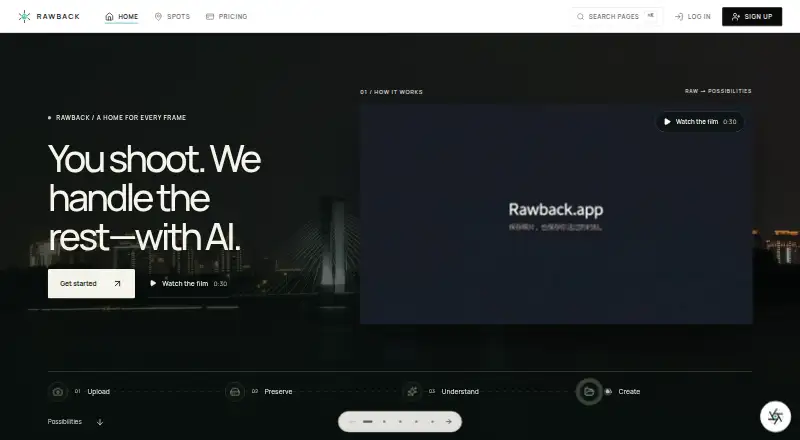
What Rawback is
Rawback is an AI platform for photographers who want to preserve, understand, organize, and create from photo libraries. Its tools include image analysis and ratings, people recognition, conversational editing, Dream recaps, and album-story drafting, as well as travel, gear, and places features. Camera uploads can use FTP, FTPS, or SFTP; accepted formats include JPEG, PNG, HEIC/HEIF, WebP, and several RAW formats. Originals do not expire by default while within the plan’s storage allowance, and users can set automatic archiving or optional deletion periods. The desktop client monitors local libraries and supports background uploads on Apple silicon Macs and Windows 10/11 x64. The iPhone app requires iOS 26 or later and is marked as coming soon. AI features are off until users consent; enabled features may send images, thumbnails, or related content to listed providers depending on settings.
Good
- Supports several RAW formats alongside common image formats.
- Originals do not expire by default within storage allowance.
- Desktop client supports background uploads.
- Free plan includes 5 GB storage.
Watch out
- iPhone app requires iOS 26 or later and is coming soon.
- AI features require explicit consent.
- Third-party Core SDK use requires written approval.
Who it suits
Rawback may suit photographers who want photo-library organization, AI-assisted editing, and camera-file uploads. Check the storage allowance and iPhone availability if those matter to your workflow.
Verdict
Rawback combines photo-library tools, camera uploads, and AI features with configurable preservation settings. Its free tier is limited to 5 GB, and users should review the consent and data-sharing details before enabling AI processing.
Plans and prices
From Rawback's own pricing page, checked 21 Oct 2026.
| Plan | Price | What it gives you |
|---|---|---|
| Free | Free | 5 GB storage · 200 AI credits/month · 500 face-recognition/month · public sharing · forever |
| +100 GB storage | $1.99 a month | Requires a paid plan · monthly add-on |
| +1,000 AI credits | $2.99 a month | Requires a paid plan · monthly add-on |
| Lite | $4.99 a month | 200 GB storage · 1,500 AI credits/month · 1,500 face-recognition/month · MCP connector · public and restricted sharing · monthly |
| +500 GB storage | $7.99 a month | Requires a paid plan · monthly add-on |
| +5,000 AI credits | $11.99 a month | Requires a paid plan · monthly add-on |
| Pro | $14.99 a month | 600 GB storage · 5,000 AI credits/month · 5,000 face-recognition/month · MCP connector · public and restricted sharing · monthly |
| +2 TB storage | $24.99 a month | Requires a paid plan · monthly add-on |
| +15,000 AI credits | $27.99 a month | Requires a paid plan · monthly add-on |
| Max | $44.99 a month | 3 TB storage · 20,000 AI credits/month · 20,000 face-recognition/month · MCP connector · unlimited sharing · priority processing · monthly |
The facts
Each one read from Rawback's own pages, with the date it was checked.
What it does
- AI capabilities
- AI features include image analysis and ratings, conversational editing, face grouping, Dream recaps, and album-story drafting.checked 4 Oct 2026
- AI consent
- AI processing is disabled until the user explicitly consents, and the setting applies across devices and upload methods.checked 21 Oct 2026
- AI data sharing
- The privacy policy says enabled AI features may send images or thumbnails and related content to OpenAI, Google Gemini, Tencent Cloud, or a user's configured provider depending on the feature and settings.checked 4 Oct 2026
- AI features
- Published AI capabilities include analysis, quality scoring, scene categories, image conversation, conversational editing, face recognition, dream recaps and album stories.checked 21 Oct 2026
- AI providers
- Depending on enabled features, Rawback may send content to OpenAI, Google Gemini, Tencent Cloud IAI, Stripe's AI gateway or a user-configured provider.checked 21 Oct 2026
- Camera integration
- The CLI can control Canon cameras over CCAPI, including shooting, settings, card browsing, downloads and live view.checked 21 Oct 2026
- Changelog event
- Rawback Desktop version 1.0.17, dated September 2, 2026, added environment switching and updated video probing behavior.checked 21 Oct 2026
- Changelog limit
- A Desktop changelog entry dated August 12, 2026 says camera connection requires a paid plan.checked 21 Oct 2026
- CLI
- The CLI supports uploads, library search, albums, Markdown stories, dreams, shares, usage inspection and structured JSON output.checked 21 Oct 2026
- CLI formats
- Documented image support includes JPEG, PNG, WebP, GIF, TIFF, HEIC/HEIF, BMP, AVIF and RAW formats including CR2, CR3, NEF, ARW, DNG, RAF, ORF, PEF, RW2, SRW and X3F.checked 21 Oct 2026
- CLI protocols
- CLI photo uploads use SFTP with resumable transfers and duplicate skipping.checked 21 Oct 2026
- CLI security
- CLI credentials and upload state are stored under ~/.rawback, with restrictive Unix permissions and a requirement that manually created config.yml use mode 0600.checked 21 Oct 2026
- Core SDK
- Rawback publishes a typed Node.js Core SDK with generated services for photos, albums, articles, dreams, shares, usage, pricing and account data.checked 21 Oct 2026
- Desktop requirements
- The macOS desktop client supports Apple-silicon arm64, while the Windows client supports Windows 10/11 x64.checked 21 Oct 2026
- Desktop signing
- The macOS desktop downloads are signed and notarized; the Windows installer is unsigned.checked 21 Oct 2026
- Desktop support
- The native desktop client supports Apple silicon Macs and Windows 10/11 x64 for monitoring local photo libraries and background uploads.checked 4 Oct 2026
- GitHub activity
- The public CLI repository shows 197 commits and was updated September 6, 2026.checked 21 Oct 2026
- GitHub organization
- The rawback-app GitHub organization publicly lists a TypeScript CLI repository and a Ruby Homebrew tap repository.checked 21 Oct 2026
- Independent project description
- EvoniaAI describes Rawback as an AI photo platform offering organization, smart tags, face detection, scene recognition, EXIF extraction and secure uploads.checked 21 Oct 2026
- Integrations
- The MCP connector can connect Rawback to Claude, ChatGPT, or another MCP client, and is included with paid plans.checked 4 Oct 2026
The company
- Company facts
- The opened EvoniaAI page identifies a founder contact and email but does not state a legal entity name, headquarters, founding year, employee count or funding.checked 21 Oct 2026
- Company identity
- Rawback is presented as a public project of EvoniaAI, an AI company that says it builds agents and AI platforms.checked 21 Oct 2026
Where it runs
- iOS availability
- The native iPhone app requires iOS 26 or later, and its App Store listing is marked coming soon.checked 4 Oct 2026
- iOS status
- The native iOS app is listed as coming soon and requires iOS 26 or later.checked 21 Oct 2026
The full review of Rawback
Overview
Rawback is a cloud photo-library service that combines preservation, organization, and AI-assisted creation. It is aimed at photographers who want camera-to-cloud transfers, RAW support, and ways to search or reshape a collection beyond ordinary backup.
The strongest case is its breadth of library tools and configurable retention. The 5 GB free allowance is restrictive for a serious archive, and anyone enabling AI should be comfortable with its consent and provider-sharing arrangements.
Key features
Rawback can analyze and rate images, group faces, support conversational editing, produce Dream recaps, and draft album stories. Those functions make a large library more useful for discovery and storytelling, but the monthly AI-credit and face-recognition quotas put a practical ceiling on intensive use.
Originals remain available by default while they fit within the selected storage allowance. Auto-archiving and optional deletion periods are configurable, so users can establish a retention policy instead of accepting automatic expiry. That flexibility does not remove the storage ceiling: the free plan's 5 GB will fill quickly with RAW files.
Camera setup accepts FTP, FTPS, and SFTP transfers, with JPEG, PNG, HEIC/HEIF, WebP, and several RAW formats accepted by default. This is a useful range for photographers moving files from camera systems. The native desktop client monitors local libraries and uploads in the background on Apple silicon Macs and Windows 10/11 x64.
Paid plans include an MCP connector for Claude, ChatGPT, or another MCP client, allowing those tools to connect to Rawback. The Core SDK is downloadable, but third-party use and production deployment require written approval, so it is not an unrestricted development platform.
AI remains off until the user explicitly consents; accepting the terms alone does not activate processing. Once enabled, images or thumbnails and related content may be sent to OpenAI, Google Gemini, Tencent Cloud, or a configured provider, depending on the feature and settings. Rawback describes TLS encryption in transit, encryption at rest where the underlying cloud provider supports it, and restricted production access with authentication and audit logging.
Pricing
Rawback uses a freemium model. The Free plan costs nothing, is billed forever, and includes 5 GB of storage, 200 AI credits per month, 500 face-recognition uses per month, and public sharing. It is suitable for trying the workflow or maintaining a small library, not for a growing professional archive.
Lite costs $4.99 a month, billed monthly. It raises storage to 200 GB, AI credits to 1,500 per month, and face recognition to 1,500 per month, while adding the Claude and ChatGPT MCP connector plus public and restricted sharing. It is the sensible entry point for individuals whose collection fits 200 GB.
Pro costs $14.99 a month, billed monthly, and provides 600 GB, 5,000 AI credits, and 5,000 face-recognition uses monthly, with the same MCP and sharing features as Lite. It fits photographers using AI regularly across a larger library.
Max costs $44.99 a month, billed monthly. Its 3 TB allowance, 20,000 AI credits, 20,000 face-recognition uses, MCP connector, public, restricted, and unlimited sharing, and priority processing target heavy users and teams with demanding workflows. Users needing more storage or custom features can contact Rawback.
Platforms
Rawback is offered through web, iOS, macOS, Windows, Linux, and an API. The iPhone app requires iOS 26 or later and is marked coming soon. Desktop background uploading is supported on Apple silicon Macs and Windows 10/11 x64.
Who it's for
Choose Rawback if you want one service for camera ingestion, cloud preservation, RAW files, and AI-assisted catalog work. It is particularly well matched to photographers who will use configurable retention, face grouping, recaps, or conversational editing. Look elsewhere if 5 GB is all you need without AI, if you require a currently available iPhone app, or if sending AI-related content to external providers is unacceptable.
Pros and cons
Pros
- RAW support and FTP, FTPS, and SFTP transfers suit camera-centered workflows.
- Configurable archiving and deletion provide control over retention while originals remain within storage limits.
- AI analysis, face grouping, recaps, editing, and story drafting add organization and creative uses beyond backup.
- Paid plans connect to Claude and ChatGPT through MCP and offer restricted sharing.
Cons
- The free plan's 5 GB is a small archive allowance.
- AI credits and face-recognition quotas can constrain frequent processing.
- Enabled AI may send images or related content to external providers according to feature settings.
- The iOS app is not yet available, and SDK production use needs written approval.
Alternatives
Photo Backup Software is the broader category guide for comparing services.
Pick IDrive instead if you want a backup-focused service with Android support, trials, and a 100 GB Mini plan at $0.25 a month.
PhoneCopy is a better fit for synchronizing contacts, calendars, tasks, notes, and media across devices.
Choose Ente Photos for a 10 GB free tier and a 50 GB Starter plan at $2.49 a month with family-oriented storage.
PhotoSync suits users who want transfer utilities across Android, iOS, macOS, and Windows.
Tonfotos is an option for a lifetime-use desktop photo manager with a free license and no trial period.
FOREVER is aimed at buyers preferring one-time storage purchases rather than monthly billing.
Pho offers an open-source core sync engine for users prioritizing that model.
Fotoback is a narrower iOS and macOS choice centered on encrypted backup and child-photo organization.
Verdict
Rawback is best for photographers who want RAW-capable preservation, camera uploads, and AI tools in one library. Choose it for that integrated workflow and its retention controls; look elsewhere for a larger free allowance, a ready iPhone app, or a service that avoids third-party AI processing.
Alternatives to Rawback
- 1

Ente Photos
Free planOpen sourceAndroidiOSWebLinux8.6From $2.49 a month - 2

IDrive
Free planAndroidiOSWebLinux8.4From $0.25 a month - 3

PhoneCopy
Free planAndroidiOSWebLinux8.2From €1.99 a month - 4

PhotoSync
Free planAndroidiOSWebLinux8.0From $6.49 a year - 5
Tonfotos
Free planAndroidiOSLinuxmacOS8.0$59 one-time - 6

FOREVER
AndroidiOSWebmacOS7.1$179.99 one-time